A smart doorbell does more than announce a visitor. It lets you see exactly who is standing at your front door, speak with them in real time, and capture footage of packages, suspicious activity, or missed deliveries, all from your phone. Whether you are at the office, on vacation, or simply in another room, a video doorbell puts you in control of your entryway around the clock. The market has matured significantly, and in 2026 the best smart doorbells offer impressive resolution, accurate AI detection, flexible power options, and, increasingly, subscription-free local storage that saves you money every month.
Our editorial team at HomeThru independently researched, compared, and evaluated dozens of models across price ranges, power configurations, and feature sets. We analyzed verified buyer feedback, manufacturer specifications, and real-world performance data to narrow the field to the 8 smart doorbells that consistently deliver on their promises. From budget-friendly battery-powered options to dual-camera wired units with color night vision, this guide covers every scenario a homeowner is likely to face.
Top Smart Doorbells of 2026

Pros
- Exceptional 180-degree field of view captures complete front-door coverage from head to toe
- Dual power options (hardwired or battery) adapt to any installation scenario and home setup
- Subscription-free local storage via microSD card keeps your footage private and accessible
- Advanced AI detection reduces false alerts by accurately identifying people, vehicles, and packages
- Ring Call feature lets you answer visitors by phone without fumbling with your app
Cons
- Limited to 2.4 GHz Wi-Fi connectivity only; homes relying on 5 GHz networks will need a dual-band router
- No customer reviews available yet, so real-world performance feedback from homeowners is unavailable
The Tapo D225 stands out as a versatile smart doorbell that doesn't force you into a single installation method. Whether you have existing doorbell wiring or prefer battery-powered flexibility, this camera adapts to your home's needs. The 10,000mAh battery delivers up to 8 months between charges, while hardwiring enables continuous 24/7 recording for those who want comprehensive monitoring without power concerns.
Video quality and field of view are where the D225 truly excels. The 2K QHD resolution captures fine details that help you identify faces and recognize visitors clearly, while the expansive 180-degree field of view eliminates the frustrating blind spots common in traditional doorbells. The AI-powered detection system intelligently distinguishes between people, packages, and vehicles, sending targeted notifications so you're not overwhelmed by false alarms. Ring Call functionality is a practical convenience that lets you answer visitors via phone without opening an app.
Privacy-conscious homeowners will appreciate the local storage option using a microSD card (up to 512GB), which requires no subscription and keeps footage under your control. The included modular chime provides flexible placement throughout your home, while full-color night vision with an adjustable motion-activated spotlight ensures visibility in low-light conditions. Integration with Alexa and Google adds compatibility with existing smart home ecosystems, though note that this doorbell requires a 2.4 GHz Wi-Fi connection.
| Specification | Detail |
|---|---|
| Brand | Tapo |
| Model | D225 |
| Color | Black |
| Dimensions | 5.91 x 1.97 x 1.51 inches |
| Weight | 1.46 pounds |
| Power Options | Hardwired (8-24V) or Battery Powered |
| Battery Capacity | 10,000mAh (up to 8 months between charges) |
| Video Resolution | 2K QHD |
| Field of View | 180 degrees (head-to-toe) |
| Night Vision | Full-color with motion-activated spotlight |
| Wi-Fi | 2.4 GHz (does not support 5 GHz) |
| Storage | MicroSD card (up to 512GB) or Tapo Care cloud |
| Encryption | AES 128-bit and TLS 1.2 |
| Audio | Two-way audio with quick response prompts |
| Detection | AI-powered person, vehicle, and package detection |
| Smart Home Integration | Works with Alexa and Google |
| Included Accessories | Modular chime, 15° horizontal wedge, 5° vertical wedge |
Wired Installation: If your home has existing doorbell wiring (8-24V), you can hardwire the D225 for continuous power and 24/7 recording. This eliminates battery concerns and provides uninterrupted security monitoring. Hardwiring typically requires connecting to your existing doorbell transformer and may involve basic electrical work.
Battery Installation: For homes without suitable wiring or renters, battery installation offers complete flexibility. The 10,000mAh battery provides up to 8 months of use between charges depending on activity level and settings. Simply mount the doorbell using the included wedges to adjust viewing angles, then connect to your 2.4 GHz Wi-Fi network through the Tapo app.
Positioning: Use the included 15-degree horizontal and 5-degree vertical wedges to optimize your doorbell's angle. Position it at a height where it captures faces clearly and uses the 180-degree field of view to monitor your entire front entry area. Test the field of view in the app before finalizing installation to ensure you're capturing the areas that matter most.
Local Storage: The D225 supports microSD card storage (up to 512GB) for subscription-free recording, keeping your footage private and under your complete control. This option eliminates reliance on cloud services and ongoing subscription fees.
Encryption Standards: Video and data transmission are protected using AES 128-bit encryption and TLS 1.2 protocols, providing robust security for sensitive information like camera footage and identity data.
Cloud Storage Option: If you prefer cloud backup, Tapo Care offers optional cloud storage with 30 days of video history. You maintain control over whether to use local storage, cloud storage, or both for comprehensive coverage.
Smart Home Privacy: When integrating with Alexa and Google, review each platform's privacy settings to ensure you're comfortable with how footage is accessed and stored through those ecosystems.
Best For: Homeowners seeking a flexible doorbell that works with or without existing wiring, those prioritizing local storage and privacy, and DIYers who want advanced AI detection without subscription requirements.
Consider This Doorbell If: You want a 180-degree field of view that eliminates blind spots, you value the ability to answer visitors via phone call, you prefer subscription-free local storage options, or you want AI-powered detection that distinguishes between people, packages, and vehicles.
Wi-Fi Requirement: This doorbell requires a 2.4 GHz Wi-Fi connection and does not support 5 GHz networks. If your home only has 5 GHz Wi-Fi, you'll need a dual-band router that broadcasts both frequencies or a separate 2.4 GHz network.
Storage Consideration: MicroSD card is not included. Budget for a reliable microSD card (up to 512GB supported) if you choose local storage, or evaluate Tapo Care cloud subscription costs if you prefer cloud backup.
Pros
- Exceptional 2K video quality with color night vision eliminates grainy footage in low light
- Wide 150-degree field of view ensures comprehensive coverage of your front entrance
- Dual installation options (battery or wired) fit most homes without major modifications
- AI face recognition and customizable alert zones reduce notification fatigue
- No mandatory monthly subscription required for basic video recording and playback
Cons
- Wireless chime accessory is listed as coming soon, limiting options for battery-only installations
- AI facial recognition features require a separate Video Monitoring Plan subscription
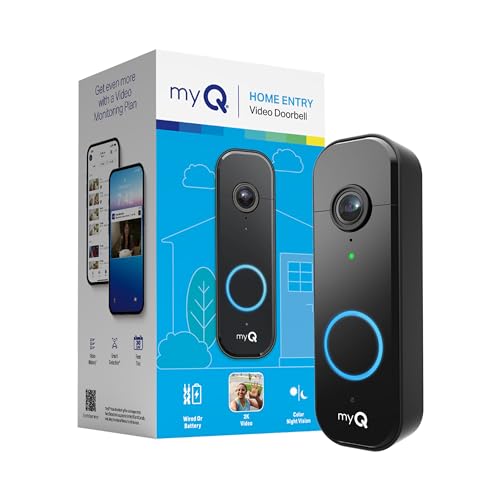
The Chamberlain myQ Video Doorbell stands out for its impressive 2K resolution paired with color night vision, a combination that delivers remarkably clear footage whether it's bright daylight or complete darkness at your front door. The 150-degree wide-angle lens captures your entire entryway, eliminating the blind spots common with narrower doorbell cameras. This expansive view means you'll see packages left on the side, unexpected visitors approaching from different angles, and activity across your entire porch area.
Installation flexibility is a major strength for homeowners with varying setups. You can install it as a battery-powered device that recharges via USB-C, or wire it directly into your existing doorbell chime system. The removable battery design eliminates the frustration of hardwired cameras that require trips to the breaker box for resets. Motion detection triggers real-time alerts instantly, and the AI-powered system can recognize familiar faces versus unknown visitors, though this advanced capability requires an optional Video Monitoring Plan subscription.
For budget-conscious homeowners, the myQ Video Doorbell offers compelling value since basic video recording and two-way talk don't require a paid subscription. The customizable monitoring zones let you reduce alert fatigue by focusing notifications on the areas you care about most. The only notable limitation is that the wireless chime accessory is still coming, which may affect battery-only installation options for some users.
| Specification | Detail |
|---|---|
| Video Resolution | 2K |
| Night Vision | Color Night Vision |
| Field of View | 150 degrees wide-angle |
| Installation Type | Battery or Wired |
| Charging Method | USB-C (removable battery) |
| Motion Detection | Yes, with real-time alerts |
| Two-Way Audio | Yes |
| AI Features | Facial recognition (with Video Monitoring Plan) |
| Customizable Zones | Yes, for alert preferences |
| Dimensions | 5.71 x 1.89 x 1.34 inches |
| Color | Black |
| Category | Home Improvement |
Battery Installation: Mount the doorbell bracket at your front door entrance using the included hardware. Ensure the mounting surface is clean and dry. Insert the rechargeable battery into the doorbell unit and secure it to the bracket. Pair the doorbell with the myQ app on your smartphone by scanning the QR code. Test the motion detection and two-way audio before relying on it for security.
Wired Installation: Turn off power to your existing doorbell at the breaker. Remove the old doorbell if applicable. Connect the myQ doorbell wires to your existing chime system following the included wiring diagram. Restore power and pair the device with your myQ app. This option eliminates the need for battery recharging and provides continuous power to the camera.
Charging: For battery models, simply remove the doorbell from its mount when the battery is low. Use the included USB-C cable to recharge it with any standard USB power adapter. Full charging typically takes a few hours, depending on your power source.
Optimize Your Field of View: Position the doorbell at eye level or slightly higher to capture visitor faces clearly. The 150-degree wide-angle lens covers a large area, so mount it where it captures both your porch and the path leading to your door. Avoid pointing it directly at bright outdoor lights, which can cause glare in recordings.
Reduce Alert Fatigue: Use the customizable monitoring zones to focus alerts on your front door and entryway rather than monitoring the entire 150-degree view. This prevents unnecessary notifications from street traffic, passing pedestrians, or animals in your yard. You can always review the full video feed if needed.
Maximize Night Vision Performance: Color night vision performs best when there's at least some ambient light, such as from a porch light or nearby streetlight. If your entryway is very dark, consider adding a motion-activated light fixture to enhance visibility and deter potential intruders. The camera's color mode will activate automatically when sufficient light is present.
Battery Maintenance: Check your battery level monthly through the myQ app and plan recharging during low-activity periods. Cold weather can reduce battery life, so monitor performance during winter months. Keep the USB-C charging port clean and dry to ensure reliable charging.
Who Should Buy This Doorbell? The Chamberlain myQ Video Doorbell is ideal for homeowners who want professional-grade video quality without complicated installation or mandatory monthly subscriptions. It works well for those with existing doorbell chime systems who can wire it in, or for renters and homeowners who prefer battery-powered flexibility. It's also a good fit if you want AI-powered features like facial recognition but don't want to commit to expensive monitoring plans upfront.
Who Might Want to Look Elsewhere? If you need a doorbell with a built-in wireless chime included in the box, you may want to wait for Chamberlain's chime accessory to become available. Those who require 24/7 professional monitoring or integration with specific smart home systems beyond the myQ app should compare other options. Budget shoppers might find lower-cost alternatives, though they typically sacrifice video quality and night vision performance.
Key Considerations: Evaluate your installation preference before purchasing. Battery models require occasional recharging, while wired models need access to your existing doorbell wiring. Check that your home's electrical system is compatible if choosing the wired option. Consider your entryway lighting when evaluating the color night vision feature. If you want advanced AI features like facial recognition, factor in the cost of an optional Video Monitoring Plan. Finally, ensure your home's WiFi network reaches your front door for reliable connectivity.

Pros
- Exceptional video clarity at 5MP resolution with WDR technology handles backlighting and high-contrast scenes effectively
- Smart motion detection significantly reduces false alerts by combining three detection methods and AI filtering
- No cloud subscription costs for video storage and playback, saving money over the product's lifetime
- Flexible installation options suit any home setup, whether you prefer battery convenience or hardwired reliability
- Wide 166-degree field of view with vertical 4:3 framing captures more relevant porch activity and ground-level details
Cons
- The product has received no customer reviews yet, so long-term reliability and real-world performance data are unavailable
- Local storage is limited to 60 days of loop recording, which may require manual review of footage if an incident occurs beyond that window
The aosu Wireless Doorbell Camera stands out for its 5MP resolution and advanced WDR technology, delivering noticeably sharper video than typical 2K doorbells. The 7-piece optical glass lens and 166-degree field of view with a 4:3 aspect ratio provide excellent vertical framing, capturing visitor faces and ground-level packages with impressive clarity. Whether you're dealing with bright sunlight, backlit conditions, or low-light scenarios, the enhanced WDR ensures you won't miss important facial details.
Where this doorbell truly excels is its intelligent motion detection system. By combining PIR sensors, radar technology, and AI analysis, the aosu reduces the frustrating false alerts that plague many video doorbells. The radar component adds distance awareness, so it detects when someone is actively approaching your door rather than just passing by, while the AI filters out irrelevant background movement like blowing leaves or passing cars. This three-layer approach keeps you informed about genuine threats without overwhelming you with notifications.
The local storage model eliminates the need for monthly cloud subscriptions, storing 60 days of loop-recorded video directly on the aosuBase Mini hub. This gives you significant cost savings and privacy benefits. You can choose between battery operation (up to 180 days per charge) for wire-free convenience or hardwired installation for always-on power. The dual-band WiFi with built-in signal boost ensures reliable connectivity, and compatibility with Alexa and Google makes it easy to integrate into your existing smart home ecosystem.
| Specification | Details |
|---|---|
| Video Resolution | 5MP Ultra HD |
| Field of View | 166 degrees |
| Aspect Ratio | 4:3 (vertical framing) |
| Lens | 7-piece optical glass |
| Image Technology | Advanced WDR (Wide Dynamic Range) |
| Motion Detection | Triple detection: PIR, radar, and AI |
| WiFi | Dual-band (2.4GHz and 5GHz) |
| Battery | 5000mAh rechargeable (up to 180 days) |
| Wiring Option | Hardwire compatible for continuous power |
| Local Storage | Built-in 8GB, 60 days loop recording |
| Storage Hub | aosuBase Mini (required for local storage) |
| Cloud Subscription | Not required |
| Smart Home Integration | Alexa and Google compatible |
| Dimensions | 6.1 x 2.4 x 5.4 inches |
| Product Group | Camera |
Is This Doorbell Right for You? The aosu Wireless Doorbell works best for homeowners who prioritize video quality, intelligent alerts, and cost savings. If you're tired of false notifications from passing cars or wind-blown leaves, the triple motion detection system will significantly improve your experience. This doorbell is ideal if you want to avoid monthly cloud subscription fees and prefer keeping your video footage locally stored.
Installation Considerations You have flexibility with installation. Choose the battery-powered option for a completely wire-free setup that lasts up to 180 days per charge, or hardwire it directly to your existing doorbell circuit for always-on operation. The aosuBase Mini hub is required for local storage and indoor chime functionality, so factor that into your setup. Dual-band WiFi support means it works well even in homes with spotty connectivity.
Who Should Buy This doorbell suits DIYers who want professional-grade video without ongoing subscription costs, homeowners with older homes where hardwiring might be challenging (thanks to the battery option), and anyone frustrated by false motion alerts from their current system. It's also a smart choice if you already use Alexa or Google devices and want seamless integration with your smart home.
Optimize Motion Detection Take advantage of the radar and AI filtering by positioning your doorbell where it has a clear view of your entryway. The radar's distance awareness works best when visitors approach from the driveway or walkway, so mounting height and angle matter. Adjust notification settings to focus on people detection rather than all motion to keep your alerts truly relevant.
Maximize Battery Life If using the battery-powered option, position your doorbell in a location with good sunlight exposure when possible, as some solar-powered features may extend charge duration. Check the battery status monthly through the app and plan charging around your schedule. The 180-day battery life is excellent, but it assumes typical motion detection activity.
Leverage Local Storage The 60-day loop recording means older footage gets overwritten, so download any important videos promptly if you need them for longer than two months. Use the aosuBase Mini hub as your system's command center, and ensure it stays powered for continuous local storage and indoor chime functionality.

Pros
- Exceptional battery endurance means less frequent charging compared to typical wireless doorbells
- Wide 180-degree field of view captures packages and visitors without requiring additional cameras
- Advanced AI motion detection distinguishes between people, visitors, and stationary objects to reduce false alerts
- Easy app-based installation and setup with 24/7 customer support
- Extended 18-month warranty (12 months plus 6-month activation bonus) with free replacement for defects
Cons
- No existing customer reviews available to verify real-world performance and user satisfaction
- Requires 2.4 GHz WiFi connection, which may be problematic in homes with only 5 GHz networks or weak signal areas
The BOTSLAB doorbell camera stands out in the wireless security market with its 180-degree panoramic lens, a feature that fundamentally changes how homeowners approach front-door monitoring. Rather than dealing with the typical narrow field of view that leaves blind spots, this 5MP camera captures nearly everything happening at your doorstep in a single frame, eliminating the need for multiple cameras or awkward positioning adjustments.
Battery performance is a major strength here. The 150-day runtime per charge addresses one of the biggest complaints about wireless doorbells, which typically need recharging every few months. The addition of AI-powered detection using radar and PIR sensors means fewer false alarms from passing cars, rustling leaves, or neighborhood pets, so you get meaningful notifications rather than constant interruptions. Integration with Alexa and Google Assistant adds convenience for voice-activated features and smart home routines.
The IP66 weatherproof rating ensures reliable operation through seasons of rain, sleet, and temperature swings, while the dual power option (battery or AC wired) gives flexibility for different installation scenarios. The extended warranty package with 24/7 support reflects confidence in the product's durability, though prospective buyers should note that real-world performance data from established user bases would provide additional assurance before purchase.
| Specification | Details |
|---|---|
| Video Resolution | 5MP |
| Field of View | 180 degrees (panoramic) |
| Color Options | Black, Grey |
| Dimensions | 6.3 x 2.16 x 1.56 inches |
| Power Options | Rechargeable battery (150 days per charge) or AC wired |
| WiFi Connectivity | 2.4 GHz |
| Weather Resistance | IP66 rating (all-weather durability) |
| Detection Technology | AI-powered human detection, visitor recognition, radar and PIR sensors |
| Smart Home Integration | Alexa and Google Assistant compatible |
| Warranty | 12 months standard plus 6-month extension (app-activated) |
| Customer Support | 24/7 support via Amazon Messages |
Battery Installation: The BOTSLAB doorbell is designed for straightforward battery-powered setup. Mount the camera using the included hardware, connect to your 2.4 GHz WiFi network through the companion app, and you're ready to monitor. No electrical wiring required, making it ideal for renters or quick installations.
AC Wired Installation: For permanent installations, you can connect the doorbell to your existing doorbell wiring. This option provides continuous power and eliminates battery maintenance. If you're unfamiliar with electrical work, consult a qualified electrician to ensure safe installation.
App Setup: Download the BOTSLAB app, create an account, and follow the pairing instructions. The panoramic view and AI detection features are configured within the app, allowing you to customize motion zones and alert preferences. Integration with Alexa or Google Assistant is completed through those respective apps.
Maximize Battery Life: Position the camera away from high-traffic areas if possible to reduce constant motion detection activity. Adjust motion sensitivity in the app to focus on meaningful events (people approaching) rather than passing vehicles or animals.
Optimize WiFi Connection: Place your router within reasonable range of the doorbell or use a WiFi extender to ensure strong 2.4 GHz signal. Weak connectivity can drain battery faster due to repeated reconnection attempts and missed footage.
Leverage the Panoramic View: The 180-degree field of view is designed to eliminate the need for multiple cameras. Use the app's viewing options to zoom into specific areas for package identification or visitor details without losing the full context of what's happening at your door.
Activate the Extended Warranty: Don't forget to activate the additional 6-month warranty through the app after purchase. It's a straightforward process that extends your coverage and peace of mind.
Is This Right for You? The BOTSLAB doorbell is best suited for homeowners and renters who prioritize wide-angle coverage and long battery life. If your home has a 2.4 GHz WiFi network with decent signal strength, this camera will integrate smoothly into your existing smart home setup.
Key Considerations: Verify that your WiFi network supports 2.4 GHz connectivity (many modern routers do, but dual-band or 5 GHz-only networks may require adjustment). Consider whether battery or AC-wired power makes more sense for your installation location. If you frequently experience false alarms from other doorbells, the AI detection should be a significant improvement.
Comparison Points: Look for wireless doorbells with similar battery endurance and field of view. Most competitors offer either excellent battery life or wide angles, but rarely both in a single unit. The BOTSLAB's combination of 150-day runtime and 180-degree panoramic view is relatively uncommon at its price point. Smart home integration and weatherproof durability are now standard expectations, so ensure any alternative you consider matches these baseline features.

Pros
- Panoramic 180-degree lens eliminates blind spots and captures complete visitor profiles
- Smart motion detection with customizable zones reduces notification fatigue from pets and passing traffic
- Exceptional battery life means weeks between charges in typical use
- Local SD card storage keeps your footage private without mandatory cloud subscriptions
- Package detection adds real value for homes with frequent deliveries
Cons
- No customer reviews available yet to validate real-world performance and reliability
- Requires 2.4GHz WiFi connectivity, which may limit placement in homes with only 5GHz networks
The BOTSLAB 5MP wireless video doorbell stands out with its 180-degree panoramic lens, a feature that genuinely sets it apart in the crowded doorbell camera market. Unlike traditional doorbells with narrow fields of view, this wide-angle design captures full-body shots of visitors from head to toe, making it easier to identify who's at your door and what they're carrying. The 5-megapixel resolution ensures facial features and clothing details remain clear and usable, which matters when you need to review footage later.
Motion detection is where this doorbell shows real intelligence. By combining a PIR motion sensor, radar detection, and AI algorithms, the system significantly reduces false alerts compared to single-sensor alternatives. You can customize detection zones to ignore areas like sidewalks or driveways, which means you'll get meaningful notifications about actual visitors rather than every passing car or neighborhood cat. The added package detection feature uses AI to automatically recognize deliveries, a practical touch for homes that receive frequent shipments.
Battery performance and storage flexibility make this doorbell genuinely wireless without sacrificing functionality. The 6400mAh battery supports up to 180 days of operation on a single charge, and you have the option to hardwire it if you prefer never worrying about battery levels. The included 32GB SD card provides local storage, so your footage stays on the device rather than relying solely on cloud services. Two-way audio with a voice-changing feature rounds out the package, giving you the ability to communicate with visitors and delivery personnel from anywhere while maintaining privacy.
| Brand | BOTSLAB |
| Model | R811S |
| Resolution | 5 Megapixels |
| Field of View | 180 degrees (panoramic) |
| Battery Capacity | 6400mAh rechargeable |
| Battery Life | Up to 180 days wireless operation |
| Storage | 32GB SD card included |
| Motion Detection | Triple technology (PIR sensor, radar, AI) |
| Package Detection | AI-powered recognition |
| Audio | Two-way audio with voice-changing feature |
| Connectivity | 2.4GHz WiFi |
| Power Options | Battery or wired |
| Color | Dark Grey |
| Dimensions | 2.36 x 1.18 x 5.12 inches |
| Category | Video Doorbell Camera |
Wireless Installation (Battery-Powered)
The wireless setup is straightforward for most homeowners. Mount the doorbell at your entrance using the included hardware, ensuring it's positioned at a comfortable height for visitors. Charge the 6400mAh battery fully before installation. Download the companion app, connect to your 2.4GHz WiFi network, and follow the app's pairing instructions. The panoramic lens should have a clear, unobstructed view of your entryway for optimal performance.
Wired Installation
If you prefer hardwired operation, you'll need access to your existing doorbell wiring. Turn off power at your breaker, disconnect the old doorbell, and connect the BOTSLAB unit to your 16-24V AC power source. This option eliminates battery concerns entirely and is ideal if your home already has doorbell wiring infrastructure.
Setup Considerations
Ensure your WiFi router is within reasonable range and operates on 2.4GHz frequency. The included 32GB SD card should be inserted before powering on the device. Test the two-way audio and motion detection zones through the app before finalizing placement. Position the unit to avoid direct sunlight glare on the lens, which can affect image quality during bright daylight hours.
Maximize Battery Life
To extend your 180-day battery window, customize your motion detection zones to focus only on your entry area. Disable detection for sidewalks, driveways, and common movement paths. Reduce video recording resolution if your WiFi allows, and consider scheduling lower sensitivity during off-hours when you're home and less concerned about doorstep activity.
Optimize Motion Detection
The triple motion detection system works best when you take time to calibrate detection zones in the app. Create a perimeter that captures your front door and entry steps while excluding areas where pets roam or cars pass. This reduces false alerts and keeps your notification feed relevant, so you'll actually pay attention when something important happens.
Leverage Package Detection
The AI package detection feature works best with clear daylight visibility. Position the doorbell to capture packages as they're set down, not from extreme angles. Test the feature with a few deliveries to understand how it recognizes different box sizes and shapes, then adjust your detection sensitivity if needed through the app.
Local Storage Strategy
Use the included 32GB SD card for local backup of important footage, then optionally sync critical videos to cloud storage. This dual approach gives you privacy for routine monitoring while maintaining redundancy for incidents you want to preserve long-term.
Who Should Buy This Doorbell
The BOTSLAB 5MP is ideal for homeowners who want wireless flexibility without sacrificing coverage quality. If you've been frustrated by false alerts from other motion sensors, the triple detection system is a genuine upgrade. It's particularly valuable for homes with frequent package deliveries, since the AI recognition automatically flags when something's been left at your door. The 180-day battery life suits anyone who wants to avoid constant recharging or doesn't have existing doorbell wiring.
Key Considerations Before Buying
You'll need reliable 2.4GHz WiFi coverage at your entryway. If your router only broadcasts 5GHz, you'll need to enable dual-band mode or add a 2.4GHz access point. The panoramic lens is exceptional, but it requires good lighting to perform well, so homes with covered porches or dim entryways may need supplemental lighting. Since there are no customer reviews yet, you're buying based on specifications and features rather than proven real-world performance.
Comparison Points
When evaluating this doorbell against competitors, focus on the 180-degree field of view, which is wider than most traditional models. The combination of PIR, radar, and AI motion detection is more sophisticated than single-sensor alternatives. Battery life up to 180 days is competitive, and the included 32GB SD card adds value compared to models requiring cloud-only storage. The voice-changing feature and two-way audio are standard in this price range, but worth confirming on competing models.

Pros
- Exceptionally wide 180-degree viewing angle captures complete visitor profiles and package deliveries
- No monthly fees for basic cloud storage keeps long-term costs low compared to wired alternatives
- Fully wireless installation works for renters and homes without existing doorbell wiring
- Smart PIR motion detection with customizable zones minimizes false alerts from passing traffic
- Compatible with Alexa and Google Home for seamless smart home integration
Cons
- Battery requires recharging every 1-2 months, which may be inconvenient for busy homeowners or high-traffic areas
- 2.4GHz Wi-Fi only support limits compatibility with modern dual-band routers and may cause connectivity issues in congested wireless environments
The XTU Battery Doorbell stands out for its exceptional 180-degree diagonal field of view, which captures visitors from head to toe in both fisheye and 1:1 aspect ratios. This wide perspective is a significant advantage over standard 16:9 doorbells, providing better coverage of your entire entryway and making it easier to identify who's at your door. The 3MP resolution delivers crisp 2K video quality, and integrated infrared night vision ensures you maintain visibility around the clock, whether monitoring unexpected visitors or package deliveries.
What makes this doorbell particularly attractive is its commitment to privacy and cost savings. You get free 6-second cloud recordings per event with no mandatory monthly subscription, and you can also store footage locally using an SD card. The customizable motion detection zones are a practical feature that lets you focus on your front door while ignoring movement from the street or neighboring properties, significantly reducing nuisance alerts. Two-way audio with pre-recorded quick-reply options means you can communicate with visitors even when you're away, adding genuine convenience to daily life.
The completely wireless, battery-powered design makes installation straightforward for renters and homeowners without existing doorbell wiring. The 5200-mAh battery lasts 1-2 months per charge with in-app status monitoring, so you'll know when charging is needed. However, potential buyers should note that frequent motion or doorbell presses in high-traffic areas will drain the battery faster, and the 2.4GHz Wi-Fi limitation may cause connectivity challenges in homes with modern dual-band networks. Compatibility with Alexa and Google Home adds flexibility for smart home integration.
| Specification | Details |
|---|---|
| Brand | XTU |
| Color | Black |
| Dimensions | 2.2 x 14.9 x 5.69 inches |
| Weight | 0.90 pounds |
| Video Resolution | 3MP (2K HD) |
| Field of View | 180 degrees diagonal |
| Night Vision | Integrated infrared |
| Power Source | Rechargeable 5200-mAh battery |
| Battery Life | 1-2 months per charge |
| Wi-Fi Standard | 2.4GHz only |
| Storage | Free cloud (6-sec events) or microSD card |
| Motion Detection | Smart PIR with customizable zones |
| Audio | Two-way talk with quick replies |
| Smart Home Compatible | Alexa and Google Home |
| Installation | Wireless (no hardwiring required) |
Wireless Installation: The XTU doorbell requires no hardwiring, making setup ideal for renters and quick deployments. Simply mount it to your door frame using the included hardware, ensure your 2.4GHz Wi-Fi network is available, and connect via the mobile app. No electrician needed.
Wi-Fi Connection: Connect the doorbell to your 2.4GHz Wi-Fi network during setup. Note that this model does not support 5GHz networks, so ensure your router broadcasts a 2.4GHz band or that you have a dual-band router that can be configured accordingly.
Battery Charging: The doorbell arrives with a rechargeable 5200-mAh battery. Use the included USB charging cable to charge fully before first use. Monitor battery status regularly via the app to plan charging intervals, especially in high-traffic areas where battery drain accelerates.
Storage Configuration: Choose between free cloud storage (6-second event recordings) or insert a microSD card (not included) for local storage. Premium cloud storage with AI features is available as an optional add-on if you need extended recording periods.
Optimize Motion Detection: Use the customizable detection zones feature to exclude street edges, sidewalks, and neighboring properties. This dramatically reduces false alerts from passing traffic and pedestrians, keeping you focused on genuine doorway activity.
Maximize Battery Life: In high-traffic areas, motion and doorbell presses drain the battery faster than the advertised 1-2 months. Plan charging intervals accordingly and consider a solar charging accessory if available. Check battery status weekly via the app to avoid unexpected discharge.
Position for Best Coverage: Mount the doorbell at eye level (approximately 48-54 inches from the ground) to capture visitor faces clearly. The 180-degree view provides excellent coverage, but slight angle adjustments can optimize facial recognition and package detection.
Use Quick Replies Effectively: Pre-record helpful quick-reply messages like 'Leave packages at the side door' or 'I'll be right there' for common scenarios. This saves time when you can't respond verbally and provides consistent communication with visitors.
Who Should Buy This Doorbell? The XTU Battery Doorbell is ideal for renters, homeowners without existing doorbell wiring, and anyone seeking a no-commitment security solution. It's perfect if you want to avoid monthly subscription fees and prefer the flexibility of battery power over hardwired installation.
Who Should Look Elsewhere? If you live in a high-traffic area with frequent motion or doorbell activity, the 1-2 month battery life may prove inconvenient. Similarly, if your home relies on 5GHz Wi-Fi networks exclusively, you'll need a router that supports 2.4GHz or choose a different model. For 24/7 continuous recording, consider a wired doorbell with dedicated power.
Key Considerations: Evaluate your Wi-Fi setup before purchasing to ensure 2.4GHz compatibility. Plan for regular battery charging, especially during seasons with higher visitor traffic. If you need advanced AI features or extended cloud storage, budget for premium add-ons beyond the base price. The 180-degree view is exceptional, but verify that your door frame accommodates the mounting hardware.

Pros
- No subscription required with generous local storage built directly into the device
- Dual cameras eliminate blind spots by showing both visitor faces and packages on doorstep
- Superior color night vision uses dual-light system for clarity up to 16 feet
- Flexible installation options accommodate both renters and permanent home upgrades
- Intelligent AI detection distinguishes between people and packages, cutting down noise alerts
Cons
- Limited to 8GB storage capacity, which may require periodic manual deletion of older footage for heavy-use installations
- No subscription option means you're responsible for managing local storage and backups without cloud redundancy
The eufy Security E340 stands out in the video doorbell market by delivering comprehensive front-door coverage through its innovative dual-camera design. The primary forward-facing camera captures visitors head-to-toe in 2K clarity, while the downward-angled secondary camera specifically monitors your doorstep for packages and ground-level activity. This thoughtful layout addresses a real pain point for homeowners: the ability to verify both who's at your door and what they may have left behind, all from a single device.
The color night vision system represents a meaningful upgrade over standard infrared approaches. Using a dual-light setup paired with advanced image processing, the E340 delivers clear color footage up to 16 feet in low light, reducing the blur and grain typical of older night vision technology. Combined with 2K resolution, this means you can identify visitors and read package labels even after dark. The AI-driven motion and package detection engine learns to distinguish meaningful events from passing cars or animals, helping you focus on alerts that actually matter.
From a practical standpoint, the E340 eliminates the recurring subscription model entirely. Its 8GB of onboard storage handles continuous recording and event clips without requiring a paid cloud plan, saving homeowners over $120 per year. The flexible installation options, whether battery-powered for renters or hardwired for permanent setups, make this doorbell adaptable to most homes. Two-way audio and smart home integration with Alexa and Google Assistant round out a feature set that prioritizes both security and convenience.
| Specification | Details |
|---|---|
| Brand | eufy Security |
| Model | E340 |
| Camera Configuration | Dual cameras (head-to-toe + downward) |
| Video Resolution | 2K FHD |
| Night Vision | Color, up to 16 feet (5m) |
| Storage | 8GB built-in emmc (no subscription) |
| Power Options | Wireless (rechargeable battery) or wired (16-24V) |
| Audio | Two-way talk |
| AI Detection | Motion detection, package detection |
| Smart Home Compatible | Alexa, Google Assistant, eufy HomeBase 2/3, eufy Minibase Chime |
| Color | Black |
| Dimensions | 5.91 x 2.03 x 1.11 inches |
| Weight | 1.06 pounds |
Wireless Installation (Battery Mode)
The E340's quick-release rechargeable battery makes setup straightforward for renters or temporary installations. Simply charge the battery fully, insert it into the doorbell unit, and mount the device above your door using the included hardware. The battery powers the camera and can last weeks between charges depending on activity levels. You can swap in a spare battery in seconds with zero downtime.
Hardwired Installation (Permanent Setup)
For permanent installations, connect the E340 to your existing 16-24V doorbell power source. This keeps the battery continuously topped up while the doorbell operates indefinitely. If you have an existing mechanical chime, the E340 can trigger it when visitors ring. For homes without chimes, pair the doorbell with a eufy HomeBase or compatible smart speaker for audio and visual notifications.
Initial Setup
Download the eufy app, create an account, and follow the in-app pairing process. The doorbell connects to your 2.4GHz Wi-Fi network (5GHz is not supported). Once connected, you can customize motion zones, adjust night vision sensitivity, and enable AI detection features. Local storage begins recording immediately without requiring any cloud subscription.
Maximize Storage Efficiency
The 8GB onboard storage typically holds 7-14 days of continuous footage depending on activity and resolution settings. Regularly review and delete old clips you don't need, or enable motion-only recording to extend storage life. Consider setting up a routine to back up important footage to your phone or a local drive before it ages out.
Optimize Night Vision Performance
Position the doorbell at a height where the dual-light system has a clear view of your entry area. Avoid pointing it directly at reflective surfaces like glass doors or metal fixtures, which can cause glare. If you have porch lighting, keep it on during evening hours to complement the E340's color night vision capabilities.
Leverage AI Detection Smartly
Configure motion detection zones to exclude areas with frequent movement (like passing cars or tree branches) to reduce false alerts. Enable package detection if you receive regular deliveries, and set custom notification sounds to distinguish doorbell rings from motion alerts. Fine-tune these settings in the eufy app based on your home's specific environment.
Smart Home Integration
If you own a eufy HomeBase, link your E340 to it for enhanced local processing and faster response times. For Alexa or Google Home users, enable the integration in the eufy app to receive voice announcements when someone rings your doorbell or when packages are detected.
Who Should Buy This Doorbell?
The E340 is ideal for homeowners and renters who want comprehensive doorstep security without subscription costs. If you receive frequent package deliveries, the dual-camera design is a major advantage. Those living in areas with low nighttime visibility will appreciate the color night vision. If you're already invested in the eufy ecosystem or use Alexa/Google Home, this doorbell integrates seamlessly.
Key Considerations Before Purchase
Storage management is important: with 8GB onboard, you'll need to periodically review footage. The doorbell requires a 2.4GHz Wi-Fi network for connectivity. If you plan hardwired installation, verify your existing doorbell wiring supports 16-24V. The device is weather-resistant but not designed for extreme environments. Confirm your door frame can accommodate the compact dimensions (5.91 x 2.03 inches).
Comparison Points
Unlike subscription-based competitors, the E340 eliminates monthly cloud storage fees from day one. The dual-camera approach is less common than single-camera doorbells, offering better coverage of both visitor identity and package activity. The color night vision with dual-light technology outperforms standard infrared in low-light scenarios. Battery flexibility distinguishes it from devices requiring hardwiring, making it accessible to renters and those unwilling to modify existing wiring.
Expected Performance
Expect 2K clarity in daylight conditions with readable facial details at typical doorstep distances. Night vision should deliver clear color footage up to 16 feet under moderate lighting. Motion detection typically responds within 1-2 seconds. Battery life depends on activity but generally supports 2-4 weeks between charges in moderate-use homes. Local storage without cloud backup means you control your footage but must manage it manually.

Pros
- Exceptional battery life eliminates frequent recharging and provides reliable long-term operation
- Wide 160-degree viewing angle reduces blind spots and captures more of your porch area
- No mandatory monthly fees for person detection or basic cloud storage
- Wireless installation requires no hardwiring, making it suitable for rental properties
- Compact, lightweight design fits most standard doorbell mounting locations
Cons
- Chime unit sold separately, requiring an additional purchase for doorbell notifications in your home
- Requires stable WiFi connection for remote access and alerts, which may be problematic in areas with weak signal
The Tapo D205 stands out as a practical wireless video doorbell for homeowners seeking straightforward security without subscription obligations. The 2K resolution combined with a 160-degree field of view captures detailed footage across a broad area, while the AI-powered person detection accurately distinguishes visitors from passing activity, sending alerts only when someone approaches your door.
Battery performance is a genuine strength here. The 5,200mAh lithium-ion battery provides up to 180 days of operation between charges, meaning most homeowners will only need to recharge a few times per year. The two-way audio feature works smoothly through the Tapo app, allowing real-time conversation with visitors or delivery personnel. Night vision via infrared ensures your entryway remains visible around the clock, and the IP67 weather rating confirms this unit can handle rain, dust, and temperature fluctuations without performance degradation.
Storage flexibility is another advantage. You can use a microSD card for local recording at no cost (up to 512GB capacity) or opt into Tapo Care's cloud subscription if you prefer remote access to footage. The wireless design eliminates installation complexity, making it accessible to renters and homeowners alike. Note that the doorbell chime is sold separately, so budget for that additional component if you want in-home notifications when someone rings the bell.
| Specification | Details |
|---|---|
| Model | Tapo D205 |
| Color | Black |
| Resolution | 2K (2560 x 1440) |
| Field of View | 160 degrees (ultra-wide) |
| Battery | 5,200mAh rechargeable lithium-ion |
| Battery Life | Up to 180 days per charge |
| Night Vision | Infrared (IR) |
| Person Detection | AI-powered, no subscription required |
| Audio | Two-way talk via Tapo app |
| Weather Rating | IP67 (dust and water resistant) |
| Local Storage | microSD card (up to 512GB, sold separately) |
| Cloud Storage | Optional Tapo Care subscription |
| Dimensions | 5.51 x 1.81 x 1.19 inches |
| Weight | 0.47 pounds |
| Connectivity | WiFi (requires stable connection) |
| Chime | Sold separately |
Wireless Mounting: The D205 mounts directly above your door frame or on a wall beside your entrance. Use the included mounting bracket and hardware, positioning the doorbell at a height where visitors' faces appear centered in the frame (typically 48-60 inches from the ground).
WiFi Connection: Download the Tapo app and create an account. During setup, connect the doorbell to your 2.4GHz WiFi network (5GHz is not supported). Ensure your WiFi signal is strong at your door location for reliable alerts and video streaming.
Battery Charging: The unit arrives partially charged. Use the included USB cable to fully charge before first use. Charging typically takes 4-6 hours. After initial setup, you'll recharge every few months depending on activity and weather.
Storage Configuration: For local recording, insert a microSD card into the slot on the device (cards sold separately). For cloud backup, subscribe to Tapo Care through the app. You can use both methods simultaneously for redundancy.
Chime Setup: Purchase a compatible Tapo chime separately and connect it to your WiFi. The app will notify you when someone rings the doorbell, and the chime will sound indoors.
Positioning for Best Results: Mount the doorbell at eye level with visitors to capture clear facial details. Avoid pointing it directly at bright sunlight or reflective surfaces, which can wash out video quality. Test the field of view after installation to confirm it covers your entire porch and walkway.
Battery Optimization: The 180-day battery life assumes moderate activity. High-traffic areas or frequent video streaming will reduce this timeframe. Check battery status monthly in the app and plan recharging during seasons with predictable visitor patterns (e.g., recharge before holidays).
Activity Zone Customization: Use the app's activity zone feature to focus person detection on your porch area only. This reduces false alerts from street traffic or passing pedestrians, keeping notifications relevant and actionable.
Storage Management: If using a microSD card, monitor available space regularly. The app shows storage capacity. For continuous recording without gaps, choose a 256GB or 512GB card. If opting for cloud storage, Tapo Care provides automatic backup, eliminating manual management.
WiFi Stability: Position your router within reasonable range of the doorbell. If you experience dropped connections, consider a WiFi extender or mesh system to strengthen signal at your entrance. Stable connectivity ensures real-time alerts and smooth two-way audio.
Is This Right for You? The Tapo D205 suits homeowners and renters who prioritize ease of installation, long battery life, and subscription-free operation. It's ideal if you want reliable video doorbell security without monthly fees for person detection. If you need hardwired power or prefer a traditional wired setup, consider a different model.
What You'll Need to Buy Separately: Plan for a compatible Tapo chime (sold separately) if you want indoor notifications. A microSD card (up to 512GB) is optional but recommended for local recording without cloud fees. Budget approximately $30-50 for these accessories.
Comparing Wireless vs. Wired Doorbells: Wireless models like the D205 offer flexibility and easy installation but require periodic recharging and stable WiFi. Wired doorbells plug into existing doorbell circuits, eliminating battery concerns but requiring professional installation. Choose wireless if you're renting, value simplicity, or have no existing doorbell wiring.
Storage Decisions: Local storage via microSD card keeps recordings private and costs nothing beyond the card purchase. Cloud storage (Tapo Care subscription) offers remote access and automatic backup but involves monthly fees. Many users combine both methods for maximum security and peace of mind.
Key Considerations: Verify your WiFi signal strength at your door before purchasing. Confirm your router supports 2.4GHz connectivity (the D205 does not work on 5GHz-only networks). Ensure mounting space is available above or beside your door. If you live in an area with frequent power outages affecting WiFi, battery-powered wireless doorbells are less dependent on home internet stability than wired alternatives.
Pros
- No subscription required with generous local storage built directly into the device
- Dual cameras eliminate blind spots by showing both visitor faces and packages on doorstep
- Superior color night vision uses dual-light system for clarity up to 16 feet
- Flexible installation options accommodate both renters and permanent home upgrades
- Intelligent AI detection distinguishes between people and packages, cutting down noise alerts
Cons
- Limited to 8GB storage capacity, which may require periodic manual deletion of older footage for heavy-use installations
- No subscription option means you're responsible for managing local storage and backups without cloud redundancy
The eufy Security E340 stands out in the video doorbell market by delivering comprehensive front-door coverage through its innovative dual-camera design. The primary forward-facing camera captures visitors head-to-toe in 2K clarity, while the downward-angled secondary camera specifically monitors your doorstep for packages and ground-level activity. This thoughtful layout addresses a real pain point for homeowners: the ability to verify both who's at your door and what they may have left behind, all from a single device.
The color night vision system represents a meaningful upgrade over standard infrared approaches. Using a dual-light setup paired with advanced image processing, the E340 delivers clear color footage up to 16 feet in low light, reducing the blur and grain typical of older night vision technology. Combined with 2K resolution, this means you can identify visitors and read package labels even after dark. The AI-driven motion and package detection engine learns to distinguish meaningful events from passing cars or animals, helping you focus on alerts that actually matter.
From a practical standpoint, the E340 eliminates the recurring subscription model entirely. Its 8GB of onboard storage handles continuous recording and event clips without requiring a paid cloud plan, saving homeowners over $120 per year. The flexible installation options, whether battery-powered for renters or hardwired for permanent setups, make this doorbell adaptable to most homes. Two-way audio and smart home integration with Alexa and Google Assistant round out a feature set that prioritizes both security and convenience.
| Specification | Details |
|---|---|
| Brand | eufy Security |
| Model | E340 |
| Camera Configuration | Dual cameras (head-to-toe + downward) |
| Video Resolution | 2K FHD |
| Night Vision | Color, up to 16 feet (5m) |
| Storage | 8GB built-in emmc (no subscription) |
| Power Options | Wireless (rechargeable battery) or wired (16-24V) |
| Audio | Two-way talk |
| AI Detection | Motion detection, package detection |
| Smart Home Compatible | Alexa, Google Assistant, eufy HomeBase 2/3, eufy Minibase Chime |
| Color | Black |
| Dimensions | 5.91 x 2.03 x 1.11 inches |
| Weight | 1.06 pounds |
Wireless Installation (Battery Mode)
The E340's quick-release rechargeable battery makes setup straightforward for renters or temporary installations. Simply charge the battery fully, insert it into the doorbell unit, and mount the device above your door using the included hardware. The battery powers the camera and can last weeks between charges depending on activity levels. You can swap in a spare battery in seconds with zero downtime.
Hardwired Installation (Permanent Setup)
For permanent installations, connect the E340 to your existing 16-24V doorbell power source. This keeps the battery continuously topped up while the doorbell operates indefinitely. If you have an existing mechanical chime, the E340 can trigger it when visitors ring. For homes without chimes, pair the doorbell with a eufy HomeBase or compatible smart speaker for audio and visual notifications.
Initial Setup
Download the eufy app, create an account, and follow the in-app pairing process. The doorbell connects to your 2.4GHz Wi-Fi network (5GHz is not supported). Once connected, you can customize motion zones, adjust night vision sensitivity, and enable AI detection features. Local storage begins recording immediately without requiring any cloud subscription.
Maximize Storage Efficiency
The 8GB onboard storage typically holds 7-14 days of continuous footage depending on activity and resolution settings. Regularly review and delete old clips you don't need, or enable motion-only recording to extend storage life. Consider setting up a routine to back up important footage to your phone or a local drive before it ages out.
Optimize Night Vision Performance
Position the doorbell at a height where the dual-light system has a clear view of your entry area. Avoid pointing it directly at reflective surfaces like glass doors or metal fixtures, which can cause glare. If you have porch lighting, keep it on during evening hours to complement the E340's color night vision capabilities.
Leverage AI Detection Smartly
Configure motion detection zones to exclude areas with frequent movement (like passing cars or tree branches) to reduce false alerts. Enable package detection if you receive regular deliveries, and set custom notification sounds to distinguish doorbell rings from motion alerts. Fine-tune these settings in the eufy app based on your home's specific environment.
Smart Home Integration
If you own a eufy HomeBase, link your E340 to it for enhanced local processing and faster response times. For Alexa or Google Home users, enable the integration in the eufy app to receive voice announcements when someone rings your doorbell or when packages are detected.
Who Should Buy This Doorbell?
The E340 is ideal for homeowners and renters who want comprehensive doorstep security without subscription costs. If you receive frequent package deliveries, the dual-camera design is a major advantage. Those living in areas with low nighttime visibility will appreciate the color night vision. If you're already invested in the eufy ecosystem or use Alexa/Google Home, this doorbell integrates seamlessly.
Key Considerations Before Purchase
Storage management is important: with 8GB onboard, you'll need to periodically review footage. The doorbell requires a 2.4GHz Wi-Fi network for connectivity. If you plan hardwired installation, verify your existing doorbell wiring supports 16-24V. The device is weather-resistant but not designed for extreme environments. Confirm your door frame can accommodate the compact dimensions (5.91 x 2.03 inches).
Comparison Points
Unlike subscription-based competitors, the E340 eliminates monthly cloud storage fees from day one. The dual-camera approach is less common than single-camera doorbells, offering better coverage of both visitor identity and package activity. The color night vision with dual-light technology outperforms standard infrared in low-light scenarios. Battery flexibility distinguishes it from devices requiring hardwiring, making it accessible to renters and those unwilling to modify existing wiring.
Expected Performance
Expect 2K clarity in daylight conditions with readable facial details at typical doorstep distances. Night vision should deliver clear color footage up to 16 feet under moderate lighting. Motion detection typically responds within 1-2 seconds. Battery life depends on activity but generally supports 2-4 weeks between charges in moderate-use homes. Local storage without cloud backup means you control your footage but must manage it manually.
Smart Doorbell Buying Guide
Choosing the right smart doorbell involves more than picking the highest resolution camera on the shelf. Power source, field of view, storage method, smart home compatibility, and detection accuracy all affect how useful a doorbell is day to day. The sections below walk through each factor so you can match a model to your home and habits without overpaying for features you will never use.
Wired vs. Battery-Powered: Which Power Source Is Right for You?
This is the first decision most buyers face, and it comes down to your existing wiring and how much you want to deal with maintenance. Wired doorbells tap into your home’s existing doorbell circuit, which means they run continuously without ever needing a recharge. That translates to always-on live view, faster event response, and no risk of a dead battery leaving your front door unwatched. The trade-off is that installation requires a compatible transformer and existing wiring, though many modern wired models simplify the process considerably.
Battery-powered doorbells are the easier install for most homes. You mount the unit, charge the battery, connect to Wi-Fi, and you are done. Models like the BOTSLAB 5MP and the XTU Battery Doorbell use large-capacity rechargeable cells that can last weeks or even months between charges depending on traffic at your door and how often motion events trigger recording. If you live in a cold climate, expect battery life to drop noticeably in winter. Several models in this guide, including the Tapo D225 and the Chamberlain myQ, offer dual power modes so you can start with battery and switch to wired later if your situation changes.
Video Resolution and Field of View
Resolution determines how much detail you can pull from recorded footage, which matters most when you need to read a package label, identify a face, or capture a license plate. Most modern smart doorbells offer at least 1080p Full HD, while several models in this guide push to 2K or even 5MP, which is roughly 2.5K equivalent. The eufy Security E340 and the aosu deliver 2K and 5MP respectively, giving you noticeably sharper stills when you zoom in on a freeze frame.
Field of view shapes what the camera can actually see. A standard wide-angle lens covers roughly 130 to 150 degrees horizontally, which is adequate for most porches. However, the real differentiator in 2026 is vertical coverage. A 180-degree head-to-toe view, offered by models from BOTSLAB, eufy Security, and XTU, captures the full body of a visitor and, crucially, packages left on the ground directly in front of the door. That extra vertical range is more practically useful than a few extra megapixels in most real-world scenarios.
AI Motion Detection and Smart Alerts
The single biggest source of frustration with older smart doorbells is notification overload. Every passing car, swaying branch, or shift in light used to trigger an alert. Modern AI-based detection has changed that significantly. The best models in this guide distinguish between people, vehicles, and packages, sending you an alert only when something genuinely warrants your attention. The eufy Security E340 uses dual-camera AI processing to identify packages left at the door, while the BOTSLAB units and the aosu offer triple or dual detection logic that filters out common false triggers.
When evaluating detection accuracy, look for models that let you set activity zones, which are specific areas of the frame where alerts are triggered. A camera that pings you every time a car drives past the edge of the frame quickly becomes background noise. Zone-based detection, combined with AI classification, keeps alerts meaningful. This same discipline applies to other smart home tools: whether you are installing a doorbell, setting up spirit levels for a mounting project, or running new wiring, precise setup matters for reliable results.
Local Storage vs. Cloud Subscriptions
Subscription fatigue is a real and growing concern for homeowners. Paying a monthly fee just to access recorded footage that your own camera captured is a significant ongoing cost, particularly when you factor in years of ownership. Several models in this guide address this directly. The eufy Security E340 includes built-in 8GB of local storage at no extra charge. The aosu also ships with built-in 8GB. The Tapo D225 supports microSD cards for free local storage, and both Tapo models offer optional cloud plans for buyers who want remote redundancy.
Cloud storage is not inherently bad. It provides off-site backup if your doorbell is stolen or damaged, and it typically enables more sophisticated event search and timeline features. The Chamberlain myQ and the BOTSLAB models support a combination of local and cloud options, giving you flexibility. The key question to ask is whether the base functionality you actually need, live view, event recording, and two-way talk, works without a subscription. For every model in this guide, the answer is yes.
Night Vision and Low-Light Performance
Most doorbell activity happens during the day, but the incidents that matter most often happen at night. Standard infrared night vision produces usable black-and-white footage, but color night vision is meaningfully better for identification purposes. The eufy Security E340 specifically advertises color night vision powered by its dual-camera design, and the Chamberlain myQ also delivers color footage in low light. Color details like clothing color or vehicle color are exactly what makes the difference when reviewing footage after an incident.
If your porch has an existing light fixture or a motion-activated floodlight, any camera will perform better because ambient light supplements the sensor. Even budget models like the Tapo D205 and the XTU produce acceptable footage in partial illumination. For completely dark entryways, prioritize models with dedicated color night vision or a built-in spotlight.
Two-Way Talk and Audio Quality
Every smart doorbell in this guide supports two-way audio, letting you speak with visitors through your phone regardless of where you are. Audio quality varies more than you might expect. Microphone placement, speaker volume, and noise cancellation determine whether the conversation is clear or garbled. A doorbell mounted near a busy street needs stronger noise filtering than one on a quiet cul-de-sac. Look for models that mention active noise cancellation or echo reduction in their specifications if street noise is a concern at your address.
Smart Home Compatibility
If you already use a smart home ecosystem, compatibility is worth checking before you buy. The XTU Battery Doorbell explicitly supports both Alexa and Google Home, letting you view a live feed on an Echo Show or a Nest Hub without opening a separate app. The aosu also integrates with Alexa and Google. Tapo models connect natively to the Tapo/Kasa ecosystem and support Google Assistant and Amazon Alexa. The Chamberlain myQ uses its own app and integrates with a range of garage and home automation platforms.
If you use Apple HomeKit, check compatibility carefully because not all models in this guide support it natively. Third-party bridge devices exist, but they add setup complexity. Matter support is starting to appear in newer firmware updates across the industry, so checking the product listing for the latest compatibility information before purchasing is always worthwhile. Installing smart home devices correctly often pairs naturally with other home improvement projects: cordless drills make mounting brackets and running short cable runs far less frustrating, and having a reliable tape measure on hand helps you position the doorbell at the optimal height for head-to-toe coverage.
Wi-Fi Requirements and Connectivity
All models in this guide connect via Wi-Fi, and all support 2.4GHz networks, which offer better range through walls compared to 5GHz. Some models, including the aosu, also support 5GHz for faster data transfer if your router is close to the front door. If your Wi-Fi signal is weak at the entryway, a mesh network node or a simple Wi-Fi range extender near the front door will dramatically improve reliability regardless of which doorbell you choose. A consistently strong connection is far more important than any single camera specification when it comes to getting timely alerts and smooth live view.
Why Trust HomeThru
HomeThru is an independent editorial platform with no affiliation to any manufacturer or retailer. We do not sell products, process orders, or handle returns. Our team researches and evaluates home improvement and home security products by analyzing verified purchase data, manufacturer specifications, expert community feedback, and long-term ownership reports. Every recommendation in this guide reflects that independent analysis, not advertising relationships or sponsored placements.
For this guide, we assessed each doorbell across eight criteria: video resolution, field of view, detection accuracy, storage options, night vision quality, audio performance, smart home compatibility, and total cost of ownership including subscription fees. Our goal is to give homeowners the clearest possible picture of how a product performs in real life, not just on a spec sheet. The same editorial rigor we apply here is consistent across every category we cover, from impact drivers worth buying to utility knives for everyday home use.
Final Thoughts
The smart doorbell market in 2026 is stronger than it has ever been, with genuinely excellent options at every price point. Subscription-free storage has moved from a premium feature to a realistic expectation, AI detection has become meaningfully accurate, and battery life has improved enough that wireless models are now a serious alternative to hardwired installations for most homes. The 8 models in this guide represent the best of what is currently available across a range of budgets and use cases.
Here is a quick summary of our top recommendations by category:
- Best Overall: eufy Security Video Doorbell E340 delivers dual-camera coverage, 2K Full HD resolution, built-in local storage, and color night vision with no ongoing subscription required, making it the most well-rounded option in this guide.
- Best Budget Pick: Tapo 2K Wireless Smart Video Doorbell D205 offers 2K resolution, person detection, two-way talk, and subscription-free local storage at one of the lowest price points in the category, with an outstanding buyer satisfaction rating.
- Best for Subscription-Free Smart Home Integration: XTU Battery Doorbell pairs 180-degree head-to-toe video with Alexa and Google Home compatibility and no monthly fee, making it an excellent choice for homeowners who already use a voice assistant ecosystem.
- Best for Ultra-High-Resolution Coverage: aosu Doorbell Camera Wireless leads the group in raw resolution with its 5MP sensor, dual-band Wi-Fi, and built-in 8GB storage, suited to buyers who want the clearest possible still frames for identification purposes.
- Best for Ease of Installation: Chamberlain myQ Video Doorbell earns top marks in buyer satisfaction and offers the simplest setup experience among battery or wired models in this guide, with color night vision and real-time motion alerts included.
Whichever model you choose, a smart doorbell is one of the most impactful upgrades you can make to your home security setup. Installation is straightforward for most homeowners: a compact cordless drill, a utility knife for trimming wire insulation, and a small spirit level to align the mount are typically all the tools you need. For wired installations, a reliable impact driver speeds up securing wall anchors into brick or stucco. Once installed, your doorbell works continuously to give you visibility and peace of mind at your front door.
Frequently Asked Questions
Do I Need a Subscription to Use a Smart Doorbell?
No. Every model in this guide provides core functionality, including live view, two-way talk, and motion alerts, without a monthly subscription. Several models also store recorded clips locally for free using built-in memory or a microSD card. Cloud subscriptions add remote video history access and advanced search features, but they are optional extras rather than requirements. If avoiding ongoing fees is a priority, look for models with built-in storage like the eufy E340 or the aosu, or models that accept a microSD card like the Tapo D225. Proper wall mounting is a quick job with a solid claw hammer and a few wall anchors.
How Difficult Is It to Install a Smart Doorbell?
Battery-powered models are the easiest to install. You mount a small bracket to the wall or doorframe, clip the doorbell onto it, connect to your Wi-Fi network through the companion app, and you are done in under thirty minutes in most cases. Wired models require connecting to your existing doorbell wiring, which adds about fifteen minutes if the wiring is accessible. The main tool you need is a small cordless drill for the wall anchors. If you are routing a new wire or cutting through a wall, a reciprocating saw makes that step much cleaner.
What Happens to Recorded Footage When the Wi-Fi Goes Down?
For models with onboard or microSD storage, the camera continues to detect motion and record clips locally even without an internet connection. You lose the ability to receive push notifications on your phone and access live view remotely, but the footage is saved and available once connectivity is restored. Cloud-only models cannot record during an outage, which is a meaningful distinction if your internet connection is occasionally unreliable. This is one reason subscription-free local storage has become such a valued feature among homeowners evaluating smart doorbells in 2026.
Can a Smart Doorbell Work With My Existing Chime?
Wired smart doorbells typically work with most standard mechanical and digital chimes already installed in your home, though compatibility varies by transformer voltage. Check the product listing for the specific voltage range it supports before buying. Battery-powered models usually include a wireless plug-in chime or rely on your phone for notifications, bypassing the existing indoor chime entirely. Some models, including the Tapo D225, ship with a plug-in chime unit in the box. If you want both doorbell notifications and the familiar indoor chime sound, confirm the model explicitly supports in-box or sold-separately chime options.
How Far Away Can I Answer the Doorbell From?
Distance is not a limiting factor for smart doorbells the way it is for older intercom systems. As long as your phone has a cellular data or Wi-Fi connection, you can answer the door from anywhere in the world. Response time depends on your home internet speed and the phone network at your current location. Most models in this guide deliver a live view stream within two to five seconds of a ring event under normal network conditions. For the fastest response, a wired doorbell with a strong home internet connection will consistently outperform a battery model on a congested 2.4GHz network.