Your front door is the first line of defense for your home, and a smart lock makes that line smarter, more convenient, and far more controllable than a traditional deadbolt ever could be. Whether you want to let in a dog walker while you’re at the office, check whether you locked up before bed without getting out from under the covers, or simply stop fumbling for keys in the rain, the best smart locks deliver a level of everyday convenience that is genuinely hard to give up once you’ve experienced it. The market has grown fast, and the range of options now spans everything from budget-friendly Wi-Fi deadbolts to high-end locks with palm vein recognition and built-in doorbell cameras. Our team at HomeThru independently researched, compared, and evaluated the most popular models available today, drawing on verified owner experiences, manufacturer specifications, and hands-on community feedback to build this guide. Below you’ll find our top picks across every category, followed by a thorough buying guide to help you choose with confidence.
Our Top Picks for Smart Locks

Pros
- Multiple unlock options provide flexibility for different situations and household members
- Long battery life reduces maintenance and hassle for homeowners
- No bridge required means simpler setup and fewer devices to manage
- Fingerprint technology is fast and secure with sub-1.5-second unlock time
- Integrates with eufy ecosystem and popular voice assistants for smart home automation
Cons
- No existing customer reviews available to verify real-world performance and reliability over extended use
- Fingerprint recognition may struggle with wet or very dirty fingers in outdoor conditions
The eufy Security C220 offers a straightforward approach to keyless entry by combining fingerprint recognition with multiple backup unlock methods. The self-learning AI fingerprint system adapts to your finger patterns over time, reducing failed attempts and frustration. With six distinct ways to unlock, including app control, keypad entry, Apple Watch compatibility, and voice assistant integration, homeowners gain genuine flexibility for different scenarios whether they're arriving home with hands full or managing access remotely.
Battery performance stands out as a practical strength, with eight AA batteries providing approximately eight months of operation under typical use. The built-in Wi-Fi connection eliminates the need for a separate hub, simplifying the smart home setup process. Real-time notifications and event history tracking give homeowners visibility into who enters and when, while the IP53 waterproof rating ensures the lock performs reliably through rain, snow, and temperature swings from -30 to 70 degrees Celsius.
Installation is designed for DIY capability, requiring just 15 minutes without drilling on most standard US and Canadian deadbolts. The 18-month warranty and round-the-clock customer service provide peace of mind, though prospective buyers should note that this product currently lacks verified customer reviews, making it difficult to assess long-term durability or identify potential issues that may emerge with extended real-world use.
| Specification | Details |
|---|---|
| Brand | eufy Security |
| Model | C220 |
| Color | Black |
| Dimensions | 7.67 x 4.49 x 4.41 inches |
| Battery Type | 8 AA batteries |
| Battery Life | Approximately 8 months |
| Unlock Methods | Fingerprint, app, keypad, physical key, Apple Watch, voice assistant |
| Connectivity | Built-in Wi-Fi (no bridge required) |
| Weather Rating | IP53 Waterproof |
| Operating Temperature | -30 to 70 degrees Celsius (-22 to 158 degrees Fahrenheit) |
| Installation | 15 minutes without drilling on standard US and Canadian deadbolts |
| Warranty | 18 months |
| Fingerprint Speed | Less than 1.5 seconds |
Before You Start: Confirm your door has a standard US or Canadian deadbolt. The C220 is designed for straightforward replacement without drilling, making it accessible for most homeowners.
Installation Steps: Remove your existing deadbolt interior assembly, align the C220 unit with your door's deadbolt hole, and secure it in place. The process takes approximately 15 minutes and requires basic hand tools. No special skills or professional installation are necessary.
Setup via App: Download the eufy Security app, create an account, and add the C220 to your home. The built-in Wi-Fi connects directly without requiring a separate hub. Once connected, you can set up fingerprint profiles, keypad codes, and access permissions for household members or guests. Integration with Apple Watch and voice assistants happens within the app settings.
First Use: Register at least one fingerprint before relying on biometric unlock. Test the app controls and backup methods to ensure everything functions properly before depending on the lock for daily entry.
Maximize Fingerprint Recognition: Register the same finger multiple times from different angles during setup. This trains the self-learning AI more effectively and reduces failed unlock attempts in real-world conditions.
Battery Management: Replace all eight AA batteries at the same time rather than mixing old and new batteries. This ensures consistent power delivery and extends the overall battery life estimate.
Smart Home Integration: If you own a eufy doorbell or other eufy Security devices, add the C220 to automation routines. You can trigger multiple actions simultaneously, such as unlocking the door when your doorbell detects a delivery.
Weather Considerations: Although IP53 rated, keep the fingerprint sensor area clean and dry during heavy rain or snow for optimal recognition. The self-learning AI adapts to seasonal changes, so consistent use improves accuracy over time.
Access Control: Use the app's event history to monitor lock activity. Set up notifications for unusual unlock attempts or times outside your normal routine, adding an extra security layer to your home.
Who Should Buy This Lock: The eufy C220 suits homeowners seeking a balance of convenience and security without complex smart home infrastructure. It works well for households with multiple family members, frequent guests, or delivery services. Renters and homeowners who prefer not to drill into their doors will appreciate the non-invasive installation.
Key Considerations: This lock requires Wi-Fi connectivity for remote app control. If you experience frequent internet outages, you'll still have fingerprint, keypad, and physical key access, but app features become temporarily unavailable. The eight-month battery life is reasonable but requires planning for replacements.
Compatibility Check: Verify your door has a standard US or Canadian deadbolt before purchasing. The C220 is designed for common residential deadbolt sizes and configurations. If your door uses a non-standard or international deadbolt, this lock may not fit.
Smart Home Ecosystem: If you already use eufy Security products like doorbells or cameras, the C220 integrates seamlessly within the same app. This unified control simplifies management and enables cross-device automation. Owners of Apple Watch or Google Home devices gain additional convenience through voice and wearable unlock options.
Support and Warranty: The 18-month warranty covers defects and failures. eufy's 24/7 customer service is available for installation questions, troubleshooting, or technical issues. Keep your proof of purchase and registration documentation for warranty claims.

Pros
- Multiple access methods provide flexibility for different family members and guest situations
- No hub required thanks to built-in Wi-Fi connectivity for straightforward setup and control
- Fingerprint and passcode options eliminate the need to carry or hide physical keys
- Comprehensive activity logging and real-time notifications enhance home security awareness
- Easy DIY installation with just a screwdriver, compatible with standard door thicknesses
Cons
- Requires 4 or 8 AA alkaline batteries (not included) and needs 2.4GHz Wi-Fi network within 65 feet for optimal performance
- No built-in door sensor means the lock cannot detect whether the door is physically closed, only whether the deadbolt is engaged
The Philips Wi-Fi Smart Door Lock delivers practical convenience for homeowners looking to upgrade from traditional keys. Its multi-method access approach accommodates different preferences within a household: fingerprint recognition works instantly for busy mornings, passcodes offer flexibility for guests and service workers, and smartphone app control enables remote management when you're away. The built-in Wi-Fi eliminates the need for a separate hub, simplifying the setup process for users comfortable with basic smart home installation.
Security features are thoughtfully designed for real-world use. Activity notifications alert you whenever the door locks or unlocks, and the access history log provides a complete record of who entered and when. Auto-lock functionality removes the worry of forgetting to secure the door, while Away Mode adds an extra layer of protection during extended absences by restricting access methods. Voice integration with Alexa and Google Assistant adds convenience for hands-free operation, though initial app setup and network stability are important for reliable voice control performance.
Installation is straightforward for most homeowners, requiring only a screwdriver and fitting doors between 1-3/8" and 2" thick. Keep in mind that the lock operates on 2.4GHz Wi-Fi networks and performs best when your router is within 65 feet. Battery power (4 or 8 AA alkaline batteries, sold separately) is required, and the lock does not include a door sensor, so it monitors only the deadbolt position rather than whether the door itself is closed.
| Specification | Details |
|---|---|
| Brand | Philips |
| Color | Matte Black (also available in Nickel) |
| Dimensions | 6 x 2 x 1.5 inches |
| Weight | 1.4 pounds |
| Door Compatibility | 1-3/8" to 2" (38mm to 50mm) thick |
| Power Source | 4 or 8 AA alkaline batteries (not included) |
| Wi-Fi Standard | 2.4GHz (65 feet recommended range) |
| Unlock Methods | App, fingerprint, passcode, physical key, voice command |
| Passcode Limit | Up to 100 custom codes |
| Auto-Lock Duration | 10 to 180 seconds (adjustable) |
| Smart Assistant Compatibility | Amazon Alexa, Google Assistant |
| Installation | DIY with screwdriver |
| Product Category | Home Improvement, Deadbolts |
Initial Setup: Install 4 or 8 AA alkaline batteries into the lock, then download the Philips Smart Lock app. Connect to your 2.4GHz Wi-Fi network (ensure your router is within 65 feet for optimal performance). Follow the app prompts to add the lock and create your master passcode.
Unlock Methods: Use your smartphone app for remote access from anywhere, scan your enrolled fingerprint for instant entry, enter a custom passcode at the keypad, use your physical key as backup, or give voice commands to Alexa or Google Assistant. Each family member can choose their preferred method.
Managing Access: Create up to 100 unique passcodes through the app, assign one-time codes for guests or deliveries, or set scheduled codes for regular service providers. Enable auto-lock to have the door secure itself after 10-180 seconds, and activate Away Mode before travel to restrict access to your master code only. Check real-time notifications and access logs anytime through the app.
Network Optimization: Position your Wi-Fi router as close as possible to the lock (within 65 feet) and ensure you're using a 2.4GHz band, not 5GHz. Update your lock's app to the latest version before enabling voice control features for the most stable performance.
Battery Management: Check battery levels regularly through the app to avoid unexpected lockouts. Keep spare AA alkaline batteries on hand, and note whether your door requires 4 or 8 batteries based on your specific lock model.
Security Best Practices: Use Away Mode when traveling for extended periods to disable all access methods except your master code. Create temporary passcodes for guests or service workers rather than sharing a permanent code, and review your access history log periodically to monitor door activity.
Fingerprint Enrollment: Enroll multiple fingerprints for each family member to account for different finger angles and ensure reliable recognition. Clean the fingerprint sensor regularly to maintain accuracy.
Is This Lock Right for You? The Philips Wi-Fi Smart Door Lock works best for homeowners who want convenient remote access without installing a separate hub, have a stable 2.4GHz Wi-Fi network, and value flexibility in how family members and guests access their home. It's ideal if you frequently have service providers, renters, or guests who need temporary access.
Installation Considerations: Verify your door thickness falls between 1-3/8" and 2" before purchasing. Plan for DIY installation using basic tools (screwdriver), and ensure your Wi-Fi router can reach your front door within 65 feet. You'll need to purchase 4 or 8 AA alkaline batteries separately.
Important Limitations: This lock requires a 2.4GHz Wi-Fi network and does not include a door sensor, meaning it only monitors whether the deadbolt is locked, not whether the door itself is closed. Voice control requires a stable network connection and updated app software. Consider these factors when evaluating whether this lock meets your security needs.
Support and Warranty: Philips provides US-based customer support Monday-Friday 9AM-9PM EST, Saturday 10AM-6PM EST, plus 24/7 email support. Review the warranty terms and support options before purchase to understand coverage and assistance availability.

Pros
- Encrypted WiFi connection and customizable alarm for forced entry attempts provide genuine peace of mind
- Fingerprint-resistant touchscreen stays clean and functional in high-traffic entryways
- Flexible access management ideal for Airbnb hosts, rental properties, and multi-lock households
- Reliable battery performance with convenient AA battery power eliminates complicated wiring
- Straightforward setup and app interface makes smart lock technology accessible to non-tech users
Cons
- Requires WiFi connectivity and Schlage Home app pairing for remote access; local keypad control only without internet
- Battery replacement needed every six months with typical use, requiring ongoing maintenance and monitoring
The Schlage Encode Smart Wi-Fi Deadbolt represents a practical approach to keyless home security. With built-in WiFi and encrypted connections, this lock delivers genuine remote access through the Schlage Home app, allowing homeowners to manage entry from anywhere. The ability to create and revoke up to 100 unique access codes makes it especially valuable for Airbnb hosts, landlords, and families managing guest access without sharing physical keys.
Security credentials matter, and Schlage backs this model with BHMA certification for the highest residential security, durability, and finish ratings. The customizable alarm system alerts you to door movement and forced entry attempts, while the fingerprint-resistant touchscreen maintains a clean appearance. Installation is genuinely straightforward, requiring only a screwdriver and fitting standard doors in minutes, with the Snap 'n Stay design keeping hands free during setup.
Practical considerations include six-month battery life from four AA batteries, which homeowners should plan to replace seasonally. The lock pairs seamlessly with Alexa and Google Home for voice control when connected to WiFi and the Schlage app, though local keypad access works independently. Auto-lock with adjustable time delays adds convenience for those who prefer automatic security, while the included backup key provides mechanical access if needed.
| Specification | Details |
|---|---|
| Brand | Schlage |
| Model | BE489WB CEN 622 |
| Color | Matte Black |
| Type | Smart Wi-Fi Deadbolt (Single) |
| Dimensions | 0.9 x 3 x 5 inches |
| Weight | 3.4 pounds |
| Door Thickness Compatibility | 1-3/8 to 1-3/4 inches |
| Backset Options | 2-3/8 or 2-3/4 inches |
| Power Source | Four AA batteries (included) |
| Battery Life | Up to six months with typical use |
| Connectivity | Built-in WiFi, Alexa, Google Home compatible |
| Access Codes | Up to 100 keyless codes |
| Security Rating | BHMA certified highest residential rating |
| Installation | No hardwiring required |
| Backup Access | One physical key included |
Installation: Turn off the power to your existing lock if applicable. Use a screwdriver to remove the interior side of your old deadbolt. Align the Encode's interior assembly with the door hole, insert the exterior component, and secure both sides with provided screws. The Snap 'n Stay design holds the lock in place during installation, freeing both hands for fastening.
Initial Setup: Install four AA batteries into the battery compartment. Download the Schlage Home app and create an account. Follow in-app instructions to add your lock and connect to your home WiFi network. Set a master code on the touchscreen keypad (press the lock symbol, then enter your chosen code). Create additional access codes through the app for family members, guests, or service providers.
Daily Operation: Use the touchscreen keypad to enter your code and unlock, or press the lock symbol to lock from outside. Inside, use the standard lever handle. Enable auto-lock in the app to automatically lock after a set time delay (options range from immediate to 30 minutes, or disable completely). Check the app for lock history, battery status, and entry notifications. Replace batteries when the low-battery indicator appears on the keypad or in the app.
Access Code Management: Create temporary codes with expiration dates for contractors, cleaners, or short-term guests. This eliminates the need to change codes after they leave. Use descriptive names in the app (like 'Plumber' or 'Guest - May') to track who accessed your home and when.
Battery Life Optimization: Reduce touchscreen brightness in the app settings if your lock receives direct sunlight, which can extend battery life. Set auto-lock time delays strategically—shorter delays use less battery than frequent manual locking. Keep backup AA batteries on hand so you can replace them immediately when the low-battery alert appears.
Smart Home Integration: Pair your Encode with Alexa or Google Home for voice commands like 'Alexa, lock the front door.' Create automation routines that lock your door at sunset or when the last person leaves home. For Airbnb hosts, use the app's history feature to verify guest entry times and monitor lock activity throughout your rental period.
Is This Lock Right for You? The Schlage Encode works best for homeowners who want smartphone control without complicated installation or wiring. It's ideal for Airbnb hosts managing guest access, landlords overseeing rental properties, or families coordinating entry for multiple people. If you prioritize convenience and don't mind replacing batteries twice yearly, this lock delivers genuine value. However, if your home lacks reliable WiFi or you prefer battery-free options, consider alternatives.
Compatibility Checklist: Verify your door thickness (1-3/8 to 1-3/4 inches) and backset measurement (2-3/8 or 2-3/4 inches) before purchasing. Confirm your home WiFi network is strong near your front door—weak signals can cause connectivity issues. Check that you have space for the exterior touchscreen keypad without obstruction from porch structures or trim.
Warranty and Support: Schlage provides standard manufacturer warranty coverage and customer support through the Schlage Home app. Keep your purchase receipt and product documentation. The included backup key ensures mechanical access if the lock malfunctions, providing a safety net for unexpected issues. Contact Schlage support directly for technical questions about WiFi pairing or app functionality.

Pros
- Biometric palm vein recognition is far more secure than traditional keycards or fingerprints, with zero forgery risk
- Rear display screen makes this genuinely accessible for non-tech-savvy household members, eliminating app dependency
- Integrated doorbell camera and smart lock reduce installation complexity and cost compared to separate systems
- Exceptional low-light performance with f/1.6 lens and HDR ensures clear video footage at any time of day
- Matter support future-proofs your investment and ensures compatibility with multiple smart home ecosystems
Cons
- No camera stream support through Matter protocol means you'll need the eufy app for full video functionality rather than relying solely on Apple Home or Google Home
- Requires HomeBase 3 for advanced AI features and Matter compatibility, adding to overall system cost and setup complexity
The eufy FamiLock S3 Max represents a meaningful leap forward in residential security by combining three essential home protection features into a single integrated device. The standout feature is its palm vein recognition system, which offers 99.9% accuracy and unlocks in just 0.6 seconds. Unlike fingerprint readers that can be spoofed or traditional keys that can be lost, palm vein patterns are unique to each person and stored securely on the device itself, ensuring your biometric data never leaves your home.
What makes this system particularly thoughtful is the rear lock display screen. For households with elderly residents, children, or anyone who isn't comfortable with smartphone apps, this feature transforms the entire experience. You can check who's at the front door, see real-time alerts, and understand the lock status without opening an app or shouting for help. The 2K HDR camera with its 150-degree field of view captures sharp, detailed footage even in low light, and the 16GB built-in storage means you're not constantly reliant on cloud uploads.
The dual power system is genuinely practical for real-world living. The rechargeable battery provides up to four months of use, and when it runs low, a set of emergency AAA batteries kicks in for an additional month. This thoughtful redundancy means your family won't be locked out during power outages. Matter integration ensures compatibility with Apple Home, Google Home, Alexa, and SmartThings, though full video features work best through the eufy app rather than other platforms.
| Specification | Details |
|---|---|
| Brand | eufy Security |
| Model | FamiLock S3 Max |
| Color | Black |
| Dimensions | 3.07 x 1.22 x 7.87 inches |
| Weight | 2.3 pounds |
| Primary Unlock Method | Palm Vein Recognition (99.9% accuracy, 0.6 second unlock) |
| Camera Resolution | 2K HDR |
| Camera Lens | f/1.6 |
| Field of View | 150 degrees (head-to-toe) |
| Video Storage | 16GB built-in |
| Battery Type | Rechargeable + 4 AAA emergency backup |
| Battery Life | Up to 4 months (rechargeable), plus 1 month (emergency) |
| Security Rating | BHMA 1 |
| Smart Home Integration | Matter, Apple Home, Google Home, Alexa, SmartThings, eufy Ecosystem |
| Required Hub | HomeBase 3 (for advanced AI and Matter) |
| Additional Feature | Rear lock video screen display |
Initial Setup: Install the FamiLock S3 Max on your front door following the included instructions. Connect it to your Wi-Fi network and pair it with HomeBase 3 for full functionality. Register your palm vein data by placing your palm on the scanner multiple times to ensure accurate recognition.
Unlocking Your Door: Simply place your palm on the recognition sensor. The system will verify your vein pattern and unlock in approximately 0.6 seconds. If you need to grant access to guests, use the Wi-Fi keypad to enter a temporary code, or share access through the eufy app to family members.
Checking the Front Door: Use the rear display screen to see who's at the door without unlocking it. The screen shows a live video feed and allows you to view recent activity. For full app features, use the eufy app on your smartphone to receive real-time alerts, review video history, and adjust settings.
Maintenance: Keep the palm vein sensor clean and dry for optimal recognition. Check battery levels regularly through the app or rear display. Replace emergency AAA batteries as needed, and recharge the main battery when the app notifies you of low power.
Biometric Data Protection: Your palm vein data is stored locally on the device and never transmitted to the cloud. This keeps your biometric information private and secure. Only register palm vein patterns for people you trust with access to your home.
Access Control: Regularly review who has access to your smart lock through the eufy app. Remove temporary codes for guests after they no longer need access. Use unique Wi-Fi keypad codes for different family members so you can track who enters.
Video Privacy: Ensure your HomeBase 3 and eufy app are protected with a strong password. Position the doorbell camera to capture your front entrance while respecting neighbors' privacy. Review and delete old video footage regularly, especially if you have guests or service workers visiting.
Backup Systems: Keep the emergency AAA batteries fresh and test them periodically. Ensure someone in your household knows how to manually unlock the door in case of system failure. Store a backup key in a secure location outside your home.
Network Security: Use a strong Wi-Fi password and keep your HomeBase 3 firmware updated. Enable two-factor authentication in the eufy app for added protection of your account and home access controls.
Is This Right for You? The FamiLock S3 Max is ideal if you want cutting-edge biometric security, integrated video monitoring, and accessibility for non-tech-savvy household members. It's especially valuable for families with elderly residents, children, or anyone who struggles with apps and codes.
Key Considerations: You'll need HomeBase 3 for full functionality, which is an additional investment beyond the lock itself. If you prefer managing everything through Apple Home or Google Home without using a separate app, note that full video features require the eufy app. The system requires professional or careful DIY installation, so factor in installation time or costs.
Comparison Points: Unlike traditional deadbolts, this system combines three devices (lock, doorbell, display) into one. Compared to basic smart locks, you get biometric security instead of codes or cards. Compared to doorbell cameras alone, you get integrated access control and a rear display for family members who don't use phones.
Budget Planning: Factor in the cost of HomeBase 3 if you don't already own one. Consider the long-term value of not replacing batteries as often (rechargeable system) and having one integrated device instead of multiple separate systems. The palm vein recognition offers superior security compared to fingerprint or code-based systems.

Pros
- AI learning technology adapts to your fingerprint patterns for fewer failed scans and faster access
- Exceptional battery longevity at 8 months means less frequent replacements
- Multiple unlock options give you flexibility depending on your situation and who needs access
- USB-C emergency backup power prevents lockouts even when batteries completely drain
- Seamless integration with Wyze ecosystem allows unlock confirmation via video doorbell feed
Cons
- No user reviews available yet, so real-world reliability and long-term durability remain unverified
- Requires Wi-Fi connectivity for remote app control, which may be problematic in homes with weak network coverage
The Wyze Auto-Lock Bolt v2 brings fingerprint biometric technology to smart home security at an accessible price point. The 0.5-second unlock speed and AI learning capability that improves recognition accuracy over time address two major pain points homeowners face with fingerprint locks: slow reads and false rejections. The tempered glass scanner design is both functional and aesthetically thoughtful, resisting the smudges and scratches that typically degrade fingerprint sensors.
Battery performance stands out as a genuine strength. Eight months of runtime from standard AA batteries is competitive in the smart lock category, and the USB-C emergency backup port ensures you'll never be locked out due to dead batteries. This practical safeguard matters for families with unpredictable schedules and visitors. The integration with Wyze's app ecosystem and video doorbell compatibility creates a cohesive smart home experience where you can visually verify visitors before unlocking remotely.
The lock's flexibility in access methods is genuinely useful for different scenarios: fingerprint for daily speed, the app for remote control, keypad codes for guests or service providers, and physical keys as an absolute failsafe. The anti-peep keypad design adds a security layer that prevents casual observation of your entry code. BHMA2 certification and IP53 weather resistance indicate this lock is built to handle outdoor conditions reliably.
| Specification | Details |
|---|---|
| Brand | Wyze |
| Model | Auto-Lock Bolt v2 |
| Color | Black |
| Dimensions | 7.09 x 2.93 x 1.41 inches |
| Weight | 3.25 pounds |
| Lock Type | Fingerprint Biometric Smart Deadbolt |
| Battery Life | Up to 8 months (8 AA batteries) |
| Emergency Power | USB-C backup with power bank |
| Connectivity | Built-in Wi-Fi |
| Security Rating | BHMA2 certified |
| Weather Resistance | IP53 rated |
| Unlock Speed | 0.5 seconds |
| Access Methods | Fingerprint, app, keypad code, physical keys |
| Special Features | AI learning scanner, anti-peep keypad, scratch-resistant glass |
Initial Setup: Install the lock on your deadbolt, insert 8 AA batteries, and download the Wyze App. Follow the in-app pairing instructions to connect via Wi-Fi. Register your fingerprints in the app, adding up to 10 different fingerprints for family members or trusted individuals.
Daily Access: Press your finger on the tempered glass scanner for 0.5-second unlock. The AI learning feature improves accuracy after each use. For app-based access, open Wyze App and tap 'Unlock' to control remotely from anywhere. Set up keypad codes for guests by generating temporary or permanent codes in the app.
Emergency Access: If batteries die, connect any USB power bank to the USB-C port on the lock to unlock. Keep physical backup keys in a secure location. Check battery status regularly through the Wyze App notifications to avoid unexpected low-battery situations.
Doorbell Integration: Pair with a Wyze Video Doorbell to unlock directly from the live video feed, allowing visual verification of visitors before granting entry.
Fingerprint Security: The AI learning feature improves over time, but ensure your fingers are clean and dry for most reliable scans. Register multiple fingerprints from the same person (thumb and index finger) for backup access if one print isn't recognized.
Keypad Code Safety: Create strong, non-sequential codes (avoid 1234 or birth dates). Change guest codes regularly, especially after service visits. Use the app to disable temporary codes when no longer needed. The anti-peep keypad helps protect your code entry from observation.
Battery and Power Management: Check battery levels monthly through the app. Keep fresh AA batteries on hand for quick replacement. Test the USB-C emergency backup port quarterly to ensure it works when needed. Never ignore low-battery warnings.
Wi-Fi and App Security: Use a strong Wyze account password and enable two-factor authentication if available. Keep your Wyze App updated for latest security patches. Review access logs in the app to monitor who unlocked the door and when. Disable remote unlock temporarily if your home is unoccupied for extended periods.
Physical Security: Store physical backup keys separately from the lock, not in obvious locations. Periodically verify the lock is secure and hasn't been tampered with. Report any unusual unlock activity immediately through the app.
Is This Lock Right for You? The Wyze Auto-Lock Bolt v2 works best for homeowners who want fingerprint convenience without premium pricing, value battery longevity, and already use Wyze smart home products. It's ideal if you have reliable home Wi-Fi and appreciate multiple access methods for different situations.
Installation Requirements: This replaces your existing deadbolt, so basic tools and mechanical ability are needed. If you're uncomfortable with door hardware installation, hire a professional locksmith. Verify your door thickness and deadbolt type before purchase.
Compatibility Considerations: Requires Wi-Fi for remote app control (Wi-Fi-only, no Z-Wave or Zigbee). Pairs best with other Wyze products, especially video doorbells for visual verification. Works with standard deadbolt cutouts on most residential doors.
Who Should Buy: Budget-conscious homeowners wanting biometric entry, families needing multiple access methods, Wyze ecosystem users, rental property managers wanting keyless codes, and anyone wanting an 8-month battery life between changes.
Who Should Look Elsewhere: Those needing professional-grade security certifications beyond BHMA2, homes without reliable Wi-Fi, users wanting offline-only operation, or those preferring established brands with extensive user reviews and long market history.
Key Questions Before Buying: Does your door have standard deadbolt dimensions? Is your home Wi-Fi reliable and reaches your front door? Do you have 8 AA batteries available? Are you comfortable with app-based control? Would multiple family members use fingerprint access?

Pros
- Eliminates the need for separate doorbell camera and smart lock installations
- Facial recognition and fingerprint access offer touchless entry for busy hands
- Excellent low-light performance with color night vision for security in darkness
- Flexible access options mean family members, guests, and service providers have multiple entry methods
- 4-6 month battery life reduces frequent charging compared to many competitors
Cons
- Smart Detection and auto-lock features require a paid myQ subscription beyond basic app control
- No reviews available yet, making it difficult to assess real-world durability and long-term user satisfaction
The myQ Secure View represents an ambitious all-in-one approach to smart home entry. By combining a deadbolt lock, video doorbell, and facial recognition system into a single device, Chamberlain eliminates the complexity and installation challenges of managing multiple entry points. The 2K HDR camera with color night vision delivers impressive clarity whether it's bright daylight or complete darkness, and the wide-angle lens ensures you capture the full picture of who's at your door.
What sets this device apart is its flexibility in access methods. The facial recognition feature works without requiring your phone or keys, fingerprint access adds another biometric layer, PIN codes accommodate temporary guests, and the traditional key backup ensures you're never locked out. The myQ app ties everything together, letting you monitor arrivals, adjust access permissions, and lock or unlock remotely from anywhere. For homeowners seeking convenience without sacrificing security, these options create a genuinely flexible entry system.
The 4-6 month battery life is respectable for a device this feature-rich, and the pop-out design makes recharging straightforward without removing the entire lock. However, prospective buyers should note that advanced features like AI-powered smart detection and auto-lock require a paid subscription. Additionally, since this is a newer product with no user reviews yet, real-world feedback on long-term reliability and performance edge cases remains limited.
| Specification | Details |
|---|---|
| Brand | Chamberlain |
| Model | myQ Secure View |
| Color | Black |
| Dimensions | 2.95 x 3.84 x 6.85 inches |
| Weight | 4.88 pounds |
| Camera Resolution | 2K HDR |
| Night Vision | Color night vision |
| Access Methods | Face recognition, fingerprint, PIN, app control, key |
| Battery Life | 4-6 months (rechargeable) |
| Installation | DIY with standard tools |
| Smart Features | Motion detection, doorbell alerts, auto-lock (subscription) |
| Compatibility | Works with myQ app and myQ Chime (sold separately) |
Installation: The myQ Secure View installs on your existing deadbolt hole using standard tools. Chamberlain provides detailed guides for measuring and positioning. No electrical wiring is required since the device runs on a rechargeable battery.
First-Time Setup: Download the myQ app, create an account, and follow the pairing instructions. The app will guide you through connecting the lock to your home WiFi and configuring your preferred access methods.
Adding Access Methods: Use the app to enroll fingerprints, set up facial recognition, and create PIN codes for family members or guests. You can assign temporary PINs with expiration dates for service providers or short-term visitors.
Battery Maintenance: When the battery indicator shows low, simply pop out the rechargeable battery pack and charge it separately. Chamberlain recommends keeping a spare battery (sold separately) to avoid downtime.
Daily Use: Unlock via face recognition by standing in front of the camera, use your fingerprint on the sensor, enter your PIN on the keypad, or use the app from your phone. The two-way audio lets you communicate with visitors through the doorbell camera.
Optimize Facial Recognition: Enroll your face in different lighting conditions so the system recognizes you consistently. Include a profile with and without glasses or hats if you wear them regularly.
Manage Guest Access Wisely: Use temporary PINs with expiration dates for service providers, delivery personnel, or house sitters. This gives you control without permanently sharing access codes.
Position the Camera Properly: Install the device at eye level on most visitors so the 2K camera captures clear facial details. Avoid direct sunlight glare on the lens.
Leverage Smart Detection Zones: If you subscribe to smart detection, customize detection zones to reduce false alerts from street traffic or neighboring properties.
Keep Your Battery Healthy: Invest in a spare battery pack so you can rotate charging without losing access. Store it in a cool, dry place when not in use.
Monitor Your Access Logs: Regularly review the myQ app's activity log to see who accessed your door and when. This helps you spot unauthorized attempts early.
Who Should Buy This? The myQ Secure View suits homeowners who want a unified smart entry system without managing separate devices. It's ideal for busy families, those with frequent guests, and anyone who values both convenience and security.
Key Considerations: Evaluate whether you need subscription-based features like smart detection and auto-lock before purchasing. Consider your home's WiFi strength, as the device requires stable connectivity for remote access. Assess whether facial recognition and fingerprint access matter to you, or if app control alone meets your needs.
Installation Compatibility: This device replaces your existing deadbolt, so verify that your door's bolt hole and strike plate are standard sizes. The DIY installation takes 30-60 minutes for most homeowners.
Budget Planning: Factor in the cost of a spare battery if you want uninterrupted access during charging. Additionally, budget for any myQ subscription tier that includes the smart detection and auto-lock features you want.
Alternative Scenarios: If you prefer separate devices or want a simpler smart lock without a built-in camera, Chamberlain and competitors offer standalone options. If you rent your home, confirm your landlord allows lock modifications before installing.

Pros
- Invisible design preserves your door's traditional appearance while adding smart home functionality
- Industry-leading security certifications and end-to-end encryption provide genuine peace of mind
- Works with all major smart home ecosystems through Matter protocol
- Built-in door sensor eliminates need for separate magnetic sensors on your entryway
- Quick DIY installation without professional help or structural modifications
Cons
- Requires a separate Matter hub or Level Connect Wi-Fi Bridge for remote access beyond Bluetooth range
- Optional Level Keypad sold separately, adding extra cost for keypad entry convenience
The Level Lock Pro represents a genuinely innovative approach to smart locks by hiding all technology inside your door. Unlike bulky exterior-mounted smart locks, this model maintains the clean, traditional appearance of a standard deadbolt while packing in features like Apple Home Key, Matter compatibility, and integrated door sensors. For homeowners who value aesthetics as much as functionality, this hidden-hardware design is a major advantage.
Security is comprehensive here. The lock holds BHMA AAA and ANSI Grade 1/A certifications, the highest standards in the industry for durability and resistance to forced entry. The bump and pick-resistant cylinder, combined with end-to-end encryption, ensures your home receives legitimate security protection rather than just convenience features. The 2-year limited warranty backs the manufacturer's confidence in build quality.
Installation and smart home integration are both straightforward. DIY setup requires only a screwdriver and takes minutes on standard U.S. doors. Once installed, the lock operates locally via Bluetooth or remotely through Matter with Apple Home, Google Home, Alexa, and SmartThings, giving you flexibility in your smart home ecosystem. The integrated door status detection means you'll know if a door is left open without adding visible sensors to your entryway.
| Specification | Details |
|---|---|
| Brand | Level |
| Model | Lock Pro |
| Color | Matte Black |
| Dimensions | 4.5 x 2.75 x 2.75 inches |
| Weight | 3.17 pounds |
| Door Compatibility | Standard U.S. doors, 1.75-2 inches thick |
| Security Rating | BHMA AAA, ANSI Grade 1/A |
| Connectivity | Bluetooth, Matter, Thread |
| Smart Home Support | Apple Home, Google Home, Alexa, SmartThings |
| Battery | CR2 (included) |
| Warranty | 2-year limited warranty |
| Included Accessories | 2 NFC key fobs, 2 physical keys, strike plate, installation guide |
Installation Requirements: This lock is designed for DIY installation on standard U.S. doors between 1.75 and 2 inches thick. You'll need a screwdriver and about 15-30 minutes. No wiring, drilling, or professional installation is required. The package includes an easy-to-follow installation guide plus access to video tutorials and 7-day-a-week expert support if you have questions.
Smart Home Setup: After physical installation, download the Level Home app and follow the pairing process. For remote access beyond Bluetooth range, you'll need either a Matter-compatible hub (like an Apple TV 4K, HomePod mini, or iPad) or a separate Level Connect Wi-Fi Bridge. Once connected, you can control the lock through your preferred smart home platform.
Keypad Integration: If you want keypad entry for family members or guests, the optional Level Keypad can be mounted anywhere within Bluetooth range of the lock. This flexibility means you're not locked into a specific installation location.
Matter Protocol: The Level Lock Pro's Matter support is a major advantage for future-proofing your smart home. Matter is an open standard designed to improve compatibility across different manufacturers and platforms, reducing the risk of being locked into a single ecosystem.
Voice Control: Once connected to your smart home hub, you can unlock the door using voice commands through Apple Siri, Amazon Alexa, or Google Assistant. This is convenient for hands-free access when you're carrying groceries or have your hands full.
Remote Access: With a Matter hub and Thread border router, you can lock and unlock from anywhere, check door status, and review access activity through the Level Home app. This requires additional hardware beyond the lock itself, so factor that into your setup plan.
Apple Home Key: iPhone and Apple Watch users get the added convenience of tap-to-unlock functionality, making entry as simple as holding your device near the lock.
Certifications: BHMA AAA and ANSI Grade 1/A certifications mean this lock meets the highest industry standards for security, durability, and finish quality. These aren't marketing terms but actual third-party verified security ratings.
Cylinder Protection: The lock includes a bump and pick-resistant cylinder, which protects against common forced-entry techniques. Combined with end-to-end encryption for all digital communications, your lock resists both physical and digital attack methods.
Door Status Detection: Built-in sensors let you know if your door is left open or ajar, providing peace of mind that you haven't forgotten to close up. This is especially useful if you have family members coming and going throughout the day.
Access Management: The Level Home app lets you create temporary access codes for guests, service providers, or family members, and you can revoke access instantly. Activity logs show who unlocked the door and when, creating an audit trail for security purposes.

Pros
- Multiple access methods provide convenience and flexibility for different household situations
- Exceptional battery longevity reduces maintenance burden and replacement costs over time
- Fast fingerprint recognition is reliable and practical for everyday use
- Intuitive guest access management with temporary or scheduled codes for added security control
- BHMA Grade 2 security rating ensures robust protection against forced entry
Cons
- No existing customer reviews available yet, so real-world durability and long-term performance remain unverified
- Requires Wi-Fi connectivity for remote app access; Bluetooth-only operation has limited range from your home
The Tapo DL110 smart deadbolt stands out as a practical choice for homeowners looking to modernize their entry security without excessive complexity. The fingerprint sensor is genuinely impressive, recognizing prints and unlocking your door in just 0.42 seconds. With capacity for 100 fingerprints, it accommodates larger families, roommates, and frequent guests without the need to reprogram. The six access methods ensure you're never locked out: fingerprint, custom keypad codes, Wi-Fi app control, Bluetooth, voice assistant integration, and traditional backup keys.
Battery performance is a significant advantage that sets this lock apart. The rechargeable battery lasts a full year under normal use, and USB-C charging makes top-ups convenient and modern. You won't be scrambling for replacement batteries or dealing with the frustration of a dead lock at an inconvenient time. The ability to create resident profiles with permanent codes alongside guest codes with expiration dates or scheduling adds genuine security flexibility for managing household access and service providers.
From a security standpoint, the BHMA Grade 2 certification indicates this deadbolt meets commercial-grade standards for residential use. The compact dimensions fit standard door installations without requiring modifications. While the product lacks user reviews at this stage, the combination of responsive fingerprint technology, reliable battery life, multiple access pathways, and solid security certification makes it a compelling option for DIYers and homeowners seeking dependable smart lock functionality.
| Specification | Details |
|---|---|
| Brand | Tapo |
| Model | DL110 |
| Type | Smart Wi-Fi Deadbolt |
| Color | Black |
| Dimensions | 5.91 x 2.69 x 1.29 inches |
| Weight | 4.61 pounds |
| Battery | Rechargeable, 1-year life |
| Charging | USB-C port |
| Fingerprint Capacity | Up to 100 fingerprints |
| Recognition Speed | 0.42 seconds |
| Access Methods | Fingerprint, keypad, Wi-Fi app, Bluetooth, voice assistant, backup keys |
| Security Rating | BHMA Grade 2 |
| Connectivity | Wi-Fi and Bluetooth |
Initial Setup: Download the Tapo app, create your account, and connect the lock to your Wi-Fi network. Register your fingerprints and primary passcodes through the app or the lock's touchscreen keypad.
Daily Access: Use your registered fingerprint for the fastest unlock, or enter your custom passcode on the illuminated keypad. The lock responds in less than half a second with fingerprint recognition.
Managing Guest Access: Create temporary or scheduled access codes in the app for visitors, contractors, or service providers. Set expiration dates or time windows so codes automatically deactivate when no longer needed.
Remote Monitoring: Check lock status, view access history, and unlock remotely via the app from anywhere with internet. Receive notifications when the door is accessed.
Battery Maintenance: When the battery indicator shows low, charge via the USB-C port. A full charge takes just a few hours and provides another year of operation.
Fingerprint Registration: Register multiple fingerprints from each household member to ensure reliable recognition. Include index, middle, and thumb fingers for better accuracy in different lighting and hand positions.
Backup Access: Keep the included backup keys in a secure location away from your door. Ensure at least one household member knows the master passcode in case the lock malfunctions.
Guest Codes: For frequent visitors like dog walkers or cleaners, set scheduled codes that activate only during specific times rather than permanent codes. This adds an extra layer of security control.
Wi-Fi Reliability: Position your router within reasonable range of your front door for consistent app access. If Wi-Fi drops, you can still unlock with fingerprint, keypad, or Bluetooth from close range.
Regular Updates: Check the Tapo app periodically for firmware updates that improve security and add features. Enable automatic updates if available.
Is This Lock Right for You? The Tapo DL110 suits homeowners who want smart lock convenience without premium pricing, value fingerprint recognition, and prefer flexibility in access methods. It works well for families, rental properties with guest management needs, and anyone seeking reliable security with minimal maintenance.
Installation Considerations: This lock fits standard deadbolt installations. If your door has a non-standard bolt or existing smart lock, verify compatibility before purchase. Most homeowners can install it themselves with basic tools, though professional installation is an option.
What to Expect: Plan for straightforward app setup taking 10-15 minutes. Fingerprint registration takes a few minutes per person. The lock operates silently and doesn't require any special wiring or professional setup.
Connectivity Requirements: You need a stable Wi-Fi network for remote app access. Bluetooth works independently for close-range unlocking without Wi-Fi. A reliable router near your front door ensures consistent performance.
Security Confidence: BHMA Grade 2 certification provides assurance of residential security standards. The combination of fingerprint, codes, and physical backup keys means multiple layers of access control and emergency entry options.
Pros
- No hub required thanks to built-in WiFi, simplifying installation and reducing costs
- Multiple access methods give you flexibility while maintaining security for different household members and visitors
- Fast fingerprint recognition at 0.3 seconds makes entry quick and intuitive
- Voice control integration with major smart home platforms adds convenience to your daily routine
- Comprehensive customer support with phone availability during business hours plus round-the-clock email assistance
Cons
- No existing customer reviews available to verify real-world performance and durability over time
- Requires sufficient battery power for all features to function properly, including auto-lock and WiFi connectivity
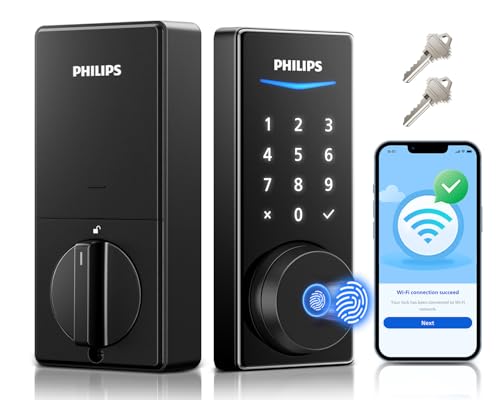
The Philips 240X-1HW smart lock brings modern security and convenience to your front door with its comprehensive suite of access methods. The standout feature is its built-in WiFi connectivity, which eliminates the need for a separate hub and allows you to manage your lock remotely through a smartphone app. This means you can grant temporary access codes to guests, monitor lock and unlock activity in real-time, and manage user permissions from anywhere, making it especially useful for rental properties or when you have service providers visiting your home.
The fingerprint recognition technology is genuinely fast, unlocking your door in just 0.3 seconds with accurate biometric verification. Combined with PIN codes, voice commands, app access, and a backup physical key, you have multiple pathways into your home depending on your situation. The PIN code system is particularly flexible, supporting permanent codes for family members, one-time codes for guests, and scheduled codes for regular service visits. Voice control through Alexa or Google Assistant adds another layer of convenience, though physical or biometric methods remain the most secure options for daily use.
Philips backs this lock with a solid 24-month warranty and accessible customer support, including phone availability during business hours and 24/7 email assistance. The splash-proof design protects against weather exposure, and the auto-lock feature with a 30-180 second customizable timer adds passive security when you leave. Battery life depends on usage frequency, but the included eight batteries should provide reasonable longevity for typical household use.
| Specification | Details |
|---|---|
| Brand | Philips |
| Model | 240X-1HW |
| Color | Matte Black |
| Dimensions | 6 x 2 x 1.5 inches |
| Weight | 0.04 pounds |
| Connectivity | Built-in WiFi (no hub required) |
| Unlock Methods | Fingerprint, PIN code, app, voice assistant, physical key |
| Fingerprint Speed | 0.3 seconds recognition time |
| Voice Assistants | Alexa and Google Assistant compatible |
| Auto-Lock Timer | 30-180 seconds (customizable) |
| Weather Resistance | Splash-proof design |
| Batteries Included | 8 batteries |
| Warranty | 24 months |
| Support | 24/7 email, phone support Mon-Fri 9am-9pm EST, Sat 10am-6pm EST |
Initial Setup: Install the lock on your door using the included hardware, then download the Philips app and connect the lock to your home WiFi network. The lock will prompt you to create an admin PIN code and register your fingerprints during the setup process.
Fingerprint Access: Register fingerprints for all household members and trusted visitors. Simply place your finger on the sensor and hold steady for recognition. The 0.3-second response time means quick entry without delays.
PIN Code Management: Create different PIN codes for family members, guests, and service providers. You can set permanent codes for regular users or one-time codes that expire after a single use. Scheduled codes work on specific dates and times, perfect for temporary access needs.
Remote Control: Use the smartphone app to lock or unlock your door from anywhere, receive real-time notifications, and manage user access. This is particularly useful when you're away and need to grant emergency access to someone.
Voice Commands: Say "Alexa, unlock my front door" or use Google Assistant voice commands for hands-free operation. Ensure your voice assistant device is properly linked to the lock through the app first.
Auto-Lock Feature: Enable auto-lock in the app and set your preferred timer between 30-180 seconds. The door will automatically lock after this duration, but ensure the door is fully closed and batteries are adequately charged for reliable operation.
Battery Management: Check battery levels monthly through the app to avoid being locked out. The lock will send low-battery notifications, but don't wait until the last moment to replace batteries. Keep a spare set of 8 batteries on hand for quick replacements.
Fingerprint Registration: Register multiple fingerprints per person if possible, including both index fingers and thumbs. This increases recognition success rates and provides backup options if one finger is wet or dirty.
PIN Code Strategy: Use complex PIN codes (avoid obvious sequences like 1234 or birthdates) and change them periodically for security. For rental properties, use one-time codes instead of permanent codes for guests to maintain better access control.
WiFi Reliability: Position your WiFi router within reasonable range of your front door. If the lock loses WiFi connection, you can still use fingerprint, PIN, voice commands, or the physical key, so connectivity issues won't lock you out of your home.
Guest Access: When expecting service providers or guests, create a scheduled PIN code that's active only during their expected visit window. This provides security without requiring you to be home or manage manual unlock/lock cycles.
Voice Control Setup: Test voice commands with your smart speaker before relying on them as your primary access method. Some voice assistants may require additional confirmation steps for security purposes.
Is This Lock Right for You? The Philips 240X-1HW works best for homeowners who want convenience without sacrificing security. It's ideal if you value remote access, have multiple household members with different access needs, or frequently host guests and service providers.
Installation Considerations: This is a deadbolt replacement, so you'll need to remove your existing lock. The installation process is straightforward for most doors, but if you're uncomfortable with basic hardware installation, consider hiring a locksmith. Ensure your door frame is compatible with standard deadbolt dimensions (6 x 2 x 1.5 inches).
WiFi Requirements: Your home WiFi network must be stable and within range of your front door. If you have a weak signal at your entrance, consider a WiFi extender or mesh system to ensure reliable connectivity for remote access and notifications.
Smart Home Integration: If you already use Alexa or Google Assistant, this lock integrates seamlessly. However, voice control should be a convenience feature, not your primary access method. Always maintain backup access through fingerprint, PIN, or physical key.
Battery Life Expectations: Eight batteries are included, but actual longevity depends on how frequently you use fingerprint scanning, WiFi connectivity, and app access. Plan to check batteries quarterly and budget for replacements annually.
Security Considerations: This lock is splash-proof but not fully waterproof, so avoid direct water spray. Use strong, unique PIN codes and change them if you suspect compromise. The fingerprint system is secure, but ensure you're the only person registering your biometric data.
Warranty and Support: The 24-month warranty is solid, and Philips offers accessible customer support. Register your lock immediately after purchase to ensure warranty coverage and to receive any important firmware updates.

Pros
- Multiple entry methods eliminate the need to carry keys while maintaining security options for every situation
- Matter and Thread support future-proofs your smart home investment across competing ecosystems
- Fingerprint recognition provides fast, touchless access that works even with wet or gloved hands
- Remote access management lets you grant temporary or permanent access to family, guests, and service providers from anywhere
- Long battery life and low-energy design mean fewer maintenance interruptions throughout the year
Cons
- No reviews currently available to assess real-world performance and reliability from actual users
- Requires a compatible Matter hub or Thread border router for full remote access functionality, which may require additional hardware investment
The ULTRALOQ Bolt SE represents a thoughtful approach to smart home security by combining multiple access methods in a single deadbolt. The inclusion of fingerprint recognition, passcodes, smartphone app control, voice commands, and traditional mechanical keys ensures that homeowners have flexible options for different situations. Whether you're unlocking with your finger while carrying groceries, sharing a temporary code with a contractor, or controlling access remotely through Apple Home, the lock adapts to your needs.
What sets this lock apart is its commitment to ecosystem compatibility through Matter and Thread technology. Rather than locking you into a single smart home platform, the Bolt SE works across Apple, Amazon, and Google ecosystems simultaneously. The Thread integration also addresses a common pain point: battery drain. By using Thread's low-energy mesh network, the lock achieves an impressive 18-month battery life, which is substantially longer than many competing models. The ability to store up to 50 fingerprints and 50 access codes provides genuine flexibility for larger households or those who frequently host guests.
Installation and everyday use are designed to be straightforward. The lock installs in roughly 10 minutes without requiring professional installation, and the weather-resistant IP65 rating means it can handle exterior door exposure in any climate. Real-time notifications and access logs keep you informed about who enters and when, while the auto-lock feature and manual lock button provide additional security options. The combination of lifetime mechanical coverage, 18-month electronic protection, and responsive customer support reflects confidence in the product's durability.
| Specification | Details |
|---|---|
| Brand | ULTRALOQ |
| Model | Bolt SE |
| Color | Black |
| Connectivity | WiFi + Matter over Thread |
| Dimensions | 2.95 x 1 x 2.95 inches |
| Material | Zinc alloy |
| Weather Rating | IP65 Waterproof |
| Fingerprint Storage | Up to 50 fingerprints |
| Passcode Storage | Up to 50 codes |
| Battery Life | 18 months (Thread-enabled) |
| Installation Time | Approximately 10 minutes |
| Smart Home Compatibility | Apple Home, Alexa, Google Assistant |
| Warranty | Lifetime mechanical, 18-month electronic |
Initial Setup: The installation process takes about 10 minutes. Remove your existing deadbolt, install the Bolt SE's interior and exterior mechanisms, and secure with provided screws. Download the ULTRALOQ app on your iOS or Android device, scan the QR code on the lock, and follow the guided setup wizard to connect to your WiFi and Matter network.
Adding Access Methods: Once installed, you can add fingerprints by placing your finger on the sensor multiple times from different angles until the lock recognizes the print. For passcodes, use the app to create unique codes for different users, setting whether access is permanent or limited to specific dates and times. Share eKeys through the app for temporary or permanent access without sharing physical keys.
Daily Operation: Unlock using your preferred method: touch the fingerprint sensor, enter your passcode on the keypad, use the smartphone app, voice command to Siri/Alexa/Google, or use the mechanical key as backup. Set auto-lock in the app to automatically lock after a preset time, or press the ULTRALOQ button for instant manual locking. Check the app anytime for access history and real-time notifications when the door is unlocked.
Maximize Battery Life: Thread's mesh network extends battery life significantly, but ensure your Thread border router or Matter hub is positioned within reasonable range of the lock. Avoid excessive app checking or frequent remote unlocking, as connectivity features do consume some battery power.
Fingerprint Registration: Register each fingerprint at least 3-4 times from different angles and hand positions. This ensures the lock recognizes your print reliably in all conditions, even when your finger is slightly wet, dry, or at different angles.
Access Code Strategy: Create different passcodes for different people rather than sharing one code. This allows you to see who unlocked the door in your access logs. Set time-limited codes for contractors or service providers to automatically expire after the job is complete.
Remote Access Setup: To unlock remotely from anywhere, ensure your Matter hub (Apple Home Hub, Amazon Echo, or Google Home device) is properly set up and connected to the same WiFi network. Without a hub, you can only control the lock when connected to your home WiFi.
Is This Lock Right for You? The Bolt SE works best for homeowners who want modern smart lock features without committing to a single smart home ecosystem. If you use Apple Home, Alexa, Google Home, or a mix of these platforms, the Matter compatibility ensures the lock works across all of them. It's particularly valuable if you frequently share access with family, guests, or service providers.
Smart Home Ecosystem Requirements: While the lock functions with WiFi alone, full remote access and automation require a Matter hub. Apple Home users need an Apple TV or HomePod mini, Alexa users benefit from an Echo device with hub capability, and Google Home users need a Google Nest Hub or compatible device. If you don't have a hub, you can still unlock remotely over your home WiFi but with reduced functionality.
Installation Considerations: The DIY installation is straightforward for most doors with standard deadbolt cutouts. However, if your door has an unusual thickness, non-standard deadbolt configuration, or smart lock-incompatible hardware, professional installation may be necessary. Measure your door thickness and existing deadbolt before purchasing.
Comparing to Alternatives: The Bolt SE's main advantages are its fingerprint recognition, extensive access code management, and true cross-ecosystem compatibility. If you only use one smart home platform, some brand-specific locks may offer tighter integration. However, for households with mixed devices or future flexibility, the Bolt SE's Matter support is a significant advantage that will matter more as smart home standards evolve.
Smart Lock Buying Guide
Choosing the right smart lock is not as simple as picking the one with the most features. The lock that works perfectly for a tech-forward homeowner who is all-in on Apple Home may be completely wrong for a renter who needs a no-drill retrofit. Before you spend a dollar, work through the key factors below. Each one has a real impact on how happy you will be with your purchase six months from now.
Lock Type: Deadbolt Replacement vs. Deadbolt Adapter
Most smart locks fall into one of two categories. A deadbolt replacement removes your existing deadbolt entirely and replaces it with a new motorized unit. These offer the most features and the tightest integration, and nearly every pick in our list, including models from eufy Security, Schlage, Philips, Tapo, WYZE, Level, ULTRALOQ, and CHAMBERLAIN, follows this approach. A deadbolt adapter (or retrofit lock) leaves your existing deadbolt cylinder in place and replaces only the interior thumb turn with a motorized one, which is a popular solution for renters who cannot modify door hardware. Know which type fits your door and your living situation before you start comparing specs. Installation difficulty matters too: if you’re handy with basic tools, a full deadbolt replacement takes about 20 minutes; a cordless drill and a steady hand are all you need. If power tools are new territory, our guides to cordless drills and impact drivers can help you gear up first.
Connectivity: Wi-Fi, Z-Wave, Zigbee, Bluetooth, Matter, and Thread
The wireless protocol your smart lock uses determines how it connects to your home network, which smart home platforms it supports, and how reliably it responds to remote commands. Here is a quick breakdown of the protocols you will encounter across this list.
- Built-in Wi-Fi is the most straightforward option. The lock connects directly to your router with no hub required. Models like the eufy Security Smart Lock C220, the Philips Wi-Fi Door Lock, the Tapo DL110, and the Wyze Auto-Lock Bolt v2 all use built-in Wi-Fi, which makes setup easy and remote access immediate. The trade-off is that Wi-Fi draws more power than other protocols, so battery life tends to be shorter compared to Bluetooth-only models.
- Bluetooth offers fast, low-power local communication but limits remote access unless paired with a Wi-Fi bridge or hub. Many locks use Bluetooth as a secondary channel for proximity-based auto-unlock.
- Matter over Thread is the newest and arguably most exciting protocol. Matter is an industry-wide interoperability standard, and Thread is a low-power mesh networking protocol that provides the reliability of a wired connection without the power drain of Wi-Fi. The Level Lock Pro and the ULTRALOQ Bolt SE both support Matter over Thread, making them future-proof picks that work natively with Apple Home, Alexa, Google Home, and SmartThings without forcing you to choose an ecosystem.
- Z-Wave and Zigbee are mature mesh protocols you will find in many older and mid-range locks. They require a compatible hub but offer excellent reliability and long range.
If you are building a broader smart home, think carefully about which ecosystem you are already invested in. Apple Home Key support, for example, is a meaningful convenience that lets you tap your iPhone or Apple Watch to unlock instantly, and the Level Lock Pro brings that feature to one of the most compact deadbolts on the market.
Entry Methods: How Many Ways Can You Unlock?
The best smart locks offer multiple ways to enter so that you are never locked out, regardless of what technology fails. Look for a combination of the following access methods.
- Fingerprint reader: Fast, convenient, and personal. Biometric readers vary widely in quality. A good scanner reads a dry or slightly dirty finger in under a second and rarely produces false rejects. WYZE’s AI Learning Scanner and eufy’s multi-fingerprint engine are among the stronger performers on our list in this category.
- Touchscreen keypad: Essential for sharing access with guests, housekeepers, or service workers without giving out a physical key. Look for anti-peep technology (which scrambles PIN entry by requiring extra digits) and backlit keys for nighttime use.
- Smartphone app: Every lock on this list includes app control, but app quality varies enormously. Read real user reviews of the app, not just the hardware, before committing.
- Physical key backup: Non-negotiable. Even the most reliable smart lock can have a dead battery or a software glitch. Every serious contender should include a keyed cylinder as a backup. The Wyze Auto-Lock Bolt v2 explicitly includes backup keys, and most full-replacement deadbolts do as well.
- Advanced biometrics: The eufy Security Smart Lock FamiLock S3 Max goes a step further with palm vein recognition, a technology that reads the unique vascular pattern in your palm and is extremely difficult to spoof.
- Face access: The myQ Secure View from CHAMBERLAIN integrates a 2K HDR doorbell camera and offers face access and fingerprint access in one package, effectively combining a smart lock and a video doorbell.
Security Certifications and Grading
Not all deadbolts are built equally strong. The Builders Hardware Manufacturers Association (BHMA) grades locks on a scale from Grade 1 (commercial, highest security) through Grade 3 (residential, entry level). Here is how our picks stack up.
- BHMA Grade 1: The eufy Security FamiLock S3 Max earns the top commercial-grade certification, making it the physically toughest lock on this list.
- BHMA Grade 2: The Tapo DL110 and the Wyze Auto-Lock Bolt v2 both carry Grade 2 ratings, offering solid residential security at a more accessible price point.
- BHMA Grade 3: The eufy Security Smart Lock C220 is Grade 3 rated. It is still a legitimate residential lock, but it is worth noting if security is your top priority.
Beyond BHMA grading, look for an IP water-resistance rating if your door is exposed to rain or snow. Both the eufy C220 and the Wyze Auto-Lock Bolt v2 carry IP53 ratings, meaning they resist dust and light water spray, which is adequate for most covered entryways. For fully exposed doors in wet climates, look for IP65 or higher.
Battery Life: How Long Before You Need to Recharge or Replace?
Battery life is one of the most underappreciated specs when buying a smart lock. A lock with a dead battery at midnight is worse than useless. Most smart locks use four AA batteries; others use a built-in rechargeable pack. Here is how the picks in this guide compare on battery longevity.
- 18 months: The ULTRALOQ Bolt SE leads the pack with an exceptional 18-month battery life, meaning most users will replace batteries less than once a year.
- 8 months: Both the eufy Security C220 and the Wyze Auto-Lock Bolt v2 claim approximately 8 months of runtime, which is solid performance for Wi-Fi-connected locks.
- 1 year rechargeable: The Tapo DL110 uses a rechargeable battery rated for about one year per charge, which eliminates the recurring cost of AA batteries.
Always check whether the lock sends low-battery alerts through the app before the battery actually dies. This is a standard feature on quality locks but is occasionally missing on cheaper models.
Smart Home Ecosystem Compatibility
If you already own an Alexa speaker, a Google Nest display, or an Apple HomePod, you will want a lock that fits neatly into that ecosystem. The Schlage Encode is compatible with Alexa and Google Home and has a long track record of reliable integration. The Philips Wi-Fi Door Lock also supports Alexa and Google Assistant. For Apple-centric households, the Level Lock Pro’s Apple Home Key support is genuinely impressive: a quick tap of your iPhone unlocks the door with no app-opening required. For households that span multiple ecosystems, or for buyers who may switch platforms in the future, a Matter over Thread lock like the ULTRALOQ Bolt SE is the most flexible long-term investment.
Access Sharing and Guest Management
One of the most practical advantages of a smart lock is the ability to grant and revoke access without cutting a physical key. Look for these features in any lock you are seriously considering.
- Scheduled access codes: Ideal for housecleaners, dog walkers, or short-term rental guests. The Schlage Encode supports Airbnb integration directly, which makes it a natural fit for hosts.
- Temporary codes: Single-use or time-limited PINs that expire automatically.
- Remote locking and unlocking: Essential if you manage rentals or frequently need to let in contractors. Every Wi-Fi and Matter-enabled lock on this list supports remote operation through its companion app.
- Access logs: A record of who entered and when, accessible from the app. This is invaluable for families with teenagers, Airbnb hosts, and anyone who wants accountability at the door.
Design, Finish, and Door Compatibility
Smart locks need to fit your door, both physically and aesthetically. Before you order, measure your door thickness (most standard US residential doors are 1-3/8 inches to 1-3/4 inches thick) and confirm the lock is compatible. Check the backset measurement (typically 2-3/8 inches or 2-3/4 inches) and make sure the strike plate aligns with your door frame. On the aesthetic side, matte black has become the dominant finish in modern home design, and several locks on our list, including the Schlage Encode, the Level Lock Pro, and the Philips models, are available in matte black. If your home hardware skews brushed nickel or satin chrome, confirm finish availability before purchasing. Making sure the lock fits correctly may require a reliable tape measure and occasionally a sharp utility knife for trimming weatherstripping.
Integrated Cameras and Video Doorbells
A growing category within smart locks combines a keyless entry deadbolt with a doorbell camera in a single unit, eliminating the need to wire or mount a separate video doorbell. The eufy Security FamiLock S3 Max includes a 2K HDR doorbell camera with 16 GB of built-in local storage, a rear lock video screen, and palm vein recognition, making it an all-in-one security hub. The myQ Secure View from CHAMBERLAIN takes a similar approach, packing a 2K HDR camera with color night vision, two-way audio, face access, and fingerprint access into one doorplate. These combination units command a premium price, but for homeowners who want a single device to handle locking and video monitoring, they represent strong value compared to buying the two components separately.
Why Trust HomeThru?
HomeThru is a fully independent review platform. We are not a retailer, we do not sell the products we cover, and we have no affiliation with any manufacturer. Our editorial team independently researched every smart lock in this guide by analyzing verified purchase reviews, manufacturer technical documentation, certification filings, and real-world community feedback from homeowners and renters. We do not accept payment for placement, and our rankings reflect our honest assessment of which products deliver the best combination of security, convenience, and value for real people living in real homes. Just as our guides to reciprocating saws and circular saws are built on independent research rather than brand relationships, so is every recommendation on this page.
Final Thoughts
The smart lock market in 2026 has never been more competitive, and that is great news for buyers. Whether your priority is maximum physical security, the deepest smart home integration, the lowest possible price, or the most discreet installation, there is a lock on this list built for you. Here are our standout picks across the key buying categories.
- Best Overall: Level Lock Pro earns this honor with a perfect 4.8-star rating, Matter over Thread support, Apple Home Key, and the smallest footprint of any smart deadbolt on the market, all without compromising on remote access or ecosystem flexibility.
- Best Budget Pick: Wyze Auto-Lock Bolt v2 delivers fingerprint recognition, AI-learning biometrics, Wi-Fi connectivity, BHMA Grade 2 security, IP53 weather resistance, and an 8-month battery at one of the lowest price points in the category. It is hard to ask for more at this tier.
- Best for Apple Home: Level Lock Pro supports Apple Home Key natively via Matter over Thread, letting iPhone and Apple Watch users tap to unlock without opening any app. For households already invested in Apple’s ecosystem, it is the obvious choice.
- Best for Maximum Security: eufy Security FamiLock S3 Max is the only BHMA Grade 1 lock on our list, and it adds palm vein recognition, a 2K HDR doorbell camera, and 16 GB of built-in local storage for a complete front-door security upgrade.
- Best for Smart Home Power Users: ULTRALOQ Bolt SE offers seven keyless entry methods, an industry-leading 18-month battery life, Matter over Thread support, and compatibility with Apple Home, Alexa, and Google, making it the most versatile all-in-one deadbolt for buyers who want to do it all.
Whichever lock you choose, pairing it with a reliable home Wi-Fi network and keeping the companion app updated will keep performance sharp for years. If your installation requires any door prep work, a set of quality cordless drills, a trusty spirit level, and accurate tape measures will make the job straightforward. Smart locks represent one of the highest-return upgrades you can make to your home’s security and daily convenience, and any of the picks on this list will serve you well.
Frequently Asked Questions
Do Smart Locks Work if the Internet Goes Down?
Yes, with an important caveat. Most smart locks store access codes and fingerprints locally on the device, so keypad and biometric entry still work without an internet connection. What you lose during an outage is remote access through the app, voice assistant control, and any cloud-dependent features. Keeping the physical key backup accessible is always a smart precaution, regardless of your connection status.
Can a Smart Lock Be Hacked?
Like any connected device, a smart lock carries some cybersecurity risk, but reputable brands reduce that risk significantly through end-to-end encryption, two-factor authentication, and regular firmware updates. The physical security of the deadbolt itself (look for BHMA Grade 1 or Grade 2 ratings) matters just as much. Keeping your app and lock firmware updated is the single most effective step you can take to minimize vulnerability.
Will a Smart Lock Fit My Existing Door?
Most smart deadbolts are designed to fit standard US residential doors ranging from 1-3/8 inches to 1-3/4 inches thick, with backset measurements of either 2-3/8 inches or 2-3/4 inches. Measure your door and existing deadbolt before ordering. A quality tape measure and the lock’s installation template make this straightforward. If your door is non-standard, check the manufacturer’s compatibility guide carefully.
Are Smart Locks Safe for Short-Term Rentals?
Smart locks are arguably the best technology upgrade an Airbnb or short-term rental host can make. The ability to assign unique, time-limited access codes to each guest, revoke access remotely, and review entry logs eliminates the cost and risk of key duplication. The Schlage Encode has direct Airbnb integration, and any Wi-Fi lock with scheduled access codes will serve hosts well. Always verify that the lock supports automatic code expiration so previous guest codes do not remain active after checkout.
What Happens When a Smart Lock Battery Dies?
Every quality smart lock sends a low-battery alert to your phone well before the battery is actually depleted, typically when 10 to 20 percent charge remains. If the battery does run completely flat before you can replace it, most smart locks include a physical key override cylinder and some models have an emergency external power port that accepts a 9-volt battery to provide just enough charge to retract the bolt. Knowing where your backup key is stored before you need it is a good habit regardless of which lock you own. Installing a hand saw or a set of claw hammers to help with door maintenance keeps your entryway in top shape too.