Keeping your home safe starts at the perimeter, and the best outdoor security cameras give you eyes on every corner of your property around the clock. Whether you want a solar-powered system that runs without ever touching a power outlet, a wired setup for continuous recording, or a budget-friendly wireless option with solid night vision, the market has expanded rapidly and choosing the right camera is trickier than ever. At HomeThru, our editorial team independently researched, analyzed, and compared dozens of models across price tiers, evaluating resolution, detection accuracy, weather resistance, storage options, and long-term value. The eight cameras below represent the strongest choices available right now, covering everything from a single-camera solar solution to a multi-cam kit with 4K clarity and facial recognition.
Our Top Picks for Outdoor Security Cameras

Pros
- Truly subscription-free with secure local storage means no hidden monthly fees or cloud dependency
- Solar power combined with battery backup provides year-round operation even during cloudy weather
- Automatic motion tracking and cross-camera correlation save significant time reviewing security footage
- 2K resolution with enhanced night vision delivers usable color footage in low-light conditions
- Simple installation and intuitive app control make this system accessible to non-technical homeowners
Cons
- No customer reviews available yet limits real-world performance validation from actual users
- Requires consistent sunlight exposure (3+ hours daily) which may be challenging for heavily shaded properties or northern climates
The aosu 4-camera wireless security system stands out in the crowded home security market by eliminating subscription fees entirely while delivering solid 2K resolution with color night vision. The solar-powered design is genuinely practical for most homeowners - three hours of daily sunlight keeps the system running indefinitely, and the included aosuBase provides encrypted local storage without relying on cloud services or monthly charges. This combination of features addresses two major pain points: recurring subscription costs and privacy concerns about cloud storage.
The 360-degree pan-and-tilt capability with automatic motion tracking represents a meaningful upgrade over fixed-position cameras, as it actively follows movement within the target area rather than simply recording static views. The ability to watch all four camera feeds simultaneously on one screen and control multiple cameras with a single click demonstrates thoughtful software design. Cross-camera event tracking is particularly useful - the system automatically correlates footage from the same time period across all cameras, significantly reducing the time needed to review incidents and understand what happened around your property.
Installation is genuinely straightforward, requiring only three anchor points and basic drilling skills. The 32GB local storage provides approximately four months of continuous loop recording, which is adequate for most residential security needs. The enhanced 4-LED night vision setup captures usable color footage rather than grayscale thermal imaging, making identification more reliable. For homeowners prioritizing privacy, reliability, and long-term cost savings over premium cloud features, this system delivers solid value.
| Specification | Details |
|---|---|
| Number of Cameras | 4 cameras included |
| Resolution | 2K (3MP) |
| Night Vision | Color night vision with 4 LED lights |
| Pan & Tilt Range | 360-degree coverage |
| Power Source | Solar-powered with rechargeable battery |
| Local Storage | 32GB (aosuBase) - up to 4 months loop recording |
| Subscription Required | No |
| Live Streaming | 4-camera quad view on single screen |
| Motion Tracking | Automatic motion detection and tracking |
| Installation | Wireless, 3-hole mounting, approximately 5 minutes |
| Colors Available | Black or White |
| Dimensions (per unit) | 19.7 x 11.8 x 19.3 inches |
| Weight (per unit) | 7.4 pounds |
Pre-Installation Checklist: Before mounting, identify four locations with adequate sunlight exposure (minimum 3 hours daily). Avoid heavily shaded areas, as solar charging depends on direct light. Ensure each location has clear line-of-sight to your WiFi router or plan for WiFi extender placement. Gather a power drill, appropriate wall anchors for your surface type (drywall, brick, or concrete), and a level.
Mounting Instructions: Mark three hole locations using the included mounting template. Drill pilot holes and install wall anchors if needed. Mount the camera bracket securely and attach the camera unit. The 360-degree pan-and-tilt mechanism should rotate freely without obstruction. Position cameras to maximize coverage of entry points, driveways, and perimeter areas. The quad-view display helps verify coverage overlap - adjust pan-and-tilt positions to eliminate blind spots between cameras.
Network Setup: Download the aosu app and follow the pairing wizard to connect each camera to your WiFi network. The aosuBase hub stores all recordings locally and manages notifications. Test live streaming from each camera angle and confirm motion tracking activates properly. Set recording schedules and notification preferences within the app. Allow 24-48 hours for the solar panels to fully charge the batteries before relying on the system for continuous operation.
Maximize Solar Charging: Position cameras on south-facing walls in the Northern Hemisphere for optimal sun exposure throughout the day. Clean solar panels monthly with a soft, damp cloth to maintain charging efficiency. During winter months with shorter daylight, consider supplemental placement or battery backup planning.
Optimize Motion Tracking: Calibrate the motion detection sensitivity based on your environment - higher sensitivity in quiet areas, lower sensitivity near busy streets or trees that move in wind. Use the cross-camera tracking feature to create a timeline of events, which is invaluable for identifying intruders or understanding incident sequences.
Leverage Quad-View Monitoring: Arrange your four cameras to cover all property entrances, then use the single-screen quad-view display during peak activity times (early morning, evening, nighttime). This approach provides comprehensive awareness without switching between individual camera feeds.
Storage Management: The 4-month loop recording cycle means older footage automatically overwrites. For important incidents, manually save or export video clips from the app to preserve evidence. Organize saved footage by date and incident type for easy retrieval.
Is This System Right for You? The aosu 4-camera system works best for homeowners who prioritize privacy, dislike subscription fees, and have adequate sunlight at their property. It's ideal for single-story homes, properties with clear sightlines, and users comfortable with basic app navigation. If your property is heavily shaded, receives less than 3 hours of direct sunlight daily, or you need 24/7 cloud backup and professional monitoring, consider alternative systems.
Key Decision Factors: Evaluate your property's sunlight exposure first - this is the primary constraint. Count your installation locations and confirm each has WiFi connectivity or plan for range extension. Assess your comfort level with local storage and app-based monitoring versus cloud-dependent systems. Consider whether 32GB storage (4 months of footage) meets your needs or if longer retention is critical.
Budget Considerations: This system eliminates monthly subscription costs, making it cost-effective long-term despite the higher upfront investment compared to budget alternatives. Factor in zero battery replacement costs due to solar power. Calculate potential savings over 3-5 years compared to subscription-based competitors.
Comparison Points: Unlike cloud-dependent systems, aosu prioritizes local storage and privacy. Unlike fixed-camera systems, the 360-degree pan-and-tilt provides active coverage. Unlike battery-only systems, solar power eliminates recurring maintenance. When comparing alternatives, prioritize which features matter most: subscription costs, privacy, ease of use, or advanced analytics.

Pros
- Exceptional battery longevity reduces recharging hassles and maintenance burden
- Free cloud storage plan saves money compared to subscription-based competitors
- Full-color night vision with built-in LED lights captures usable footage in complete darkness
- Easy app-based setup requires no technical expertise or professional installation
- Works with Alexa for seamless smart home integration and voice control
Cons
- Free cloud storage limited to SD quality; HD playback requires paid subscription upgrade
- No customer reviews available yet, so real-world performance data from actual users is limited
The HITELLARCAM 2K wireless outdoor camera stands out for its impressive battery endurance and practical feature set designed for homeowners who want reliable security without constant maintenance. The 2K resolution delivers sharp, zoomable footage, while the full-color night vision with integrated LED lights ensures usable video even in complete darkness, addressing a common weakness in budget security cameras that rely on grayscale infrared alone.
Setup is refreshingly straightforward through the mobile app, and the dual-band WiFi support (2.4GHz and 5GHz) accommodates different home network configurations. The AI-powered motion detection intelligently filters out false alerts from wind, shadows, and animals, sending real notifications only when genuine activity occurs. Two-way audio enables direct communication with visitors or delivery personnel, adding practical value beyond passive monitoring.
The free cloud storage plan is a genuine money-saver for budget-conscious homeowners, though it's important to note that free-tier footage is limited to SD quality, with HD requiring a paid upgrade. Local SD card storage (up to 256GB) provides a privacy-focused alternative for those who prefer keeping footage on-device. Battery life claims of up to 6 months depend heavily on motion detection frequency and environmental conditions, so real-world performance will vary by usage patterns.
| Specification | Details |
|---|---|
| Video Resolution | 2K Ultra HD (2560 x 1440) |
| Night Vision | Full-color with built-in LED lights |
| Battery Life | 1-6 months (depends on motion detection frequency) |
| WiFi Support | Dual-band: 2.4GHz and 5GHz |
| Storage Options | Free cloud storage (SD quality) + local SD card (up to 256GB) |
| Audio | Two-way talk with microphone and speaker |
| Motion Detection | AI-powered with instant phone alerts |
| Weather Rating | IP66 waterproof and dustproof |
| Smart Home Integration | Compatible with Alexa |
| Dimensions | 2.25 x 2.25 x 3.32 inches |
| Color | White |
Maximize Battery Life: Position your camera where motion detection will be triggered 5-8 meters away (the manufacturer's recommended detection range). Placing it too close to high-traffic areas increases motion events and drains the battery faster. Adjust sensitivity settings in the app to match your environment and reduce unnecessary alerts.
Optimize Night Vision: The built-in LED lights provide full-color footage in darkness, but avoid pointing the camera directly at reflective surfaces (windows, metal, wet pavement) that can wash out the image. Mount the camera slightly above eye level and angle it downward for better coverage of entry points and pathways.
WiFi Placement: Use the 5GHz band if your router is close to the camera for faster streaming and lower latency during two-way audio calls. Switch to 2.4GHz if the camera is farther away or if walls between the router and camera are causing weak signal. The dual-band support gives you flexibility to optimize for your specific home layout.
Storage Strategy: Pair the free cloud storage with a local SD card for redundancy. Keep critical footage in cloud storage and use the SD card as a backup. This protects against both device loss and cloud service interruptions.
Who Should Buy This Camera? The HITELLARCAM 2K is ideal for homeowners who want outdoor security without monthly subscription costs, prefer infrequent recharging, and need reliable night vision. It's a solid fit for monitoring entry points, driveways, and patios where battery-powered convenience outweighs the need for hardwired power.
Consider Alternatives If: You need continuous HD cloud recording (the free plan is SD-quality only), require multiple cameras with centralized management, or live in an area with extremely poor WiFi coverage. Wired cameras may be better if your installation location has consistent power access.
Key Considerations: Verify your home WiFi supports 2.4GHz or 5GHz (most modern routers do). Plan where you'll mount the camera to stay within 5-8 meters of typical motion activity. Confirm you have an SD card slot available if you want local backup storage. Understand that battery life varies significantly based on motion detection frequency, temperature, and recording mode, so real-world performance may differ from the 6-month maximum claim.

Pros
- Solar panel keeps the camera running indefinitely without battery swaps or recharging
- Exceptional 3K resolution and 8x zoom let you identify details from across your property
- True 360-degree coverage means one camera can monitor multiple areas simultaneously
- No monthly subscriptions or hidden fees make this a genuine one-time purchase
- Local storage protects your privacy and works even if your internet goes down
Cons
- Solar charging may be slower in climates with limited sunlight, requiring supplemental power during winter months
- No customer reviews are currently available, so real-world performance feedback from homeowners is limited
The eufy Security SoloCam S340 stands out in the wireless security camera market by combining dual 3K sensors with solar power independence, eliminating the need for batteries, charging cables, or monthly subscriptions. The dual-camera setup captures ultra-clear footage at up to 40 feet with 8x zoom capability, giving homeowners the ability to identify details like facial features or license plates from across their property. Whether you're monitoring a front porch, backyard, or driveway, the resolution and zoom range deliver the clarity needed for genuine home security.
The 360-degree pan-and-tilt functionality transforms a single camera into a comprehensive surveillance solution. By installing the unit vertically, you gain full rotational coverage with no blind spots, which is particularly valuable for homes with complex layouts or multiple entry points. The compact 3.42 x 3.42 x 4.72 inch design means it won't dominate your home's exterior appearance, and the white finish blends with most architectural styles. Setup takes approximately 7 minutes thanks to the wire-free design and straightforward mounting system.
Where this camera truly excels is in long-term value. The removable solar panel keeps the system powered indefinitely, and local storage means your footage stays on the device rather than dependent on cloud subscriptions. This combination eliminates recurring costs and privacy concerns associated with cloud-based services. The professional customer service backing ensures that if issues arise, you have reliable support. For homeowners seeking a one-time investment in comprehensive outdoor security without ongoing fees or maintenance headaches, the SoloCam S340 delivers genuine convenience.
| Specification | Detail |
|---|---|
| Brand | eufy Security |
| Model | SoloCam S340 |
| Resolution | 3K (Dual Camera) |
| Zoom | 8x Digital Zoom |
| Coverage Range | Up to 40 feet (12 meters) |
| Pan & Tilt | 360-degree Coverage |
| Power Source | Solar Panel (Removable) |
| Installation | Wire-free, 7-minute setup |
| Storage | Built-in 8GB Local Storage |
| Color | White |
| Dimensions | 3.42 x 3.42 x 4.72 inches |
| Weight | 1.39 pounds |
| Subscription | None required |
Pre-Installation Checklist: Identify your mounting location (vertical installation recommended for 360-degree coverage), ensure the solar panel will receive adequate sunlight, and verify you have the necessary mounting hardware included in the package.
Step-by-Step Installation: Mount the camera body securely to your chosen location using the provided hardware. Attach the removable solar panel in a position that receives direct sunlight for most of the day. Connect to the eufy Security app on your smartphone, follow the pairing prompts, and configure your preferred settings. The entire process typically takes 7 minutes or less.
Positioning Tips: For maximum coverage, install the camera vertically to take full advantage of the 360-degree pan-and-tilt capability. Position it at a height that balances visibility of entry points with protection from direct weather exposure. Ensure the solar panel faces south in the Northern Hemisphere for optimal charging throughout the day.
Maximize Solar Charging: Clean the solar panel quarterly to remove dust and debris that can reduce charging efficiency. Position the panel to receive unobstructed sunlight from sunrise to sunset. In winter months with limited sunlight, consider a supplemental power source to maintain peak performance.
Optimize Coverage: Use the 360-degree pan-and-tilt feature to create multiple preset positions covering different areas of your property. This allows you to quickly check specific zones without manually panning each time. Combine multiple cameras for overlapping coverage on larger properties.
Local Storage Best Practices: Regularly review and back up important footage to your phone or computer. The 8GB built-in storage will eventually fill, so establish a routine for archiving critical events. This also protects your footage in case the camera is damaged or stolen.
Maintenance Schedule: Check mounting hardware quarterly to ensure the camera remains secure. Test the pan-and-tilt functionality monthly to confirm smooth operation. Keep the lens clean for consistent image quality and the solar panel free of obstructions for reliable charging.
Who Should Buy This Camera? Homeowners seeking comprehensive outdoor security without monthly subscriptions, renters who prefer wire-free installation, and DIYers who want straightforward setup without professional installation. It's ideal for anyone prioritizing privacy through local storage and long-term cost savings.
Who Might Consider Alternatives? Homes with minimal sunlight exposure may need supplemental power solutions. Properties requiring multiple cameras for complete coverage might benefit from a system approach. Homeowners dependent on cloud backup for footage should evaluate the local-storage-only approach.
Key Decision Factors: Evaluate your property's sunlight exposure to ensure reliable solar charging. Consider whether 360-degree pan-and-tilt coverage meets your security needs or if you require multiple fixed cameras. Assess your comfort with local storage versus cloud backup for recorded footage. Verify mounting locations can accommodate the compact design and support the 1.39-pound weight.
Long-Term Value Consideration: Calculate your savings compared to subscription-based systems over 3-5 years. Factor in the convenience of never replacing batteries or paying monthly fees. Consider the privacy benefits of keeping footage local rather than in the cloud. This camera delivers genuine value for homeowners committed to long-term, hassle-free security.
Pros
- Solar charging eliminates battery maintenance and ongoing costs, saving time and money
- 4K clarity with license plate recognition provides actionable security footage for authorities
- Local storage on HomeBase 3 keeps your footage private without relying on cloud subscriptions
- AI-powered motion detection significantly reduces false alarms from weather or animals
- Pan and tilt functionality covers large areas without needing multiple cameras
Cons
- Requires consistent direct sunlight (2 hours daily minimum) which may be challenging in heavily shaded locations
- MicroSD card expansion requires separate purchase, and HomeBase 3 firmware updates are necessary for optimal performance
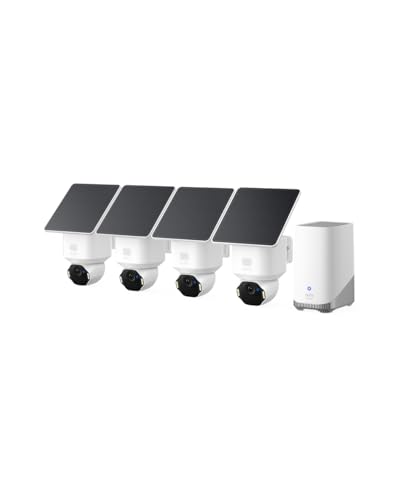
The eufy SoloCam E42 delivers impressive 4K clarity that goes beyond typical outdoor cameras, with the ability to recognize license plates from 33 feet away. This level of detail proves invaluable when documenting security incidents or providing evidence to authorities. The four-camera kit provides comprehensive coverage for most residential properties, and the pan-and-tilt functionality means you're not locked into a single viewing angle like traditional fixed cameras.
Solar charging via the SolarPlus 2.0 technology is a game-changer for wireless security systems. With just two hours of direct sunlight daily, the cameras maintain continuous operation without battery swaps or charging downtime. This makes the system genuinely maintenance-free, a major advantage over battery-dependent alternatives. The included HomeBase 3 hub expands storage to 16TB and enables continuous recording even during internet outages, ensuring your footage is always protected and accessible locally.
The AI motion detection and facial recognition features meaningfully reduce false alarms while the motion-activated strobe light serves as both a deterrent and notification system. The lack of monthly subscription fees combined with local storage options gives you complete control over your security data. For homeowners seeking a professional-grade wireless security system without recurring costs, the SoloCam E42 offers exceptional value and reliability.
| Specification | Details |
|---|---|
| Resolution | 4K UHD |
| Color | White |
| Dimensions | 14.5 x 10 x 6 inches |
| Power Source | Solar (SolarPlus 2.0) |
| Pan & Tilt | 360-degree coverage |
| Storage | HomeBase 3 with 16GB built-in, expandable to 16TB |
| Backup Storage | MicroSD up to 128GB (card not included) |
| AI Features | Motion tracking, facial recognition, vehicle detection |
| Alerts | Motion-activated strobe light and notifications |
| Subscription | No monthly fees required |
Location Selection: Choose mounting locations that receive at least 2 hours of direct sunlight daily for optimal solar charging. South-facing eaves, fence posts, and gable areas typically work well. Ensure cameras have clear sightlines to areas you want to monitor.
HomeBase 3 Placement: Install the HomeBase 3 hub in a central location with reliable WiFi coverage. This hub handles all local storage and processing, so proximity to your router matters. It can be placed indoors or in a protected outdoor location.
Initial Setup: Download the eufy app, create an account, and follow the pairing instructions to connect each camera to the HomeBase 3. Update the HomeBase firmware to V3.6.9.0 or later and the app to V5.0.80 or later for best performance. Configure motion detection zones and AI recognition preferences through the app settings.
Is This Right for You? The SoloCam E42 suits homeowners who want professional-grade security without monthly subscriptions, have adequate sunlight, and prefer local storage. It's ideal for monitoring multiple outdoor areas like driveways, patios, and yards.
Budget Considerations: While the upfront investment is higher than basic cameras, the elimination of monthly fees and battery replacement costs provides long-term savings. The four-camera kit covers most residential properties, reducing the need for additional purchases.
Sunlight Requirements: Before committing, assess your property's sunlight exposure. Heavily shaded locations may struggle to keep cameras charged during winter months. If sunlight is limited, consider supplemental solar panels or alternative power solutions.
Storage Needs: The 16GB built-in HomeBase 3 storage handles basic recording, but upgrading to higher capacity (recommended for continuous recording) requires additional investment. Plan your storage strategy based on recording frequency and retention needs.
Maximize Solar Charging: Keep camera lenses clean and free of dust or debris, which reduces light absorption. Position cameras to catch morning or afternoon sun rather than only midday rays, which can be blocked by clouds more easily.
Optimize AI Detection: Use the app's motion detection zones to focus on high-traffic areas like entryways and driveways, reducing false alerts from distant movement. Adjust sensitivity settings seasonally as vegetation and lighting conditions change.
Local Storage Strategy: Enable continuous recording on the HomeBase 3 for maximum coverage, but use the microSD backup in individual cameras as a secondary failsafe. Regularly review footage to ensure your system is capturing what matters most.
Maintenance: Check camera angles and cleanliness quarterly, especially after storms or seasonal weather changes. Update firmware when available to access performance improvements and security patches.

Pros
- Exceptional battery longevity eliminates the hassle of frequent battery changes or charging docks
- Simple installation takes minutes with included mounting hardware and pre-paired cameras
- Cloud storage with free 30-day trial keeps footage secure and accessible from your phone
- Affordable multi-camera setup compared to traditional wired security systems
- Works seamlessly with Alexa for hands-free system control and monitoring
Cons
- Sync Module Core lacks local storage, requiring cloud subscription for footage retention beyond the trial period
- No microSD card or USB storage compatibility without upgrading to Sync Module XR or 2 (sold separately)
The Blink Outdoor 4 three-camera system strikes a solid balance between affordability and performance for homeowners seeking wireless outdoor security. With up to two years of battery life per camera using included Energizer lithium batteries, you'll spend less time on maintenance and more time enjoying peace of mind. The 1080p HD daytime video combined with infrared night vision ensures you capture clear footage around the clock, while the two-way audio lets you speak directly to visitors or deter unwanted activity from your smartphone.
Setup is genuinely quick, a major advantage for DIYers who want to avoid complicated installations. The included Sync Module Core pairs with all three cameras out of the box, and the mounting kits accommodate most outdoor surfaces. Enhanced dual-zone motion detection responds faster to activity, and the optional person detection feature (with Blink Subscription Plan) helps reduce false alerts from animals or wind-blown debris. Alexa integration opens up voice control and multi-camera viewing on compatible smart home devices, streamlining your security management.
One important consideration: the Sync Module Core doesn't include local storage, so you'll rely on cloud backup for footage retention. Blink offers a free 30-day trial of its subscription plan, but ongoing cloud storage requires a paid subscription. If you prefer local storage options, you can upgrade to the Sync Module XR with microSD card or Sync Module 2 with USB flash drive, though these are sold separately. For budget-conscious homeowners willing to embrace cloud storage, this system delivers excellent value and reliability.
| Specification | Details |
|---|---|
| Color | Black |
| Camera Count | 3 Outdoor 4 Cameras |
| Camera Dimensions | 1.58 x 2.76 x 2.76 inches |
| Camera Weight | 0.24 pounds each |
| Video Resolution | 1080p HD |
| Night Vision | Infrared |
| Battery Life | Up to 2 years |
| Battery Type | AA Lithium (6 included) |
| Hub Included | Sync Module Core |
| Local Storage | Not supported on Core module |
| Cloud Storage | Free 30-day trial, subscription required |
| Motion Detection | Dual-zone enhanced detection |
| Audio | Two-way talk |
| Smart Home Integration | Works with Alexa |
| Included Accessories | 3 mounting kits, USB-C cable, power adapter |
Getting Started: Download the Blink app and create an account. Insert the six AA Energizer lithium batteries into the three cameras (two per camera). Plug in the Sync Module Core using the included power adapter and USB-C cable. Open the Blink app and follow the pairing prompts to connect each camera to your Sync Module Core. The app will guide you through naming cameras and customizing motion detection zones.
Daily Operation: Use the Blink app to view live 1080p HD footage from any camera, enable or disable motion alerts, and adjust sensitivity settings. When motion is detected, you'll receive smartphone notifications. Tap any camera feed to watch live video, access recorded clips, or use two-way audio to speak to people near the camera. You can arm and disarm the system from the app or through Alexa voice commands if you have an Alexa-enabled device.
Maintenance: Monitor battery levels in the app (they typically last two years). When batteries approach depletion, the app will notify you. Simply replace the AA batteries in each camera as needed. Periodically check camera lenses for dirt or debris and wipe clean with a soft cloth. Ensure your WiFi signal reaches each camera location for reliable performance.
Is This System Right for You? The Blink Outdoor 4 three-camera system works best for homeowners who want affordable wireless security without the complexity of professional installation or expensive equipment. It's ideal if you have WiFi coverage around your property and prefer battery-powered cameras over hardwired systems. If you're comfortable using cloud storage and don't need local backup, this system delivers excellent value.
Before You Buy: Confirm your home WiFi reaches all camera locations, as these cameras require a strong 2.4GHz signal. Consider whether you want person detection (requires paid subscription) or basic motion alerts. If local storage is essential to you, budget for upgrading to Sync Module XR or 2 separately. Verify that your outdoor mounting locations can accommodate the compact 1.58 x 2.76 x 2.76 inch camera size and included brackets.
Budget Considerations: The three-camera system includes everything needed to start monitoring immediately. Cloud storage requires a Blink Subscription Plan after the 30-day trial ends. If you own Alexa devices, integration is free and adds significant convenience. For expandability, you can add more Outdoor 4 cameras to this system later, though each additional camera requires separate purchase.
Optimize Battery Life: Position cameras in locations with moderate sunlight to maximize battery performance. Avoid placing cameras in direct, intense sun or deep shade. Reduce motion detection sensitivity if you're in a high-traffic area to minimize false alerts, which drain batteries faster. Disable continuous live view monitoring when not needed.
Improve Video Quality: Keep camera lenses clean and free of dust, pollen, and spider webs. Position cameras at eye level or slightly higher for better facial recognition if using person detection. Ensure adequate outdoor lighting for nighttime video clarity, or rely on the infrared night vision in darker areas. Test camera angles before final installation to avoid blind spots.
Maximize Smart Home Integration: Create Alexa routines that arm your Blink system at specific times or when you leave home. Use multi-camera view on Alexa devices to monitor all three feeds simultaneously. Set up custom motion detection zones for each camera to focus on high-priority areas like doorways or driveways. Test two-way audio quality before relying on it for security purposes.

Pros
- Solar panels charge cameras continuously in sunny conditions, eliminating frequent battery recharging and manual maintenance
- Local storage means your footage stays private and accessible without paying monthly subscription fees
- Dual PIR and AI detection reduces false alerts from animals, shadows, and weather, so you only get notified about real threats
- Multi-camera view and person tracking across feeds save time during incident review and improve security awareness
- Color night vision and built-in deterrence features provide clear identification and active protection when it matters most
Cons
- Solar charging performance depends heavily on sunlight availability, season, and panel placement, making winter operation less reliable in cloudy climates
- Camera-to-camera tracking and AI detection accuracy can vary based on distance, lighting conditions, and camera angle, requiring proper installation for best results
The aosu Solar Security Camera System stands out as a practical choice for homeowners seeking wireless outdoor surveillance without the burden of subscriptions or constant battery management. The split solar panel design is genuinely flexible, allowing you to position the camera where it provides the best view while placing the panel where it receives optimal sunlight. This separation reduces the need for frequent recharging and keeps your security running continuously, though performance will naturally fluctuate with seasonal sunlight and weather patterns.
Where this system truly excels is in reducing alert fatigue. The combination of PIR motion sensors and AI human detection filters out false alarms from animals, wind-blown debris, and shadows, so you only receive notifications when people are actually detected. Viewing up to 4 cameras simultaneously on your phone through the aosu app, combined with the camera-to-camera tracking feature that groups the same person across multiple feeds, makes reviewing events faster and more intuitive than managing separate camera feeds.
The IP65 weatherproof design and color night vision deliver reliable identification day and night, while the built-in light and sound deterrence features provide immediate, active protection. Local storage via microSD card (sold separately) keeps your footage private and under your control, with no mandatory monthly fees. For homeowners who value privacy, flexibility, and expandability, this 4-camera kit offers solid value, though you should realistically assess your property's sunlight exposure to ensure the solar charging meets your climate and season.
| Specification | Details |
|---|---|
| Product Type | Wireless Solar Security Camera System |
| Kit Configuration | 4-Camera Kit |
| Video Resolution | 2K HD |
| Power Source | Solar Panel (Split Design) + Rechargeable Battery |
| Detection Technology | PIR Motion Sensor + AI Human Detection |
| Night Vision | Full Color Night Vision |
| Storage | Local Storage via microSD Card (Up to 1TB, Card Sold Separately) |
| Subscriptions | No Mandatory Subscription Required |
| App Control | Unified aosu App with Multi-Camera View (Up to 4 Cameras Simultaneously) |
| Camera Tracking | Camera-to-Camera Tracking for Person Recognition Across Feeds |
| Deterrence Features | Light and Sound Alerts |
| Weather Rating | IP65 Weatherproof (Rain, Snow, Harsh Outdoor Conditions) |
| Expandability | Expandable System (Add More Cameras as Needed) |
| Brand | aosu |
| ASIN | B0GLHZMMXR |
Maximize Solar Performance: Position the split solar panel in direct sunlight for as many hours as possible each day. South-facing locations typically receive the most consistent sunlight. In winter or cloudy climates, consider supplemental charging by bringing cameras indoors occasionally to maintain battery health.
Optimize Detection Accuracy: Mount cameras at entry points (doors, gates, driveway) and angle them to capture faces clearly. Avoid backlighting and direct sun glare on the lens, which can reduce AI detection accuracy. Test detection zones after installation to ensure the system recognizes people at your property's typical approach distances.
Use microSD Card for Extended Storage: Invest in a high-capacity microSD card to keep months of footage locally stored without relying on cloud services. This gives you full control over your security data and eliminates monthly subscription costs.
Fine-Tune Alert Settings: Use the aosu app to adjust detection sensitivity based on your property's activity level. Reducing sensitivity near roads or busy sidewalks can further minimize false alerts from passing traffic or pedestrians.
Is This System Right for You? This 4-camera kit works best for homeowners with moderate to good sunlight exposure who want wireless, subscription-free security. If your property is heavily shaded or you live in a consistently cloudy climate, solar charging may not meet your needs. If you require 24/7 monitoring without any battery concerns, a wired system might be more reliable.
What to Consider Before Buying: Assess your property's sunlight availability throughout the year. Measure the distance from your primary camera locations to your WiFi router or base station to ensure strong connectivity. Determine whether local microSD storage meets your footage retention needs, or if you prefer cloud backup (which would require a paid plan). Plan your camera placement to minimize blind spots and ensure faces are clearly visible for AI detection.
Setup and Installation: The system is designed for easy DIY installation without professional help. You'll need to mount the cameras and solar panels securely, connect the base station to power and WiFi, and configure the app. Allow time for the batteries to fully charge before deploying cameras, and test the detection zones to confirm they cover your intended areas.
Long-Term Cost Savings: Unlike subscription-based systems, this kit has no recurring monthly fees. Your primary costs are the initial hardware investment and optional microSD cards for expanded storage. This makes it an economical choice for budget-conscious homeowners who want quality surveillance without ongoing expenses.

Pros
- Exceptional battery longevity eliminates the need for frequent replacements
- Simple DIY installation with included mounting hardware and no professional setup required
- Enhanced motion detection with person recognition reduces nuisance alerts
- Flexible storage options with free cloud trial plus local backup capability
- Affordable multi-camera system for comprehensive home perimeter coverage
Cons
- Requires Blink Subscription Plan for person detection and extended cloud storage beyond 30-day trial
- 1080p resolution is adequate but not as sharp as some higher-end outdoor security cameras
The Blink Outdoor 4 five-camera system represents a practical solution for homeowners seeking wireless security without the complexity of professional installation or ongoing power concerns. The two-year battery life is genuinely impressive, allowing you to deploy cameras in locations where running electrical lines would be impractical. Combined with the included Sync Module 2, this system gives you flexibility in how you store and access your footage, whether through Blink's cloud service or local backup to a USB drive.
Video quality and detection capabilities meet the needs of most residential applications. The 1080p HD resolution captures sufficient detail for identifying people and vehicles, while infrared night vision ensures you're not flying blind after dark. The dual-zone motion detection is thoughtfully engineered to minimize false alarms from moving trees or passing traffic, and the optional person detection feature (with subscription) further refines what warrants an alert. Two-way audio adds a practical dimension, allowing you to greet delivery personnel or issue warnings without being physically present.
Setup is straightforward enough for DIYers, with the included mounting kits and simple app-based configuration. The Alexa integration works smoothly if you're already in Amazon's ecosystem, enabling voice commands and video streaming to Echo Show devices. For homeowners prioritizing ease of installation, battery longevity, and multi-camera coverage at a reasonable price point, this system delivers solid value.
| Specification | Detail |
|---|---|
| Model | Blink Outdoor 4 |
| Quantity | 5 Cameras + 1 Sync Module 2 |
| Color | Black |
| Video Resolution | 1080p HD |
| Night Vision | Infrared |
| Audio | Two-way talk |
| Battery Life | Up to 2 years |
| Battery Type | AA Lithium (10 included) |
| Motion Detection | Dual-zone enhanced |
| Person Detection | Optional (requires subscription) |
| Cloud Storage | 30-day free trial included |
| Local Storage | USB drive compatible (via Sync Module) |
| Smart Home Integration | Amazon Alexa compatible |
| Installation | DIY wireless |
| Included Accessories | 5 mounting kits, USB cable, power adapter |
| Camera Dimensions | 0.71 x 2.32 x 2.44 inches |
| Camera Weight | 0.08 pounds each |
Pre-Installation: Download the Blink app and create an account. Insert AA lithium batteries into each camera (10 batteries included for 5 cameras). Ensure your home WiFi network is accessible near installation locations.
Mounting: Use the included mounting kits to position cameras at entry points (front door, back patio, garage, side yards). Mount 6-10 feet high for optimal motion detection and facial clarity. Ensure cameras have a clear view without obstructions like dense shrubs.
Sync Module Setup: Plug the Sync Module 2 into power near your WiFi router. Open the Blink app and follow the pairing prompts. Once connected, add each camera to the system one at a time through the app interface.
Placement Tips: Angle cameras slightly downward to capture faces rather than just the top of heads. Avoid pointing directly into bright sunlight or reflective surfaces. Test motion detection zones after installation to confirm coverage of your intended areas.
Battery Optimization: The two-year battery estimate assumes moderate activity. High-motion areas with frequent alerts will drain batteries faster. Check battery levels quarterly through the app and consider rotating in fresh batteries before they're completely depleted to avoid service gaps.
Motion Detection Tuning: Adjust sensitivity and dual-zone settings individually for each camera based on its environment. A camera facing a busy street needs different settings than one monitoring a quiet backyard. Spend time fine-tuning to reduce false alerts.
Storage Strategy: Use the free 30-day cloud trial to evaluate whether you need ongoing subscription storage, or set up local backup with a USB drive connected to the Sync Module for long-term footage retention without monthly fees.
Alexa Integration: Link your Blink system to Alexa to create automation routines. For example, have cameras start recording when you leave home or receive voice alerts when motion is detected. This integration works best with Echo Show devices for live video viewing.
Who Should Buy: Homeowners seeking a multi-camera wireless security system that prioritizes ease of installation and minimal maintenance. Ideal for those without existing outdoor wiring, renters with landlord restrictions, or anyone tired of replacing camera batteries annually.
Coverage Considerations: Five cameras provide solid perimeter coverage for most single-family homes. Assess your property's entry points (front door, back door, garage, side gates, patio) and place cameras accordingly. Each camera has a limited field of view, so plan placement carefully.
Subscription Decisions: The free 30-day cloud trial lets you evaluate whether cloud storage meets your needs. If you prefer not to subscribe, local backup via USB drive is viable but requires manual management. Person detection is only available with a paid subscription plan.
Smart Home Fit: This system works best if you already use Amazon Alexa. While it functions independently, Alexa integration unlocks voice control and Echo Show streaming. Non-Alexa users can still use the Blink app for full functionality.
Budget Factor: Compare total cost of ownership including any subscription plans. The upfront five-camera investment is reasonable, but factor in whether you'll pay for cloud storage or invest time in local backup solutions.

Pros
- No subscription fees or hidden charges, with built-in 32GB storage for 120 days of event recording
- Exceptional night vision with color accuracy 30% higher than standard 2K cameras, plus 40-foot detection range
- Intelligent AI tracking automatically follows people and links clips across multiple cameras for complete event context
- Solar-powered reliability with stable charging even in cloudy, rainy, or shaded conditions
- Whole-home coverage with dual-band Wi-Fi and custom detection zones to minimize false alerts from traffic
Cons
- No existing customer reviews available to verify real-world performance and reliability in varied weather conditions
- Learning curve required to optimize AI detection zones and cross-camera tracking features for your specific property layout
The ANSQUE 4-camera system addresses a common frustration for homeowners: the hidden costs of traditional security systems. With no subscription fees and 120 days of local event storage built into the base station, you're looking at genuine savings of roughly $200 per year. The system uses AES-128 encryption to keep your footage private even if a camera is stolen, which adds a meaningful layer of security beyond what many budget-friendly systems offer.
What sets this system apart is its 360-degree PTZ capability paired with AI auto-tracking. Rather than relying on static wide-angle shots, the cameras actively follow movement across your property and link video clips from the same time period across multiple cameras. This means you can see exactly how an intruder or delivery person moved from your front door to your backyard without blind spots. The 2K color night vision with smart IR and 8x digital zoom lets you capture fine details like license plates and package labels in real time, even in complete darkness up to 40 feet away.
Installation and daily operation are genuinely straightforward. The solar panels charge fully in just 2 hours of sunlight and maintain a 365-day battery cycle even in cloudy or shaded areas, eliminating the need for frequent maintenance. The dual-band Wi-Fi base station provides stable coverage across larger properties, and the mobile app allows you to switch between Home, Away, and Disarm modes with one tap, plus set custom detection zones to reduce false alerts from passing cars and pedestrians.
| Specification | Details |
|---|---|
| Brand | ANSQUE |
| Camera Count | 4 Cameras |
| Color | White |
| Dimensions | 4.33 x 5.91 x 7.87 inches |
| Weight | 8.5 pounds |
| Video Resolution | 2K HD |
| Night Vision | Color night vision with 8x digital zoom |
| Pan-Tilt-Zoom | 360-degree PTZ with auto-tracking |
| Power Source | Solar panel with 365-day battery life |
| Storage | 32GB local storage, 120 days event recording |
| Encryption | AES-128 |
| Wi-Fi | Dual-band 2.4GHz and 5GHz |
| Detection Range | 40 feet (12 meters) at night |
| Installation Time | 5 minutes |
| Subscription Fees | None |
Initial Setup: Mount the base station in a central location with Wi-Fi access. Download the ANSQUE app and follow the pairing wizard to connect your four cameras via the dual-band network. Attach the solar panels to each camera using the included 4-hole reinforced bracket, positioning them to receive at least 2 hours of direct sunlight daily.
Configuring Detection: In the app, use the custom detection zone tool to draw areas you want to monitor. This prevents alerts from passing vehicles and pedestrians on nearby streets. Enable AI auto-tracking so cameras follow movement across your property. Adjust the sensitivity of the PIR sensor based on your environment, especially if you have pets or frequent activity nearby.
Daily Operation: Switch between Home, Away, and Disarm modes using the one-tap controls in the app. Enable scheduled recording during your vacation or nighttime hours to increase security level automatically. Monitor live feeds from all four cameras simultaneously on one screen, or focus on individual camera angles. Use the 8x digital zoom to inspect suspicious activity in real time, such as license plates or package details.
Maximize Solar Charging: Position solar panels at a 45-degree angle facing south for optimal year-round charging, even in winter. Clean the panels monthly with a soft cloth to remove dust and debris, which can reduce charging efficiency by up to 20%.
Optimize AI Tracking: Set up custom detection zones to focus on high-value areas like your front door, driveway, and backyard entry points. Exclude zones where you expect frequent passing traffic to reduce false alerts and preserve battery life.
Network Stability: Place the AnsqueBase (signal booster) in a central location away from thick walls and metal objects. If you have a large property, the dual-band 5GHz network provides faster speeds for multiple simultaneous camera feeds, while 2.4GHz offers better range through obstacles.
Storage Management: Review event recordings weekly to familiarize yourself with normal activity patterns on your property. This helps you recognize genuinely suspicious behavior faster. The 120-day loop recording automatically deletes oldest footage when storage reaches capacity, so you don't need to manage files manually.
Who Should Buy This System? Homeowners and DIYers who want comprehensive surveillance without monthly subscription costs. Ideal for properties with multiple vulnerable areas like driveways, backyards, side gates, and pool areas. Works well for people who prefer local storage and privacy over cloud-based systems, and those willing to handle basic app setup.
Property Size Considerations: The dual-band Wi-Fi base station supports coverage across typical residential properties up to 2,000-3,000 square feet. Larger properties or those with dense landscaping may benefit from adding the base station as a dedicated signal booster rather than relying on your home router.
Climate Suitability: The solar panels charge effectively even in cloudy, rainy, and shaded conditions, making this system viable in most U.S. climates. However, properties with extremely limited sunlight (dense tree cover, north-facing walls) may struggle to maintain consistent charging. The 365-day battery cycle provides a buffer, but solar access remains important for long-term reliability.
Alternative Considerations: If you need cloud backup for critical footage or prefer professional monitoring, subscription-based systems may better suit your needs. If installation difficulty is a concern, this system's 5-minute setup process is genuinely beginner-friendly. Compare the annual savings from zero subscription fees against the upfront kit cost to confirm value for your budget.
How We Chose These Cameras
Our team evaluated each camera against a consistent set of criteria: image resolution and clarity in low light, motion detection intelligence (basic pixel change versus true AI or PIR human detection), power source reliability, local versus cloud storage flexibility, ease of installation, and whether a monthly subscription is required to unlock core features. We also weighted real-world durability by examining IP ratings and manufacturer weatherproofing claims, and factored in buyer feedback patterns to surface any recurring quality concerns before recommending a model.
Buying Guide for Outdoor Security Cameras
Before you commit to a system, spend a few minutes mapping out exactly where you need coverage, what power sources are available at those locations, and how you plan to store footage. The answers shape every other decision. Below is a breakdown of the factors that matter most.
Resolution: How Much Detail Do You Actually Need?
Resolution determines whether you can identify a face or read a license plate, not just detect that something moved. A 1080p camera delivers a clean, sharp image for most residential use cases and keeps file sizes manageable. Stepping up to 2K adds meaningful detail when cameras are mounted higher or cover wider driveways. Cameras like the eufy Security SoloCam E42 4-Cam Kit push all the way to 4K, which gives you impressive zoom-in clarity during review, though it also demands more local storage capacity. For tight entryways or spots where cameras can be mounted close to the action, 1080p is genuinely sufficient. For wide-open spaces, 2K or above pays off.
Power Source: Wired, Battery, or Solar?
Power source is often the single biggest installation constraint. Wired cameras offer uninterrupted operation but require routing cable, which adds complexity, especially if you are mounting on a detached garage or fence post far from an outlet. Battery-powered cameras like the Blink Outdoor 4 series are the easiest to install anywhere, with Blink claiming up to two years of battery life per set of AA lithium batteries under typical usage. Solar-powered cameras split the difference: panels keep batteries topped up in most climates, meaning you get wireless flexibility without worrying about recharging schedules. The aosu and ANSQUE solar kits in this roundup both lean on this approach effectively. One honest caveat on solar: performance drops noticeably in extended overcast periods or in shaded mounting locations, so assess your available sunlight before committing.
Night Vision: Infrared vs. Color Night Vision
Traditional infrared night vision produces a black-and-white image in darkness, which is fine for detecting motion and confirming a person is present. Color night vision, now found on cameras like the aosu solar kits and the ANSQUE system, uses ambient light combined with a warm-white LED spotlight to deliver full-color footage at night. Color footage is significantly more useful for identifying clothing, vehicle color, and other details that matter when reviewing an incident. The trade-off is that the spotlight announces the camera’s presence, which can deter intruders but also illuminates your own yard with every trigger. If you prefer a more discreet setup, stick with infrared. If identification detail is a priority, color night vision with a spotlight is the stronger choice.
Motion Detection: Basic vs. AI and PIR
Basic pixel-change motion detection sends an alert every time anything moves in the frame, including shadows, tree branches, and passing headlights. AI-based detection and passive infrared (PIR) sensors narrow alerts to genuine human or vehicle events. The aosu solar camera with PIR and AI human detection, and the eufy SoloCam E42 with facial recognition, sit at the intelligent end of this spectrum. Fewer false alerts mean you actually pay attention to notifications instead of dismissing them. If your camera overlooks a busy street or a yard with a lot of foliage, investing in a model with smart detection is genuinely worth it.
Storage: Cloud vs. Local
Most cameras offer some form of cloud storage, but many lock useful features behind a paid subscription. Some of the strongest options in this roundup sidestep that entirely: the eufy SoloCam S340 includes built-in 8GB local storage, the eufy SoloCam E42 supports local storage expandable up to 16TB, and the aosu and ANSQUE systems offer on-device storage with no ongoing fees. The HITELLARCAM wireless camera goes a step further by advertising free cloud storage as a core feature. For homeowners who prefer not to manage subscriptions, prioritizing cameras with built-in local storage or microSD card support is the smarter long-term move. Think of it the same way you would approach storage decisions for any home system: the goal is reliable access to your footage without recurring costs.
Field of View and Pan and Tilt Coverage
A fixed-lens camera with a wide-angle lens covers a broad horizontal swath but cannot follow movement. Pan and tilt cameras, like the eufy SoloCam S340 and the aosu solar kit, rotate horizontally and tilt vertically to track moving subjects automatically. The eufy SoloCam S340 specifically markets 360-degree coverage with no blind spots through its dual-camera design. For a front yard or large open area, a pan and tilt model with auto-tracking reduces the number of cameras you need to buy. For a narrow side gate or garage doorway, a fixed wide-angle lens is simpler and equally effective.
Weather Resistance and Durability
Any camera labeled for outdoor use should carry an IP65 or higher rating at a minimum. IP65 means the housing is dust-tight and protected against direct water jets, which covers rain and hose spray. IP66 adds protection against powerful water jets. Check the rating before buying, especially if you live in a region with heavy rainfall, coastal humidity, or temperature extremes. All the cameras reviewed here are marketed for outdoor use, but verifying the specific rating in the product listing before purchase is always a sound habit.
Two-Way Audio
Two-way talk lets you speak through the camera’s built-in speaker from your phone, useful for warning off trespassers or receiving a delivery without opening the door. Both Blink Outdoor 4 models include this feature, as does the HITELLARCAM wireless camera. If you plan to use your camera as a de facto intercom at a gate or entry point, confirm two-way audio is included before purchasing.
Subscription Costs and Long-Term Value
The sticker price of a camera is only part of the actual cost. A camera priced in the budget range that requires a monthly cloud plan can end up costing more over three years than a higher-upfront option with free local storage. Several cameras in this list, including the aosu kits, the ANSQUE system, and the eufy SoloCam S340, explicitly offer no monthly fee as a feature. Factor that into your comparison, particularly if you are building out a multi-camera setup where subscription fees multiply quickly. For larger home improvement projects where budgeting matters, the same logic applies whether you are buying security cameras or investing in cordless drill sets for installation work: total cost of ownership tells a more honest story than the shelf price alone.
Installation Tips for Outdoor Security Cameras
Placement is as important as the camera itself. Mount cameras at a height between eight and ten feet for the best combination of coverage angle and tamper resistance. Angle them slightly downward so faces are captured rather than tops of heads. Avoid pointing cameras directly at light sources, including street lamps or the rising or setting sun, which will blow out the image. For wired installations, a reliable utility knife makes clean cable routing and conduit work noticeably easier. For mounting into masonry or stucco, a capable drill with hammer mode saves considerable effort. Plan cable runs before drilling pilot holes and always verify there are no electrical lines or plumbing in the wall before committing.
For corner mounting, a junction box adapter gives you a cleaner finished look and better weatherproofing around the cable entry point. If you are running conduit along exterior walls, a good tape measure keeps your runs straight and your conduit lengths accurate on the first cut. For cutting conduit or strapping, a sharp hand saw handles the job cleanly without a power tool nearby.
Why Trust HomeThru
HomeThru is an independent editorial site. We do not sell products, manage orders, or handle returns. Our recommendations come from in-depth research: we analyze product specifications, manufacturer claims, user feedback patterns, and category trends to produce buying guidance that serves homeowners rather than retail interests. We have no affiliation with any brand featured on this site, and our editorial decisions are made entirely independently of advertising relationships. The same research-first approach drives every category we cover, from outdoor security cameras to impact drivers for home improvement projects and reciprocating saws for renovation work.
Final Thoughts
The outdoor security camera market in 2026 offers genuinely strong options across every budget tier and power type. Solar-powered kits from aosu and ANSQUE deliver wire-free convenience with no subscription fees, while eufy’s solar-powered SoloCam line raises the ceiling on resolution and intelligence. Blink keeps battery-powered simplicity alive with multi-year battery claims, and the HITELLARCAM wireless camera punches well above its budget-tier price point. Here is how we would summarize each top pick:
- Best Overall: aosu Solar Security Cameras Wireless Outdoor 4-Cam Kit earns this spot with a near-perfect satisfaction rating, PIR and AI human detection, color night vision, and a completely subscription-free local storage model that works right out of the box.
- Best Premium Pick: eufy Security SoloCam E42 4-Cam Kit delivers 4K resolution, facial recognition, pan and tilt auto-tracking, a built-in strobe deterrent, and expandable local storage up to 16TB, making it the most capable system in this roundup for homeowners who want the highest level of detail and intelligence.
- Best for No-Subscription Solar Coverage: eufy Security SoloCam S340 offers dual-camera 360-degree coverage, pan and tilt, and built-in 8GB local storage in a single compact unit that eliminates blind spots without any recurring fees.
- Best Budget Wireless Camera: HITELLARCAM 2K Security Camera Wireless Outdoor is the standout value option, combining 2K resolution, AI motion detection, two-way talk, a spotlight siren, free cloud storage, and a waterproof build at a price well within reach for most households.
- Best for Easy Battery-Powered Setup: Blink Outdoor 4 Three-Camera System is the go-to recommendation for renters or anyone who needs a quick, no-drill deployment with a long advertised battery life and solid 1080p daytime and infrared night performance.
Whatever your property layout or budget, there is a strong option in this list. Start by identifying your power constraints and coverage priorities, then use the buying guide above to narrow your decision. Installing your cameras correctly makes as much difference as the cameras themselves, so do not overlook mounting height, cable management, and weatherproofing at the entry point. For any drilling or mounting work involved in the installation, a solid set of claw hammers for home projects and well-maintained spirit levels help you get every mount square and secure on the first try.
Frequently Asked Questions
Do Outdoor Security Cameras Work Without Wi-Fi?
Most modern outdoor security cameras require a Wi-Fi connection to send alerts to your phone and enable remote viewing. However, cameras with built-in local storage, like the eufy SoloCam models and the aosu kits, continue recording to their internal or microSD storage even if your internet connection drops. You just will not receive live notifications until connectivity is restored. For truly off-grid setups without any Wi-Fi, you would need a standalone DVR or NVR system with wired cameras rather than a smart wireless kit.
How Many Cameras Do I Need for a Typical Home?
A typical single-family home benefits from coverage at the front door, back door, garage, and at least one side yard, which points to a four-camera kit as a practical starting point. Homes on corner lots or with multiple outbuildings may need six or more. Pan and tilt cameras with auto-tracking, like the eufy SoloCam S340 or aosu models, can reduce the total number of cameras needed by eliminating blind spots that would otherwise require a second fixed unit. Map your property perimeter before purchasing and identify every access point a person could use to approach undetected.