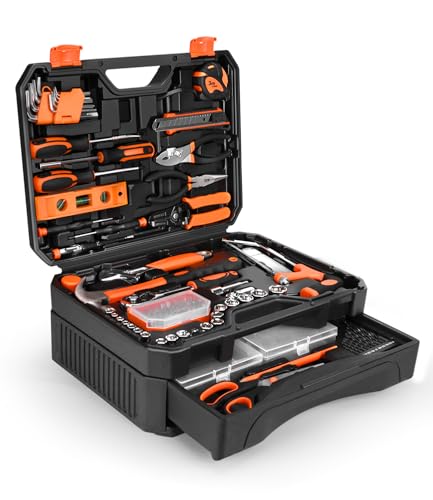
A check engine light can mean anything from a loose gas cap to a failing catalytic converter. Without the right tool, you are left guessing. Automotive scan tools pull diagnostic trouble codes directly from your vehicle’s onboard computer, giving you real data to work with before you spend money at the shop. Whether you are a weekend DIYer trying to clear a nuisance code or a home mechanic who wants full bidirectional control, the right scanner changes the entire experience. We researched and evaluated nine of the most popular options on the market, covering everything from budget-friendly code readers to professional-grade bidirectional diagnostic tablets, so you can buy with confidence. Pairing a capable scan tool with a well-organized mechanic tool set means you can diagnose and fix most issues without leaving your driveway.
Top Automotive Scan Tools We Recommend

Pros
- Works with nearly all 1996+ vehicles, including US, European, and Asian cars and light trucks
- Portable and durable with a 2.5-foot cable and sturdy construction that withstands garage use
- Fast, accurate results help you decide whether a repair is DIY-able or requires professional help
- No subscription fees or complicated software; straightforward plug-and-read functionality
Cons
- Only diagnoses emission-related codes, not all engine faults or non-emission system problems
- Requires OBD2 interface compatibility; older OBD1 vehicles cannot be diagnosed even with an adapter
The ANCEL AD310 is a straightforward OBD2 code reader designed for homeowners and DIYers who want quick answers when the check engine light illuminates. It connects directly to your vehicle's OBD2 port and draws power from the vehicle itself, eliminating the need for batteries or charging. The device reads and clears diagnostic trouble codes related to your vehicle's emissions system, displays live data and freeze frame information, and checks I/M monitor readiness, giving you a clear picture of what's wrong before you call a mechanic or attempt repairs.
The scanner's compact design and lightweight construction (12 ounces, roughly the size of a small book) make it easy to store in your toolbox or vehicle. Its large display and clearly labeled buttons mean you don't need automotive expertise to understand the results. The ANCEL AD310 supports all five OBD2 protocols and works with the vast majority of vehicles manufactured in 1996 or later, including domestic and foreign cars, light trucks, and SUVs, though you should verify compatibility with your specific vehicle before purchasing.
One important limitation to understand: the AD310 exclusively diagnoses emissions-related faults. If your check engine light is triggered by a non-emission engine problem, this scanner won't identify it. Additionally, it only works with OBD2 vehicles; if your car uses the older OBD1 interface, this tool cannot be used. For homeowners seeking a reliable, affordable way to troubleshoot emission codes and avoid unnecessary mechanic visits, the ANCEL AD310 delivers solid value and dependable performance.
| Specification | Details |
|---|---|
| Brand | ANCEL |
| Model | AD310 |
| Type | OBD2 Code Reader / Diagnostic Scanner |
| Vehicle Compatibility | 1996+ US vehicles, 2000+ EU and Asian vehicles, OBD2 and CAN protocol vehicles |
| Supported Protocols | KWP2000, J1850 VPW, ISO9141, J1850 PWM, CAN |
| Functions | Read/clear emission codes, live data, freeze frame, I/M monitor readiness, vehicle information |
| Cable Length | 2.5 feet |
| Weight | 12 ounces |
| Dimensions | 8.9 x 6.9 x 1.4 inches |
| Power Source | Vehicle OBD2 port (no batteries or charger required) |
| Display | Large screen with clear readability |
| Interface | OBD2 Data Link Connector only (not compatible with OBD1) |
Getting Started: Locate your vehicle's OBD2 port, typically found under the dashboard on the driver's side. Insert the ANCEL AD310 connector into the port until you hear or feel it click into place. The device will power on automatically and begin communicating with your vehicle's computer.
Reading Codes: Use the clearly labeled buttons to navigate the menu and select 'Read Codes' or similar option. The scanner will display any stored diagnostic trouble codes related to your emissions system. Each code appears with a description to help you understand the issue. You can also view live data, freeze frame information, and monitor readiness status.
Clearing Codes: After you've repaired the problem your vehicle identified, return to the menu and select 'Clear Codes.' The scanner will erase the stored codes, and your check engine light should turn off. If the light returns immediately, the underlying problem hasn't been fully resolved.
Is This Right for You? The ANCEL AD310 is ideal if you're a homeowner or casual DIYer who wants to understand why your check engine light came on before scheduling expensive mechanic visits. It's not a professional-grade scanner and won't diagnose non-emission faults, but for emissions troubleshooting, it delivers reliable results at an entry-level price point.
Vehicle Compatibility Check: Before purchasing, confirm your vehicle uses OBD2 (not the older OBD1 standard). Most vehicles from 1996 onward in the US meet this requirement, but European and Asian vehicles should be 2000 or newer. Contact the manufacturer to verify your specific make, model, and year are supported.
What to Expect: This scanner excels at identifying emissions codes quickly and accurately. It won't replace a professional diagnostic tool for complex engine issues, and it won't diagnose transmission, ABS, or other non-engine systems. Use it as a first-line troubleshooting tool to determine whether you can handle a repair yourself or need professional help.
Keep a Code Reference Handy: While the ANCEL AD310 displays code descriptions, keep a notebook or use your phone to document codes and their meanings. This helps you track recurring issues and communicate clearly with mechanics if professional service becomes necessary.
Check Twice Before Clearing: Always write down or photograph the codes before clearing them. If the light returns shortly after, you'll know whether it's the same code (indicating the repair didn't work) or a new code (suggesting a different problem).
Monitor Freeze Frame Data: The freeze frame feature captures vehicle conditions at the moment the code triggered. Review this data to understand driving conditions when the problem occurred, which can help identify whether the issue is consistent or intermittent.
Verify Repairs: After making a repair, use the scanner to confirm the code is gone and monitor readiness status. Some vehicles require multiple drive cycles before the system resets, so patience is sometimes necessary.

Pros
- Plug-and-play operation with no setup, charging, or software installation required
- Live data graphing helps you monitor multiple engine parameters simultaneously and identify trends
- EVAP system leak detection and O2 sensor testing optimize fuel economy and emissions
- Affordable entry-level tool for homeowners who want to handle routine diagnostics themselves
- Clear, intuitive interface with audio feedback and dedicated readiness hotkeys
Cons
- Limited to basic OBD2 functions; cannot diagnose ABS, SRS, EPB, A/C, or battery system issues
- Does not support advanced features like bidirectional control, calibration, or specialized resets that professional mechanics need
The FOXWELL NT301 fills a practical niche for homeowners and DIYers who want to understand what's triggering their check engine light without paying a shop diagnostic fee. The device connects directly to your vehicle's OBD2 port and immediately begins reading fault codes, live sensor data, and emissions readiness status. Its 2.8-inch color screen is bright enough to use in sunlight, and the straightforward menu structure means you won't need a manual to navigate basic functions like reading codes or checking emissions status.
Where this scanner excels is live data monitoring. You can watch oxygen sensors, fuel trims, coolant temperature, RPM, and other engine parameters update in real time, displayed as easy-to-read graphs. This capability helps you spot suspicious values and track trends that might indicate an underlying problem. The EVAP system leak check and O2 sensor test are particularly useful for understanding fuel economy issues and preparing your vehicle for emissions testing. The color-coded LED indicator and audio feedback make it simple to confirm whether your car is ready for a smog check.
Keep expectations realistic: this is a basic code reader, not a professional diagnostic tool. It won't access ABS, SRS, EPB, or air conditioning systems, and it doesn't support advanced functions like bidirectional control or specialized resets. Compatibility varies by vehicle year, make, model, and VIN, so confirm your car is supported before purchasing. For routine diagnostics and emissions prep, it's a solid investment; for complex repairs, you'll still need a shop.
| Specification | Details |
|---|---|
| Brand | FOXWELL |
| Model | NT301 |
| Display | 2.8-inch color screen |
| Vehicle Compatibility | 1996+ U.S. gasoline vehicles; 2000+ European and Asian models; 12V diesel with OBD2 |
| Supported Protocols | KWP2000, J1850 VPW, ISO9141, J1850 PWM, CAN |
| Core Functions | Read/clear DTCs, live data graphing, VIN retrieval, emissions readiness, EVAP leak test, O2 sensor test |
| Unsupported Systems | ABS, SRS, EPB, A/C, battery diagnostics |
| Power Source | Vehicle OBD2 port (no charging required) |
| Connection | 16-pin OBD2 connector |
| Software Updates | Lifetime updates included |
| Warranty | 1-year seller assurance |
Getting Started: Locate your vehicle's OBD2 diagnostic port (usually under the steering wheel or dashboard). Insert the NT301's 16-pin connector firmly into the port until you hear a click. The device powers on automatically and requires no charging or software setup.
Reading Codes: Turn the ignition to the ON position (engine off). Select OBDII from the main menu, wait a few seconds for the device to establish communication, then select Read Codes. Fault codes will display on screen. Write down any codes that appear, then research what they mean for your specific vehicle.
Checking Live Data: From the main menu, navigate to Live Data to monitor real-time engine parameters like fuel trim, oxygen sensor voltage, coolant temperature, and RPM. Watch for values that seem unusual compared to manufacturer specifications. Graphing mode helps you spot trends over time.
Emissions Readiness: Select Readiness Status to check if your vehicle is prepared for a smog inspection. The red-yellow-green LED indicator provides instant visual feedback. All monitors must show green before scheduling your emissions test.
Clearing Codes: After you've repaired the issue causing the fault code, use the Clear Codes function to reset the check engine light. If the code returns immediately, the underlying problem may not be fully resolved.
Verify Vehicle Compatibility First: Before purchasing, confirm your vehicle's year, make, model, and VIN are supported. Compatibility varies significantly, and some vehicles may not work with all NT301 functions. Check the manufacturer's compatibility list if available.
Use Live Data to Build Baseline Values: Record normal live data readings when your vehicle is running well. This gives you a reference point for comparison when troubleshooting issues later. Unusual fuel trim readings or oxygen sensor voltages often signal developing problems.
Document Codes and Conditions: Write down fault codes along with the driving conditions when they appeared (highway, cold start, idle, etc.). This information helps you or a mechanic pinpoint the root cause more accurately.
Prepare for Emissions Testing: Use the readiness status feature at least a week before your scheduled smog check. If monitors aren't ready, drive the vehicle normally for several days to complete the test cycle. Don't rely on clearing codes right before testing.
Know Its Limits: This scanner handles basic diagnostics only. If you encounter codes related to transmission, ABS, airbags, or climate control, you'll need professional equipment. Use it to gather information, not as a replacement for a shop diagnosis on complex issues.
Who Should Buy This: Homeowners and DIYers who want to understand check engine lights and handle routine diagnostics independently. It's ideal if you're comfortable with basic vehicle maintenance and want to avoid expensive diagnostic shop fees for simple issues.
Who Shouldn't Buy This: Professionals who need advanced diagnostics, users with vehicles lacking OBD2 (pre-1996 U.S. models), or anyone needing to diagnose ABS, SRS, transmission, or climate control systems. If your vehicle has extended warranties or you prefer leaving all diagnostics to shops, this tool may not be necessary.
Key Considerations: Confirm compatibility before purchase since functionality varies by vehicle year, make, and model. Understand that reading a code doesn't automatically identify the repair needed; you'll still need to research what each code means for your specific vehicle. The device won't fix problems, only identify them. Budget time to learn the menu structure and live data parameters relevant to your vehicle.
Value Assessment: At its price point, this scanner pays for itself after avoiding just one or two diagnostic shop visits. It's particularly valuable if you own multiple vehicles or plan to keep your current vehicle long-term. The lifetime software updates and one-year guarantee provide reasonable protection for the investment.

Pros
- Bidirectional controls and advanced live data access provide capabilities that typically cost hundreds more at a dealership
- Comprehensive vehicle coverage from 1996 onward with free updates ensures long-term usability as new model years arrive
- Responsive US-based customer support team helps verify compatibility and troubleshoot connection issues quickly
- No recurring subscription fees or hidden costs after purchase
- Multilingual interface supports English, Spanish, and French for broader household use
Cons
- Feature availability varies significantly by vehicle make, model, and year—compatibility must be verified before purchase using Innova's coverage checker
- As a specialized diagnostic tool, it has a steeper learning curve than basic code readers and requires some automotive knowledge to use effectively
The Innova 5610 stands out as a serious diagnostic tool for homeowners and DIYers who want to move beyond simple code reading. Unlike basic scanners that only retrieve and clear fault codes, the 5610 sends actual commands to vehicle systems—you can trigger the fuel pump, test the electric parking brake, and access live data streams from ABS and transmission systems. This bidirectional capability bridges the gap between consumer-grade tools and what professional mechanics use in their shops, letting you diagnose complex issues without paying dealership rates.
What makes this tool practical for home use is its integration with the RepairSolutions2 app, which provides repair guidance and wireless connectivity. The wireless pairing eliminates the tether between your scanner and vehicle, and the app's 4 million user base means you're accessing a community-driven repair database. Free lifetime updates ensure the tool stays relevant as manufacturers release new vehicle models and software, while the lack of subscription fees means your investment doesn't grow into an annual expense.
The main consideration is compatibility. The 5610 doesn't work universally across all vehicles—its advanced features vary depending on your specific make, model, and year. Before purchasing, you'll need to use Innova's coverage checker to confirm what functions your vehicle supports. If your car is covered, the ASE-certified US support team (available Monday-Friday, 6AM-6PM PST) can answer questions about compatibility and walk you through setup. For vehicles with full support, this tool delivers genuine dealership-level diagnostics at a fraction of the cost.
| Specification | Details |
|---|---|
| Brand | Innova |
| Model | 5610 |
| Type | Bidirectional OBD2 Scan Tool |
| Vehicle Compatibility | Most 1996-2023 OBD2 vehicles (2024 coming soon) |
| Bidirectional Controls | Yes - fuel pump, electronic parking brake, and other functions |
| Live Data Access | Engine, ABS, SRS, transmission, and other advanced systems |
| Special Features | Dealership-level re-learn procedures, enhanced data stream |
| App Integration | RepairSolutions2 app (wireless connectivity) |
| Languages Supported | English, Spanish, French |
| Software Updates | Free lifetime updates included |
| Subscription Fees | None |
| Technical Support | US-based, ASE-certified; Monday-Friday 6AM-6PM PST |
| Support Contact | Phone: +1 (800) 544-4124 or email: [email protected] |
Getting Started
Before using the Innova 5610, verify your vehicle's compatibility using Innova's coverage checker on their website. This step prevents frustration and confirms which features your specific vehicle supports.
Basic Operation
Connect the Scanner: Plug the OBD2 connector into your vehicle's diagnostic port (typically located under the dashboard on the driver's side). Power on the scanner and follow the on-screen prompts to select your vehicle year, make, and model.
Read Codes: Navigate to the code reading function to retrieve any stored or pending diagnostic trouble codes. The scanner displays the code number and a brief description of the issue.
View Live Data: Access the live data stream to monitor real-time sensor readings from your engine, transmission, ABS, or other systems. This helps you understand how your vehicle is performing and identify intermittent problems.
Advanced Features
Bidirectional Controls: Use the command function to send signals to vehicle components (fuel pump activation, parking brake retraction, etc.). This allows you to test whether repairs are successful without starting the engine or driving the vehicle.
Reset Functions: Apply special re-learn procedures for items like oxygen sensors or transmission adaptations after repairs. These functions replicate dealership diagnostic capabilities.
App Integration
Download the RepairSolutions2 app and pair it wirelessly with your scanner for enhanced functionality, repair guidance, and access to a community repair database. The app provides step-by-step repair instructions and parts recommendations.
Troubleshooting Connection Issues
If your scanner won't connect to your vehicle, contact Innova's support team at +1 (800) 544-4124 or [email protected]. Their team will guide you through diagnostics and connection procedures step by step.
Maximize Your Diagnostic Results
Check Vehicle Coverage First: Use Innova's coverage checker before purchasing. This tool works best when your specific vehicle model and year have full feature support. Some vehicles may have limited functionality.
Understand Code Categories: Diagnostic trouble codes fall into categories (P = powertrain, C = chassis, B = body, U = network). Understanding these prefixes helps you prioritize which systems need attention first.
Use Live Data to Confirm Repairs: After replacing a sensor or component, monitor the live data stream to verify the new part is communicating correctly with the engine control module. This confirms your repair worked before you close everything up.
Advanced Diagnostic Techniques
Monitor Multiple Sensors Simultaneously: The enhanced data stream lets you watch several sensors at once. For example, if you're diagnosing a rough idle, monitor fuel trim, ignition timing, and oxygen sensor voltage together to identify the root cause faster.
Use Bidirectional Commands Strategically: Test fuel pump operation, injector pulse, or parking brake function without starting the engine. This isolates electrical and mechanical issues without complex manual testing.
Document Your Findings: The RepairSolutions2 app lets you save diagnostic sessions. Keep records of codes, live data snapshots, and repair actions. This history helps you track recurring issues and verify that problems stay fixed.
Maintenance and Care
Keep Software Updated: Check for updates regularly (they're free). Updated software adds support for new vehicle models and improves diagnostic accuracy for existing vehicles.
Protect Your Investment: Store the scanner in a cool, dry place. Keep the OBD2 cable organized to prevent kinks or damage. A damaged cable connection is the most common cause of communication failures.
Is This Tool Right for You?
The Innova 5610 is ideal if you:
- Own multiple vehicles and want to diagnose problems yourself
- Prefer dealership-quality diagnostics without paying shop labor rates
- Need to test advanced systems like ABS, transmission, or SRS
- Want to verify repairs are successful before leaving the driveway
- Value free updates and zero subscription fees
- Appreciate US-based technical support you can actually reach
This tool is less suitable if you:
- Own a vehicle manufactured before 1996 (pre-OBD2 era)
- Need a simple, basic code reader for occasional use
- Want a universal tool that works identically on every vehicle
- Prefer minimal learning curve over advanced capabilities
What to Check Before Buying
1. Vehicle Compatibility: Use Innova's coverage checker to verify your vehicle is supported and confirm which features are available. This is non-negotiable—don't skip this step.
2. Feature Requirements: Determine what you actually need. If you only clear check engine lights, a basic code reader costs less. If you diagnose transmission, ABS, or SRS issues, the 5610's advanced features justify the investment.
3. Long-Term Value: Consider that free lifetime updates and zero subscription fees keep costs predictable. Compare total cost of ownership over 5-10 years against subscription-based competitors.
Support and Warranty Considerations
Innova backs this tool with ASE-certified technical support available Monday-Friday, 6AM-6PM PST. Contact them at +1 (800) 544-4124 or [email protected] with any questions about compatibility, features, or troubleshooting. They can answer whether specific repair procedures are supported before you buy.
Getting the Most Value
Pair the scanner with the free RepairSolutions2 app to access repair guides and a 4-million-user community database. This combination transforms the scanner from a diagnostic tool into a complete repair reference system. The app helps you understand what codes mean and guides you through repairs step by step.

Pros
- No subscription fees or account required makes this a true one-time investment
- Wireless Bluetooth design keeps your workspace clutter-free and mobile
- Comprehensive diagnostic coverage includes ABS, airbag, SRS, and TPMS codes beyond basic check engine lights
- Built-in repair database with videos saves time and money on DIY repairs
- Excellent customer support available around the clock for troubleshooting
Cons
- Limited to 1996 and newer gas-powered vehicles; diesel engines and older models are not supported
- Requires a smartphone or tablet with iOS or Android to use the app, which may be a barrier for some users
BlueDriver transforms vehicle diagnostics from a mechanic-only service into something any homeowner can do themselves. By plugging the wireless sensor into your vehicle's OBD2 port and connecting via Bluetooth to your phone, you gain access to the same diagnostic information mechanics use every day. This means you can identify what's actually wrong with your car before scheduling a repair, which often saves hundreds of dollars in unnecessary work.
What sets BlueDriver apart is its comprehensive approach to diagnostics. Beyond the standard check engine light codes, it reads and clears ABS, airbag, SRS, and TPMS trouble codes that most basic code readers can't touch. The app also provides unlimited repair reports with possible causes and fixes tailored to your specific vehicle, plus live data monitoring that lets you watch your car's systems in real time. For DIYers, the integrated repair video library with step-by-step instructions turns diagnosis into actionable knowledge.
The no-subscription model is refreshing in a market full of recurring fees. You pay once and own the tool permanently with no hidden charges, account requirements, or data harvesting. Paired with responsive 24/7 support via phone or in-app chat, BlueDriver gives homeowners and weekend mechanics the confidence to tackle their own diagnostics and simple repairs without feeling lost or unsupported.
| Brand | BlueDriver |
| Product Type | Bluetooth OBD2 Code Reader & Scanner |
| Connection Type | Wireless Bluetooth |
| Compatible Devices | iPhone, iPad, Android smartphones and tablets |
| Vehicle Compatibility | All gas-powered vehicles 1996 and newer sold in US, Canada, and Mexico |
| Supported Codes | Check Engine, ABS, SRS, Airbag, TPMS, and 7,000+ diagnostic codes |
| Key Features | Read/clear codes, live data monitoring, repair videos, unlimited repair reports |
| Subscription Cost | None - one-time purchase, no recurring fees |
| Support | 24/7 phone and in-app chat support |
| Account Required | No |
| Data Privacy | No personal data collection or sale |
Step 1: Download the App - Install the BlueDriver app on your iPhone, iPad, or Android device from the App Store or Google Play.
Step 2: Plug in the Sensor - Locate your vehicle's OBD2 port (usually under the dashboard on the driver's side) and plug the BlueDriver Bluetooth sensor into it.
Step 3: Connect via Bluetooth - Open the app and enable Bluetooth on your phone. The app will detect the BlueDriver sensor and establish a wireless connection.
Step 4: Start Scanning - Once connected, tap 'Scan' to read your vehicle's diagnostic codes. The app will display any trouble codes, their meanings, and possible causes.
Step 5: Clear Codes (Optional) - If you've fixed an issue, use the app to clear the code. The check engine light will turn off once the code is cleared.
Step 6: Access Repair Guidance - Browse the repair video library and unlimited repair reports to understand fixes and next steps. Use live data monitoring to track your vehicle's performance in real time while driving.
Use Live Data Before Repairs - Enable live data monitoring before taking your vehicle to a mechanic. This gives you real-time insight into what systems are struggling and helps you ask smarter questions about what needs fixing.
Check Codes Regularly - Scan your vehicle every few months even if the check engine light isn't on. Early detection of developing issues can prevent expensive repairs down the road.
Watch the Repair Videos First - Before attempting any DIY fix, review the step-by-step repair videos in the app. They'll show you exactly what tools and parts you need, saving time and frustration.
Document Your Codes - Take screenshots of diagnostic codes and reports before clearing them. This creates a maintenance history that's valuable if you sell the vehicle or need to reference past issues.
Leverage 24/7 Support - Don't hesitate to use the in-app chat or phone support if you're unsure about a code or repair. The trained technicians can provide personalized guidance for your specific situation.
Is BlueDriver Right for You? - BlueDriver is ideal if you own a 1996 or newer gas-powered vehicle and want to understand what's wrong with it before spending money at a mechanic. It's perfect for DIYers, curious car owners, and anyone who values transparency and control over their vehicle maintenance.
What You Need to Get Started - You'll need a smartphone or tablet running iOS or Android, and your vehicle's OBD2 port (standard on all US vehicles since 1996). No computer, laptop, or special software installation required.
What BlueDriver Cannot Do - This tool is designed for diagnosis, not repair. It tells you what's wrong but doesn't physically fix anything. It also doesn't work on diesel engines, hybrid vehicles, or cars older than 1996. For complex repairs, you may still need a professional mechanic.
Cost Comparison - A single diagnostic scan at a mechanic shop typically costs $100-150. BlueDriver pays for itself after one or two diagnostic visits, and then you own it forever with no recurring costs. This makes it an excellent investment for anyone who plans to keep their vehicle for several years.
Support and Warranty - BlueDriver offers 24/7 customer support via phone and in-app chat. Check the manufacturer's warranty details before purchasing to understand coverage and return policies.

Pros
- Bidirectional testing prevents costly parts replacement by confirming component response before you buy
- Lifetime free updates save hundreds of dollars over time compared to annual subscription scan tools
- Covers 28+ real-world maintenance services that DIYers and small shops actually perform regularly
- Wireless operation and professional reporting make it practical for mobile mechanics and home garage work
- Full-system access across multiple vehicle modules beats basic OBD2 readers by a wide margin
Cons
- Service availability varies significantly by vehicle make, model, year, and system configuration, so compatibility isn't guaranteed for every job
- No user reviews available yet, so real-world feedback on long-term reliability and software performance is limited
The ANCEL DS500BT bridges the gap between basic code readers and expensive shop-grade diagnostic equipment. Unlike simple OBD2 scanners that only pull engine codes, this full-system tool accesses multiple vehicle modules including transmission, ABS, SRS, BCM, TPMS, steering, and suspension. That means you get a complete health picture of your vehicle in one scan, which is invaluable when diagnosing complex issues that span multiple systems.
What sets the DS500BT apart is its bidirectional capability. Rather than just reading codes and data, you can command supported components like injectors, fuel pumps, fans, and A/C clutches to perform active tests. This lets you confirm a component is actually faulty before replacing it, saving money on unnecessary parts and labor. The tool also covers 28+ maintenance services including oil resets, DPF regeneration, ABS bleeding, throttle relearning, and injector coding, which covers the jobs DIYers and small shops perform most often.
The lifetime free software updates are a significant advantage. Many diagnostic tools charge annual subscription fees, but the DS500BT keeps improving at no extra cost. Wireless Bluetooth 5.0 connectivity gives you mobility around the vehicle, and the ability to generate PDF reports and access ANCEL technical support for VIN-based compatibility checks adds professional value. For home garage owners and mobile mechanics who want capability beyond OBD2 without recurring costs, this tool delivers solid value.
| Specification | Details |
|---|---|
| Brand | ANCEL |
| Model | DS500BT |
| Type | Full-System Bidirectional Diagnostic Scanner |
| Connectivity | Bluetooth 5.0 Wireless |
| Vehicle Compatibility | Most 12V vehicles (varies by make, model, year) |
| System Coverage | Engine, Transmission, ABS, SRS, BCM, TPMS, Steering, Suspension |
| Service Functions | 28+ services including Oil Reset, EPB, SAS, BMS, DPF Regeneration, ABS Bleeding, Throttle Relearn, Injector Coding, Gear Learning |
| Bidirectional Testing | Yes - command injectors, fuel pumps, fans, windows, A/C clutch, EVAP system and more |
| Protocol Support | CAN FD |
| Data Functions | Read/Clear Codes, Live Data, Freeze Frame, ECU Information, I/M Readiness |
| Software Updates | Lifetime Free Updates |
| Reporting | PDF Diagnostic Reports |
| Support | ANCEL Technical Support, VIN-Based Compatibility Checks |
Getting Started: Pair the DS500BT to your diagnostic tablet via Bluetooth 5.0. Contact ANCEL technical support or use their VIN-based compatibility tool to confirm which systems and services are available for your specific vehicle before you begin.
Reading Codes and Data: Connect to your vehicle's OBD port, select your vehicle profile, and access the system you want to evaluate. The scanner displays fault codes, live data streams, freeze frame information, and ECU details across all available modules.
Running Bidirectional Tests: Navigate to the active test menu for your target component (injector, fuel pump, fan, etc.). Command the component to perform its function and observe the response. This confirms whether the part is actually faulty or if the issue lies elsewhere.
Performing Maintenance Services: Select from the 28+ available services for your vehicle (oil reset, DPF regeneration, ABS bleeding, throttle relearn, etc.). Follow the on-screen prompts to complete the service procedure. Service availability depends on your vehicle's configuration.
Generating Reports: After your diagnostic session, generate a PDF report summarizing codes, data, test results, and services performed. Share this report with other technicians or keep it for your records.
Verify Compatibility First: Before purchasing, contact ANCEL support with your vehicle's VIN to confirm that the services you need are actually available. Service coverage varies significantly by make, model, year, and system configuration, so pre-purchase verification prevents disappointment.
Use Bidirectional Tests to Avoid Guesswork: Don't replace components based on codes alone. Use the active test feature to command the suspected part and confirm it's actually faulty. This single feature can save hundreds of dollars in unnecessary parts and labor.
Keep Software Updated: Regularly sync your DS500BT to download the latest free updates. New vehicle models are added continuously, and updates improve diagnostic accuracy and expand service coverage over time.
Document Your Work: Generate PDF reports after every diagnostic session. These records help track recurring issues, serve as proof of work completed, and provide valuable reference data if you encounter the same problem on another vehicle.
Leverage Technical Support: Don't hesitate to contact ANCEL support for setup help, function guidance, or compatibility questions. Their VIN-based compatibility tool is especially useful for confirming what your specific vehicle can do before you start diagnostics.
Who Should Buy This Tool? The DS500BT is built for DIYers who want to move beyond basic code readers, mobile mechanics who need professional diagnostics without a shop overhead, and small repair shops looking to reduce software subscription costs. It's not designed for dealership-level diagnostics or vehicles outside the 12V standard.
Key Questions to Ask Yourself: Does your vehicle brand and model have good coverage for the services you need? Can you commit to learning the diagnostic workflow? Do you have access to a tablet for the scanning interface? Will the lifetime free updates justify the upfront investment compared to cheaper OBD2 tools? If you answer yes to most of these, this tool is worth considering.
What You're Really Getting: You're investing in a full-system diagnostic platform that prevents costly parts replacement through bidirectional testing, covers the maintenance services you'll actually use, and eliminates recurring software fees. The wireless connectivity and professional reporting add practicality for real-world use.
Before You Buy: Confirm your vehicle's compatibility using ANCEL's VIN-based tool. Compare the available services against the maintenance jobs you anticipate performing. Consider whether you'll use the bidirectional testing feature, as this is what truly justifies the investment over cheaper alternatives. Check that you have a compatible tablet for the scanning interface.
Long-Term Value: Unlike subscription-based scan tools, the DS500BT's lifetime free updates mean the tool actually becomes more valuable over time as coverage expands. For home garage owners and mobile mechanics planning to keep this tool for years, the cost-per-use is significantly lower than annual subscription models.
Pros
- Massive upgrade from previous models with 3,000+ active tests matching enterprise-level scanners
- Supports 150+ vehicle makes covering 10,000 vehicles from 1996 through 2026
- Large 8-inch touchscreen with Android 11 OS provides intuitive navigation and fast performance
- Wireless connectivity and cloud storage mean you'll never lose diagnostic data
- Includes 1 year of free software updates to keep pace with new vehicle models
Cons
- Battery test and endoscope functions require separate paid purchases (BT506 and MV108S/MV105S adapters)
- FCA AutoAuth subscription for Chrysler, Dodge, Jeep, and Renault vehicles costs extra annually beyond the base tool
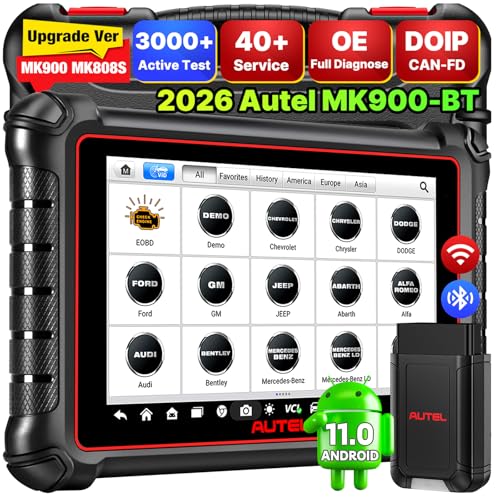
The Autel MaxiCOM MK900BT represents a significant leap forward in diagnostic capability for serious DIYers and independent shops. With 3,000+ active tests, this scanner matches the depth of diagnostics you'd find on far more expensive shop equipment. The jump from 50 tests on older models to 3,000 means you can command virtually any vehicle component to operate, monitor its response, and pinpoint failures with precision. Whether you're diagnosing a faulty fuel injector, testing window motors, or evaluating cooling fan operation, the MK900BT gives you granular control over vehicle systems.
The hardware itself is well-designed for real-world shop work. The 8-inch display is noticeably larger than competing 7-inch models, reducing eye strain during long diagnostic sessions. The quad-core processor and 4GB RAM ensure snappy performance when scrolling through live data streams or navigating menus. Wireless connectivity extends to 33 feet, freeing you from being tethered to the vehicle during diagnosis. The addition of CAN FD and DOIP protocols ensures compatibility with late-model vehicles from GM, Volvo, BMW, and other premium brands that early adopters are now bringing in for service.
Practical features like auto VIN identification, one-click WiFi printing, and cloud storage address real shop workflow challenges. Pre- and post-scan reports make it easy to document what you found and what you fixed, which is invaluable when communicating with customers. The 40+ service functions cover the most common maintenance tasks shops encounter, from oil resets to transmission recalibrations. However, note that some advanced functions like battery testing and endoscope integration require additional hardware purchases, and FCA-specific diagnostics require a separate annual subscription beyond the base tool cost.
| Display | 8-inch touchscreen |
| Operating System | Android 11.0 |
| Processor | Quad-core RK3566 CPU |
| Memory | 4GB RAM / 64GB storage |
| Connectivity | 5GHz & 2.4GHz WiFi, Bluetooth |
| Wireless Range | 33 feet |
| Battery | 7,700mAh rechargeable |
| Active Tests | 3,000+ |
| Service Functions | 40+ |
| Vehicle Coverage | 150+ makes, 10,000 vehicles (1996-2026) |
| Protocols Supported | CAN FD, DOIP, and standard OBD2 |
| Languages | 21+ |
| Diagnostic Reports | WiFi print, cloud storage, pre/post comparison |
| Warranty | 1 year |
| Software Updates | 1 year free (renewal $179/year) |
Getting Started: After charging the device, connect it to your vehicle's OBD2 port (typically located under the dashboard on the driver's side). The scanner will automatically detect the vehicle or allow you to manually enter the VIN. The auto VIN feature scans license plates or vehicle identification numbers to speed up this process.
Reading Codes and Live Data: Navigate to the 'Scan' menu to retrieve diagnostic trouble codes from all vehicle systems (engine, transmission, ABS, airbags, etc.). Once codes appear, select any code to see detailed descriptions. Use the 'Live Data' function to monitor real-time sensor readings and actuator operation while the engine runs. Record data streams for later review or playback.
Running Active Tests: The bidirectional testing menu contains 3,000+ available commands. Select a component you want to evaluate (such as a fuel injector or cooling fan), and the scanner will command it to operate while you observe its response. This helps confirm whether a component is truly faulty or if the problem lies elsewhere in the circuit.
Service Functions: Access maintenance routines like oil resets, ABS bleeding, throttle calibration, and battery registration from the 'Services' menu. Follow on-screen prompts specific to your vehicle's make and model. These guided procedures eliminate guesswork and ensure proper completion.
Printing Reports: After completing diagnostics, use the WiFi print feature to generate a pre- and post-scan comparison report. This document highlights which codes were present initially and which have been cleared, making it easy to share findings with customers or your service advisor.
Leverage Bidirectional Testing: Don't just read codes and clear them. Use the 3,000+ active tests to command components into operation and confirm they respond correctly. This transforms the scanner from a code reader into a true diagnostic instrument, helping you avoid unnecessary parts replacement.
Use Auto VIN for Speed: The auto VIN and license plate scanning features save time, especially when you're managing multiple vehicles in a day. Enable these features in settings to minimize manual data entry and reduce the chance of misidentification.
Save and Compare Data: The cloud storage and pre/post scan reports are powerful tools for documentation. Always generate a report before and after repair work. This creates a clear paper trail that protects you and helps customers understand what was wrong and what you fixed.
Keep Software Current: Take advantage of the 1-year free software updates to ensure compatibility with the newest vehicle models as they arrive. After the first year, budget for the renewal fee, which is considerably less expensive than purchasing a new scanner.
Plan for Add-Ons Early: If you anticipate needing battery testing or endoscope capabilities, budget for the BT506 and MV108S/MV105S adapters upfront. Similarly, if you service Chrysler, Dodge, Jeep, or Renault vehicles, factor in the FCA AutoAuth subscription cost.
Who Should Buy: This scanner is ideal for independent shop owners, serious DIYers who work on multiple vehicles, and technicians who need professional-grade diagnostics without the enterprise price tag. If you regularly service vehicles from 1996 onward and need to perform more than basic code reading, the MK900BT's 3,000+ active tests and bidirectional control justify the investment.
Vehicle Compatibility Considerations: While the MK900BT covers 150+ makes and 10,000 vehicles, not all functions are available for every vehicle. Before purchasing, contact the seller with your vehicle's make, model, year, and VIN to confirm that the specific diagnostic and service functions you need are supported. This is especially important if you work on specialty brands or older vehicles.
Budget for Total Cost of Ownership: The base tool price is just the starting point. Factor in the annual software renewal fee ($179/year after the first year), any FCA AutoAuth subscription if you service Chrysler/Dodge/Jeep/Renault vehicles ($50/year), and optional hardware like the battery test adapter (BT506) or endoscope modules if you need those capabilities. These additions can significantly impact your long-term ownership costs.
Compare to Your Alternatives: The MK900BT's main competitors are older Autel models (MK808S, MK900, MX900) and other professional scanners in the $1,500-$3,000 range. The key differentiator is the 3,000+ active tests and bidirectional control, which are typically found only on much more expensive equipment. If you primarily need code reading and basic live data, a less expensive scanner might suffice. If you need true diagnostic capability, this tool delivers significant value.
Support and Warranty: The seller provides 1-year warranty coverage and 30-day refund or replacement if you receive a defective unit. Contact the seller directly for language authorization, software updates, or technical support. Keep your serial number handy for warranty claims and subscription management.

Pros
- Exceptional value for the price compared to dealer diagnostic tools and competing professional scanners
- Comprehensive vehicle coverage across American, European, and Asian brands with regular updates
- Bidirectional control lets you command components to verify they respond correctly, eliminating guesswork
- Offline ECU coding eliminates unnecessary dealership visits for simple customizations and module matching
- Step-by-step touchscreen guidance makes advanced diagnostics accessible to experienced DIYers
Cons
- FCA vehicle diagnostics require paid in-app registration for gateway access, adding extra cost for some owners
- Steep learning curve for users unfamiliar with professional-grade diagnostic tools and vehicle systems
The FOXWELL NT919BT stands out as a comprehensive diagnostic solution that bridges the gap between basic OBD2 readers and expensive dealership equipment. Its 3000+ bidirectional active tests go well beyond simple fault code reading, allowing you to command vehicle components like radiator fans, ABS pumps, and fuel injectors to verify they respond correctly. This capability is invaluable for diagnosing intermittent faults and validating repairs without the guesswork that plagues budget scanners.
The 34 maintenance services represent genuine time and money savers for DIYers and shop owners alike. Resetting oil service lights, retracting electronic parking brakes, performing ABS bleeding, and calibrating steering angle sensors are all routine tasks that typically cost $100-300 at dealerships. Being able to handle these directly from your garage, guided by clear on-screen instructions, makes this tool pay for itself within just a few service cycles. The offline ECU coding feature adds another layer of value, letting you customize comfort features and match modules after replacements without internet dependency or dealer appointments.
Coverage across 140+ vehicle brands with lifetime free updates ensures this scanner remains relevant as automotive technology evolves. The 8-inch touchscreen and live sensor data graphs make complex diagnostics approachable, though users new to professional-grade tools should expect a learning curve. The paid gateway registration required for newer FCA vehicles is a minor drawback, but the overall feature set and comprehensive functionality deliver professional-level diagnostics at a fraction of dealer-grade pricing.
| Specification | Details |
|---|---|
| Model | FOXWELL NT919BT |
| Display | 8-inch touchscreen |
| Vehicle Coverage | 140+ brands (American, European, Asian) |
| Bidirectional Tests | 3000+ active tests |
| Maintenance Services | 34+ common functions |
| Protocols Supported | CAN FD, DoIP, OBD2 |
| ECU Coding | Offline coding available |
| Live Data | Real-time sensor data with graphing |
| Software Updates | Lifetime free updates |
| Subscription Fees | None (FCA gateway access is optional paid feature) |
| Model Year Coverage | Works with 2018+ FCA vehicles; broader coverage for other brands |
Getting Started: Connect the NT919BT to your vehicle's OBD2 port (typically located under the steering wheel). Power on the device and select your vehicle's year, make, and model from the touchscreen menu. The scanner will automatically detect available vehicle systems.
Running Diagnostics: Start with an all-system scan to capture any fault codes. The scanner displays both generic OBD2 codes and manufacturer-specific codes with clear definitions. Use the live data feature to monitor sensor readings in real-time and identify trends. For intermittent issues, leverage bidirectional control to command components and verify their response.
Performing Maintenance Services: Navigate to the maintenance menu and select your desired service (oil reset, ABS bleeding, etc.). The touchscreen provides step-by-step guidance for each function. Follow on-screen prompts carefully, as some services require specific vehicle actions or conditions. After completion, verify the service was successful by rescanning the relevant system.
ECU Coding: Access offline coding through the main menu to customize vehicle settings like daytime running lights or auto door locks. Compatibility varies by vehicle model and year, so verify your specific vehicle supports the desired coding change before proceeding.
Maximize Diagnostic Accuracy: Always perform an all-system scan first to get a complete picture of your vehicle's health. Don't rely solely on fault codes; use live data to monitor sensor trends and bidirectional tests to verify component function. This comprehensive approach catches issues that single-code readings miss.
Validate Repairs Thoroughly: Use before-and-after scans to confirm your repair work. Run bidirectional tests on the repaired component to ensure it responds correctly under command. This verification process prevents comeback jobs and builds confidence in your work.
Document Everything: Take screenshots or notes of fault codes, sensor readings, and test results. This documentation is invaluable if you need to reference prior diagnostics or explain issues to vehicle owners. It also helps you track patterns in intermittent faults.
Stay Current with Updates: Check for software updates regularly to ensure you have the latest vehicle coverage and protocol support. The lifetime free update policy means you'll always have access to the newest diagnostic capabilities as manufacturers release new models.
Learn Your Vehicle Systems: Familiarize yourself with your specific vehicle's systems and sensor locations. Understanding what values are normal helps you spot abnormalities in live data. Manufacturer service manuals paired with this scanner create a powerful diagnostic combination.
Is This the Right Tool for You? The NT919BT is designed for serious DIYers, independent mechanics, and shop owners who want professional-grade diagnostics without dealership costs. If you're comfortable with vehicle maintenance beyond basic oil changes and tire rotations, this scanner will pay for itself through saved labor and service fees. However, if you only need basic code reading for occasional troubleshooting, a simpler OBD2 reader may suffice.
What to Consider Before Buying: Verify that your primary vehicles are covered under the 140+ brand list. If you own multiple FCA vehicles (2018+), factor in the optional gateway registration cost for deeper diagnostics. Ensure you're comfortable learning professional diagnostic terminology and processes, as this tool has a steeper learning curve than budget scanners. Check that you have adequate workspace and lighting to safely work on your vehicle while using the scanner.
Long-Term Value: The lifetime free software updates and zero subscription fees mean your investment remains current indefinitely. Unlike subscription-based competitors, you won't face recurring annual costs. The 34 maintenance services alone justify the investment if you service multiple vehicles, as each service typically costs $100-300 at shops.
Support and Resources: Look for online communities and forums dedicated to FOXWELL products where users share tips and troubleshooting advice. Many experienced DIYers and mechanics use these tools, so finding guidance is straightforward. Manufacturer documentation and video tutorials are available to help you master specific features.

Pros
- Exceptionally broad vehicle coverage spanning three decades and 90+ brands beats most competitors
- Lifetime free updates over WiFi mean you're never locked into outdated software or hit with renewal fees
- Advanced reset and adaptation functions (throttle, DPF, oil, brake) reduce costly dealer visits for routine service resets
- Multi-graph live data display with merge and waveform options makes complex diagnostics clear and shareable
- Expandable architecture lets you add battery testing and TPMS capability as your needs grow
Cons
- CAN-FD and DoIP protocol support requires purchasing an additional OBD2 cable, adding unexpected cost
- No user reviews available yet to validate real-world performance and reliability across different vehicle models
The Launch CRP123X V3.0 Elite stands out as a serious diagnostic tool designed for homeowners and small shop owners who want professional capabilities without the dealership markup. The 2026 hardware refresh brings a faster processor, larger memory footprint, and improved WiFi connectivity that makes scanning and data review noticeably quicker. What really sets this scanner apart is the breadth of vehicle compatibility: it covers 90+ brands dating back to 1996, which means whether you own a 20-year-old Honda or a brand-new Chrysler, you'll have access to comprehensive diagnostics.
The newly added reset functions represent genuine value for DIYers tackling routine maintenance. Throttle adaptation, oil service resets, SAS (steering angle sensor) calibration, brake bleeding, DPF regeneration, and ABS service can typically cost $100 to $300 at a dealer for each procedure. Being able to perform these resets yourself after completing the actual repair work eliminates a second trip and a significant service charge. The automatic VIN recognition eliminates manual data entry, and the multi-graph live data display lets you visualize what's actually happening in your vehicle's systems in real time, making diagnosis faster and more intuitive than scrolling through lists of numbers.
Keep in mind that accessing the newer protocols (CAN-FD for recent GM and Chrysler models, DoIP for Volvo, BMW, and Land Rover) requires buying a separate OBD2 cable, which adds to the total investment. Additionally, since this is a newer product revision, actual owner feedback remains limited. The expandable module ecosystem is a smart design choice if you want to grow your diagnostic capabilities into battery testing or TPMS work down the road.
| Feature | Specification |
|---|---|
| Brand | Launch |
| Model | CRP123X V3.0 Elite |
| Vehicle Compatibility | 90+ brands, 1996-2026 |
| Processor & OS | New 2026 processor, Android 8.1 |
| Display | 5-inch touchscreen, 720P resolution |
| Memory | 32GB internal storage |
| Battery | 6100mAh rechargeable |
| Connectivity | WiFi 2.4 & 5.0 GHz |
| Updates | Lifetime free WiFi updates (monthly/weekly frequency) |
| OBD Protocols | OBDII, CAN, CAN-FD, DoIP (CAN-FD/DoIP require additional cable) |
| Key Functions | Code reading/clearing, live data, throttle adaptation, oil/SAS/BMS/brake/DPF/ABS reset |
| FCA Support | AutoAuth for 2018+ FCA vehicles with SGW |
| Data Display | Single view, multi-graph, 4-in-1 merged waveform |
| Report Features | Vehicle health reports, email/print capability |
| Optional Modules | BST360 battery tester, X431 i-TPMS tool |
Getting Started: Charge the device fully using the included USB cable. Download the Launch app on your smartphone if you want remote access to reports and updates. Power on the scanner and allow it to boot (Android 8.1 ensures quick startup).
Scanning Your Vehicle: Connect the OBD2 cable to your vehicle's diagnostic port (usually located under the dashboard on the driver's side). Tap the VIN recognition button on the scanner's home screen for automatic vehicle identification, or manually select your vehicle make, model, and year. Once identified, the scanner will display available diagnostic modules for your specific vehicle.
Reading Codes and Live Data: Select 'Read Codes' to pull any stored or pending fault codes. The scanner will display the code, definition, and suggested repair path. Switch to 'Live Data' to monitor real-time sensor readings (engine speed, coolant temperature, fuel pressure, etc.). Use the multi-graph feature to compare multiple data streams simultaneously, which helps identify correlations between sensor failures.
Reset Functions: After completing a repair (throttle service, oil change, brake work, etc.), navigate to the appropriate reset function menu. Follow the on-screen prompts, which vary by vehicle. The scanner will guide you through any required steps (such as turning the ignition on/off or holding the brake pedal).
Updating and Maintenance: Connect to WiFi periodically to download the latest vehicle database and software updates. The scanner will notify you when updates are available. Save important diagnostic reports to the device's 32GB storage or email them directly for your records.
Use Multi-Graph Mode for Complex Issues: When diagnosing intermittent problems or multiple related codes, use the multi-graph or 4-in-1 waveform display to overlay several sensor readings at once. This visual comparison often reveals the root cause faster than reviewing individual data streams.
Generate and Share Reports: After a thorough diagnostic session, create a vehicle health report and email it to yourself or your mechanic. This creates a timestamped record of what was happening at the time of diagnosis, which is invaluable if you need to revisit the issue later or explain the problem to a repair shop.
Plan for Protocol Cables Early: If you own or plan to own newer GM, Chrysler, Volvo, BMW, or Land Rover vehicles, budget for the additional CAN-FD or DoIP cable upfront. This ensures you won't be surprised by compatibility gaps when you need to diagnose a newer model.
Leverage the Feedback Module: The built-in 'Feedback' module connects you with certified professionals who can provide repair guidance based on your specific diagnostic data. Use this for complex or unfamiliar issues rather than guessing at repairs.
Keep Your Database Current: Set a reminder to check for WiFi updates monthly. Launch updates its vehicle database frequently (sometimes weekly), so staying current ensures you have the latest repair procedures and reset functions for newly released models.
Is This Scanner Right for You? The CRP123X V3.0 Elite is designed for homeowners and small shop owners who want professional-grade diagnostics without paying dealership prices. If you own multiple vehicles, perform your own maintenance, or run a small independent repair operation, this tool will pay for itself quickly by eliminating diagnostic fees and enabling you to perform advanced resets yourself.
Who Should Consider This: DIY enthusiasts with multiple vehicles, small independent repair shops, mobile mechanics, and serious car hobbyists. If you frequently encounter check engine lights, transmission warnings, ABS codes, or SRS airbag alerts, this scanner will help you pinpoint problems in minutes rather than guessing or booking expensive dealer appointments.
Who Might Want to Look Elsewhere: Casual owners with a single vehicle who rarely encounter warning lights may find this level of capability overkill. If you only need basic code reading and clearing, a simpler entry-level scanner might suffice. However, the lifetime update feature and broad vehicle coverage make this a smart long-term investment even for casual users.
Key Considerations Before Buying: Budget for the additional OBD2 cable if you own newer GM, Chrysler, Volvo, BMW, or Land Rover models (CAN-FD and DoIP support). Consider whether you'll use expansion modules (battery tester, TPMS tool) and factor those into your total investment. Ensure your vehicles are 1996 or newer with OBD2 ports; older vehicles won't be compatible.
Warranty and Support: Verify the manufacturer's warranty period and support channels. The 'Feedback' module provides access to certified professionals for complex diagnostic questions, which is a valuable resource beyond the standard manual.

Pros
- Exceptional value for independent shops and advanced DIYers with professional-grade capabilities at a fraction of dealership diagnostic costs
- No subscription fees for wireless updates means long-term savings and continuous software improvements without recurring charges
- Comprehensive active testing eliminates guesswork by sending commands directly to vehicle systems to verify repairs and diagnose intermittent issues
- ECU coding capabilities allow customization of vehicle settings and hidden features that dealerships typically charge premium rates to unlock
- Fast processing speed and intuitive Android interface make complex diagnostics accessible without steep learning curves
Cons
- FCA AutoAuth functionality requires separate account registration and paid membership fee beyond the scanner purchase, adding unexpected cost for Chrysler/Dodge/Jeep/RAM owners
- No customer reviews available yet, making it difficult to assess real-world reliability, durability, and long-term user satisfaction
The THINKSCAN 689BT represents a significant step forward for DIYers and independent mechanics who want genuine diagnostic capability without dealership markups. This bidirectional scanner goes far beyond reading and clearing trouble codes. It can command vehicle systems to perform active tests like EVAP checks, fuel trim resets, and injector buzz tests, giving you real confidence that repairs actually work before handing keys back to a customer or declaring a personal project complete.
What truly sets the 689BT apart is the combination of ECU coding, 34+ specialized services, and zero-cost wireless updates. The coding features let you customize vehicle settings like interior light colors, disable auto start-stop, activate mirror folding, and adjust original equipment settings that dealers typically lock behind expensive service appointments. With support for 140+ vehicle makes and growing, plus CAN FD and DoIP protocols for faster communication, this tool handles modern vehicles with the sophistication they demand.
The hardware itself is built on Android 10 with solid specs (4-core CPU, 4GB RAM, 64GB storage) that deliver processing speeds five times faster than older scanner models. The interface is designed for immediate use without complicated registration, and the included gateway accessories save additional money. For shops and serious DIYers, the lifetime wireless updates with no subscription fees represent genuine long-term value that quickly justifies the investment.
| Feature | Details |
|---|---|
| Model | THINKSCAN 689BT |
| Platform | Android 10 |
| Processor | 4-Core CPU |
| RAM | 4GB |
| Storage | 64GB ROM |
| Vehicle Coverage | 140+ Makes and Growing |
| Diagnostic Services | 34+ Services (Oil Reset, EPB, BMS, SAS, ABS Bleeding, Injector Coding, Gearbox Match, Clutch, ECU, FRM, Gate, Rlsensor, Turbo Reset, and more) |
| Bi-Directional Control | Yes - Full System Control |
| Active Testing | 3000+ Active Tests (EVAP, Fuel Trim, Injector Buzz, Window/Mirror/Door Lock, Pump and Valve Tests) |
| ECU Coding | Yes - Customize OE Settings, Interior Lights, Auto Hold, Dash Kits, Mirror Folding, Auto Start-Stop |
| All System Diagnostics | Engine, Transmission, Brake, TPMS, Battery, SRS, and More |
| Data Display | Text, Graphical, and Analog Formats |
| Protocols Supported | CAN FD and DoIP |
| FCA AutoAuth | Yes - 2018+ Chrysler, Dodge, Jeep, RAM (Requires Separate Membership Fee) |
| Language Support | 28 Languages |
| Vehicle Types | Passenger Cars, 12V Pickup, Hybrid Vehicles, SUVs |
| Updates | Wireless Updates with No Subscription Fees |
| Report Generation | Yes - Saves and Exports Customer Reports |
| Speed Improvement | 5X Faster than Older MAX/MINI/PLUS Models |
Getting Started: The THINKSCAN 689BT requires no complicated registration process. Simply power on the device and connect wirelessly to your vehicle's OBD2 port. The Android interface guides you through vehicle selection and diagnostic options immediately.
Basic Diagnostics: Navigate to Diagnose, select your car model, choose the system you want to examine (Engine, Transmission, Brake, etc.), and the scanner reads all available trouble codes and real-time sensor data. You can view information in text format for quick reference or switch to graphical and analog displays for deeper analysis.
Active Testing: To perform active tests, go to Diagnose > Car Model > System > Active Test. The scanner sends commands directly to vehicle components like the EVAP system, fuel injectors, door locks, and mirrors without requiring you to manually operate vehicle controls. This is invaluable for verifying repairs work correctly.
ECU Coding: Access coding features through the main menu to customize vehicle settings. You can modify interior light colors, toggle auto start-stop, activate mirror folding, or adjust other OE settings depending on your vehicle model and year. Always verify compatibility before attempting coding changes.
Saving Reports: After diagnostics, generate customer reports that display findings in professional format. The scanner saves these reports locally for record-keeping and customer communication.
Leverage Active Testing for Confidence: Don't rely solely on code readings. Use active testing to command systems like EVAP, fuel trim, and injector buzz to verify repairs actually work. This eliminates comebacks and builds customer trust in your diagnostics.
Explore ECU Coding Carefully: The coding features are powerful but vary by vehicle model and year. Research your specific vehicle's available coding options before making changes. Start with simple customizations (like interior light colors) before attempting more complex adjustments like disabling auto start-stop.
Check Compatibility First: With 140+ vehicle makes supported, always verify your specific vehicle model and year is compatible with the 689BT before purchase. The growing service list means new vehicles and features are added regularly.
Plan for FCA Ownership: If you work on Chrysler, Dodge, Jeep, or RAM vehicles, understand that FCA AutoAuth requires a separate membership fee beyond the scanner purchase. Budget accordingly if you plan to diagnose these vehicles regularly.
Keep Updates Current: Take advantage of the free wireless updates. These continuously add new vehicle models, services, and features to your scanner without subscription costs. Regular updates ensure you maintain compatibility with newer vehicles.
Is This Scanner Right for You? The THINKSCAN 689BT is designed for independent repair shops, serious DIYers, and mechanics who work on vehicles beyond basic maintenance. If you're currently limited to code reading and want genuine diagnostic power, active testing capability, and ECU customization, this tool delivers significant value. Budget-conscious DIYers who only need basic code reading should consider more affordable OBD2 scanners.
What Makes It Stand Out: Most OBD2 scanners are passive readers. The 689BT is bidirectional, meaning it sends commands to vehicle systems for active testing. This capability, combined with 34+ specialized services, ECU coding, and lifetime free updates, creates a feature set typically found only in expensive shop diagnostic systems. The 5X speed improvement over older models means faster diagnostics and less time spent troubleshooting.
Hidden Costs to Consider: The scanner itself is competitively priced, but FCA AutoAuth for Chrysler, Dodge, Jeep, and RAM vehicles requires a separate paid membership. Factor this into your budget if you regularly service these brands. All other features and updates are free for life.
Long-Term Value: The zero-subscription wireless updates mean your investment continues delivering value indefinitely. As new vehicle models and services are added, your scanner automatically improves without paying recurring fees. This is a significant advantage over competitors charging annual subscription costs.
Before You Buy: Verify that your specific vehicle makes and models are supported. While the 689BT covers 140+ brands, compatibility varies by year and specific vehicle platform. Check the manufacturer's compatibility list to ensure your vehicles are included.
How We Evaluated These Scan Tools
Our editorial team analyzed hundreds of verified owner reviews, manufacturer specifications, and real-world diagnostic reports across all nine scanners. We assessed each tool across five core criteria: protocol support (including CAN FD and DoIP for newer vehicles), diagnostic system coverage, bidirectional and active test capability, update policy, and ease of use for non-professional users. Tools were cross-referenced against 2024 and 2025 model year vehicles to verify compatibility claims. Price tiers were noted but we did not let cost alone determine rankings. A budget scanner that does its job reliably scores higher than an expensive tablet with overstated feature claims.
Buying Guide for Automotive Scan Tools
Choosing the right scan tool comes down to understanding what your vehicle needs and how deep you want to go with diagnostics. The market spans simple plug-in code readers to full-featured professional tablets. Here is what to evaluate before you buy.
OBD2 Basics and Vehicle Compatibility
All vehicles sold in the United States since 1996 are required to support the OBD2 standard. That means any scan tool with an OBD2 connector will at minimum read and clear generic engine fault codes on virtually any car or truck you own. The real differences emerge with manufacturer-specific systems. Transmission, ABS, airbag, and body control module codes are often proprietary, and budget scanners may miss them entirely. If you own a European or Asian import, verify coverage before purchasing. Most reputable brands publish compatibility lists on their websites. A scanner that works with your specific make and model is worth far more than one with an impressive feature list that cannot communicate with your car. After you have diagnosed an issue, having a proper tool box set close at hand speeds up the repair process considerably.
Code Reading vs. Full-System Diagnostics
Entry-level scanners read and clear powertrain codes from the engine and transmission. Mid-tier tools add ABS, SRS, and airbag system coverage. Full-system scanners access every module in the vehicle, from the body control unit to the TPMS sensor. If you only need to clear a check engine light before an emissions inspection, a basic code reader is all you need. If you are troubleshooting an airbag warning or an ABS fault, you need at minimum a mid-tier tool like the BlueDriver Bluetooth Pro or the FOXWELL NT301. For shops or serious home mechanics working on multiple vehicles, a full-system tool with bidirectional capability is worth the investment. Understanding where you fall on that spectrum will prevent you from overpaying or under-buying.
Bidirectional Control and Active Tests
Bidirectional control is the feature that separates advanced diagnostic tools from simple code readers. It allows you to send commands to individual vehicle components and observe their response. For example, you can activate an ABS pump, cycle an EGR valve, or command an injector to fire. This capability dramatically shortens diagnostic time because you can isolate a faulty component without removing it first. Tools like the Autel MaxiCOM MK900BT, the FOXWELL NT919BT, and the Innova 5610 offer varying levels of bidirectional support. The Autel and FOXWELL units offer over 3,000 active tests each. If you plan to do serious diagnostics rather than just reading codes, prioritize a scanner with confirmed bidirectional capability for your specific vehicle brand. Keep in mind that bidirectional tools typically require a stable connection, so working on a solid garage workbench with good lighting helps during longer diagnostic sessions.
CAN FD, DoIP, and Newer Vehicle Protocols
Vehicles produced from roughly 2020 onward increasingly use CAN FD (Controller Area Network Flexible Data-rate) and DoIP (Diagnostics over Internet Protocol) communication standards. These protocols allow faster and higher-bandwidth data transfer between modules, which is essential for vehicles with advanced driver assistance systems, over-the-air updates, and complex powertrain management. If your scanner does not support CAN FD and DoIP, it may simply refuse to communicate with certain 2022 or newer models. The Launch CRP123X, ANCEL DS500BT, THINKCAR THINKSCAN 689BT, Autel MK900BT, and FOXWELL NT919BT all include explicit CAN FD and DoIP support. If you own or service newer vehicles, this is a non-negotiable specification to check. Older scanners without these protocols are not future-proof purchases.
Wired vs. Wireless Connectivity
Traditional scan tools use a direct cable connection from the OBD2 port to the scanner unit. Bluetooth-based tools like the BlueDriver Bluetooth Pro eliminate the cable entirely and route all data through a smartphone app. Each approach has tradeoffs. Wired connections are more reliable and do not depend on battery life or phone signal. Wireless tools are compact, easy to store, and benefit from regular app updates that add features without requiring new hardware. For most DIY users, Bluetooth scanners are convenient and capable enough. For professional use or when working in signal-challenged environments, a dedicated handheld scanner with a direct connection tends to be more dependable. Some mid- and high-tier tools offer both wired and wireless options, giving you flexibility depending on the situation.
Service Reset Functions
Beyond reading codes, many modern scan tools include service reset functions that used to require a dealer visit. Common resets include oil life reset, electronic parking brake retraction, battery management system registration, throttle body adaptation, DPF regeneration, and steering angle sensor calibration. The number and type of supported resets vary significantly by tool. Entry-level scanners may offer two or three. Mid-range tools like the ANCEL DS500BT list 28 or more service functions. Professional tools from Autel and FOXWELL support 34 to 40-plus functions. Before purchasing, confirm that the specific resets you need are included for your vehicle make and model, not just generically listed as supported.
Software Updates and Long-Term Value
A scan tool is only as good as its most recent software update. New vehicle models introduce new module addresses, updated trouble code definitions, and new protocol requirements every year. Some manufacturers charge annual subscription fees for updates after the first year. Others, including several tools in this roundup, offer lifetime free updates. The ANCEL DS500BT and FOXWELL NT919BT both advertise lifetime free updates, which meaningfully improves their long-term value proposition compared to tools that charge recurring fees. When evaluating cost, factor in the multi-year update expense, not just the upfront price. A scanner with a lower sticker price but a steep annual update fee can easily cost more over three years than a premium tool with no ongoing charges. Keeping your garage set up efficiently with rolling shop carts makes it easier to keep your scan tool and cables organized and accessible.
Display and User Interface
Scan tools range from simple handheld units with two-line LCD displays to full Android tablets with seven-inch color touchscreens. A larger display is genuinely useful when reviewing live data streams with multiple parameters simultaneously. For basic code reading, screen size matters less. If you are performing complex diagnostics that involve monitoring ten or more live data PIDs at once, a small screen becomes a real limitation. Professional tools from Autel, Launch, and FOXWELL feature tablet-style interfaces that are far easier to navigate than button-operated legacy units. App-based tools like BlueDriver leverage your smartphone screen, which is often larger and more responsive than a built-in scanner display.
Budget Tiers: What You Get at Each Level
Automotive scan tools in this roundup fall into three broad tiers. Entry-level tools at the lower end of the price range, like the ANCEL AD310 and FOXWELL NT301, handle engine code reading and basic live data. They are ideal for casual DIYers who want to understand a warning light before visiting a mechanic. Mid-tier tools, including the BlueDriver Bluetooth Pro and Launch CRP123X, add multi-system coverage and select service resets. They suit enthusiast owners and light-duty shade tree mechanics. Professional tools from Autel, FOXWELL, ANCEL, THINKCAR, and Innova in the upper price range deliver bidirectional control, ECU coding, full-system diagnostics, and advanced protocol support. They are appropriate for home mechanics who work on multiple vehicles regularly or anyone who wants to match what a dealership scanner can do. Investing in a solid scan tool pairs well with other garage upgrades like car lifts for home garages if you are building out a serious home shop.
Why Trust HomeThru
HomeThru is an independent review publication with no affiliation to any manufacturer, retailer, or repair shop. We do not sell products, process orders, or handle warranties. Our editorial team researched and analyzed the nine automotive scan tools in this roundup by reviewing manufacturer specifications, verified purchaser feedback from thousands of real-world owners, automotive forum discussions, and professional diagnostic community input. We cross-referenced claimed features against actual owner experiences to flag tools where marketing language overstates real-world performance. We have no financial incentive to favor any brand over another. Our only goal is to help you spend your money wisely. For broader garage organization and setup guidance, we also cover topics like wall-mounted garage cabinets, smart tool storage solutions, and heavy-duty garage shelving units to help you build a workshop that works as hard as your tools do.
Final Thoughts
The best automotive scan tools are the ones that match your actual diagnostic needs, not just the ones with the longest feature list. For most home mechanics, a mid-tier tool with multi-system coverage and at least a handful of service reset functions covers 90 percent of real-world situations. If you are building a more serious home shop, a bidirectional professional tool with CAN FD support and lifetime updates delivers genuine long-term value. Below are our top picks by use case, based on the products evaluated in this roundup.
- Best Budget Pick: ANCEL AD310 Classic Enhanced Universal OBD II Scanner delivers reliable engine code reading and clearing for occasional DIY use at an accessible price point.
- Best Mid-Range Value: BlueDriver Bluetooth Pro OBDII Scan Tool combines no-subscription wireless convenience with multi-system coverage including ABS, SRS, and airbag codes across 7,000-plus vehicle issues.
- Best for Growing DIY Mechanics: Launch OBD2 Scanner CRP123X adds CAN FD, DoIP, and multiple service resets for owners ready to move beyond basic code reading.
- Best Professional Bidirectional Tool: Autel Scanner MaxiCOM MK900BT offers 3,000-plus active tests, 40-plus service functions, and full-system coverage for serious home mechanics and professional use alike.
- Best Lifetime Update Value: ANCEL DS500BT Bidirectional Scan Tool pairs 28-plus service functions and CAN FD support with lifetime free updates, making it one of the strongest long-term investments in this roundup.
Whichever tier you choose, pairing your scan tool with a well-stocked garage matters. From car creepers for undercar work to parts washers for cleaning components and shop vacs for garage cleanup, having the right support equipment makes every repair job smoother. A good rolling tool chest keeps your scan tool cables, adapters, and documentation organized between uses.
Frequently Asked Questions
Do I Need a Bidirectional Scanner or Will a Basic Code Reader Work?
For most casual DIYers who want to identify and clear a check engine light, a basic OBD2 code reader handles the job without any issues. Bidirectional scanners become necessary when you need to command vehicle components directly, such as retracting electronic parking brakes, bleeding ABS modules, or performing injector balance tests. If you work on your own vehicles regularly and want to reduce shop visits, a bidirectional tool is a worthwhile upgrade from a simple reader.
Can One Scanner Work on All My Vehicles?
Most OBD2 scan tools communicate with any vehicle manufactured since 1996, since the OBD2 standard is universal. The real variation is in manufacturer-specific system coverage. A scanner that reads ABS codes on a Ford may not access those same systems on a BMW or Toyota without dedicated software support for that brand. Always verify that your specific makes and model years are confirmed in the scanner’s compatibility documentation before purchasing.
What Is the Difference Between a Bluetooth Scanner and a Handheld Unit?
Bluetooth scanners like the BlueDriver connect to your smartphone and route all data through a companion app. This keeps the hardware compact and allows the software to be updated like any app. Handheld units have their own built-in screen and processor and do not require a phone. Bluetooth tools are typically more convenient for casual users. Handheld units are generally preferred for professional environments where phone dependency and signal reliability are concerns. Both types can deliver comparable diagnostic depth at similar price tiers. You can also complement your diagnostic setup with air compressors for pneumatic tools when repairs call for more than just diagnostics.
How Important Are Free Lifetime Updates?
Lifetime free updates are a significant advantage when vehicles change rapidly year over year. New model introductions often require software updates to communicate with updated module addresses and protocols. A scanner without current software may fail to connect with a newer vehicle even if the hardware is otherwise capable. Tools that charge annual update fees can add meaningfully to the total cost of ownership over three to five years. If you plan to keep your scanner for the long term, lifetime updates represent genuine savings. A pegboard tool organizer in your garage helps keep your scan tool accessories visible and ready between update sessions.
Will a Scan Tool Work on My 2024 or 2025 Vehicle?
Newer vehicles manufactured from approximately 2020 onward increasingly use CAN FD and DoIP protocols instead of traditional CAN bus communication. Many older scan tools do not support these protocols and will fail to establish a connection with affected modules. If you own a recent model year vehicle, confirm that the scanner you are considering explicitly supports CAN FD and DoIP. Tools like the Launch CRP123X, ANCEL DS500BT, FOXWELL NT919BT, Autel MK900BT, and THINKCAR THINKSCAN 689BT all include this capability. Having a reliable garage door opener also helps when you need to run the engine for live data capture in an enclosed space.