Smart displays have evolved far beyond simple alarm clocks into full-featured command centers that can run your kitchen, secure your front door, anchor a home office, and replace a tangle of smart speakers across every room. Whether you want a voice-controlled hub for your kitchen counter, a dedicated home security panel with live multi-camera views, or a high-resolution monitor that doubles as an entertainment screen, the right smart display can fundamentally change how you interact with your space. Our editorial team at HomeThru independently researched, analyzed, and compared dozens of options from ViewSonic, Amazon, Dell, and eufy Security to surface the most capable, well-built smart displays available right now, spanning everything from compact bedside companions to widescreen curved monitors designed for serious productivity and creative work.
The products in this guide cover a wide range of use cases and budgets. We evaluated display quality, connectivity, software integration, build quality, and overall value so you can make a confident, informed choice for your home or office setup. Whether you are furnishing a nightstand, wiring up a home security command center, or building out a dual-monitor desk, this roundup has a strong answer worth considering. For anyone setting up a new workspace alongside a display purchase, a reliable set of cordless drills makes monitor mounting and cable management significantly easier.
Top Smart Displays We Recommend

Pros
- Expansive 11-inch screen reduces eye strain and makes multitasking easier
- Integrated smart home hub eliminates the need for separate bridge devices
- Superior audio quality with spatial sound delivers an immersive entertainment experience
- Advanced camera features with auto-framing and noise reduction enhance video call quality
- Strong privacy protections with physical disable buttons and in-app controls
Cons
- No user reviews available yet, making it difficult to assess real-world performance and reliability
- Larger footprint requires more counter or wall space compared to smaller Echo Show models
The Echo Show 11 represents a meaningful upgrade for smart home enthusiasts seeking a larger, more capable display device. The 11-inch Full-HD screen delivers 60% more viewing area than the Show 8, making it substantially easier to read recipes, check calendars, and enjoy streaming content without constantly moving closer to see details. The addition of the AZ3 Pro chip ensures snappy performance when switching between apps and managing multiple smart home devices simultaneously.
What sets this model apart is its integration as a built-in smart home hub, eliminating the need for separate hardware to control Zigbee and Thread-based devices. Combined with Omnisense technology, you can create sophisticated automation routines triggered by environmental conditions or visual detection rather than relying solely on voice commands. The spatial audio system produces noticeably fuller sound with enhanced bass and a wider soundstage, making it a capable entertainment device for streaming shows and music throughout your home.
Video calling features are well-executed with a centered, auto-framing camera that keeps you in view during calls, 3.3x zoom for flexibility, and noise reduction that filters out background distractions. The physical camera and microphone disable buttons provide tangible privacy assurance beyond software controls. The photo memory feature transforms the display into a personalized slideshow when idle, adding a decorative element to your kitchen or living space.
| Specification | Details |
|---|---|
| Display Size | 11 inches |
| Resolution | Full-HD (1920 x 1200) |
| Color | Graphite |
| Processor | AZ3 Pro Chip |
| Dimensions | 10.03 x 5.02 x 7.18 inches |
| Weight | 2.87 pounds |
| Camera | Auto-framing with 3.3x zoom and noise reduction |
| Audio | Spatial audio with enhanced bass and wider soundstage |
| Smart Home Hub | Built-in (Zigbee and Thread support) |
| Privacy Controls | Physical camera and microphone disable buttons |
Device Compatibility: The Echo Show 11 works with thousands of Alexa-compatible smart home devices including lights, thermostats, door locks, cameras, and plugs. The built-in smart home hub supports Zigbee and Thread protocols, allowing you to control compatible devices directly without additional bridge hardware.
Automation with Omnisense: Beyond voice commands, Omnisense technology lets you create smart routines triggered by temperature changes, presence detection, or visual identification. This enables more sophisticated automation scenarios such as adjusting lighting when motion is detected or activating scenes based on time and conditions.
Visual Monitoring: View live camera feeds from compatible security cameras directly on the 11-inch display. The large screen makes it easy to monitor multiple camera angles simultaneously, and the auto-framing camera supports video calls with family members to check in on pets or children while away from home.
Who Should Buy: This device is ideal for homeowners with an existing Alexa ecosystem who want a central control hub with a larger display. It's particularly valuable if you have multiple smart home devices, enjoy streaming entertainment, or want a device capable of handling video calls with good visibility.
Placement Considerations: The 11-inch display works well on kitchen counters, nightstands, or mounted on walls. At 2.87 pounds, it's substantial enough to feel stable but requires adequate counter space. Consider placement near WiFi for optimal connectivity and within sight lines for video calls.
Alternatives to Consider: If you need a smaller footprint, the Echo Show 8 offers similar features in a more compact form. For those without existing Alexa devices, starting with a smaller Echo Show or Echo Dot may be more cost-effective. Families heavily invested in other smart home ecosystems may want to evaluate competing platforms before committing to Alexa.

Pros
- Multi-view capability lets you monitor your entire property simultaneously without switching between cameras
- Local storage eliminates cloud dependency, ensuring fast playback and privacy
- Intelligent daily summaries save time by highlighting only the security events that matter
- Responsive touchscreen interface works well for both tech-savvy users and seniors
Cons
- Requires HomeBase 3 to unlock advanced features like facial recognition and package detection
- No reviews available yet to confirm real-world performance and long-term reliability
The eufy Smart Display E10 serves as a central hub for your home security ecosystem, combining a responsive 8-inch touchscreen with intelligent monitoring capabilities. Its standout feature is the ability to display four live camera feeds simultaneously, eliminating the need to switch between individual streams. When motion is detected at your door or a doorbell is pressed, the display automatically wakes up and delivers instant voice alerts, keeping you informed without requiring manual checks.
What sets this hub apart is its reliance on local storage rather than cloud-dependent playback. Events are automatically downloaded to the device's 64GB storage, meaning you can instantly replay security footage without buffering delays or subscription fees. The system integrates with eufy's HomeBase 3 to deliver daily event summaries powered by advanced facial and package recognition, giving you actionable intelligence about your property's activity at a glance.
The interface is designed for accessibility across age groups, with straightforward touch controls and one-tap access to live streams. This makes it suitable for households where multiple family members need to monitor security without technical barriers. For homeowners seeking a self-contained security command center that prioritizes speed, privacy, and ease of use, the E10 addresses core pain points in traditional security monitoring.
| Specification | Detail |
|---|---|
| Display Size | 8 inches |
| Color Options | Black, White |
| Storage Capacity | 64GB eMMC |
| Dimensions | 78.4 x 54.6 x 6.43 inches |
| Primary Function | Smart Home Hub & Security Control Panel |
| Key Feature | Four simultaneous live camera feeds |
| Alert System | Instant door alerts with voice notifications |
| Video Playback | Local instant replay, no buffering |
| Ecosystem | Compatible with eufy HomeBase 3 |
Initial Setup: Connect the E10 to your home Wi-Fi and pair it with your eufy cameras and HomeBase 3. The touchscreen will guide you through adding devices and configuring alert preferences.
Monitoring Your Property: Once set up, the display automatically shows four live feeds when you approach or when motion is detected. Tap any feed to expand it for a closer view, or swipe to access additional cameras connected to your system.
Accessing Recordings: Historical events are stored locally on the device. Simply tap the timeline or event log to instantly replay footage from any time period. No waiting for cloud uploads or downloads.
Daily Reports: Each morning, the system compiles a summary of key security events. Review these summaries to quickly understand what happened at your property without watching hours of footage.
Remote Monitoring: Use the eufy app on your smartphone to access live feeds and recordings from anywhere, giving you the same instant playback experience on the go.
Position for Maximum Coverage: Place the E10 in a central location where you naturally pass by frequently, such as a kitchen counter or entryway. This increases the likelihood you'll notice alerts immediately.
Customize Alert Settings: Configure which camera events trigger the automatic display wake-up. Prioritize doorbell and unlock events over general motion to reduce alert fatigue while staying informed about important activity.
Leverage Daily Reports: Review the AI-generated summaries each evening to stay on top of package deliveries, visitor patterns, and security events without manually reviewing footage.
Use Local Storage as Your Advantage: Unlike cloud-dependent systems, your footage remains on the device. This means faster playback and greater privacy. Regularly review and archive important events to maintain storage space.
Integrate with Your Routine: Set the display to show a family calendar or weather forecast during quiet hours, then switch to security monitoring when you need it. The touchscreen's versatility makes it a practical kitchen or entryway device.
Who Should Buy This? The E10 is ideal for homeowners who want a dedicated security command center without relying on smartphone apps for critical alerts. It's particularly valuable for families with multiple age groups, since the touchscreen interface is accessible to both tech-savvy users and seniors.
What You Need to Know: This is a display and hub, not a complete security system. You'll need eufy cameras and a HomeBase 3 to unlock advanced features like facial recognition and package detection. If you already own eufy cameras, the E10 is a natural addition to your ecosystem.
Key Considerations: The 64GB storage handles typical household security footage, but heavy-use properties may need to archive events regularly. The device requires Wi-Fi connectivity and works best when positioned where you naturally pass by to catch alerts visually.
Value Proposition: Compare this against other smart displays that rely on cloud services. The E10's local storage eliminates buffering and subscription fees, making it cost-effective over time. If privacy and speed are priorities, the investment pays dividends.

Pros
- Exceptional screen real estate eliminates window switching and boosts productivity for multitasking
- Outstanding color accuracy makes it ideal for photo editing, video work, and design tasks
- Single USB-C connection powers the monitor and charges compatible laptops simultaneously
- Fast 120Hz refresh rate with minimal input lag benefits both professional work and gaming
- Curved design reduces eye strain and creates an immersive viewing experience
Cons
- Premium pricing places it out of reach for budget-conscious buyers compared to standard 27-inch monitors
- Requires adequate desk space and proper monitor arm or stand due to its substantial 34-inch width
The Dell S3425DW ultrawide curved monitor delivers exceptional value for professionals and power users who spend extended hours at their desk. Its 3440x1440 resolution provides roughly 1.5 times the screen real estate of a standard 27-inch display, making it perfect for side-by-side document comparison, video editing timelines, and spreadsheet work without constant window switching. The 21:9 aspect ratio feels natural and immersive rather than gimmicky, and the gentle curve helps reduce eye strain during long work sessions.
Color accuracy is a major strength, with 99% sRGB and 95% DCI-P3 coverage meeting professional standards for photography, graphic design, and content creation. The VA panel's 3000:1 contrast ratio produces deep, inky blacks and vibrant highlights that make images pop. The 120Hz refresh rate with 0.03ms response time is fast enough for smooth scrolling and gaming, though this monitor prioritizes productivity and color accuracy over pure gaming performance. ComfortView Plus technology reduces harmful blue light by up to 35%, making extended viewing sessions more comfortable without compromising color fidelity.
The single USB-C connection is a game-changer for desk organization, delivering both video and up to 65W power delivery through one cable. This means you can connect your laptop, charge it, and run your monitor all with a single connection, eliminating desk clutter. The re-engineered integrated speakers offer noticeably better sound than typical monitor speakers, with improved frequency response and deeper output, though serious audio work still warrants dedicated speakers or headphones.
| Specification | Detail |
|---|---|
| Screen Size | 34 inches |
| Resolution | 3440 x 1440 pixels |
| Aspect Ratio | 21:9 ultrawide |
| Panel Type | VA (Vertical Alignment) |
| Refresh Rate | Up to 120 Hz |
| Response Time | 0.03 ms |
| Color Gamut | 99% sRGB, 95% DCI-P3 |
| Contrast Ratio | 3000:1 |
| Connectivity | USB-C (65W power delivery), DisplayPort, HDMI |
| Curved Design | Yes |
| Blue Light Filter | ComfortView Plus (up to 35% reduction) |
| Integrated Speakers | Yes, enhanced audio |
| Dimensions | 31.78 x 16.2 x 8.73 inches |
| Weight | 20.68 pounds |
| Color | Ash White |
| HDR Ready | Yes |
Optimize Your Workspace: Position this ultrawide monitor at arm's length directly in front of you. The curved design is most effective when you're centered, allowing your eyes to naturally track across the screen without excessive head movement. Consider using a monitor arm mount to free up desk space and achieve the ideal viewing height.
Leverage the Real Estate: Take full advantage of the extra width by organizing your workflow vertically. Use the left third for reference materials, the middle third for your primary work, and the right third for communication tools or secondary tasks. This setup dramatically reduces context switching and boosts productivity.
Color Calibration: If you're doing color-critical work like photo editing or design, invest time in calibrating the monitor using a hardware colorimeter. The factory calibration is excellent, but fine-tuning ensures your work matches your intended output across different devices.
USB-C Cable Management: Use the single USB-C connection strategically. Keep your laptop docking setup simple by connecting only the monitor, and let the monitor's USB-C hub handle peripheral connections. This keeps your desk organized and reduces cable fatigue on your laptop's ports.
Is This Monitor Right for You? The Dell S3425DW suits professionals, creative workers, and serious multitaskers who value screen space and color accuracy. If you're a writer, programmer, video editor, graphic designer, or financial analyst who works with multiple windows simultaneously, this monitor will transform your productivity. It's also excellent for gaming and entertainment if you appreciate immersive visuals and smooth motion.
Consider These Factors Before Buying: First, measure your desk space carefully. At 31.78 inches wide, this monitor requires substantial room and a sturdy stand or arm. Second, verify that your graphics card can handle 3440x1440 resolution at your desired refresh rate. Third, confirm your laptop supports USB-C video output if you plan to use the single-cable connection feature. Fourth, consider your typical viewing distance. This monitor shines at arm's length, so it's ideal for desk work but less suitable if you sit far from your screen.
Value Proposition: While the S3425DW carries a premium price tag, it effectively replaces two standard monitors and delivers superior color accuracy and productivity features. For professionals whose work depends on screen real estate and color fidelity, the investment typically pays dividends in efficiency gains. If you're primarily browsing the web or checking email, a standard 27-inch monitor may be more practical.

Pros
- Large 32-inch screen real estate reduces the need for multiple monitors and increases productivity
- IPS panel technology ensures consistent color accuracy and wide viewing angles for collaborative work
- Eye care features including flicker reduction and blue light filtering minimize fatigue during extended use
- Frameless bezel design creates a clean aesthetic and simplifies multi-monitor configurations
- Flexible inputs accommodate both modern and legacy devices across different operating systems
Cons
- No built-in speakers means you'll need external audio if your setup requires integrated sound
- 75Hz refresh rate is modest for gaming-focused users who may prefer 144Hz or higher displays
The ViewSonic VS3225-2K stands out as a practical solution for homeowners and professionals seeking a large, comfortable monitor for everyday productivity. The 32-inch Quad HD IPS panel delivers ample screen real estate for multitasking, spreadsheet work, video editing, and design applications. The frameless design isn't just aesthetically pleasing; it's functionally smart for anyone considering a multi-monitor setup, as the minimal bezels create a nearly seamless viewing experience across multiple displays.
Comfort is a priority with this monitor, and ViewSonic's inclusion of Flicker-Free technology and a Blue Light Filter addresses the real concern of eye fatigue during long work sessions. These features are especially valuable for remote workers and DIYers managing home office spaces where screen time can stretch into 8+ hour days. The Variable Refresh Rate technology smooths out visual stuttering, though the 75Hz refresh rate positions this squarely as a productivity monitor rather than a gaming-focused display.
Connectivity is straightforward and practical, with both HDMI and DisplayPort inputs ensuring compatibility across Windows PCs, Macs, and most laptops. The monitor's lightweight construction at 15 pounds makes repositioning and mounting manageable without requiring professional installation. For homeowners upgrading their workspace or professionals seeking a reliable, eye-friendly display for daily work, this ViewSonic delivers solid value with thoughtful ergonomic design.
| Specification | Details |
|---|---|
| Screen Size | 32 inches |
| Resolution | 2560 x 1440 (Quad HD) |
| Panel Type | IPS |
| Refresh Rate | 75Hz |
| Color | Black |
| Dimensions | 28.1 x 20.5 x 9.1 inches (W x H x D) |
| Weight | 15 pounds |
| Connectivity | HDMI, DisplayPort |
| Display Features | Frameless design, Flicker-Free, Blue Light Filter, Variable Refresh Rate |
| Compatible Devices | PCs, Macs, Laptops |
Is This Monitor Right for You? The VS3225-2K excels for productivity-focused users: remote workers, graphic designers, financial analysts, and home office professionals who benefit from expansive screen space. If you're upgrading from a smaller 24-inch monitor, the jump to 32 inches will noticeably improve your workflow efficiency.
Ideal Use Cases: Video editing and color-critical work (IPS panel ensures accurate colors), spreadsheet and document editing (extra pixels mean less scrolling), coding and programming (large workspace for multiple windows), and multi-monitor setups (frameless design pairs seamlessly with other displays).
Consider Alternatives If: You primarily game and need high refresh rates (look for 144Hz+ displays), you require built-in speakers for audio, or you work in a bright environment where glossy screens cause reflection issues. For most home office and creative professionals, however, this monitor delivers practical value and comfort-focused features.
Optimal Positioning: Mount or position the monitor at arm's length away (about 24-30 inches) with the top of the screen at or slightly below eye level. This reduces neck strain and allows the large display to work with your natural vision range.
Maximize Productivity: Use Windows Snap Layouts or macOS Split View to divide the expansive screen into organized work zones. The 2560x1440 resolution provides enough pixels to run two full-sized windows side-by-side without cramping your content.
Enhance Eye Comfort: Take advantage of the Blue Light Filter during evening work sessions, and follow the 20-20-20 rule: every 20 minutes, look at something 20 feet away for 20 seconds. Pair the monitor's Flicker-Free technology with proper ambient lighting to further reduce eye fatigue.
Pros
- Large 32-inch 4K screen provides excellent real estate for multitasking and detailed work
- HDR10 and preset viewing modes deliver excellent color accuracy and contrast across different content types
- Eye-care features including flicker-free technology and blue light filter help reduce fatigue during extended use
- Versatile connectivity supports both Windows and Mac systems without adapters
Cons
- 60Hz refresh rate limits performance for fast-paced gaming compared to higher refresh rate monitors
- IPS panel specification in title conflicts with MVA panel technology, which may cause confusion about actual color reproduction capabilities
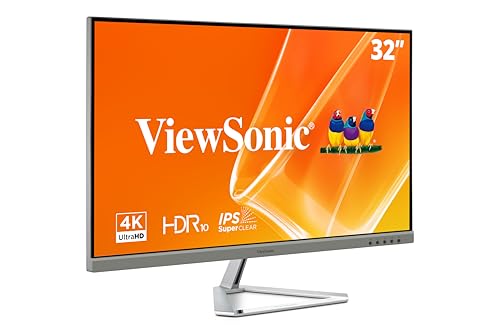
The ViewSonic VX3276-4K-MHD brings 4K clarity to a large 32-inch screen, making it a solid choice for home offices and creative work. The 3840x2160 resolution ensures sharp text and detailed visuals, while the HDR10 support enhances contrast and color depth for movies, photo editing, and content creation. The combination of a spacious display and affordable 4K pricing makes this monitor accessible for homeowners upgrading their workspace.
Eye comfort is a priority with this monitor, thanks to Flicker-Free technology and a Blue Light Filter that reduce strain during long work sessions. The five preset modes (Game, Movie, Web, Text, and Mono) let you quickly optimize the display for whatever you're doing, whether that's spreadsheets, streaming, or creative projects. The ultra-thin bezels also maximize usable screen space without adding bulk to your desk setup.
Connectivity is straightforward with HDMI, DisplayPort, and Mini DisplayPort inputs, making it easy to connect laptops, desktops, and Macs. The 60Hz refresh rate is sufficient for productivity and entertainment but won't satisfy competitive gamers. Overall, this monitor delivers excellent value for professionals and DIYers who want 4K resolution without premium pricing.
| Specification | Details |
|---|---|
| Screen Size | 32 inches |
| Resolution | 4K UHD (3840 x 2160 pixels) |
| Panel Type | MVA |
| Refresh Rate | 60Hz |
| HDR Support | HDR10 |
| Connectivity | HDMI, DisplayPort, Mini DisplayPort |
| Eye Care Features | Flicker-Free, Blue Light Filter |
| Viewing Modes | Game, Movie, Web, Text, Mono |
| Bezel Design | Ultra-thin |
| Dimensions | 28.1 x 19.9 x 9.1 inches |
| Weight | 15 pounds |
| Color | Black/Silver |
Is This Monitor Right for You? This 32-inch 4K monitor works best for home office professionals, content creators, and anyone who values screen real estate and image clarity. If you spend hours editing photos, working with spreadsheets, or watching streaming content, the large screen and sharp resolution will improve your experience.
What to Consider Before Buying: Ensure your graphics card or laptop supports 4K output through HDMI or DisplayPort. The 60Hz refresh rate is fine for productivity and entertainment but not ideal for competitive gaming. Measure your desk space to confirm a 32-inch monitor fits comfortably at arm's length.
Setup Tips: Position the monitor at eye level to reduce neck strain. Use the preset modes to find the best settings for your tasks. Enable the Blue Light Filter during evening work sessions to minimize sleep disruption. Connect via DisplayPort when possible for optimal image quality.
Optimize Color Accuracy: Use the Movie preset when watching films or streaming content to get the most from HDR10. For photo editing, experiment with the Web preset as a starting point, then fine-tune brightness and contrast using your software's color management tools.
Reduce Eye Fatigue: The Flicker-Free and Blue Light Filter features work together to ease strain. Combine them with the 20-20-20 rule: every 20 minutes, look away for 20 seconds at something 20 feet away. Adjust the monitor height so the top of the screen is at or slightly below eye level.
Maximize Screen Space: With 32 inches of 4K real estate, you can comfortably display two full-size windows side by side or use the entire screen for detailed work. On Windows, use Snap Layouts to organize windows efficiently. On Mac, use Mission Control and Split View to manage multiple apps.

Pros
- IPS panel ensures accurate color reproduction and comfortable viewing from any angle
- Eye-care features make this monitor suitable for all-day work without fatigue
- Compact 24-inch size fits snugly on most desks while delivering full 1080p clarity
- FreeSync support adds gaming capability without compromising office functionality
- Affordable entry point for upgrading from built-in laptop displays
Cons
- 1080p resolution at 24 inches means smaller text and UI elements compared to higher-resolution alternatives
- 100Hz refresh rate is adequate for casual gaming but won't satisfy competitive esports players seeking 144Hz or higher
The ViewSonic VX2476-SMHD strikes a practical balance between productivity and entertainment, making it a solid choice for home offices and casual computing. The 24-inch IPS panel delivers vibrant, accurate colors with consistent image quality across wide viewing angles, so whether you're working on spreadsheets or streaming content, the display remains clear and vivid. The ultra-thin bezels create a modern aesthetic while maximizing usable screen space, and the compact footprint makes it ideal for desks where space is at a premium.
Eye comfort is a priority with this monitor thanks to Flicker-Free technology and a built-in Blue Light Filter, both of which reduce strain during extended sessions. The five preset viewing modes (Game, Movie, Web, Text, and Mono) let you quickly optimize the display for whatever task is at hand, eliminating the need for manual calibration. FreeSync support ensures smooth, tear-free motion during gaming or video playback, while the 100Hz refresh rate provides noticeable fluidity compared to standard 60Hz displays.
Connectivity is straightforward and flexible, with HDMI, DisplayPort, and VGA inputs allowing you to connect laptops, desktop PCs, and even older Mac systems without adapters. At this price point, the VX2476-SMHD represents strong value for anyone upgrading from a basic monitor or building a modest home office setup. It won't satisfy hardcore gamers seeking 144Hz+ performance or professionals demanding 4K resolution, but for general-purpose computing with occasional gaming, it's a dependable performer.
| Specification | Details |
|---|---|
| Screen Size | 24 inches |
| Resolution | 1920 x 1080 (Full HD) |
| Panel Type | IPS |
| Refresh Rate | 100Hz |
| Color | Black/Silver |
| Dimensions | 16.3 x 8.2 x 21.3 inches |
| Weight | 6.5 pounds |
| Connectivity | HDMI, DisplayPort, VGA |
| Key Features | FreeSync, Flicker-Free, Blue Light Filter, Preset Modes |
Who Should Buy This Monitor?
The ViewSonic VX2476-SMHD is best suited for home office workers, students, and casual gamers who prioritize comfort and versatility over cutting-edge specs. If you spend 8+ hours daily at your desk, the eye-care features justify the investment. Remote workers will appreciate the multiple connectivity options and preset modes that adapt to different tasks throughout the day.
When to Consider Alternatives
If you play competitive online games, stream content professionally, or work with photo and video editing, you'll likely want a higher refresh rate (144Hz+) or higher resolution (1440p or 4K). Graphic designers should also consider monitors with wider color gamuts and hardware calibration support.
Setup Tips
Mount the monitor at eye level to reduce neck strain. Use the DisplayPort connection for the fastest response times if connecting to a gaming PC. Adjust the Blue Light Filter intensity based on your environment and time of day for optimal eye comfort.
Maximize Eye Comfort
Enable the Flicker-Free setting and Blue Light Filter immediately after setup. During evening work sessions, increase the Blue Light Filter intensity to reduce sleep disruption. Position the monitor about an arm's length away and slightly below eye level for ergonomic viewing.
Gaming Optimization
Switch to the Game preset mode to enhance contrast and response times during gameplay. Ensure your graphics card supports FreeSync to eliminate tearing. The 100Hz refresh rate pairs well with mid-range gaming systems that output 80-100 FPS at 1080p.
Connectivity Best Practices
Use DisplayPort for primary connections to modern PCs and laptops for best performance. HDMI works well for secondary devices or streaming boxes. Keep the VGA port in mind if you need to connect older office equipment during transitions.

Pros
- Exceptional portability with minimal weight and thickness makes it genuinely travel-friendly
- USB-C connectivity simplifies setup with one cable for video, audio, power, and charging
- IPS panel provides wide viewing angles and accurate color reproduction for creative work
- Magnetic cover doubles as screen protector and transforms into a stand
- 60W USB-C power delivery keeps your laptop charged while using the monitor
Cons
- 60Hz refresh rate and 1080p resolution limit gaming and graphics-intensive work compared to larger desktop monitors
- No built-in speakers means you'll need external audio for video calls or media consumption
The ViewSonic VG1655 stands out as a genuinely portable second monitor that doesn't compromise on usability. At 1.8 pounds with a 0.6-inch profile, it slips into a laptop bag without adding noticeable weight, making it perfect for coffee shop work sessions, client meetings, or extended travel. The 15.6-inch Full HD IPS display delivers crisp text and vibrant colors suitable for spreadsheets, documents, design work, and video conferencing.
Connectivity is where this monitor shines for modern mobile workers. The USB-C input handles video, audio, and data transfer through a single cable, while 60W power delivery charges your laptop simultaneously when paired with the included adapter. This eliminates the cable management nightmare of traditional portable monitors and reduces the number of adapters you need to carry. The Mini-HDMI input provides backup connectivity for devices without USB-C, ensuring broad compatibility with older laptops and desktop computers.
The included magnetic cover serves double duty as both a screen protector and a built-in stand with flexible orientation options. Whether you need landscape mode for spreadsheets or portrait mode for document editing, the stand holds the monitor securely. The IPS panel and eye care features make extended work sessions more comfortable than typical portable monitors, though the 60Hz refresh rate keeps this firmly in the productivity category rather than gaming territory. ViewSonic's 3-year warranty and US-based support provide peace of mind for a device you'll rely on daily.
| Specification | Details |
|---|---|
| Screen Size | 15.6 inches |
| Resolution | 1920 x 1080 (Full HD) |
| Panel Type | IPS |
| Refresh Rate | 60Hz |
| Weight | 1.8 lbs |
| Thickness | 0.6 inches |
| Dimensions | 8.8 x 14 x 0.6 inches |
| Color | Black |
| USB-C Power Delivery | 60W |
| Connectivity | USB-C, Mini-HDMI |
| Compatibility | Windows, Mac, Linux |
| Included Accessories | Magnetic cover, built-in stand, power adapter |
| Warranty | 3 years with US-based support |
Who Should Buy This Monitor? The VG1655 is ideal for remote workers, freelancers, digital nomads, and business travelers who spend significant time away from a desk. It's also perfect for anyone who wants to extend their laptop screen real estate without the weight and bulk of a full-sized monitor. Designers, developers, and content creators will appreciate the accurate IPS display for color-critical work.
What to Consider Before Buying Evaluate your primary use case. If you need a second monitor for gaming or video editing, the 60Hz refresh rate and 1080p resolution may feel limiting compared to desktop alternatives. However, for productivity tasks like email, spreadsheets, video calls, and document editing, this monitor excels. Check that your laptop has USB-C output if you want single-cable connectivity, though the Mini-HDMI backup ensures compatibility with older devices.
Setup Tips Position the monitor at eye level using the included stand to reduce neck strain during extended work sessions. For the cleanest cable setup, use the USB-C connection to handle both video and charging simultaneously. If your laptop lacks sufficient USB-C power delivery, use the included power adapter to charge the monitor independently while data flows through USB-C.
Maximize Portability Keep the monitor in its magnetic cover at all times. The cover protects the screen during travel and transforms into a stand, eliminating the need for a separate carrying case or stand. This all-in-one approach reduces what you need to pack.
Optimize Display Settings Adjust brightness and color temperature in your operating system to match your work environment. The IPS panel handles different viewing angles well, but positioning the monitor directly in front of you minimizes glare and reduces eye strain during long work sessions.
Power Management Use the USB-C passthrough charging feature to keep both your monitor and laptop powered from a single outlet. This is especially valuable in airport lounges, coffee shops, or other locations with limited power access. Carry the power adapter even though USB-C is convenient, as not all laptops provide sufficient power delivery.
Connectivity Flexibility Test both USB-C and Mini-HDMI connections before your first trip to confirm compatibility with your devices. Some older laptops may require adapters for the Mini-HDMI input, so verify this beforehand rather than discovering it at a client meeting.
Pros
- Compact 4.1-inch size fits perfectly on nightstands, desks, and kitchen counters
- Integrated eero WiFi extender eliminates the need for separate mesh network hardware
- Intuitive touchscreen makes controlling lights, thermostats, and blinds easy without voice commands
- Excellent sound quality for a device this size, with balanced audio across music genres
- Privacy-focused design with physical mic mute and transparent data practices
Cons
- No user reviews available yet, so real-world durability and long-term reliability remain unproven
- Requires existing eero network or compatible mesh system to use WiFi extender feature; standalone WiFi capability not included
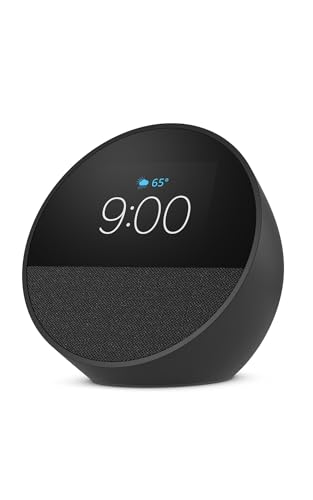
The Echo Spot is Amazon's latest addition to the Alexa ecosystem, designed specifically for spaces where a full-size Echo Show would be overkill. Its compact 4.1-inch footprint and lightweight design make it ideal for nightstands, offices, and kitchen counters where space is at a premium. The 2.83-inch touchscreen provides just enough real estate to display time, weather, song titles, and smart home controls without dominating your room's aesthetic.
What sets this model apart is the integrated eero mesh WiFi functionality. Rather than requiring a separate WiFi extender, the Echo Spot can extend your existing eero network by up to 1,000 square feet, solving connectivity dead zones while serving as a full-featured smart display. The audio performance punches above its weight class, delivering clear vocals and surprisingly deep bass for music, podcasts, and audiobooks. Combined with Alexa's voice control and the ability to create routines for gradual wake-ups, smart home automation, and music playback, the Echo Spot becomes a genuinely useful bedside or kitchen companion.
Amazon has prioritized privacy with multiple control layers, including a physical microphone mute button and in-app privacy settings. The device's construction incorporates 36% recycled materials, appealing to environmentally conscious homeowners. However, potential buyers should note that the WiFi extender feature requires an existing eero network, and the touchscreen, while responsive, is smaller than larger Echo Show models, which may limit visibility for some users.
| Specification | Details |
|---|---|
| Color | Black |
| Dimensions | 4.1 x 4.5 x 4.4 inches |
| Weight | 0.9 pounds |
| Display Size | 2.83-inch touchscreen |
| Key Features | Alexa voice control, eero mesh WiFi extender, smart home device control, customizable clock faces |
| Audio | Rich sound with clear vocals and deep bass |
| Privacy | Microphone off button, in-app privacy controls |
| Sustainability | 36% recycled materials |
| Connectivity | WiFi (eero compatible), Bluetooth |
Getting Started: The Echo Spot works with thousands of compatible smart home devices including lights, thermostats, locks, and blinds from major brands like Philips Hue, Nest, Ecobee, and LIFX. Simply enable the relevant Alexa skills in the app and link your accounts.
Voice Control: Ask Alexa to turn on lights, adjust temperature, lock doors, or open blinds. Voice commands work from anywhere in the room, making it perfect for morning routines or bedtime adjustments.
Touch Control: Use the touchscreen to quickly dim lights, see thermostat settings, or control music without speaking. This is especially useful in bedrooms where you might not want to wake others with voice commands.
Routines: Create automated sequences that trigger multiple devices at once. For example, a morning routine can gradually brighten lights, play music, and display weather, while an evening routine can dim lights and lower the thermostat.
eero Integration: The Echo Spot includes built-in eero mesh WiFi technology, allowing it to extend your existing eero network by up to 1,000 square feet. This eliminates the need to purchase a separate mesh extender.
Setup Requirements: You must have an existing eero network or compatible eero system to use the WiFi extender feature. The device cannot function as a standalone WiFi router.
Coverage Benefits: Ideal for extending WiFi to bedrooms, home offices, or kitchens that experience weak signal. The extender maintains the same network name and password as your primary eero system for seamless connectivity.
Placement Tip: Position the Echo Spot midway between your eero router and the area with weak signal for optimal coverage expansion.
Best For: Homeowners and renters who want a compact Alexa device for bedside smart home control, alarm clock functionality, and music streaming. Also ideal for those with existing eero networks who need WiFi coverage extension.
Consider This Model If: You need a screen-equipped Alexa device but don't have space for a full Echo Show. You want integrated WiFi extension without separate hardware. You value privacy controls and prefer a smaller footprint.
Look Elsewhere If: You need a larger display for video calling or watching content. You don't have an eero network and only want standalone WiFi capability. You prefer devices without touchscreens.
Room Placement: Nightstands work best for alarm and sleep routines. Kitchens benefit from quick recipe and weather checks. Home offices allow easy smart device control during work hours. Avoid humid bathrooms to protect the electronics.
How to Choose the Right Smart Display for Your Home
The term “smart display” covers a surprisingly wide spectrum of products, from voice-activated smart speakers with screens to professional-grade IPS monitors with adaptive refresh rates. Before you buy, it pays to get clear on exactly how and where the display will live in your home, because a bedside smart alarm clock has very different requirements from a 34-inch curved monitor anchoring a home office setup. The buying decisions that matter most come down to screen size, panel type, smart integration depth, port layout, eye comfort, and whether portability is a factor at all.
Screen Size and Resolution
Screen size is the most visible variable, but resolution matters just as much. A 24-inch panel at 1080p delivers sharp, readable text for everyday tasks, while a 32-inch display at 1440p or 4K gives you noticeably more detail and working room for multitasking or streaming. The ViewSonic VX2476-SMHD lands at an approachable price point for a 24-inch IPS panel, making it a practical entry point for anyone upgrading from an older or smaller screen. If you plan to use the display for creative work, look for panels that cover at least 95% sRGB so colors remain accurate and consistent across different lighting conditions.
Ultra-wide formats like 21:9, found on the Dell 34 Plus curved model in our lineup, let you open two full-size windows side by side without feeling cramped. That is a genuine productivity gain for anyone juggling documents, spreadsheets, and video calls simultaneously. For compact smart displays meant for a nightstand or kitchen counter, an 8-inch to 11-inch screen is usually the sweet spot. The Amazon Echo Show 11 sits at the upper end of that range with a full-HD 11-inch panel that reads easily from across a room. Larger panels can feel overwhelming in tight spaces, while anything under 7 inches can be hard to glance at quickly during a morning routine.
Panel Type: IPS vs. VA
IPS panels offer wide viewing angles and accurate color reproduction, making them the go-to choice for home offices, creative workspaces, and shared kitchen displays where multiple people might glance at the screen from different positions. ViewSonic uses IPS technology across its entire lineup in this guide for exactly that reason. VA panels deliver a higher native contrast ratio, which translates to deeper blacks and more cinematic visuals for movie watching and gaming. The Dell 34 Plus curved monitor hits a 3000:1 contrast ratio that makes a real difference for immersive content.
If your display will sit directly in front of you and you care about contrast over color accuracy, VA is worth considering. For general home use with varied viewing angles, IPS remains the safer, more versatile bet. Anyone building out a full home office setup alongside a new monitor will find that tape measures help dial in desk dimensions and optimal viewing distances before committing to a monitor position.
Smart Features and Voice Assistant Integration
Not every display in this guide is “smart” in the voice-assistant sense, and that distinction matters before you buy. Amazon’s Echo Show 11 and Echo Spot are purpose-built around Alexa, letting you check your calendar, stream music, make video calls, and control compatible smart home devices entirely by voice. They work best when you already have Alexa-compatible lights, locks, thermostats, and cameras in place.
The eufy Smart Display E10 takes a different angle, acting as a centralized home security hub with a live four-view camera feed, instant door alerts, 64GB of onboard storage, and one-tap device control. It is the most specialized product in this lineup and genuinely useful for homeowners who want their security cameras consolidated onto a single screen without subscribing to a cloud service. ViewSonic monitors, on the other hand, bring smart connectivity through ports rather than voice assistants. USB-C with 60W power delivery on the VG1655 portable model means you can charge a laptop while extending its display with a single cable, which can be just as practically useful as a built-in assistant for the right user.
Connectivity and Ports
Check the port layout carefully before buying. Monitors aimed at desktop setups typically include a mix of DisplayPort and HDMI inputs, which covers most desktop PCs, gaming consoles, and streaming sticks. If you work from a modern laptop, USB-C connectivity with power delivery eliminates the cable clutter of separate power bricks and video adapters. The ViewSonic VG1655 portable monitor earns specific praise here for its 60W USB-C input paired with a mini HDMI fallback, giving laptop users maximum flexibility in any room of the house.
For home security and smart hub displays, Wi-Fi connectivity and local storage matter far more than traditional video ports. The eufy E10’s 64GB eMMC storage means footage stays on the device rather than requiring constant cloud uploads, which is a meaningful privacy and reliability advantage. Routing cables cleanly after installation is much easier with utility knives close at hand for cutting cable ties and trimming wire sleeves neatly.
Eye Care and Ergonomics
If a display is going to be part of your daily routine, eye comfort becomes a genuine priority rather than a marketing footnote. Flicker-free backlights and blue-light filters are now standard on most mid-range and premium monitors, but it is worth verifying these features are present rather than assuming. ViewSonic markets its Eye Care technology across its entire lineup in this guide specifically to address these concerns, and the company’s track record on this front is solid. Adjustable stands that let you tilt, swivel, and change height make a meaningful difference over long sessions.
Ultra-thin bezels reduce visual fatigue when switching between screen and surroundings, particularly on the ViewSonic VX2476-SMHD and VX3276-4K-MHD. For a nightstand smart display like the Amazon Echo Spot, adaptive brightness that dims automatically after dark is equally important for comfortable overnight use without disturbing sleep. Mounting a display at the right height is a separate ergonomics consideration, and spirit levels help ensure a wall-mounted panel sits perfectly plumb before you commit to the final position.
Refresh Rate and Adaptive Sync
Refresh rate matters most if the display will double as a gaming screen or handle fast-moving video content. A 60Hz panel is perfectly smooth for productivity and casual streaming. The ViewSonic VS3225-2K supports variable refresh rates with AMD FreeSync, and the Dell S3425DW goes further with FreeSync Premium and up to 120Hz, a meaningful jump for gamers stepping up from a standard office monitor. Adaptive sync eliminates screen tearing without requiring expensive GPU hardware, which makes it a particularly attractive feature at this price tier.
For voice-assistant smart displays and home security hubs, refresh rate is largely irrelevant since content is mostly static dashboards, video feeds, and music controls. Focus your attention on response time and brightness uniformity instead, especially if the display will be mounted in a bright kitchen or living room environment. Getting a display mounted precisely on a wall calls for claw hammers and solid anchor hardware to ensure the bracket stays secure long-term.
Portability
A portable smart display like the ViewSonic VG1655 opens up use cases that a traditional desktop monitor simply cannot. At 15.6 inches with a built-in stand and single-cable USB-C setup, it functions as a second screen in a home office in the morning and can move to a dining table, spare room, or even a friend’s space in the afternoon. It is a practical solution for households where desk space is shared or where flexible working from different rooms is the norm.
If portability is a priority, confirm the display has a built-in kickstand or integrated stand before buying, since carrying a separate accessory defeats the purpose. The VG1655 handles this correctly with a folding built-in stand that works on any flat surface without additional hardware. Anyone optimizing a mobile workspace may find that hand saws are worth keeping nearby for any custom shelving or desk-build projects that improve how the portable monitor fits into a given room.
Color Accuracy and HDR Support
Color accuracy becomes critical the moment you move from casual browsing into photo editing, video production, or design work. The Dell S3425DW covers 99% sRGB and 95% DCI-P3, making it genuinely capable for professional creative workflows at a competitive price for a 34-inch panel. The ViewSonic VX3276-4K-MHD supports HDR10, which adds expanded dynamic range to streaming content from compatible platforms. HDR is most impactful on larger panels viewed in controlled lighting, so a 32-inch or wider screen benefits noticeably more from HDR support than a compact 24-inch display would.
For voice-first smart displays like the Echo Show 11, color accuracy is less relevant since the screen serves primarily as an interface layer. Brightness and glare resistance matter more in that context, particularly if the display will sit on a kitchen counter near a window. Setting up a new creative workstation often involves building or adjusting custom furniture, and reciprocating saws make short work of any structural cuts needed to fit shelving or cable trays neatly behind a desk.
Privacy and Local Storage Considerations
Privacy is an increasingly important factor when choosing a smart display, particularly for devices placed in kitchens, bedrooms, or living areas where they are always powered on. Voice-assistant displays from Amazon continuously listen for wake words, which is worth understanding before placement in a private space. Amazon provides hardware mute buttons on both the Echo Show 11 and Echo Spot to disable the microphone physically when needed.
The eufy Smart Display E10 takes a more privacy-forward approach for security monitoring by storing footage locally on 64GB of onboard eMMC storage rather than pushing it automatically to a cloud server. That architecture means your camera footage remains on the device by default, with no mandatory subscription required to access recent recordings. For homeowners who want security awareness without relinquishing control of their footage to a third-party server, that local-first design is a compelling differentiator in this lineup. Organizing the wiring around a new security hub display is easier with jigsaws handy for cutting cable access ports in furniture or cabinetry cleanly.
Why Trust HomeThru
HomeThru is an independent review platform with no affiliation to any retailer or manufacturer. We do not sell products, process orders, or handle returns of any kind. Our editorial team researches and evaluates home technology products by analyzing verified buyer feedback, manufacturer specifications, independent laboratory data, and expert commentary from the wider technology community. Every recommendation in this guide reflects our own assessment of real-world performance and value, with no paid placement or sponsored ranking influencing the order or selection of products.
For this smart displays guide, we compared options from ViewSonic, Amazon, Dell, and eufy Security across key criteria including display quality, smart integration depth, connectivity flexibility, eye care features, and long-term reliability. We assessed how each product performs across its primary use case rather than applying a single scoring rubric that would flatten meaningful differences between a security hub and a professional monitor. Our broader home and workshop coverage follows the same rigorous approach, including roundups of impact drivers ranked for DIY and professional use and random orbital sanders evaluated for finish quality across different materials.
Final Thoughts
Smart displays have become one of the most versatile product categories in the modern home, and the right pick depends entirely on how you plan to use it. Below are our top recommendations from the products in this guide, each chosen for a specific use case and audience.
- Best Overall Smart Display: Amazon Echo Show 11 (Newest Model) delivers a vibrant full-HD 11-inch panel, spatial audio, and deep Alexa integration that makes it the most capable all-around voice-first smart display in this lineup for kitchens, living rooms, and home offices alike.
- Best for Home Security Monitoring: eufy Smart Display E10 stands out as a dedicated security hub with a four-view camera panel, 64GB of onboard local storage, and instant door alerts that give homeowners genuine peace of mind at a glance without relying entirely on cloud connectivity.
- Best Ultrawide Monitor for Home Offices: Dell 34 Plus USB-C Curved Monitor S3425DW combines a sweeping 3440×1440 VA panel, 99% sRGB color accuracy, 120Hz refresh rate, AMD FreeSync Premium, and integrated speakers into a premium package that rivals dedicated creative workstation setups at a reasonable price for its class.
- Best Portable Display for Flexible Workspaces: ViewSonic VG1655 earns this title with its 60W USB-C single-cable setup and built-in stand, making it the easiest way to add a quality second screen anywhere in your home without a cluttered desk or a bag full of adapters.
- Best Compact Bedside Smart Display: Amazon Echo Spot (Newest Model) is the smartest alarm clock in this guide, combining Alexa voice control, adaptive brightness, and a space-saving footprint that works equally well on nightstands, kitchen shelves, and home office desks.
Whichever direction you go, prioritizing panel type, connectivity, and smart ecosystem compatibility will help you avoid buyer’s remorse. The best smart displays are the ones that fit naturally into your daily routine rather than demanding adjustment to accommodate them. If you are still building out your broader home workspace, circular saws for custom shelving builds and spirit levels for precise wall mounting are practical additions worth researching alongside your display purchase.
Frequently Asked Questions
What is the difference between a smart display and a regular monitor?
A regular monitor requires a connected computer or device to display content, while a smart display has an onboard operating system and voice assistant built in. Smart displays can stream media, control smart home devices, make video calls, and show information dashboards entirely on their own, without needing a PC. Some products in this guide are traditional monitors with smart port features like USB-C power delivery, which meaningfully blurs the line for practical home and office use.
Can I use an Amazon Echo Show as a home security monitor?
Yes, the Amazon Echo Show 11 can display live feeds from compatible security cameras and doorbell cameras through Alexa voice commands or the Alexa app. However, it is primarily a general-purpose smart display rather than a dedicated security hub. For a display purpose-built for security monitoring with multi-camera views and local onboard storage, the eufy Smart Display E10 is the more focused and capable solution in this lineup. Mounting either device at the right angle is straightforward with spirit levels ensuring the viewing position is perfectly plumb.
Is a 4K monitor worth it for home office use?
For most home office tasks like document editing, email, and video calls, a sharp 1440p display is practically indistinguishable from 4K at typical viewing distances. However, if you work with detailed photography, video editing, or graphic design at 32 inches or larger, as with the ViewSonic VX3276-4K-MHD in this guide, 4K resolution makes fine details noticeably clearer and reduces the need to zoom in on intricate work. The tradeoff is that 4K panels require a more capable GPU to drive smoothly across all applications.
Do smart displays work without Wi-Fi?
Voice-assistant smart displays like the Amazon Echo Show 11 and Echo Spot require an active Wi-Fi connection to function properly. Without it, most smart features including streaming, voice commands, smart home control, and calendar sync are unavailable. The eufy Smart Display E10 can display locally stored footage without internet connectivity, but its remote door alerts and daily event reports require an active connection. Traditional monitors in this guide work independently of Wi-Fi since they rely on direct cable connections from a PC or laptop.
What should I look for in a portable monitor for working from home?
Prioritize a single-cable USB-C connection with power delivery so you can extend your laptop display and charge it simultaneously without hunting for outlets. A built-in adjustable stand rather than a clip-on cover is essential for stable use on varied surfaces. Panel size between 15 and 16 inches balances screen real estate with portability. Eye care features like flicker-free backlighting matter more on a portable screen because you may use it in varied and sometimes less-than-ideal lighting conditions. Keeping your mobile workspace organized is easier when you pair a capable portable display with utility knives for clean cable management and tidy wire routing around your setup.