A router table transforms one of the most versatile power tools in any woodshop into a precision instrument. Instead of wrestling a heavy handheld router across a workpiece with both hands, you mount the tool beneath a flat, stable surface and feed the wood into the spinning bit with full control. The result is cleaner profiles, more consistent joinery, and far safer operation on small or narrow pieces that a handheld setup simply cannot handle safely. Whether you are shaping decorative edges, cutting grooves, producing molding, or duplicating parts with a template, a quality router table makes every task more repeatable and far less fatiguing.
The market ranges from compact benchtop units that weigh under fifteen pounds and store in a cabinet when not in use, all the way to full-featured systems with precision router lifts and cast-iron tops that rival dedicated workshop machinery. Choosing the right one means matching the table to your router, your shop space, and the kind of work you actually do. Our independent research team at HomeThru analyzed specs, user feedback, expert commentary, and real-world performance data across dozens of models to narrow the field down to the strongest options at every price point and use case. From the workhorse Bosch RA1181 to the ultra-precise Kreg PRS5000 lift system, here are the router tables worth your attention this year.
Top Router Tables We Recommend
Pros
- Exceptional stability from thick Baltic birch construction reduces vibration and improves cut quality
- Tool-free conversion between table and hand-held routing saves setup time and frustration
- Thoughtful design includes dust collection, storage solution, and space-saving foldable legs
- American-made craftsmanship with careful inspection ensures long-term reliability
- Micro-adjustment capability delivers precision results for detailed routing work
Cons
- Limited to trim and mid-sized routers, so owners of larger plunge routers may need to verify compatibility first
- Higher price point reflects premium materials and American manufacturing, which may challenge budget-conscious buyers
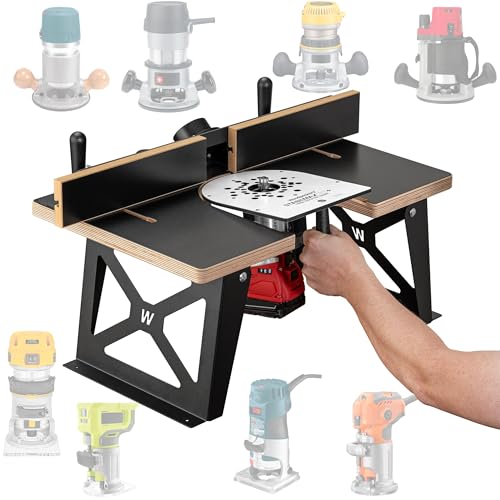
The StabilMaxRT+ represents a thoughtful engineering solution for woodworkers who regularly switch between table routing and hand-held applications. The standout feature is the tool-free conversion mechanism, which eliminates the frustration of swapping bases or making repeated adjustments. Built from 1-inch thick, 17-ply Baltic birch plywood topped with black micro-dot laminate, the table delivers the solid feel and vibration damping that serious crafters expect, directly translating to cleaner, more precise cuts.
Beyond raw stability, the design philosophy prioritizes shop efficiency. Foldable legs make storage practical for woodworkers with limited space, while the included wall-mountable Rack-It keeps your router table organized and accessible. Built-in dust ports and track clamps reduce the need for aftermarket additions, and the zero-backlash micro-adjustment system enables repeatable, fine-tuned cuts. The adjustable fence works intuitively for both straight and angled routing tasks.
As with all Woodpeckers products, this system is precision-built and carefully inspected in Strongsville, Ohio. Compatibility is limited to trim and mid-sized routers, so you'll want to verify your router against the provided compatibility chart before purchasing. For woodworkers seeking a durable, versatile routing solution that grows with their skill level, the StabilMaxRT+ delivers professional-grade performance without the industrial footprint.
| Specification | Details |
|---|---|
| Material | 17-ply Baltic birch plywood, 1 inch thick |
| Work Surface | Black micro-dot laminate finish |
| Router Compatibility | Most trim and mid-sized routers (see compatibility chart) |
| Conversion Type | Tool-free switch between table and hand-held routing |
| Fence | Adjustable |
| Legs | Foldable for compact storage |
| Adjustment System | Zero-backlash micro-adjustment |
| Built-In Features | Dust ports, track clamps, starting pin |
| Storage | Wall-mountable Rack-It included |
| Included Components | 1 StabilMax RT Base Plate, fully-equipped system |
| Manufacturing | USA made, built and inspected in Strongsville, Ohio |
Setup and Installation: Attach your compatible router to the StabilMax RT Base Plate following the included instructions. The system arrives fully equipped, so minimal assembly is required. Verify your router model against the compatibility chart to ensure proper fit.
Switching Between Routing Modes: To convert from table routing to hand-held routing, simply lift your router and base plate from the table. The tool-free design means no knobs, clips, or adjustments are needed. The extended base automatically supports hand-held routing applications without additional setup.
Using the Fence and Track Clamps: Position the adjustable fence for your desired cut depth and width. Use the built-in track clamps on the underside to secure workpieces or accessories. The zero-backlash micro-adjustment allows fine-tuning for repeatable, precise results across multiple cuts.
Dust Collection: Connect your shop vacuum or dust collection system to the built-in dust ports. This keeps your workspace cleaner and improves visibility during routing operations.
Storage: When not in use, fold the legs for compact storage. Mount the included Rack-It on your wall to keep the system organized and easily accessible for your next project.
Maximize Stability: Keep the table on a flat, level surface and ensure all legs are fully extended and locked before routing. The 17-ply construction resists vibration, but a stable foundation amplifies that benefit.
Optimize the Micro-Adjustment: Use the zero-backlash micro-adjustment system for fine-tuning rather than gross adjustments. Make small, incremental changes and test on scrap material to dial in your exact cut profile.
Dust Management: Connect your dust collection system before starting any routing work. The built-in ports are designed to work efficiently with standard shop vacuum hoses, reducing cleanup time and improving air quality.
Fence Positioning: For edge routing, position the fence close to your bit to minimize unsupported workpiece overhang. For panel work, use the track clamps to secure larger pieces and prevent drift during the cut.
Hand-Held Routing: When switching to hand-held mode, ensure the extended base is fully seated and stable before powering on. The tool-free conversion is convenient, but always verify secure attachment before routing.
Who Should Buy This? The StabilMaxRT+ is designed for woodworkers and serious DIYers who regularly switch between table routing and hand-held applications. If you own a trim or mid-sized router and value precision, stability, and American-made quality, this system is a smart investment. It's also ideal for those with limited workshop space who need a compact, foldable solution.
Router Compatibility Check: Before purchasing, verify that your router model matches the compatibility chart provided by Woodpeckers. The system accommodates most trim and mid-sized routers but not all models. Confirm fit before committing to ensure you get the right tool for your setup.
Space Considerations: While the foldable legs are convenient, ensure you have adequate wall or storage space for the wall-mountable Rack-It. Measure your shop layout and plan placement before delivery to maximize the space-saving benefits.
Dust Collection Setup: If you don't already have a shop vacuum or dust collection system, budget for one. The StabilMaxRT+ includes built-in dust ports, but you'll need compatible equipment to take full advantage of the dust management design.
Long-Term Value: This is a premium product built to last. The 17-ply Baltic birch construction and American manufacturing suggest a tool that will serve you reliably for years. Consider it an investment in precision and durability rather than a budget purchase.

Pros
- Reliable 2.3 HP motor handles demanding routing applications without bogging down
- Fixed-base design excels at precision work, edge profiling, and detail routing
- Refurbished certification provides confidence in unit reliability and performance
- Affordable entry point for woodworkers upgrading from basic routers
- 120V operation means no special electrical installation required
Cons
- No user reviews available yet, so real-world long-term durability feedback is limited
- Fixed-base design requires router table setup for some applications; lacks plunge capability for through-cuts
The ARC-POWER 2.3 HP fixed-base router is a solid mid-range choice for woodworkers and DIYers who prioritize stability and precision over versatility. The 2.3 HP motor delivers consistent power through demanding routing tasks, whether you're shaping edges, cutting grooves, or working with hardwoods. The fixed-base design excels in these precision applications, offering the rigid mounting and control that edge work and detailed profiling demand.
As a certified refurbished unit, this router has undergone quality control evaluation to ensure it meets performance standards before reaching your workshop. The 15 Amp, 120V specifications mean you can operate it from any standard household outlet without requiring dedicated electrical work. Compatibility with Bosch MRF23EVSRT accessories opens access to a wide range of bits, templates, and attachments to expand your routing capabilities.
The main trade-off with fixed-base design is that plunge capability is absent, which some users prefer for through-cuts and mortising work. However, for traditional routing applications like edge profiling, grooves, and rabbets, the fixed-base approach delivers superior accuracy and control. This router works best in a dedicated router table setup or as a primary tool for edge work on stationary projects.
| Specification | Detail |
|---|---|
| Motor Power | 2.3 HP |
| Electrical Input | 120V, 15 Amp |
| Base Type | Fixed-Base |
| Compatible Model | Bosch MRF23EVSRT |
| Unit Condition | Certified Refurbished |
| Collet Size | 1/4" and 1/2" (standard) |
| Speed Range | Variable speed (typical 10,000-24,000 RPM) |
Setup and Installation: Mount the fixed-base router securely to a router table or edge guide before operation. Ensure the bit is fully seated in the collet and tightened with the provided wrench. Always verify the bit rotation direction matches your intended cut direction.
Basic Operation: Start with the router unplugged. Insert your selected bit into the collet, adjust the depth of cut incrementally (typically 1/8 inch per pass for hardwoods), and secure the base. Plug in the unit, allow the motor to reach full speed, and feed your workpiece smoothly and steadily against the bit. Never force the material; let the bit do the work.
Edge Work: For edge profiling and shaping, use edge guides or bearing-guided bits to maintain consistent distance from the workpiece edge. Make shallow passes on figured woods to prevent tearout. Always move the workpiece against the bit rotation for safer, more controlled cuts.
Essential Precautions: Always unplug the router before changing bits, adjusting depth, or performing maintenance. Wear safety glasses to protect against flying debris and dust. Use hearing protection, as routers generate significant noise at full speed. Keep long hair, loose clothing, and jewelry away from the rotating bit.
Bit and Collet Safety: Inspect bits for damage or dullness before use; dull bits require excessive pressure and generate dangerous heat. Ensure the collet is clean and the bit is fully seated before tightening. Never operate with a loose bit or damaged collet.
Workspace Awareness: Set up your work area with adequate lighting and clear visibility of the bit and workpiece. Keep your hands and fingers well away from the bit path. Use push sticks, featherboards, or clamps to control small or narrow workpieces. Never reach over or near a running bit, and never attempt to remove scrap or debris while the motor is running.
Depth of Cut Management: Resist the urge to make one deep pass. Instead, make multiple shallow passes (1/8 inch or less per pass), especially with hardwoods or when using large-diameter bits. Shallow passes reduce motor strain, produce cleaner cuts with less tearout, and extend bit life significantly.
Bit Selection and Speed: Larger diameter bits require slower speeds to keep the cutting edge velocity safe and manageable. Most routers include variable speed controls; use slower speeds (10,000-15,000 RPM) for large bits and faster speeds (20,000+ RPM) for smaller bits. Always consult bit manufacturer recommendations for optimal speed ranges.
Router Table Integration: Invest in a quality router table fence and dust collection setup. A well-tuned fence system dramatically improves accuracy and repeatability. Proper dust collection keeps your workspace clean, improves visibility, and reduces respiratory exposure to fine wood particles. Consider adding a power switch with emergency stop capability for safer operation when your hands are occupied with workpiece control.

Pros
- Durable aluminum construction delivers precision and stability for consistent routing results
- Efficient dust collection system significantly reduces cleanup time after routing operations
- Versatile design accommodates multiple router brands with pre-drilled mounting compatibility
- Thoughtful storage features keep cords and accessories organized and accessible
- Adjustable featherboards and tall fence provide excellent guidance and safety protection
Cons
- No reviews currently available, making it difficult to assess real-world user experiences and long-term durability
- Benchtop design means you'll need dedicated workspace; not ideal for shops with limited table real estate
The Bosch RA1181 is designed for woodworkers and serious DIYers who need a reliable benchtop solution for routing work. The large aluminum top provides a generous work surface that feels substantial and durable, while the pre-drilled mounting plate makes router installation straightforward regardless of which model you own. This flexibility is valuable if you plan to upgrade your router down the road or already have one sitting in your shop.
What sets this table apart is its attention to practical workshop needs. The integrated 2.5-inch dust collection port connects to standard shop vacuums, which means less sawdust settling on your work and floor. The adjustable featherboards and tall fence system work together to guide your workpiece consistently and reduce the risk of dangerous kickback, a critical safety consideration when routing. Cord storage and an accessory pocket keep your essential tools organized and within arm's reach.
The rigid aluminum construction and precision engineering suggest this table will hold up well to regular use. The power-cord lock is a smart safety feature if multiple people use your workshop. Whether you're cutting decorative edges, making rabbets, or performing profile work, this benchtop router table provides the stability and features needed for professional-quality results on a smaller footprint than full-size cabinet tables.
| Specification | Details |
|---|---|
| Brand | Bosch |
| Model | RA1181 |
| Type | Benchtop Router Table |
| Work Surface | Large aluminum top |
| Mounting Plate | Rigid aluminum, pre-drilled for router compatibility |
| Fence | Extra tall aluminum with adjustable faceplates |
| Featherboards | Easy-to-use adjustable design |
| Dust Collection | Standard 2.5-inch port |
| Accessory Slots | Accepts featherboards and 3/4-inch optional accessories (miter gauge compatible) |
| Storage Features | 6-foot cord wrap storage, accessory pocket |
| Safety Features | Power-cord lock, featherboards for kickback protection |
| Design | Portable benchtop format |
Setting Up Your Router Table: Start by installing your compatible router into the pre-drilled aluminum mounting plate. The plate design allows you to adjust router height from above the table, making bit changes safer and more convenient. Secure the table to your workbench to prevent movement during operation.
Configuring the Fence and Featherboards: Position the tall aluminum fence to match your desired cut depth and profile. Attach the adjustable featherboards to both the fence and table surface to guide your workpiece and provide kickback protection. These should be snug but allow smooth workpiece movement.
Dust Collection Setup: Connect a standard 2.5-inch diameter shop vacuum hose to the dedicated dust-collection port. This connection should be secure to maximize debris capture and keep your workspace clear during routing.
During Operation: Always feed your workpiece against the direction of bit rotation. Let the featherboards and fence guide your work, and maintain steady, even pressure. Never reach over or near the spinning bit, and always wear appropriate safety gear including eye protection and hearing protection.
Storage and Maintenance: Use the built-in cord-wrap storage to organize your power cable. Store router accessories and tools in the dedicated pocket. Periodically check that all bolts and adjustments remain tight, and clear dust buildup from the table surface and dust port to maintain optimal performance.
Essential Safety Precautions: Always unplug the router before installing or changing bits. Wear safety glasses to protect against flying debris, and use hearing protection since router tables produce significant noise. Never reach toward the spinning bit, and keep hands at least 6 inches away from the bit path during operation. Keep long hair and loose clothing away from the table and bit.
Featherboard and Kickback Prevention: The adjustable featherboards included with this table are critical safety components. Position them to guide your workpiece smoothly without binding. Kickback occurs when the bit catches the workpiece and throws it violently; proper featherboard setup and steady feed pressure significantly reduce this risk. Never attempt to remove a stuck workpiece while the router is running.
Workshop Environment: Ensure adequate lighting around your work area so you can see your cut line clearly. Keep your work surface clean and organized to avoid tripping hazards or accidentally contacting the bit. Use the power-cord lock feature to prevent unauthorized use, especially in shared workshop spaces. Always supervise the router table and never leave it running unattended.
Dust and Ventilation: Connect the dust-collection port to a shop vacuum to minimize airborne wood dust, which can cause respiratory issues with prolonged exposure. Ensure your workshop has adequate ventilation, and consider using a dust mask rated for fine woodworking particles if your vacuum system is not highly efficient.
Bit Selection and Setup: Invest in high-quality router bits that match your project needs. Different profiles require different speeds and feed rates, so consult your router's manual for optimal RPM settings. Sharper bits produce cleaner cuts and require less feed pressure, reducing strain on both you and the equipment. Always ensure bits are fully seated in the collet and tightened securely before operation.
Workpiece Preparation: Mill your workpieces to consistent thickness and ensure edges are straight before routing. This consistency allows the featherboards to guide effectively and produces uniform results across multiple pieces. For repetitive work, consider making a simple jig to position pieces identically each time.
Feed Rate and Technique: Move your workpiece slowly and steadily through the cut. Rushing produces poor results and increases kickback risk. If the router seems to be struggling or producing tearout, slow your feed rate further. Climb cutting (feeding with the bit rotation) can produce cleaner results on difficult grain but increases kickback risk; reserve it for experienced operators using secure workpiece control.
Fence Adjustment for Precision: The tall aluminum fence provides excellent reference surface. Use feeler gauges or a dial caliper to set precise distances from the bit. For edge work, the fence face should be parallel to the bit; check this occasionally as adjustments can shift slightly with use.
Maintenance for Longevity: Keep the aluminum top clean and dry. A light coat of paste wax helps workpieces slide smoothly and prevents corrosion. Check all adjustment bolts periodically and tighten if needed. Store the table in a dry location to prevent rust on metal components.
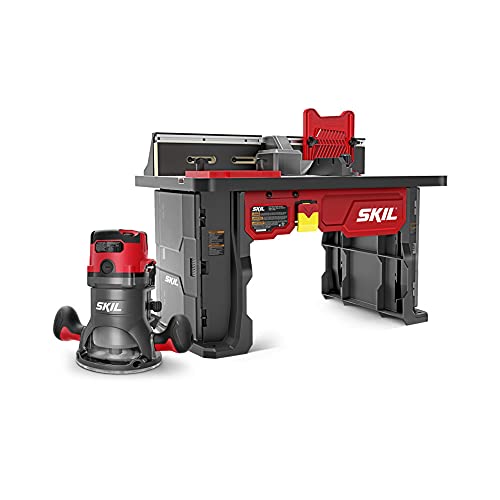
Pros
- All-in-one kit saves money and setup time compared to buying router and table separately
- Variable speed control and soft start protect the motor and reduce startup shock
- Integrated bit storage and convenient above-the-table adjustment improve workflow efficiency
- Sturdy aluminum T-slot fence and included featherboards deliver consistent, repeatable cuts
- Compact footprint works well in smaller workshops without sacrificing functionality
Cons
- Limited online user feedback means fewer real-world examples of long-term durability and edge cases
- Requires foundational router knowledge and safety practices; not ideal for complete beginners without guidance
The SKIL RT1323-01 is a complete router table system designed for homeowners and DIYers who want a ready-to-go setup without piecing together separate components. The kit pairs a 10-amp fixed base router with a purpose-built table, eliminating compatibility guesswork. The 2.0 HP motor delivers adequate power for edge routing, decorative work, and light production tasks, while soft start technology and variable speed control help protect the motor and give you better command over different bit types and wood species.
What sets this kit apart is the thoughtful integration of convenience features. The above-the-table bit adjustment means you can change or fine-tune your bit without crawling under the table, a real time-saver that also improves safety. Integrated bit storage keeps your most-used cutters within arm's reach, and the included featherboards and starter pin support consistent, repeatable cuts across your workpieces. The 24-inch fence with adjustable MDF faceplates accommodates taller stock, and the die-cast motor housing paired with shaped handles provides the ergonomic support needed for longer routing sessions.
This kit works best for DIYers with some router experience who want a permanent setup in their shop. If you're brand new to routing, budget time for learning proper technique and safety practices. The table is sturdy and well-designed for the price point, though you'll want to ensure your shop has adequate space and that you're comfortable with the fundamentals of bit selection, feed rate, and workpiece control before firing it up.
| Specification | Detail |
|---|---|
| Motor Power | 10 Amp, 2.0 HP |
| Router Type | Fixed Base Corded |
| Speed Control | Variable Speed |
| Soft Start | Yes |
| Live Tool Indicator | Yes |
| Table Surface | Aluminum with T-Slot |
| Fence Width | 24 inches |
| Fence Faceplates | Adjustable MDF |
| Bit Storage | Integrated |
| Bit Adjustment | Above the Table |
| Included Accessories | Router Clamp, Starter Pin, Two Featherboards, Guard |
| Motor Housing | Die-Cast |
| Handle Design | Ergonomic, Shaped Grip |
| Kit Contents | SKIL Router Table (SRT1039), SKIL 10 Amp Fixed Base Router (RT1323-00) |
Setup and Assembly
Assemble the table according to the manual, securing all fasteners and ensuring the fence is square to the table surface. Mount the router to the table using the router clamp, making sure it's firmly seated. Check that the motor hangs level beneath the table before tightening all clamps.
Bit Installation and Adjustment
Unplug the router before changing bits. Use the above-the-table adjustment mechanism to raise or lower the bit for your desired depth. Make small adjustments and test on scrap wood before routing your actual workpiece. Always ensure the bit is fully seated in the collet and tightened securely.
Feeding and Safety
Feed your workpiece against the direction of bit rotation (typically right to left on the fence side). Use the featherboards to maintain consistent pressure and keep your hands at a safe distance from the bit. Start with a slow feed rate and adjust based on the wood species and bit type. Never reach over or under the table while the router is running.
Speed Selection
Use variable speed to match your bit diameter and material: larger bits and harder woods typically benefit from slower speeds, while smaller bits can run faster. Consult your bit manufacturer's recommendations for optimal RPM ranges.
Before You Start
Always unplug the router before installing, adjusting, or removing bits. Wear safety glasses to protect against flying wood chips and debris. Use hearing protection if you'll be routing for extended periods. Ensure your work area is well-lit and free of clutter that could cause trips or distractions.
During Operation
Keep both hands on the workpiece and away from the bit at all times. Use featherboards and hold-downs to maintain control, especially with narrow or small pieces. Never reach under the table while the router is running. Feed the workpiece at a steady, controlled pace; forcing the wood or feeding too fast can cause kickback or tear-out.
Bit and Motor Care
Inspect bits before each use for cracks, dullness, or damage. Dull bits require more force and generate excessive heat; replace them regularly. Allow the motor to reach full speed before contacting the workpiece. Never leave the router running unattended, and always turn it off and wait for the bit to stop spinning before adjusting anything.
Workspace Setup
Secure your table to a sturdy workbench or stand so it doesn't shift during routing. Keep the area around the table clear of tools, wood scraps, and other objects. Use a dust collection system or shop vacuum to minimize sawdust accumulation, which can affect visibility and create a fire hazard.
Optimize Your Setup
Invest in a router lift or micro-adjuster if you plan to make frequent depth changes; it's faster and more precise than manual adjustment. Use a straightedge to ensure your fence is parallel to the table edge, and periodically check for wear or damage to the aluminum surface. Keep your featherboards adjusted so they apply gentle, even pressure without binding the workpiece.
Bit Selection and Maintenance
Build a collection of quality bits in common profiles (roundover, straight, cove, chamfer). Sharper bits produce cleaner cuts and require less force, reducing fatigue and improving safety. Clean bits regularly with a brass brush to remove resin buildup, and store them in a dry place to prevent rust.
Material-Specific Techniques
Softer woods like pine and cedar can handle faster feed rates, while hardwoods like oak and maple benefit from slower speeds and lighter passes. Always test your setup on scrap wood matching your project material before routing the final piece. For grain-prone woods, consider making multiple shallow passes instead of one deep cut to minimize tear-out.
Workflow Efficiency
Group similar routing tasks together to minimize bit changes. Use the integrated bit storage to keep your most-used cutters immediately accessible. Mark your preferred fence positions with tape or a pencil for quick repositioning if you're routing multiple identical pieces.
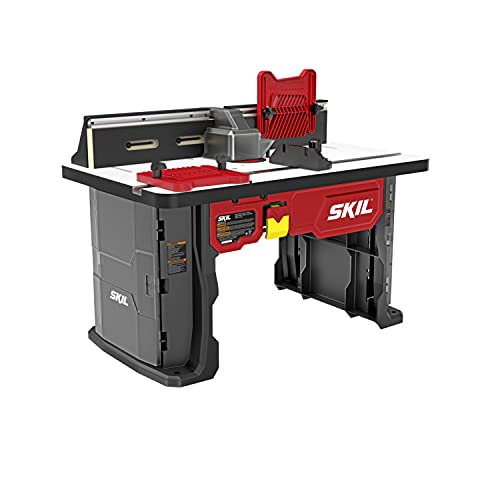
Pros
- Above-table adjustment system saves time and makes bit changes far more convenient than traditional under-table methods
- Integrated bit storage case eliminates clutter and keeps frequently-lost router bits easily accessible
- Large, smooth work surface and long fence accommodate longer pieces and complex routing tasks
- Two featherboards and adjustable guides significantly reduce kickback risk and improve cut quality
- Compact footprint makes it practical for small shops, garages, or mobile workshop setups
Cons
- Requires a SKIL router (RT1323-00 or RT1322-00) or compatible model; universal clamp may not work equally well with all router brands
- MDF table surface and fence face plates require occasional maintenance and may wear faster than solid wood or metal alternatives with heavy use
The SKIL SRT1039 brings professional router table capabilities to DIYers with limited workshop space. Its standout feature is the above-table router lift adjustment, which eliminates the frustration of reaching underneath to change bits or make micro-adjustments. Combined with the integrated dual-sided bit storage case, this table keeps your most essential tools organized and accessible right where you need them.
The work surface measures 26 by 16 inches with a smooth MDF top and aluminum miter gauge slot, providing a stable platform for routing both small detail work and longer workpieces. The 24-inch fence features adjustable MDF face plates and accepts two featherboards, which significantly enhance safety and cut quality by controlling material movement and reducing kickback risk. These edge guides are essential for anyone prioritizing safer, more controlled routing operations.
Built as a benchtop unit, the SRT1039 fits easily into compact garages, basements, or mobile workshop setups without sacrificing core functionality. The universal quick-clamp system accommodates most major router brands, though it's optimized for SKIL models. While the MDF surfaces require occasional maintenance and may show wear with heavy use, the overall design delivers solid value for hobbyists and serious DIYers seeking precision routing without a full-size cabinet table investment.
| Specification | Details |
|---|---|
| Brand | SKIL |
| Model | SRT1039 |
| Type | Benchtop Portable Router Table |
| Table Surface Size | 26" L x 16" W |
| Table Material | Smooth MDF |
| Miter Gauge Slot | Durable Aluminum |
| Fence Length | 24 inches |
| Fence Face Plates | Adjustable MDF |
| Router Mounting | Universal Quick-Clamp (fits most major brands) |
| Compatible Routers | SKIL RT1323-00 & RT1322-00 (optimized) |
| Included Accessories | Dual-sided integrated bit storage case, 2 featherboards, adjustable edge guides |
| Router Not Included | Yes |
Setup and Installation: Assemble the table on a stable, level work surface. Secure your router to the mounting plate using the quick-clamp system, ensuring it's firmly tightened. Install the miter gauge in the aluminum slot and position the fence at your desired distance from the router bit.
Adjusting the Router Bit: Use the above-table adjustment knob to raise or lower the router bit to your target depth. This eliminates the need to reach under the table, making adjustments faster and safer. Always unplug the router before making adjustments.
Using the Featherboards: Position the two featherboards along the fence and table surface to guide your workpiece and prevent kickback. Tighten the clamps securely. The featherboards should apply gentle, even pressure without forcing the material.
Routing Your Workpiece: Feed the material steadily against the fence and featherboards with the router running. Let the bit do the work; avoid forcing the piece. For longer workpieces, use the extended fence for better support and control.
Before Operation: Always unplug the router before installing, removing, or adjusting bits. Inspect the bit for cracks or damage. Ensure the table is on a stable, level surface and all clamps are tight. Wear safety glasses and a dust mask when routing.
During Operation: Never reach over or under a spinning router bit. Keep hands and fingers well away from the bit at all times. Always use the featherboards and edge guides as intended to control material movement. Feed workpieces steadily without forcing them; let the bit set the pace.
Kickback Prevention: The two included featherboards are your primary defense against kickback. Position them correctly and keep them tight. Never remove or disable the featherboards during operation. If the bit catches the material, immediately stop the router and assess the situation before continuing.
After Use: Unplug the router and allow the bit to come to a complete stop before removing the workpiece. Store router bits in the integrated storage case to keep them organized and prevent accidental contact. Keep the table clean and free of dust and debris.
Maximize Precision: Before routing, make a test cut on scrap material identical to your workpiece. This lets you verify bit depth, fence position, and featherboard pressure without risking your final piece. Fine-tune all settings with the router off, then make your actual cut.
Extend Your Fence: For routing longer pieces, temporarily attach a straightedge or auxiliary board to the existing fence using clamps. This provides extra support and guidance for pieces longer than the standard fence, improving both safety and cut quality.
Maintain Your Table: The MDF surfaces will eventually show wear. Protect the table top with a thin layer of paste wax, which reduces friction and extends surface life. Periodically check all clamps and fasteners to ensure they remain tight, especially after extended use.
Bit Storage Organization: Use the integrated dual-sided storage case to separate bits by type and size. Keep frequently used bits in the most accessible slots. Label each slot if you work with many bits, making selection faster and reducing confusion during setup.

Pros
- Excellent vibration dampening from MDF construction results in smoother, cleaner routing
- Adjustable fence with jointing capability allows for professional-grade edge work and rabbets
- Portable design lets you move it between projects or store it when space is tight
- Universal router compatibility means you can use routers you already own
- Sturdy construction provides the stability needed for precision work without wobbling
Cons
- Lacks built-in dust collection system, requiring a separate shop vacuum setup for cleanup
- 16-inch height may require additional support surface or stand for some users to achieve comfortable working position
The Kreg PRS2100 delivers professional-grade routing performance in a portable, benchtop-friendly package. The MDF top with micro-dot skin is engineered to minimize vibration and chatter, which translates directly to cleaner cuts and better surface quality on your workpieces. This is a meaningful advantage over basic router tables, especially when working with delicate profiles or edge details where vibration can ruin your finish.
The adjustable fence system stands out for its versatility. Sliding faces let you fine-tune fence position for different bit sizes, and the jointing capability is particularly useful for edge-banding and rabbeting work. Locking levers keep everything secure during operation, and the universal insert plate design means you can mount most standard routers without modification. The 16-inch height is practical for benchtop work, though taller users may want to elevate the table on a stand for extended sessions.
Build quality is solid throughout. Edge-banding protects the MDF edges from damage and moisture, and the overall frame feels stable under load. This is a realistic investment for serious DIYers and small-shop woodworkers who want routing capability without the expense and space demands of a full-size cabinet table. It's particularly well-suited for cabinetry, edge profiling, and decorative routing work where precision and clean results matter.
| Feature | Details |
|---|---|
| Model | Kreg PRS2100 |
| Table Height | 16 inches |
| Top Material | Edge-banded MDF with micro-dot skin |
| Router Compatibility | Most standard routers with universal insert plate |
| Fence Type | Sliding faces with locking levers and jointing capability |
| Portability | Benchtop portable design |
| Vibration Control | Low-friction MDF construction for reduced chatter |
| Insert Plate | Adjustable leveling for accuracy |
Setup and Installation: Place the router table on a sturdy workbench or stand. Secure it if needed to prevent shifting during operation. Mount your router to the universal insert plate according to the plate's instructions, ensuring the bit height is properly adjusted. Install your router bit and set the fence position based on your project requirements.
Basic Routing: Always wear eye protection and hearing protection. Feed workpieces against the direction of bit rotation (typically left to right for the fence). Start with light passes and make multiple shallow cuts rather than one deep cut for better control and cleaner results. Use push sticks or featherboards to keep hands safely away from the bit, especially on narrow stock.
Fence Adjustment: Use the sliding fence faces to position the fence for your desired bit exposure. The jointing capability allows you to align the fence with the bit for edge-banding and rabbeting. Lock the fence firmly with the locking levers before routing. For edge profiling, position the fence to support the workpiece while allowing the bit to cut the desired profile.
Essential Safety Practices: Always unplug the router before installing or changing bits. Never reach over or near the spinning bit. Use featherboards or push sticks to guide workpieces and keep hands at a safe distance. Wear safety glasses to protect against flying debris and hearing protection to guard against router noise.
Workpiece Control: Secure longer workpieces with clamps or stops to prevent kickback. Never freehand short pieces or narrow stock near the bit. Use a push stick with a notch designed to grip the workpiece safely. Feed the workpiece smoothly and steadily without forcing it, as this reduces strain on the motor and improves cut quality.
Workshop Setup: Ensure adequate lighting around the table so you can see the bit and workpiece clearly. Connect a shop vacuum or dust collection system to manage chips and dust. Keep the work area clear of clutter and tripping hazards. Never leave the router running unattended, and always turn it off and wait for the bit to stop before removing your workpiece.
Achieving Smooth Cuts: The low-vibration design of this table is a real asset, but you can maximize it by ensuring your workbench is solid and level. Use sharp bits and replace them when they become dull, as dull bits cause more vibration and chatter. Make multiple shallow passes rather than one deep pass for edge profiles and detailed work. This approach reduces stress on the motor and produces noticeably cleaner results.
Fence Mastery: Take time to dial in your fence position precisely. A fence that's even slightly misaligned will produce uneven cuts. The jointing capability is excellent for edge-banding work, where the fence needs to be flush with the bit at the cutting depth. Use featherboards to hold the workpiece firmly against both the fence and table during routing, which ensures consistent depth and prevents drift.
Bit Selection and Setup: Different bits require different speeds and feed rates. Larger bits and profiles typically run at slower speeds, while smaller bits can run faster. Always check your router's manual and the bit manufacturer's recommendations. Keep a variety of bits on hand so you can choose the right tool for each task rather than forcing a bit that's not ideal. Proper bit selection combined with this table's stable platform will dramatically improve your results.

Pros
- Exceptional precision control at 1/64 inch increments eliminates guesswork in bit depth adjustment
- Hard-anodized aluminum plate won't sag or warp, maintaining accuracy session after session
- Wide router compatibility spans Kreg tables and many third-party router table systems
- Anti-backlash design ensures adjustments translate directly to cutting depth without drift
- Significantly reduces setup time on repeat cuts and production work
Cons
- Limited to routers with compatible mounting systems; some older or specialty router tables may require adapter investigation
- Premium pricing reflects quality construction but may exceed budget for casual hobbyists with minimal router table use
The Kreg PRS5000 Precision Router Lift represents a meaningful upgrade for woodworkers and DIYers who operate router tables regularly. The standout feature is the 1/64 inch adjustment capability, which translates to repeatable, accurate bit depth control that's virtually impossible to achieve through manual adjustment alone. This level of precision matters most when making multiple identical cuts, running production batches, or dialing in finishes where bit height directly affects surface quality.
The hard-anodized aluminum plate is engineered to resist the warping and sagging that plague lesser router table inserts over time. A flat, stable plate is foundational to router table accuracy, and this component delivers durability that justifies the investment. The anti-backlash compensation system ensures that when you turn the adjustment mechanism, the bit actually moves to the depth you set, eliminating the frustrating play that can cause inconsistent cuts across multiple passes.
Compatibility spans 20+ router models, making the PRS5000 a viable upgrade for many existing router table setups rather than forcing a complete system replacement. For woodworkers who value consistency, repeatability, and reduced setup time, this lift system pays dividends through improved results and faster workflow. It's not essential for occasional users, but it becomes invaluable for anyone who treats their router table as a primary workshop tool.
| Specification | Detail |
|---|---|
| Brand | Kreg |
| Model | PRS5000 |
| Product Type | Router Table Lift System |
| Plate Material | Hard-anodized aluminum |
| Plate Dimensions | 3/8" x 9 1/4" x 11 3/4" (9.5mm x 235mm x 298mm) |
| Adjustment Precision | 1/64 inch increments |
| Router Compatibility | 20+ router models including Kreg tables and competitive brands |
| Key Feature | Anti-backlash compensation for accurate depth adjustment |
| Plate Finish | Hard-anodized (scratch and warp resistant) |
Installation: Mount the PRS5000 plate into your router table opening according to Kreg's instructions for your specific table model. The plate accepts your router from below, and the lift mechanism mounts underneath the table surface.
Setting Bit Depth: Loosen the router mounting hardware slightly. Turn the adjustment knob to raise or lower the router, watching your bit height above the plate. The 1/64 inch increments allow fine-tuning without overshooting. Tighten the mounting hardware once depth is set.
Repeatable Setups: Mark or note your adjustment knob position for frequently used bit depths. Return to that position for identical setups on future projects, eliminating the need to re-measure and re-adjust each time.
Maintenance: Keep the plate clean and free of dust. Periodically check that mounting hardware remains tight, as vibration can gradually loosen fasteners during extended use.
Create a Setup Log: Document your favorite bit depths and router heights for common operations (edge profiling, rabbeting, mortising, etc.). Record the adjustment knob position for each setup. This reference guide dramatically speeds future project setup and ensures consistency across multiple sessions.
Combine with Featherboards: Pair the PRS5000's precise depth control with quality featherboards and hold-downs to maximize the accuracy benefits. Precise bit height only reaches its potential when the workpiece is held firmly and consistently.
Test on Scrap First: Before committing to your project wood, always run a test pass on scrap using your new depth setting. This allows you to verify the adjustment is correct and make micro-refinements without risking expensive material.
Use the Anti-Backlash Feature: Always approach your target depth from the same direction (typically upward). This ensures the anti-backlash compensation system works as designed and prevents play from affecting your actual cutting depth.
Who Should Buy: The PRS5000 is ideal for serious DIYers and woodworkers who operate a router table regularly and value precision. If you make multiple identical cuts, run batches of components, or work with fine finishes where bit height directly affects results, this lift system delivers measurable value.
Who Might Skip It: Casual hobbyists who use a router table only occasionally may find the investment difficult to justify. Hand adjustment, while less precise, works adequately for one-off projects or rough operations.
Router Table Compatibility: Verify that your router table model is compatible with the PRS5000 before purchasing. Kreg provides a compatibility list, but if your table is from a less common brand, contact Kreg support to confirm fit before ordering.
Upgrade Timing: If you're building or upgrading a router table setup, installing the PRS5000 from the start is more cost-effective than retrofitting later. If you already own a router table, evaluate whether your current setup's accuracy meets your project needs before upgrading.
Router Table Buying Guide
Buying a router table is not simply picking the biggest or most expensive option. Several interconnected factors determine whether a table will actually improve your workflow or just take up space. Work through each consideration below before committing to a purchase.
Benchtop vs. Freestanding vs. Cabinet Style
Benchtop router tables are the most popular choice for hobbyists and serious home woodworkers alike. They clamp or sit on a workbench, cost less than freestanding systems, and store away when the shop needs to serve another purpose. Most weigh between ten and thirty pounds, making them genuinely portable. The tradeoff is a smaller tabletop footprint, which limits how far you can support long workpieces.
Freestanding and cabinet-style tables stand on their own legs and typically offer larger work surfaces, integrated storage, and better dust collection enclosures. They are the right pick for dedicated router tables in a permanent shop. If space is at a premium, a benchtop model paired with a solid workbench does the job for the vast majority of home woodworking tasks, including edge profiling, dadoes, and template routing.
Tabletop Material and Flatness
Tabletop material directly affects flatness, durability, and weight. Medium-density fiberboard covered with plastic laminate or melamine is the most common construction in benchtop tables, and it performs well: independent evaluations have found MDF tops flat within a few thousandths of an inch, which is more than adequate for woodworking. Cast aluminum, used on the Bosch RA1181, adds rigidity and resists moisture better than MDF. Cast iron is the flattest and most stable of all but adds significant weight and cost.
Look for a top with at least one miter-gauge slot so you can run a miter gauge or featherboard for guided cuts. A T-slot is more versatile than a standard groove because it accepts a wider range of accessories without requiring adapters.
Insert Plate and Router Compatibility
The insert plate is the removable panel that sits flush with the tabletop and holds the router. It needs to accept your router’s base-plate diameter. Most full-size routers use a base diameter somewhere between three and a half and four and a half inches, but always verify before purchasing. Plates with multiple ring inserts let you reduce the opening around the bit for better workpiece support and safer operation with smaller bits.
Leveling screws around the perimeter of the insert plate let you dial the plate perfectly flush with the tabletop. This detail matters more than it sounds: even a small lip at the plate edge can catch the workpiece mid-pass and ruin a cut or cause a kickback. Premium systems like the Kreg PRS5000 router lift build plate leveling and height adjustment into a single precision mechanism, which is a significant upgrade over basic fixed plates.
The Fence System
The fence guides the workpiece past the bit and is arguably the most-used component on the table. A good fence locks down firmly without shifting under feed pressure, adjusts quickly and accurately, and offers independent left and right face adjustment for bit clearance. Look for MDF or solid-wood replaceable fence faces, which you can notch for zero-clearance setups around specific bits.
Dust collection integration is increasingly built into fence bodies. A port that accepts a standard shop-vac hose, ideally two and a half inches in diameter, captures the majority of fine dust right at the source. This keeps your lungs safe and your workspace cleaner, and it matters especially when routing MDF or finishing-grade hardwoods. Pairing your router table with capable random orbital sanders for surface cleanup after routing makes the whole finishing workflow much more efficient.
Router Lift Systems
A router lift replaces the standard insert plate with a precision mechanism that raises and lowers the router from above the table using a crank handle. You no longer need to reach beneath the table, loosen a clamp, nudge the router by hand, and hope the bit height stayed where you set it. Instead, you turn a handle a few clicks and read the change on a calibrated scale. The Kreg PRS5000 is the benchmark in this category, combining a durable plate with repeatable, fine-threaded height adjustment that professional woodworkers rely on for consistent production runs.
Lifts add meaningful cost, so they make the most sense if you change bit heights frequently, run the same profiles repeatedly, or want to eliminate the frustration of imprecise adjustments. For occasional hobby use, a quality fixed-plate setup with leveling screws is perfectly adequate.
Safety Features
Router tables spin bits at very high RPM, which demands respect. Look for a table that includes a starting pin for freehand routing, guard over the bit, and a clear method to mount featherboards on both the fence and the tabletop. On-table power switches with large paddle-style off buttons allow you to cut power instantly without reaching for the router itself. Some complete kits, including the SKIL RT1323-01, build in a soft-start router motor that ramps up speed gradually, reducing the torque spike that can cause the workpiece to jerk at startup.
As with any stationary power tool, proper eye and ear protection are non-negotiable. If you are setting up a broader workshop, a quality angle grinder for metal prep work and sharp chisels for cleaning up joints by hand round out the toolkit that works alongside a router table.
Portability and Storage
If your shop doubles as a garage, a laundry room, or any shared space, portability matters. The lightest benchtop tables, often aluminum-framed designs, come in under fifteen pounds and have footprints compact enough to fit on a shelf. MDF-topped benchtops typically land in the twenty to thirty-five-pound range, which is manageable but not something most people carry to a job site. True portability requires an aluminum or polymer construction, a compact footprint under twenty by fifteen inches, and ideally a carry handle.
The Woodpeckers StabilMaxRT+ is an interesting outlier in this category: it is designed to switch quickly between handheld and table-mounted routing, giving you the best of both configurations without maintaining two separate setups. For woodworkers who value flexibility and do not want a permanent dedicated machine, that kind of system is worth evaluating seriously.
Complete Kits vs. Table-Only Purchases
Some router tables are sold as standalone units that require you to supply your own router. Others, like the SKIL RT1323-01, bundle a fixed-base router, featherboards, a miter gauge, and sometimes additional bits into a single package. Kit purchases simplify the compatibility question and often represent better overall value than sourcing each component separately. The tradeoff is that you are locked into the included router’s power and feature set. If you already own a quality router, a table-only purchase lets you pair your preferred tool with the best table for your workspace.
Woodworkers building out a full shop often find that a router table complements other stationary and portable tools. Track saws handle long rip cuts and panel breakdown, while a router table takes over for profiling and joinery work that a circular saw cannot accomplish. Jigsaws fill the gap for curved cuts, making the three tools a natural trio for a versatile workshop.
Why Trust HomeThru
HomeThru is an independent review platform with no ownership stake in any brand, retailer, or manufacturer. We do not sell products, process orders, or handle returns. Our editorial team independently researches, analyzes, and compares products using publicly available specification data, verified purchase reviews from thousands of buyers, material science principles, and category expertise built over years of covering woodworking and power tools. We apply the same evaluation framework to every category, from belt sanders for woodworking to reciprocating saws for demolition, so our recommendations reflect consistent standards rather than sponsored preferences.
For router tables specifically, our research covered tabletop flatness metrics, insert plate compatibility across popular router models, fence system rigidity under load, dust collection effectiveness, and the practical value of premium features like router lifts. We cross-referenced expert woodworking community consensus with aggregate buyer feedback to identify which tables hold up over years of regular use and which cut corners in ways that become frustrating quickly. Every product in this roundup earned its place on merit, and no manufacturer paid for inclusion or influenced our rankings.
Final Thoughts
The best router table for your shop depends on how much space you have, what router you own or plan to buy, and how precise your work needs to be. For most home woodworkers, a sturdy benchtop model with a good fence and a leveled insert plate covers the full range of hobby and light professional tasks. Those who change bit heights constantly or run production quantities of identical profiles will find the investment in a precision lift system pays back quickly in time and accuracy.
Here are the standout picks from this roundup:
- Best Overall: BOSCH RA1181 Benchtop Router Table delivers a cast aluminum top, a wide-compatibility fence system, and broad router acceptance in a package that has earned the trust of thousands of woodworkers across years of real use.
- Best Complete Kit: SKIL RT1323-01 Router Table and Fixed Base Router Kit bundles a capable ten-amp router with a well-designed benchtop table, featherboards, and a miter gauge, eliminating the compatibility guesswork for new router table buyers.
- Best Premium Benchtop: Kreg PRS2100 Bench Top Router Table stands apart for its micro-dot skin surface, plate levelers, and sliding fence face system, making it the most refined benchtop option for serious hobbyists who want near-professional results.
- Best Router Lift: Kreg PRS5000 Precision Router Lift is the upgrade component that transforms any compatible router table into a precision machine, with repeatable above-table height adjustment that eliminates the guesswork of manual router positioning.
- Best Budget-Friendly Entry: SKIL SRT1039 Benchtop Portable Router Table offers a compact, affordable starting point for woodworkers who want to explore table routing without committing to a premium price.
Whatever level of woodworking you pursue, adding a router table to your shop opens up techniques that are simply not practical with a handheld tool alone. Pair your new setup with sharp bits, proper dust collection, and good shop lighting, and you will wonder how you worked without one. If you are expanding your power tool collection further, cordless circular saws and cordless drills round out a capable and versatile woodworking arsenal for both shop and site work.
Frequently Asked Questions
Do I need a special router to use a router table?
Most full-size fixed-base and plunge routers with a base diameter between three and a half and four and a half inches are compatible with the majority of benchtop router tables, but always verify the insert plate opening before purchasing. Compact or trim routers may require a table designed specifically for smaller bases. Tables sold as complete kits eliminate this concern entirely since the router and plate are pre-matched.
What router bit shank size should I use in a table setup?
Half-inch shank bits are strongly preferred for table routing. They are stiffer than quarter-inch shanks, which reduces vibration and deflection at the cutting edge, especially during heavy profiling passes. Quarter-inch shanks are fine for light detail work but can flex under lateral load when cutting larger profiles, which affects cut quality and can stress the router collet over time.
Can a benchtop router table handle the same work as a full-size freestanding table?
For most hobbyist tasks including edge profiling, dadoes, rabbets, raised panel work, and template routing, yes. The primary limitation of benchtop models is the smaller tabletop, which makes it harder to support long boards without outfeed tables or roller stands. A well-built benchtop table with a quality router and a sharp bit produces results that are indistinguishable from a freestanding setup on shorter workpieces. For dedicated production work with large panels, a freestanding unit is worth the investment. Tile saws and other stationary tools operate on the same principle: a compact benchtop version handles most tasks, while a freestanding machine serves production demands.
How important is dust collection on a router table?
Extremely important. Routing generates fine dust that stays airborne for minutes, and when routing MDF or hardwoods, the particles are fine enough to reach deep into the lungs. A fence with an integrated dust port connected to a shop vacuum captures the majority of dust at the source. Without dust collection, you will spend significant time cleaning up and expose yourself to unnecessary respiratory risk. Always run dust collection when routing, even for short sessions.
Is a router lift worth the extra cost for a home woodworker?
It depends on how often you change bit heights. If you run the same profile repeatedly and rarely adjust, a standard leveled insert plate is sufficient. If you frequently swap between multiple bit heights within a single project, a router lift like the Kreg PRS5000 pays back its premium in time saved and frustration avoided. Above-table adjustment is a genuine quality-of-life upgrade, not just a luxury for professionals. Many serious hobbyists consider it one of the best investments they have made in their shops. Pairing a lift with impact drivers for assembly work and hammer drills for jig installation rounds out a productive woodworking workflow.