A reliable security camera can be the difference between peace of mind and a sleepless night. Whether you want to watch over your front door, monitor a backyard, or keep tabs on an entire property, the market in 2026 offers an impressive range of options, from budget-friendly single cameras to fully wired multi-camera systems with professional-grade resolution. Our team at HomeThru researched and analyzed dozens of models, narrowing the field down to the 11 best security cameras available today, spanning brands like Ring, Blink, REOLINK, eufy Security, aosu, ANSQUE, ANNKE, and HITELLARCAM. Whether you are a renter who needs a simple plug-and-play solution or a homeowner ready to invest in a comprehensive surveillance setup, this guide covers every scenario. While security cameras are a focused purchase, homeowners planning larger renovation or DIY projects may also find value in having reliable cordless drill sets on hand for mounting brackets and running cable.
Our Top Picks for Security Cameras

Pros
- Color night vision provides clear footage in low-light conditions, not just grayscale
- Physical privacy cover offers genuine peace of mind without relying on software toggles
- Simple setup and flexible mounting make it accessible for renters and homeowners alike
- Customizable motion detection zones reduce alert fatigue from irrelevant movement
- Compact footprint and lightweight design work in tight spaces or high-mounted positions
Cons
- Ring Protect subscription is required to unlock key features like video history scrollback and AI-powered alerts
- 1080p resolution is adequate but not exceptional compared to newer 2K and 4K competitors in the same price range
The Ring Indoor Cam is a straightforward security solution for homeowners and renters seeking basic indoor monitoring without complex installation. The 1080p HD video paired with color night vision delivers usable footage in most household lighting conditions, and the Advanced Pre-Roll feature captures a few seconds before motion events, giving you better context about what triggered the alert. Real-time notifications arrive quickly, and the ability to customize detection zones means you can focus on entry points or high-traffic areas while ignoring false alerts from ceiling fans or window reflections.
What sets this camera apart is the physical privacy cover, a simple swivel mechanism that lets you disable both video and audio instantly without opening an app or trusting software switches. For households with privacy concerns, this tangible control is genuinely valuable. The flexible mounting options and lightweight design make repositioning effortless, whether you're securing a nursery, office, or entryway. Alexa integration works smoothly, allowing voice commands and live viewing on Echo Show devices if you already own one.
The main limitation is that meaningful features like video history scrollback and advanced AI alerts require a Ring Protect subscription (sold separately). The 1080p resolution is also middle-of-the-road; newer models at similar price points offer 2K or higher. For basic motion detection and live viewing, however, the Ring Indoor Cam delivers reliable performance at an accessible price point, especially if you're already invested in Ring's ecosystem.
| Specification | Detail |
|---|---|
| Brand | Ring |
| Color | White |
| Video Resolution | 1080p HD |
| Night Vision | Color Night Vision |
| Dimensions | 1.93 x 1.93 x 3.75 inches |
| Weight | 0.16 pounds |
| Power | Plug-in (AC powered) |
| Mounting | Table or wall mount with flexible swivel |
| Privacy Control | Manual privacy cover |
| Smart Features | Motion alerts, customizable detection zones, Alexa integration |
| Quantity | 1 camera |
Setup and Installation
Plug the Ring Indoor Cam into a standard AC outlet near your desired monitoring location. Download the Ring app, create or log into your Ring account, and follow the in-app setup wizard to connect the camera to your home Wi-Fi network. The process typically takes 5-10 minutes and requires no technical expertise.
Mounting and Positioning
Use the included flexible swivel mount to position the camera on a shelf, table, or wall. The compact 1.93-inch width allows placement in tight corners or narrow shelves. For wall mounting, use the provided hardware and ensure the outlet is within reach of the power cable. Adjust the swivel to frame your desired viewing area, then test live view in the Ring app to confirm coverage.
Configuring Motion Alerts
Open the Ring app and navigate to the camera settings. Create custom motion detection zones by drawing on a preview image to specify which areas trigger alerts. This reduces false notifications from pets, plants, or activity outside your window. Adjust sensitivity levels based on your environment and test by walking through the monitored zone.
Using Privacy Mode
To disable the camera, simply swivel the physical privacy cover until it clicks into place. The cover disables both video and audio recording. Swivel it back to reactivate monitoring. This manual control works independently of the app, so you don't need internet or smartphone access to stop recording.
Optimal Placement for Maximum Coverage
Mount the camera 5-7 feet high at entry points or high-traffic areas to capture faces and body details. Avoid pointing directly at windows or bright light sources, which can cause glare and reduce night vision effectiveness. Test different angles in live view before finalizing the mount position.
Reduce Alert Fatigue
Use motion detection zones to exclude areas where you don't need alerts, such as outdoor windows or areas visible from neighboring properties. Start with high sensitivity and gradually lower it if you receive excessive false alerts from shadows or moving curtains.
Maximize Night Vision Performance
Position the camera where ambient light (from hallways, night lights, or outdoor sources) can reach the lens. The color night vision feature works best with at least minimal light in the room. Complete darkness may result in lower-quality footage.
Integrate with Your Smart Home
If you own an Echo Show, set up the camera to display live video when motion is detected. Use Alexa routines to trigger announcements or turn on lights when the camera detects movement, creating a more comprehensive security response.
Plan for Subscription Features
Consider whether you'll need a Ring Protect subscription for features like video history and advanced AI alerts. This helps you budget upfront and decide if the camera's value proposition aligns with your security needs.
Who Should Buy This Camera?
The Ring Indoor Cam is ideal for renters, apartment dwellers, and homeowners who need flexible, plug-and-play security without installation complexity. It works well for monitoring nurseries, home offices, basements, or entryways. If you already own Ring doorbells or other Ring products, this camera integrates seamlessly into your existing setup.
Who Might Want to Look Elsewhere?
If you require higher video resolution (2K or 4K), extensive cloud storage without subscription fees, or advanced AI features like person/package detection without extra cost, consider competing brands. Professional installers or those needing hardwired reliability may also prefer wired alternatives.
Key Considerations Before Purchasing
Internet Connectivity: The camera requires a stable 2.4GHz Wi-Fi connection. Test your Wi-Fi strength in the intended mounting location before buying.
Power Availability: Ensure an AC outlet is nearby and accessible. Extension cords work but may look unsightly.
Subscription Costs: Basic motion alerts are free, but video history and advanced features require Ring Protect (sold separately). Factor this into your total cost of ownership.
Privacy Preferences: If you value manual privacy controls, this camera's physical cover is a strong advantage. If you prefer app-only controls, this feature is less relevant.
Warranty and Support
Ring products typically include a one-year limited warranty. Check the product listing for current coverage details. Customer support is available through the Ring app and website.

Pros
- Exceptional battery longevity eliminates the hassle of frequent battery changes or charging docks
- Simple installation takes minutes with included mounting hardware and pre-paired cameras
- Cloud storage with free 30-day trial keeps footage secure and accessible from your phone
- Affordable multi-camera setup compared to traditional wired security systems
- Works seamlessly with Alexa for hands-free system control and monitoring
Cons
- Sync Module Core lacks local storage, requiring cloud subscription for footage retention beyond the trial period
- No microSD card or USB storage compatibility without upgrading to Sync Module XR or 2 (sold separately)
The Blink Outdoor 4 three-camera system strikes a solid balance between affordability and performance for homeowners seeking wireless outdoor security. With up to two years of battery life per camera using included Energizer lithium batteries, you'll spend less time on maintenance and more time enjoying peace of mind. The 1080p HD daytime video combined with infrared night vision ensures you capture clear footage around the clock, while the two-way audio lets you speak directly to visitors or deter unwanted activity from your smartphone.
Setup is genuinely quick, a major advantage for DIYers who want to avoid complicated installations. The included Sync Module Core pairs with all three cameras out of the box, and the mounting kits accommodate most outdoor surfaces. Enhanced dual-zone motion detection responds faster to activity, and the optional person detection feature (with Blink Subscription Plan) helps reduce false alerts from animals or wind-blown debris. Alexa integration opens up voice control and multi-camera viewing on compatible smart home devices, streamlining your security management.
One important consideration: the Sync Module Core doesn't include local storage, so you'll rely on cloud backup for footage retention. Blink offers a free 30-day trial of its subscription plan, but ongoing cloud storage requires a paid subscription. If you prefer local storage options, you can upgrade to the Sync Module XR with microSD card or Sync Module 2 with USB flash drive, though these are sold separately. For budget-conscious homeowners willing to embrace cloud storage, this system delivers excellent value and reliability.
| Specification | Details |
|---|---|
| Color | Black |
| Camera Count | 3 Outdoor 4 Cameras |
| Camera Dimensions | 1.58 x 2.76 x 2.76 inches |
| Camera Weight | 0.24 pounds each |
| Video Resolution | 1080p HD |
| Night Vision | Infrared |
| Battery Life | Up to 2 years |
| Battery Type | AA Lithium (6 included) |
| Hub Included | Sync Module Core |
| Local Storage | Not supported on Core module |
| Cloud Storage | Free 30-day trial, subscription required |
| Motion Detection | Dual-zone enhanced detection |
| Audio | Two-way talk |
| Smart Home Integration | Works with Alexa |
| Included Accessories | 3 mounting kits, USB-C cable, power adapter |
Getting Started: Download the Blink app and create an account. Insert the six AA Energizer lithium batteries into the three cameras (two per camera). Plug in the Sync Module Core using the included power adapter and USB-C cable. Open the Blink app and follow the pairing prompts to connect each camera to your Sync Module Core. The app will guide you through naming cameras and customizing motion detection zones.
Daily Operation: Use the Blink app to view live 1080p HD footage from any camera, enable or disable motion alerts, and adjust sensitivity settings. When motion is detected, you'll receive smartphone notifications. Tap any camera feed to watch live video, access recorded clips, or use two-way audio to speak to people near the camera. You can arm and disarm the system from the app or through Alexa voice commands if you have an Alexa-enabled device.
Maintenance: Monitor battery levels in the app (they typically last two years). When batteries approach depletion, the app will notify you. Simply replace the AA batteries in each camera as needed. Periodically check camera lenses for dirt or debris and wipe clean with a soft cloth. Ensure your WiFi signal reaches each camera location for reliable performance.
Is This System Right for You? The Blink Outdoor 4 three-camera system works best for homeowners who want affordable wireless security without the complexity of professional installation or expensive equipment. It's ideal if you have WiFi coverage around your property and prefer battery-powered cameras over hardwired systems. If you're comfortable using cloud storage and don't need local backup, this system delivers excellent value.
Before You Buy: Confirm your home WiFi reaches all camera locations, as these cameras require a strong 2.4GHz signal. Consider whether you want person detection (requires paid subscription) or basic motion alerts. If local storage is essential to you, budget for upgrading to Sync Module XR or 2 separately. Verify that your outdoor mounting locations can accommodate the compact 1.58 x 2.76 x 2.76 inch camera size and included brackets.
Budget Considerations: The three-camera system includes everything needed to start monitoring immediately. Cloud storage requires a Blink Subscription Plan after the 30-day trial ends. If you own Alexa devices, integration is free and adds significant convenience. For expandability, you can add more Outdoor 4 cameras to this system later, though each additional camera requires separate purchase.
Optimize Battery Life: Position cameras in locations with moderate sunlight to maximize battery performance. Avoid placing cameras in direct, intense sun or deep shade. Reduce motion detection sensitivity if you're in a high-traffic area to minimize false alerts, which drain batteries faster. Disable continuous live view monitoring when not needed.
Improve Video Quality: Keep camera lenses clean and free of dust, pollen, and spider webs. Position cameras at eye level or slightly higher for better facial recognition if using person detection. Ensure adequate outdoor lighting for nighttime video clarity, or rely on the infrared night vision in darker areas. Test camera angles before final installation to avoid blind spots.
Maximize Smart Home Integration: Create Alexa routines that arm your Blink system at specific times or when you leave home. Use multi-camera view on Alexa devices to monitor all three feeds simultaneously. Set up custom motion detection zones for each camera to focus on high-priority areas like doorways or driveways. Test two-way audio quality before relying on it for security purposes.

Pros
- Truly subscription-free with secure local storage means no hidden monthly fees or cloud dependency
- Solar power combined with battery backup provides year-round operation even during cloudy weather
- Automatic motion tracking and cross-camera correlation save significant time reviewing security footage
- 2K resolution with enhanced night vision delivers usable color footage in low-light conditions
- Simple installation and intuitive app control make this system accessible to non-technical homeowners
Cons
- No customer reviews available yet limits real-world performance validation from actual users
- Requires consistent sunlight exposure (3+ hours daily) which may be challenging for heavily shaded properties or northern climates
The aosu 4-camera wireless security system stands out in the crowded home security market by eliminating subscription fees entirely while delivering solid 2K resolution with color night vision. The solar-powered design is genuinely practical for most homeowners - three hours of daily sunlight keeps the system running indefinitely, and the included aosuBase provides encrypted local storage without relying on cloud services or monthly charges. This combination of features addresses two major pain points: recurring subscription costs and privacy concerns about cloud storage.
The 360-degree pan-and-tilt capability with automatic motion tracking represents a meaningful upgrade over fixed-position cameras, as it actively follows movement within the target area rather than simply recording static views. The ability to watch all four camera feeds simultaneously on one screen and control multiple cameras with a single click demonstrates thoughtful software design. Cross-camera event tracking is particularly useful - the system automatically correlates footage from the same time period across all cameras, significantly reducing the time needed to review incidents and understand what happened around your property.
Installation is genuinely straightforward, requiring only three anchor points and basic drilling skills. The 32GB local storage provides approximately four months of continuous loop recording, which is adequate for most residential security needs. The enhanced 4-LED night vision setup captures usable color footage rather than grayscale thermal imaging, making identification more reliable. For homeowners prioritizing privacy, reliability, and long-term cost savings over premium cloud features, this system delivers solid value.
| Specification | Details |
|---|---|
| Number of Cameras | 4 cameras included |
| Resolution | 2K (3MP) |
| Night Vision | Color night vision with 4 LED lights |
| Pan & Tilt Range | 360-degree coverage |
| Power Source | Solar-powered with rechargeable battery |
| Local Storage | 32GB (aosuBase) - up to 4 months loop recording |
| Subscription Required | No |
| Live Streaming | 4-camera quad view on single screen |
| Motion Tracking | Automatic motion detection and tracking |
| Installation | Wireless, 3-hole mounting, approximately 5 minutes |
| Colors Available | Black or White |
| Dimensions (per unit) | 19.7 x 11.8 x 19.3 inches |
| Weight (per unit) | 7.4 pounds |
Pre-Installation Checklist: Before mounting, identify four locations with adequate sunlight exposure (minimum 3 hours daily). Avoid heavily shaded areas, as solar charging depends on direct light. Ensure each location has clear line-of-sight to your WiFi router or plan for WiFi extender placement. Gather a power drill, appropriate wall anchors for your surface type (drywall, brick, or concrete), and a level.
Mounting Instructions: Mark three hole locations using the included mounting template. Drill pilot holes and install wall anchors if needed. Mount the camera bracket securely and attach the camera unit. The 360-degree pan-and-tilt mechanism should rotate freely without obstruction. Position cameras to maximize coverage of entry points, driveways, and perimeter areas. The quad-view display helps verify coverage overlap - adjust pan-and-tilt positions to eliminate blind spots between cameras.
Network Setup: Download the aosu app and follow the pairing wizard to connect each camera to your WiFi network. The aosuBase hub stores all recordings locally and manages notifications. Test live streaming from each camera angle and confirm motion tracking activates properly. Set recording schedules and notification preferences within the app. Allow 24-48 hours for the solar panels to fully charge the batteries before relying on the system for continuous operation.
Maximize Solar Charging: Position cameras on south-facing walls in the Northern Hemisphere for optimal sun exposure throughout the day. Clean solar panels monthly with a soft, damp cloth to maintain charging efficiency. During winter months with shorter daylight, consider supplemental placement or battery backup planning.
Optimize Motion Tracking: Calibrate the motion detection sensitivity based on your environment - higher sensitivity in quiet areas, lower sensitivity near busy streets or trees that move in wind. Use the cross-camera tracking feature to create a timeline of events, which is invaluable for identifying intruders or understanding incident sequences.
Leverage Quad-View Monitoring: Arrange your four cameras to cover all property entrances, then use the single-screen quad-view display during peak activity times (early morning, evening, nighttime). This approach provides comprehensive awareness without switching between individual camera feeds.
Storage Management: The 4-month loop recording cycle means older footage automatically overwrites. For important incidents, manually save or export video clips from the app to preserve evidence. Organize saved footage by date and incident type for easy retrieval.
Is This System Right for You? The aosu 4-camera system works best for homeowners who prioritize privacy, dislike subscription fees, and have adequate sunlight at their property. It's ideal for single-story homes, properties with clear sightlines, and users comfortable with basic app navigation. If your property is heavily shaded, receives less than 3 hours of direct sunlight daily, or you need 24/7 cloud backup and professional monitoring, consider alternative systems.
Key Decision Factors: Evaluate your property's sunlight exposure first - this is the primary constraint. Count your installation locations and confirm each has WiFi connectivity or plan for range extension. Assess your comfort level with local storage and app-based monitoring versus cloud-dependent systems. Consider whether 32GB storage (4 months of footage) meets your needs or if longer retention is critical.
Budget Considerations: This system eliminates monthly subscription costs, making it cost-effective long-term despite the higher upfront investment compared to budget alternatives. Factor in zero battery replacement costs due to solar power. Calculate potential savings over 3-5 years compared to subscription-based competitors.
Comparison Points: Unlike cloud-dependent systems, aosu prioritizes local storage and privacy. Unlike fixed-camera systems, the 360-degree pan-and-tilt provides active coverage. Unlike battery-only systems, solar power eliminates recurring maintenance. When comparing alternatives, prioritize which features matter most: subscription costs, privacy, ease of use, or advanced analytics.
Pros
- Solar charging eliminates battery maintenance and ongoing costs, saving time and money
- 4K clarity with license plate recognition provides actionable security footage for authorities
- Local storage on HomeBase 3 keeps your footage private without relying on cloud subscriptions
- AI-powered motion detection significantly reduces false alarms from weather or animals
- Pan and tilt functionality covers large areas without needing multiple cameras
Cons
- Requires consistent direct sunlight (2 hours daily minimum) which may be challenging in heavily shaded locations
- MicroSD card expansion requires separate purchase, and HomeBase 3 firmware updates are necessary for optimal performance
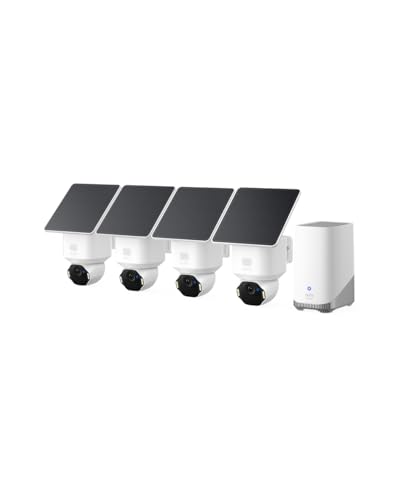
The eufy SoloCam E42 delivers impressive 4K clarity that goes beyond typical outdoor cameras, with the ability to recognize license plates from 33 feet away. This level of detail proves invaluable when documenting security incidents or providing evidence to authorities. The four-camera kit provides comprehensive coverage for most residential properties, and the pan-and-tilt functionality means you're not locked into a single viewing angle like traditional fixed cameras.
Solar charging via the SolarPlus 2.0 technology is a game-changer for wireless security systems. With just two hours of direct sunlight daily, the cameras maintain continuous operation without battery swaps or charging downtime. This makes the system genuinely maintenance-free, a major advantage over battery-dependent alternatives. The included HomeBase 3 hub expands storage to 16TB and enables continuous recording even during internet outages, ensuring your footage is always protected and accessible locally.
The AI motion detection and facial recognition features meaningfully reduce false alarms while the motion-activated strobe light serves as both a deterrent and notification system. The lack of monthly subscription fees combined with local storage options gives you complete control over your security data. For homeowners seeking a professional-grade wireless security system without recurring costs, the SoloCam E42 offers exceptional value and reliability.
| Specification | Details |
|---|---|
| Resolution | 4K UHD |
| Color | White |
| Dimensions | 14.5 x 10 x 6 inches |
| Power Source | Solar (SolarPlus 2.0) |
| Pan & Tilt | 360-degree coverage |
| Storage | HomeBase 3 with 16GB built-in, expandable to 16TB |
| Backup Storage | MicroSD up to 128GB (card not included) |
| AI Features | Motion tracking, facial recognition, vehicle detection |
| Alerts | Motion-activated strobe light and notifications |
| Subscription | No monthly fees required |
Location Selection: Choose mounting locations that receive at least 2 hours of direct sunlight daily for optimal solar charging. South-facing eaves, fence posts, and gable areas typically work well. Ensure cameras have clear sightlines to areas you want to monitor.
HomeBase 3 Placement: Install the HomeBase 3 hub in a central location with reliable WiFi coverage. This hub handles all local storage and processing, so proximity to your router matters. It can be placed indoors or in a protected outdoor location.
Initial Setup: Download the eufy app, create an account, and follow the pairing instructions to connect each camera to the HomeBase 3. Update the HomeBase firmware to V3.6.9.0 or later and the app to V5.0.80 or later for best performance. Configure motion detection zones and AI recognition preferences through the app settings.
Is This Right for You? The SoloCam E42 suits homeowners who want professional-grade security without monthly subscriptions, have adequate sunlight, and prefer local storage. It's ideal for monitoring multiple outdoor areas like driveways, patios, and yards.
Budget Considerations: While the upfront investment is higher than basic cameras, the elimination of monthly fees and battery replacement costs provides long-term savings. The four-camera kit covers most residential properties, reducing the need for additional purchases.
Sunlight Requirements: Before committing, assess your property's sunlight exposure. Heavily shaded locations may struggle to keep cameras charged during winter months. If sunlight is limited, consider supplemental solar panels or alternative power solutions.
Storage Needs: The 16GB built-in HomeBase 3 storage handles basic recording, but upgrading to higher capacity (recommended for continuous recording) requires additional investment. Plan your storage strategy based on recording frequency and retention needs.
Maximize Solar Charging: Keep camera lenses clean and free of dust or debris, which reduces light absorption. Position cameras to catch morning or afternoon sun rather than only midday rays, which can be blocked by clouds more easily.
Optimize AI Detection: Use the app's motion detection zones to focus on high-traffic areas like entryways and driveways, reducing false alerts from distant movement. Adjust sensitivity settings seasonally as vegetation and lighting conditions change.
Local Storage Strategy: Enable continuous recording on the HomeBase 3 for maximum coverage, but use the microSD backup in individual cameras as a secondary failsafe. Regularly review footage to ensure your system is capturing what matters most.
Maintenance: Check camera angles and cleanliness quarterly, especially after storms or seasonal weather changes. Update firmware when available to access performance improvements and security patches.
Pros
- 12MP resolution provides exceptional detail recognition at distance, ideal for identifying faces and license plates
- Intelligent detection algorithms minimize nuisance alerts from animals and passing vehicles
- Color night vision with scheduled spotlight operation balances security and power efficiency
- Expandable 16-channel NVR grows with your property without replacing the entire system
- Built-in two-way talk enables immediate deterrence and family communication
Cons
- Requires professional installation or significant DIY networking knowledge to set up properly, which adds time and potential complexity
- No reviews currently available, so real-world user feedback on long-term reliability and performance is limited
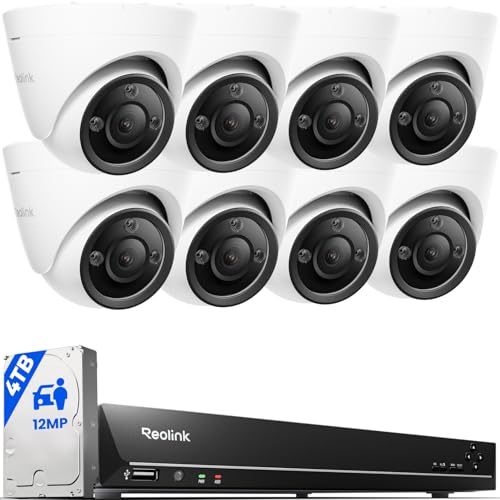
The Reolink 12MP PoE system represents a meaningful step up in home security technology. With 12MP resolution across all eight cameras, you're capturing details that standard 4MP or 8MP systems simply cannot match. This matters when you need to identify a person's face, read a license plate, or spot suspicious activity at the edge of your property. The hardware is built around a 16-channel NVR with 4TB of onboard storage, providing days of continuous recording before overwriting begins.
What sets this system apart is the combination of full-color night vision and intelligent detection. Rather than relying solely on infrared (which renders everything in grayscale), these cameras use built-in spotlights to illuminate your yard in full color after dark. You can schedule the spotlights to run continuously during certain hours, switch to IR mode during others, or activate them only when motion is detected. The AI-powered detection engine learns to distinguish between people, vehicles, and pets, which dramatically reduces the false alarms that plague many security systems and keep you from ignoring genuine threats.
The two-way audio feature and expandable architecture make this system practical for growing properties or changing security needs. You can add compatible cameras and wireless models later without replacing your core NVR. Installation does require running Ethernet cables for PoE power, which may involve some planning and effort depending on your home's layout, but this investment pays dividends in reliability and performance compared to Wi-Fi-only alternatives.
| Specification | Details |
|---|---|
| Camera Resolution | 12MP UHD |
| Number of Cameras Included | 8 |
| NVR Channels | 16 PoE ports, expandable to 24 channels |
| Storage | 4TB HDD |
| Night Vision | Full-color with motion-activated spotlights and IR LED mode |
| Detection Features | Person, vehicle, and pet detection with AI |
| Audio | Two-way talk via built-in speakers |
| Power Method | PoE (Power over Ethernet) |
| Color | White |
| Dimensions (NVR) | 16.93 x 14.57 x 13.98 inches |
| Codec | H.265 |
Network Setup: The NVR connects to your home network via Ethernet. Plan your cable runs before installation, as PoE cameras require dedicated Ethernet lines from the NVR to each camera location. Consider running conduit or using existing wall cavities to minimize visible cables.
Power Considerations: PoE eliminates the need for separate power adapters at each camera. The NVR supplies power through the Ethernet cables, simplifying both installation and maintenance. Ensure your NVR has adequate ventilation and is placed in a secure, climate-controlled location.
Camera Placement: Mount cameras at entry points, along property perimeters, and in areas with valuable assets. Ensure cameras have a clear line of sight to areas you want to monitor. Test spotlight and night vision performance before finalizing mounting positions, as spotlights may create glare on reflective surfaces.
Initial Configuration: After physical installation, access the NVR through the Reolink app or web client to configure recording schedules, detection zones, and alert settings. Enable person/vehicle/pet detection to minimize false alarms. Adjust spotlight schedules based on your neighborhood's ambient lighting and your security preferences.
Who Should Buy This System: This kit suits homeowners with medium to large properties who want professional-grade security without professional monitoring fees. It's ideal if you value clear identification over maximum camera count, or if you're willing to invest time in proper installation for superior performance.
When to Choose This Over Alternatives: Choose this system if you prioritize image clarity, intelligent detection to reduce false alerts, and expandability. The 12MP resolution justifies the investment if your property has long sightlines, multiple entry points, or if you need to identify specific individuals or vehicles. The PoE architecture is more reliable than Wi-Fi in areas with poor signal or interference.
Installation Reality Check: Budget time for running Ethernet cables throughout your property. If your home lacks existing conduit or accessible cable routes, installation complexity increases significantly. Professional installation is recommended unless you're experienced with network cabling and NVR configuration.
Long-term Considerations: With 4TB of storage and H.265 compression, expect 7-14 days of continuous recording depending on activity levels. Plan for occasional HDD upgrades as your retention needs grow. The expandable architecture means you can add cameras later without replacing your entire system, protecting your initial investment.
Optimize Night Vision Performance: Full-color night vision works best when spotlights can illuminate your target areas. Position cameras to avoid pointing directly at reflective surfaces like windows or metal siding, which can cause glare and washout. Experiment with spotlight scheduling to balance visibility with neighbor considerations and power consumption.
Leverage AI Detection Effectively: Take time to configure detection zones and sensitivity levels for your specific property. Exclude areas like streets or neighboring yards where vehicle and pet detection might trigger unnecessary alerts. The more refined your zones, the more useful your notifications become.
Plan for Expansion: Even if you're installing all eight cameras now, map out future camera locations. The expandable NVR means you can add cameras to blind spots or new property areas without replacing your core system. This flexibility saves money over time.
Network Security Matters: Change default passwords immediately and keep your NVR firmware updated. If you plan remote access through the Reolink app, use strong credentials and enable two-factor authentication. A security system is only as secure as its weakest access point.

Pros
- True 4K resolution with adjustable bitrate and Clear Stream mode for exceptional image quality
- Intelligent detection algorithms distinguish people and vehicles from false triggers like shadows and animals
- Straightforward PoE installation requires only one network cable per camera, ideal for DIY setups
- Substantial 4TB storage with upgrade flexibility reduces need for cloud subscriptions
- Reliable 24/7 recording ensures continuous protection without gaps
Cons
- Requires a 4K display or monitor to fully appreciate the resolution quality; standard displays may not showcase the clarity advantage
- Initial setup involves running network cables to each camera location, which can be labor-intensive in larger homes or complex layouts
The Reolink 4K PoE system stands out as a comprehensive security solution for homeowners who want professional-grade surveillance without recurring cloud fees. The 8MP resolution delivers genuinely useful clarity, allowing you to zoom into footage and identify details that 1080p systems simply cannot capture. When configured in Clear Stream mode with high bitrate settings on a 4K display, the image quality is noticeably superior for activities like reading license plates or identifying faces.
Installation is refreshingly straightforward compared to wireless or mixed systems. The PoE design means each camera connects via a single Ethernet cable that carries both power and data, eliminating the need for separate power adapters and reducing cable clutter. The 16-channel NVR with its pre-installed 4TB HDD is ready to record immediately out of the box, and the system supports up to 16TB of total storage if you need to expand later. The smart detection engine effectively filters out common false alarms by distinguishing people and vehicles from animals, shadows, and weather events.
Remote access through the free Reolink app works reliably, giving you the ability to check live feeds and review recorded footage from your phone or tablet anywhere with an internet connection. The system is well-suited for DIY installation by anyone comfortable running network cables through their home, and it delivers the kind of dependable 24/7 protection that security-conscious homeowners expect without requiring ongoing subscription costs.
| Specification | Detail |
|---|---|
| Camera Resolution | 8MP (3840 x 2160) 4K Ultra HD |
| Number of Cameras | 8 PoE IP Cameras |
| NVR Channels | 16-Channel (supports up to 16 cameras) |
| Storage Included | 4TB HDD (pre-installed) |
| Max Storage Capacity | Up to 16TB with additional HDDs |
| Video Codec | H.265 |
| Connection Type | PoE (Power over Ethernet) |
| Recording Mode | 24/7 or Motion-Triggered |
| Detection Features | Smart Person/Vehicle Detection |
| Remote Access | Free Reolink App (iOS, Android) |
| Streaming | WiFi, 3G/4G via App |
| Color | White |
| Weight | 28.66 pounds |
Planning Your Setup
Before running cables, map out camera locations around your home's perimeter and entry points. Identify the best location for the NVR (typically near your router or network panel). Measure cable runs and ensure you have adequate Ethernet cable length. PoE systems typically support cable runs up to 300 feet, but performance is best within 200 feet.
Running Network Cables
Use Cat6 or Cat6a Ethernet cable for optimal performance and future compatibility. Run cables from your network switch or PoE injector to each camera location. Drill small holes through exterior walls and use weatherproof conduit or cable glands where cables pass through. Label each cable at both ends to simplify configuration later.
Connecting and Configuring the NVR
Connect the NVR to your network using an Ethernet cable. Power on the system and access the web interface or use the Reolink app to configure cameras. Enable Clear Stream mode in settings for optimal 4K quality. Set up motion detection zones and configure which events trigger alerts. Test remote access through the app before finalizing your installation.
Maximize 4K Clarity
The full benefits of 4K resolution only appear on compatible displays. Connect your NVR to a 4K monitor or TV for monitoring, and enable Clear Stream mode in the camera settings. Standard 1080p monitors will display the footage but won't showcase the resolution advantage. Adjust bitrate settings based on your network bandwidth and storage needs.
Smart Detection Optimization
Configure detection zones to focus on high-traffic areas and entry points. Adjust sensitivity levels to match your environment. For example, homes near trees may need higher sensitivity thresholds to avoid false alerts from moving branches. Test your settings over a few days and refine based on actual alert patterns.
Storage Planning
Calculate your needs based on resolution, bitrate, and recording mode. 4K 24/7 recording consumes roughly 1-2TB per camera per month depending on settings. With 8 cameras, plan for 8-16TB monthly usage in continuous recording mode. Motion-triggered recording uses significantly less storage. Consider upgrading to 8TB or larger HDDs for longer retention periods.
Is This System Right for You?
This Reolink system excels for homeowners who want a complete, professional security setup with no monthly fees. It's ideal if you have reliable home internet, don't mind running network cables, and want local storage without cloud dependency. It's less suitable for renters who cannot modify wiring or users who prefer completely wireless systems.
Key Considerations Before Buying
Verify your home network can handle the bandwidth of 8 simultaneous 4K streams (typically requires 50-100 Mbps for high-bitrate recording). Ensure you have access to run Ethernet cables to desired camera locations. Consider whether you have adequate electrical power nearby for the NVR. Plan for storage expansion if you want retention beyond a few weeks.
Comparison with Alternatives
This system compares favorably to similar 4K PoE systems from competitors, offering competitive pricing with no subscription requirements. Wireless systems are easier to install but consume more power and may have connectivity issues. Lower-resolution systems cost less but provide significantly less usable detail for identification purposes. The 16-channel capacity gives you room to add cameras as your security needs evolve.

Pros
- Extended two-year battery life reduces the hassle of frequent replacements
- 2K resolution and color night vision provide detailed footage even in low light
- Weather-resistant IP-65 design handles outdoor conditions reliably
- Two-way audio with noise cancellation enables clear remote communication
- Generous 4x zoom helps you identify details without pixelation
Cons
- Smart detection features require a separate Blink Subscription Plan, adding ongoing costs
- No reviews available yet to assess real-world performance and reliability from actual users
The Blink Outdoor 2K+ represents a meaningful step forward in wireless home security. The 2K video resolution delivers noticeably sharper imagery compared to standard 1080p cameras, revealing fine details like facial features and license plate numbers. The color night vision feature is particularly impressive, requiring only ambient light to capture color footage before automatically switching to infrared black and white, which means you maintain visual context even after sunset.
Battery performance is where this system truly shines. The two-year battery life, powered by included Energizer lithium batteries, eliminates the annual battery-swap routine that frustrates many wireless camera owners. The IP-65 weather-resistant rating ensures the cameras withstand rain, dust, and temperature swings without performance degradation. Two-way audio with advanced noise cancellation allows you to communicate naturally with visitors, delivery personnel, or family members, making interactions feel immediate and personal despite the distance.
The five-camera bundle with integrated Sync Module Core provides a complete foundation for whole-home security coverage. The 4x zoom capability lets you verify package details or identify vehicles without losing image quality. Keep in mind that smart person and vehicle detection requires an optional subscription, and as a new model, real-world user feedback remains limited. For homeowners prioritizing battery longevity, video clarity, and weather durability, this system delivers solid wireless security infrastructure.
| Specification | Details |
|---|---|
| Brand | Blink |
| Model | Outdoor 2K+ |
| Color | White |
| Video Resolution | 2K |
| System Configuration | 5 Camera System with Sync Module Core |
| Camera Dimensions | 3.189 x 1.772 x 0.848 inches |
| Camera Weight | 0.096 pounds |
| Battery Life | Up to 2 years |
| Battery Type | AA 1.5V Lithium (Energizer, included) |
| Weather Rating | IP-65 (rain and dust resistant) |
| Audio | Two-way with noise cancellation |
| Zoom | 4x digital zoom |
| Night Vision | Color vision in low light, infrared black and white |
| Included Accessories | 5 cameras, 1 Sync Module Core, 10 AA lithium batteries, 5 mounting kits, power adapter, USB-C cable |
Is This Right for You? The Blink Outdoor 2K+ five-camera bundle is ideal if you need wireless security across multiple entry points without running electrical lines. The two-year battery life makes it perfect for homeowners tired of annual battery maintenance. If you live in a climate with heavy rain or dust, the IP-65 rating provides reliable protection.
Setup Considerations Installation is straightforward and takes minutes per camera. The included mounting kits and Sync Module Core get you operational quickly. You'll need Wi-Fi connectivity within range of the Sync Module Core for reliable performance. The bundle includes all batteries and power adapters needed to start, so no additional purchases are required for basic operation.
Optional Features Smart person and vehicle detection requires a separate Blink Subscription Plan. This subscription filters notifications to relevant motion events, reducing false alerts. Evaluate whether this subscription aligns with your security needs and budget before purchasing.
Maximize Night Vision Quality Position cameras where ambient light (porch lights, street lamps, moonlight) can reach them. This enables the color night vision feature and reduces reliance on infrared, which provides less detail. Even modest outdoor lighting significantly improves footage quality.
Optimize Battery Life Mount cameras at angles that minimize unnecessary motion detection from trees, traffic, or reflections. Excessive motion detection drains batteries faster. Adjust sensitivity settings in the Blink app to capture relevant activity while ignoring environmental movement.
Strategic Placement Use the 4x zoom to your advantage by positioning cameras slightly farther back. This reduces the need for multiple overlapping cameras and maximizes coverage per unit. Focus on entry points, driveways, and package delivery areas for maximum security benefit.

Pros
- Exceptional battery life of up to two years reduces maintenance and replacement hassles
- Five-camera system included with all necessary mounting hardware and batteries for immediate deployment
- Quick setup process gets your system running within minutes without technical expertise
- Person detection with optional subscription helps distinguish between real threats and motion
- Works with Alexa for convenient voice commands and smart home integration
Cons
- Sync Module Core lacks local storage; cloud storage requires a paid subscription plan after the free 30-day trial
- 1080p resolution is adequate but not as detailed as higher-end security cameras for reading fine details like license plates
The Blink Outdoor 4 five-camera system stands out as one of the most practical wireless security solutions for homeowners who want reliable outdoor monitoring without the complexity of wired installations or constant battery swaps. The two-year battery life, powered by included Energizer lithium batteries, is genuinely impressive and means you can install these cameras and largely forget about them until the batteries naturally deplete. The 1080p HD video quality is crisp enough for identifying visitors and general activity, while the infrared night vision ensures you maintain visibility even in complete darkness.
The dual-zone motion detection system is thoughtfully designed to minimize the false alerts that plague many budget security cameras, so you'll get meaningful notifications rather than being overwhelmed by every shadow or passing animal. Two-way audio adds a practical dimension, letting you speak to delivery personnel or warn away potential intruders directly from your phone. Integration with Alexa is seamless, giving you the ability to check multiple cameras simultaneously or arm and disarm your system using voice commands, which enhances both convenience and accessibility.
The main trade-off involves cloud storage, as the Sync Module Core doesn't include local backup without purchasing an upgraded module and storage device separately. Additionally, person detection requires an optional subscription plan, though the included 30-day trial lets you evaluate whether that feature justifies the ongoing cost for your household. For homeowners prioritizing ease of installation, long battery life, and multi-camera coverage at an accessible price, this system delivers solid value and peace of mind.
| Specification | Details |
|---|---|
| Brand | Blink |
| Model | Outdoor 4 |
| System Configuration | 5 Cameras |
| Color | Black |
| Camera Dimensions | 1.58 x 2.76 x 2.76 inches |
| Camera Weight | 0.24 pounds each |
| Video Resolution | 1080p HD |
| Night Vision | Infrared |
| Battery Life | Up to 2 years |
| Battery Type | AA Energizer lithium (10 included) |
| Audio | Two-way talk |
| Motion Detection | Dual-zone, enhanced |
| Person Detection | Yes (requires subscription) |
| Storage | Cloud (local storage requires additional module) |
| Smart Home Integration | Amazon Alexa compatible |
| Included Items | 5 Outdoor 4 cameras, Sync Module Core, 10 AA batteries, 5 mounting kits, USB-C cable, power adapter |
Getting Started - The Blink Outdoor 4 system is designed for quick deployment. Begin by downloading the Blink app and creating or logging into your account. Insert the included AA Energizer lithium batteries into each camera, then use the provided mounting kits to position cameras at entry points, corners, and other strategic locations around your property. The modular design means you can install all five cameras or start with fewer and add the rest later as your security needs evolve.
Sync Module Setup - Connect the Sync Module Core to power using the included USB-C cable and adapter. The module will guide you through pairing with your wireless network. Once connected, add each camera to the system through the app by scanning the QR code on the back of each unit. This entire process typically takes under 15 minutes, even for first-time users without technical experience.
Positioning Tips - Mount cameras 6-10 feet high at entry points like front doors, back doors, and garage areas. Ensure cameras have a clear view of the area you want to monitor and aren't obstructed by trees, bushes, or outdoor furniture. Test the live view and motion detection zones after installation to confirm adequate coverage and minimize false alerts from passing vehicles or wind-blown debris.
Is This Right for You? - The Blink Outdoor 4 five-camera system works best for homeowners who prioritize ease of installation, long battery life, and multi-camera coverage without the expense of professional monitoring or complex wiring. It's ideal if you want to protect multiple entry points, have a moderate-sized property, or prefer wireless cameras that don't require frequent maintenance. If you need ultra-high resolution for identifying specific details like license plates from a distance, or if you want entirely local storage without any cloud component, you may want to explore alternatives.
Budget Considerations - This bundle includes everything you need to get started, from cameras to mounting hardware to batteries. Plan for an optional subscription if you want person detection or cloud storage beyond the free 30-day trial. If you prefer local backup, budget separately for a Sync Module XR or Sync Module 2 with appropriate storage media. The long battery life means minimal ongoing operational costs compared to wired systems or cameras requiring frequent charging.
Smart Home Integration - If you already use Amazon Alexa, this system integrates smoothly for voice control and multi-camera viewing. For homes without Alexa, you'll rely entirely on the Blink app for access, which is still straightforward but slightly less convenient. Consider your existing smart home ecosystem when deciding whether this system aligns with your broader home automation goals.

Pros
- Advanced AI detection distinguishes between humans and vehicles, reducing false alarms from animals or moving objects
- Color night vision provides superior image clarity compared to traditional black-and-white infrared footage
- Durable IP67-rated construction handles rain, snow, and temperature swings without performance degradation
- H.265+ codec significantly reduces storage needs while maintaining video quality
- Multi-format camera compatibility gives you flexibility to mix camera types or upgrade individual units
Cons
- No customer reviews available yet, so real-world user feedback on long-term reliability is limited
- 1080P camera resolution, while adequate, trails behind higher-resolution 4MP or 5MP alternatives that capture finer detail
The ANNKE 3K Lite system brings intelligent surveillance technology to homeowners who want professional-grade monitoring without enterprise pricing. The standout feature is the AI 2.0 motion detection engine, which distinguishes between human intruders and vehicles versus pets or environmental movement. This smart filtering reduces the constant alerts that plague basic motion-detection systems, letting you focus on genuine security threats. The system's ability to search recordings by detection type also saves valuable time when reviewing footage after an incident.
Night vision performance is where this kit truly shines. The dual-light approach combines infrared capability (100 feet in black-and-white) with color night vision technology (66 feet in full color), giving you flexibility based on lighting conditions and your preference for detail versus range. Most budget systems force you to choose one or the other; ANNKE's implementation lets the cameras switch intelligently. The IP67 weatherproof rating ensures these outdoor cameras survive rain, snow, and temperature swings from freezing winters to scorching summers without degradation.
From a practical standpoint, the H.265+ compression is a genuine efficiency gain. It cuts storage requirements compared to older H.264 codecs, meaning your 1TB drive records longer before requiring deletion or upgrade. The DVR's multi-format compatibility is also valuable if you already own cameras or plan to mix brands during future expansions. The system supports both older analog standards and modern IP cameras, giving you a genuine upgrade path rather than forcing a complete replacement.
| Specification | Details |
|---|---|
| DVR Channels | 8 Channel |
| Camera Resolution | 1920 x 1080 (2MP) |
| DVR Resolution Support | 1080P at 30fps or 3K/5MP at 20fps |
| Video Codec | H.265+ |
| Storage Capacity | 1TB HDD (pre-installed, supports up to 10TB) |
| Night Vision - Infrared | Up to 100 feet (black-and-white) |
| Night Vision - Color | Up to 66 feet (full color) |
| Camera Rating | IP67 Weatherproof |
| Supported Camera Types | TVI, AHD, CVI, CVBS, IP |
| Detection Features | AI Human/Vehicle Detection 2.0 |
| Dimensions | 17.32 x 13.39 x 7.09 inches |
| Weight | 6.5 pounds |
| Color | Black |
Pre-Installation Planning: Before unpacking, identify eight outdoor locations with clear sightlines to areas you want monitored (driveway, front door, back patio, garage). Ensure each camera location has or can have a power outlet nearby, since these are wired cameras. Plan your DVR placement in a protected indoor location with good ventilation and network access.
Camera Mounting: The bullet cameras mount to walls or eaves using the included brackets. Position cameras at 8-10 feet high for optimal facial recognition and vehicle plate capture. Angle slightly downward to cover entry points and pathways. Ensure no trees or obstacles block the field of view, especially for night vision effectiveness. Secure all cables in conduit or clips to prevent weather damage and maintain a professional appearance.
DVR Setup: Connect the DVR to power and your home network via Ethernet. Insert the pre-installed 1TB hard drive (or your own if upgrading). Run camera cables from each location to the DVR using the appropriate connectors for your camera type. Power on the system and access the setup menu to configure recording schedules, detection zones, and mobile app notifications. The multi-format compatibility means you can mix camera types if needed, but verify your specific models match the supported standards.
Optimize AI Detection: Use the flexible detection area feature to exclude zones where false alarms occur (swaying trees, passing traffic). Focus human/vehicle detection on entry points and high-value areas. This reduces notification fatigue and makes the system more responsive to genuine threats.
Leverage Dual-Light Night Vision: In areas with ambient light (near streetlights or porch lights), enable color night vision for superior detail and evidence quality. In completely dark areas, switch to infrared mode to extend range to 100 feet. Some systems allow per-camera customization, so tailor each camera's setting to its specific environment.
Maximize Storage Efficiency: H.265+ compression is already enabled by default, but verify your DVR isn't set to maximum quality if storage is a concern. Consider upgrading to a 2TB or larger hard drive early if you want retention beyond 2-3 weeks. Enable motion-triggered recording on less-critical areas to extend retention on high-traffic zones.
Plan for Expansion: The 8-channel DVR can work with different camera formats, making it easy to upgrade individual cameras to higher resolution (3K or 5MP) without replacing the entire system. Keep this flexibility in mind if your security needs evolve.
Is This System Right for You? This kit works best for homeowners with 6-8 outdoor areas to monitor who want AI-powered detection and expandable architecture. If you're currently using a basic motion-detection system plagued by false alarms from pets or shadows, the AI 2.0 upgrade will significantly improve usability. The dual-light night vision is ideal for properties with mixed lighting conditions.
When to Consider Alternatives: If you need higher camera resolution (4MP or 5MP) for facial identification at distance, look for systems with those cameras included. If you prefer wireless cameras or cloud storage over local hard drives, this wired DVR system won't meet those needs. For properties requiring more than 8 channels, you'll need a different DVR model.
Upgrade Considerations: The 1TB hard drive provides roughly 2-3 weeks of 24/7 recording at 1080P. If you want 30+ days of retention, budget for a 4TB or larger upgrade. The 1920x1080 camera resolution is adequate for general surveillance but won't capture fine details like license plates at distance; if that's critical, plan to upgrade cameras to 3K or 5MP models later.
Long-Term Value: The multi-format compatibility means this DVR can grow with your needs. You're not locked into ANNKE cameras; you can mix brands or upgrade to better models without replacing the entire system. H.265+ compression also future-proofs your storage efficiency as you add more cameras or extend retention periods.

Pros
- No subscription fees or hidden charges, with built-in 32GB storage for 120 days of event recording
- Exceptional night vision with color accuracy 30% higher than standard 2K cameras, plus 40-foot detection range
- Intelligent AI tracking automatically follows people and links clips across multiple cameras for complete event context
- Solar-powered reliability with stable charging even in cloudy, rainy, or shaded conditions
- Whole-home coverage with dual-band Wi-Fi and custom detection zones to minimize false alerts from traffic
Cons
- No existing customer reviews available to verify real-world performance and reliability in varied weather conditions
- Learning curve required to optimize AI detection zones and cross-camera tracking features for your specific property layout
The ANSQUE 4-camera system addresses a common frustration for homeowners: the hidden costs of traditional security systems. With no subscription fees and 120 days of local event storage built into the base station, you're looking at genuine savings of roughly $200 per year. The system uses AES-128 encryption to keep your footage private even if a camera is stolen, which adds a meaningful layer of security beyond what many budget-friendly systems offer.
What sets this system apart is its 360-degree PTZ capability paired with AI auto-tracking. Rather than relying on static wide-angle shots, the cameras actively follow movement across your property and link video clips from the same time period across multiple cameras. This means you can see exactly how an intruder or delivery person moved from your front door to your backyard without blind spots. The 2K color night vision with smart IR and 8x digital zoom lets you capture fine details like license plates and package labels in real time, even in complete darkness up to 40 feet away.
Installation and daily operation are genuinely straightforward. The solar panels charge fully in just 2 hours of sunlight and maintain a 365-day battery cycle even in cloudy or shaded areas, eliminating the need for frequent maintenance. The dual-band Wi-Fi base station provides stable coverage across larger properties, and the mobile app allows you to switch between Home, Away, and Disarm modes with one tap, plus set custom detection zones to reduce false alerts from passing cars and pedestrians.
| Specification | Details |
|---|---|
| Brand | ANSQUE |
| Camera Count | 4 Cameras |
| Color | White |
| Dimensions | 4.33 x 5.91 x 7.87 inches |
| Weight | 8.5 pounds |
| Video Resolution | 2K HD |
| Night Vision | Color night vision with 8x digital zoom |
| Pan-Tilt-Zoom | 360-degree PTZ with auto-tracking |
| Power Source | Solar panel with 365-day battery life |
| Storage | 32GB local storage, 120 days event recording |
| Encryption | AES-128 |
| Wi-Fi | Dual-band 2.4GHz and 5GHz |
| Detection Range | 40 feet (12 meters) at night |
| Installation Time | 5 minutes |
| Subscription Fees | None |
Initial Setup: Mount the base station in a central location with Wi-Fi access. Download the ANSQUE app and follow the pairing wizard to connect your four cameras via the dual-band network. Attach the solar panels to each camera using the included 4-hole reinforced bracket, positioning them to receive at least 2 hours of direct sunlight daily.
Configuring Detection: In the app, use the custom detection zone tool to draw areas you want to monitor. This prevents alerts from passing vehicles and pedestrians on nearby streets. Enable AI auto-tracking so cameras follow movement across your property. Adjust the sensitivity of the PIR sensor based on your environment, especially if you have pets or frequent activity nearby.
Daily Operation: Switch between Home, Away, and Disarm modes using the one-tap controls in the app. Enable scheduled recording during your vacation or nighttime hours to increase security level automatically. Monitor live feeds from all four cameras simultaneously on one screen, or focus on individual camera angles. Use the 8x digital zoom to inspect suspicious activity in real time, such as license plates or package details.
Maximize Solar Charging: Position solar panels at a 45-degree angle facing south for optimal year-round charging, even in winter. Clean the panels monthly with a soft cloth to remove dust and debris, which can reduce charging efficiency by up to 20%.
Optimize AI Tracking: Set up custom detection zones to focus on high-value areas like your front door, driveway, and backyard entry points. Exclude zones where you expect frequent passing traffic to reduce false alerts and preserve battery life.
Network Stability: Place the AnsqueBase (signal booster) in a central location away from thick walls and metal objects. If you have a large property, the dual-band 5GHz network provides faster speeds for multiple simultaneous camera feeds, while 2.4GHz offers better range through obstacles.
Storage Management: Review event recordings weekly to familiarize yourself with normal activity patterns on your property. This helps you recognize genuinely suspicious behavior faster. The 120-day loop recording automatically deletes oldest footage when storage reaches capacity, so you don't need to manage files manually.
Who Should Buy This System? Homeowners and DIYers who want comprehensive surveillance without monthly subscription costs. Ideal for properties with multiple vulnerable areas like driveways, backyards, side gates, and pool areas. Works well for people who prefer local storage and privacy over cloud-based systems, and those willing to handle basic app setup.
Property Size Considerations: The dual-band Wi-Fi base station supports coverage across typical residential properties up to 2,000-3,000 square feet. Larger properties or those with dense landscaping may benefit from adding the base station as a dedicated signal booster rather than relying on your home router.
Climate Suitability: The solar panels charge effectively even in cloudy, rainy, and shaded conditions, making this system viable in most U.S. climates. However, properties with extremely limited sunlight (dense tree cover, north-facing walls) may struggle to maintain consistent charging. The 365-day battery cycle provides a buffer, but solar access remains important for long-term reliability.
Alternative Considerations: If you need cloud backup for critical footage or prefer professional monitoring, subscription-based systems may better suit your needs. If installation difficulty is a concern, this system's 5-minute setup process is genuinely beginner-friendly. Compare the annual savings from zero subscription fees against the upfront kit cost to confirm value for your budget.

Pros
- Exceptional battery longevity reduces recharging hassles and maintenance burden
- Free cloud storage plan saves money compared to subscription-based competitors
- Full-color night vision with built-in LED lights captures usable footage in complete darkness
- Easy app-based setup requires no technical expertise or professional installation
- Works with Alexa for seamless smart home integration and voice control
Cons
- Free cloud storage limited to SD quality; HD playback requires paid subscription upgrade
- No customer reviews available yet, so real-world performance data from actual users is limited
The HITELLARCAM 2K wireless outdoor camera stands out for its impressive battery endurance and practical feature set designed for homeowners who want reliable security without constant maintenance. The 2K resolution delivers sharp, zoomable footage, while the full-color night vision with integrated LED lights ensures usable video even in complete darkness, addressing a common weakness in budget security cameras that rely on grayscale infrared alone.
Setup is refreshingly straightforward through the mobile app, and the dual-band WiFi support (2.4GHz and 5GHz) accommodates different home network configurations. The AI-powered motion detection intelligently filters out false alerts from wind, shadows, and animals, sending real notifications only when genuine activity occurs. Two-way audio enables direct communication with visitors or delivery personnel, adding practical value beyond passive monitoring.
The free cloud storage plan is a genuine money-saver for budget-conscious homeowners, though it's important to note that free-tier footage is limited to SD quality, with HD requiring a paid upgrade. Local SD card storage (up to 256GB) provides a privacy-focused alternative for those who prefer keeping footage on-device. Battery life claims of up to 6 months depend heavily on motion detection frequency and environmental conditions, so real-world performance will vary by usage patterns.
| Specification | Details |
|---|---|
| Video Resolution | 2K Ultra HD (2560 x 1440) |
| Night Vision | Full-color with built-in LED lights |
| Battery Life | 1-6 months (depends on motion detection frequency) |
| WiFi Support | Dual-band: 2.4GHz and 5GHz |
| Storage Options | Free cloud storage (SD quality) + local SD card (up to 256GB) |
| Audio | Two-way talk with microphone and speaker |
| Motion Detection | AI-powered with instant phone alerts |
| Weather Rating | IP66 waterproof and dustproof |
| Smart Home Integration | Compatible with Alexa |
| Dimensions | 2.25 x 2.25 x 3.32 inches |
| Color | White |
Maximize Battery Life: Position your camera where motion detection will be triggered 5-8 meters away (the manufacturer's recommended detection range). Placing it too close to high-traffic areas increases motion events and drains the battery faster. Adjust sensitivity settings in the app to match your environment and reduce unnecessary alerts.
Optimize Night Vision: The built-in LED lights provide full-color footage in darkness, but avoid pointing the camera directly at reflective surfaces (windows, metal, wet pavement) that can wash out the image. Mount the camera slightly above eye level and angle it downward for better coverage of entry points and pathways.
WiFi Placement: Use the 5GHz band if your router is close to the camera for faster streaming and lower latency during two-way audio calls. Switch to 2.4GHz if the camera is farther away or if walls between the router and camera are causing weak signal. The dual-band support gives you flexibility to optimize for your specific home layout.
Storage Strategy: Pair the free cloud storage with a local SD card for redundancy. Keep critical footage in cloud storage and use the SD card as a backup. This protects against both device loss and cloud service interruptions.
Who Should Buy This Camera? The HITELLARCAM 2K is ideal for homeowners who want outdoor security without monthly subscription costs, prefer infrequent recharging, and need reliable night vision. It's a solid fit for monitoring entry points, driveways, and patios where battery-powered convenience outweighs the need for hardwired power.
Consider Alternatives If: You need continuous HD cloud recording (the free plan is SD-quality only), require multiple cameras with centralized management, or live in an area with extremely poor WiFi coverage. Wired cameras may be better if your installation location has consistent power access.
Key Considerations: Verify your home WiFi supports 2.4GHz or 5GHz (most modern routers do). Plan where you'll mount the camera to stay within 5-8 meters of typical motion activity. Confirm you have an SD card slot available if you want local backup storage. Understand that battery life varies significantly based on motion detection frequency, temperature, and recording mode, so real-world performance may differ from the 6-month maximum claim.
Security Camera Buying Guide
Shopping for security cameras involves more decisions than most people expect. Resolution, power source, storage method, night vision quality, and subscription costs all affect the long-term value of any system. Below we break down every factor worth considering before you buy.
Indoor vs. Outdoor Cameras
The single most important starting point is deciding where the camera will live. Indoor cameras, such as the Ring Indoor Cam, are designed for climate-controlled environments and typically come in a compact footprint that blends with home decor. Outdoor cameras must carry an IP weather-resistance rating, usually IP65 or IP67, to survive rain, humidity, and temperature swings. Both REOLINK and ANNKE cameras in this guide carry IP67 ratings, which means they are essentially dustproof and can handle sustained water exposure. If you plan to mount a camera under a shallow eave, a lightly rated indoor model may technically survive, but purpose-built outdoor cameras are a far safer long-term investment.
Wired vs. Wireless vs. Solar-Powered
Power source shapes everything from installation complexity to long-term reliability. Wired cameras, including PoE (Power over Ethernet) systems like the REOLINK RLK16-800D8 and RLK16-1200D8-A, draw power and transmit data over a single Ethernet cable. That means a stable connection and continuous recording without battery swaps. The trade-off is that running cable through walls requires some patience and the right tools. A sturdy claw hammer and a reliable utility knife both come in handy when fishing cable through drywall or trim.
Wireless battery-powered cameras like the Blink Outdoor 4 eliminate cable runs entirely. They are ideal for renters or anyone who wants a simple setup, but the two-year battery claim from Blink depends heavily on how often the camera triggers recordings. High-traffic areas will drain batteries faster. Solar-powered cameras such as the aosu and ANSQUE four-camera kits solve the battery problem by harvesting sunlight, though they require placement where the solar panel receives several hours of direct sun daily.
Video Resolution and Image Quality
Resolution determines how much detail you can actually read from footage. Standard 1080p HD, found on the Ring Indoor Cam and Blink Outdoor 4 models, delivers enough clarity to identify a person’s clothing and build at close range. Stepping up to 2K (roughly four megapixels) adds meaningful detail, particularly when you need to read a license plate or identify a face at ten or fifteen feet. The HITELLARCAM wireless camera and aosu four-camera kit both operate at 2K. At the top end, REOLINK’s 4K (8MP) and 12MP systems capture extraordinary detail across wide areas, which matters most on large properties where cameras cover long driveways or expansive backyards. Note that higher resolution also means larger file sizes and greater demand on local storage or cloud bandwidth.
Night Vision: Infrared vs. Color
Traditional infrared (IR) night vision produces black-and-white footage in low light and is the technology behind the Blink Outdoor 4’s nighttime performance. It works well for detecting motion and presence but sacrifices color detail that can be critical for identification. Color night vision, offered by the aosu, ANSQUE, ANNKE 3K Lite, and REOLINK 12MP systems, uses either a built-in spotlight or high-sensitivity sensors to produce full-color footage even in near-darkness. Color night vision is a meaningful upgrade if your camera covers a high-risk area such as a driveway or back gate where identifying clothing color or vehicle color matters. The eufy SoloCam E42 goes further with facial recognition built in, which requires no ongoing cloud subscription.
AI Detection: Reducing False Alerts
A security camera that alerts you every time a leaf blows past quickly becomes noise. Smart AI detection, which distinguishes between humans, vehicles, pets, and generic motion, dramatically reduces false notifications. Every system in our lineup includes some form of AI detection. The ANNKE DVR kit uses H.265+ compression paired with human and vehicle detection. REOLINK adds person, vehicle, and pet detection across its PoE lineup. The aosu and ANSQUE solar kits both offer 360-degree auto tracking, which physically pans the camera to follow a detected subject across the frame. The eufy SoloCam E42 takes AI the furthest with on-device facial recognition that stores a database of recognized faces locally, with no subscription required.
Local Storage vs. Cloud Storage
How footage is stored affects both privacy and ongoing cost. Cloud storage, used by Ring and Blink, requires a paid subscription for extended recording history beyond a very brief clip window. Subscription fees add up over the years and represent a real cost of ownership that the upfront camera price does not reflect. Local storage systems, including the ANNKE DVR kit (which ships with a one-terabyte hard drive) and both REOLINK NVR kits (which include a four-terabyte HDD), record continuously without monthly fees. The HITELLARCAM camera offers free cloud storage as well as support for a local microSD card. The eufy SoloCam E42 supports built-in local storage up to a very substantial capacity with zero cloud fees. For homeowners who are privacy-conscious, local storage means footage never leaves the property.
Two-Way Audio and Deterrence Features
Two-way audio lets you speak through the camera’s built-in speaker, which is useful for greeting a delivery driver, warning an intruder, or simply checking in on a family member. Every camera in this guide includes two-way talk. Beyond audio, several models add active deterrence features such as spotlight LEDs and a siren. The aosu, ANSQUE, and HITELLARCAM cameras all include a spotlight and a siren alarm that can be triggered automatically on motion detection or manually from a smartphone app. The REOLINK 12MP system adds both spotlights and two-way talk to its PoE cameras. These features transform a passive recording device into an active security tool.
Smart Home Compatibility
If your home already uses Amazon Alexa or Google Home, camera compatibility with those ecosystems adds real convenience. The Ring Indoor Cam integrates tightly with Alexa for live view on Echo Show displays. Blink cameras also work within the Amazon ecosystem. REOLINK, aosu, and eufy cameras rely primarily on their own apps but offer voice assistant shortcuts. Before buying, confirm that the camera works with your existing smart home hub or voice assistant to avoid a fragmented experience.
DVR and NVR System Considerations
For whole-home coverage, a DVR or NVR kit is far more cost-effective per camera than buying individual units. DVR (Digital Video Recorder) systems, like the ANNKE 3K Lite kit, use coaxial cable and work with analog cameras, making them compatible with some existing wiring. NVR (Network Video Recorder) systems, like both REOLINK kits, use PoE Ethernet and support higher-resolution IP cameras. If you are starting from scratch, NVR systems generally deliver better image quality and more flexible placement. Mounting multiple cameras cleanly will require some basic home improvement skills. Having a capable impact driver makes running screws into fascia boards, soffits, and exterior walls considerably faster. Keeping a set of tape measures nearby helps you plan cable runs accurately before cutting anything.
Pan, Tilt, and Field of View
Fixed cameras offer a static field of view, typically between 90 and 130 degrees, which means placement is critical and blind spots are real. Pan-and-tilt (PTZ) cameras can rotate horizontally and vertically to cover a much wider area from a single mounting point. The aosu, ANSQUE, and eufy SoloCam E42 all feature full 360-degree pan and tilt with auto-tracking, meaning they follow movement automatically. This makes them especially effective on large decks, driveways, or backyards where a fixed camera would require multiple units for similar coverage. If you are considering a PTZ camera for a high position like a roofline or peak mount, a reliable spirit level ensures the camera base sits perfectly plumb, which matters for accurate auto-tracking calibration.
Subscription Costs and Total Cost of Ownership
Many buyers focus exclusively on upfront camera price and overlook ongoing subscription fees. A budget camera that requires a monthly or annual subscription for any meaningful feature set may cost significantly more over three years than a pricier no-subscription system. When comparing options, add the estimated three-year subscription cost to the hardware price for a true apples-to-apples comparison. Systems from ANNKE, REOLINK, aosu, ANSQUE, eufy, and HITELLARCAM in this guide all offer meaningful functionality without mandatory subscriptions. Ring and Blink offer free basic features but restrict recording history, sharing, and AI alerts behind paid tiers.
Why Trust HomeThru
HomeThru is an independent review publication with no financial relationship with any manufacturer or retailer featured in this guide. Our editorial team researched and analyzed specifications, user feedback patterns, manufacturer documentation, and category trends to build this list. We do not accept payment for placement, and every product is evaluated on merit. Our methodology weighs real-world usability, value across the full ownership period, and the specific needs of homeowners at different budgets and property types. We apply the same rigorous, independent approach to every category we cover, whether that is surveillance equipment or reciprocating saw blades for a demolition project. If a product does not earn its place, it does not appear on our list. Our affiliate relationships with retailers help fund our research, but they never influence rankings or recommendations.
Final Thoughts
The best security cameras for your home depend on your property layout, your budget, and how much ongoing maintenance you are willing to accept. A renter in an apartment has very different needs from a homeowner monitoring a multi-acre property. After a thorough evaluation of all 11 options in this guide, here are our standout recommendations by use case.
- Best Overall: REOLINK 12MP PoE Security Camera System delivers the highest resolution, continuous local recording, color night vision, and two-way audio with no subscription fees, making it the most complete package for serious home security needs.
- Best Budget Pick: HITELLARCAM 2K Wireless Outdoor Camera offers an affordable entry point with free cloud storage, AI motion detection, a spotlight, and a siren alarm, making it genuinely capable for the price.
- Best for Renters and Apartments: Ring Indoor Cam is compact, easy to set up without tools, and integrates seamlessly with Amazon Alexa for a no-fuss indoor monitoring experience.
- Best No-Subscription Solar System: aosu Solar-Powered Security Camera Kit combines wire-free installation, 360-degree auto tracking, color night vision, and zero subscription fees into a four-camera package purpose-built for outdoor use.
- Best for Advanced AI Features: eufy Security SoloCam E42 4-Cam Kit stands apart with on-device facial recognition, pan-and-tilt auto tracking, 4K resolution, and massive local storage capacity, all without a cloud subscription requirement.
Whichever system you choose, we recommend taking time to plan your camera placement before drilling a single hole. Use a hand saw or appropriate cutting tool to trim cable conduit neatly, and rely on a circular saw if you need to cut mounting blocks or wooden brackets for non-standard surfaces. A well-planned installation extends the effective coverage of any camera system and prevents the frustration of blind spots discovered after everything is mounted. Security cameras are a long-term investment in your home and your peace of mind, and the right choice today will serve you reliably for years to come.
Frequently Asked Questions
Do I Need a Subscription for My Security Camera to Work?
Not necessarily. Many cameras in this guide, including those from REOLINK, ANNKE, aosu, ANSQUE, eufy, and HITELLARCAM, provide full or near-full functionality through local storage without requiring a monthly fee. Cameras from Ring and Blink offer basic live viewing for free but restrict access to recorded footage and advanced AI alerts behind a paid subscription. Before buying, check exactly which features are available for free versus locked behind a plan, since the upfront price alone can be misleading when ongoing fees are part of the real cost.
What Is the Difference Between DVR and NVR Systems?
A DVR (Digital Video Recorder) system processes video on the recorder itself and typically uses coaxial cable to connect analog cameras, as in the ANNKE 3K Lite kit. An NVR (Network Video Recorder) system connects to IP cameras over Ethernet, often using PoE to deliver both power and data through a single cable, as in the REOLINK kits. NVR systems generally support higher resolutions and more flexible camera placement. DVR systems can be a good choice when replacing or upgrading an older coaxial wiring infrastructure already in place.
How Many Cameras Do I Need to Cover My Home?
Most single-family homes can achieve meaningful coverage with four to eight cameras depending on property size and layout. Priority positions include the front door, back door, garage entrance, and any side gate or alley access. A four-camera solar kit like the aosu or ANSQUE options covers the core entry points of most suburban homes. Larger properties with long driveways, detached garages, or outbuildings benefit from the eight-camera PoE systems from REOLINK, which offer centralized local recording across more angles. Pan-and-tilt cameras can reduce the total count needed by covering wider areas from a single mount.
When mapping out mounting positions across multiple walls and roof lines, compact jigsaw kits help cut clean pass-through holes in siding or fascia, while a good random orbital sander smooths wood mounting blocks before painting them to match your exterior. Careful preparation at installation time prevents weatherproofing failures that can compromise both the camera and the structure it is mounted to.