A reliable wireless security system ranks among the smartest investments any homeowner or renter can make. Unlike traditional wired setups, today’s wireless options install in an afternoon without drilling through walls, connect directly to your smartphone, and scale up as your needs grow. Our editorial team at HomeThru independently researched and evaluated dozens of kits, camera systems, and hybrid setups so you can make a confident, informed purchase. Whether you want professional 24/7 monitoring, a fully local no-subscription solution, or solar-powered cameras that work without an electrician, there is a system in this guide built for your situation. The 10 picks below cover a wide range of budgets and home sizes, featuring options from SimpliSafe, Ring, Arlo, eufy Security, aosu, ANSQUE, and firstrend.
Our Top Picks for Wireless Security Systems

Pros
- Truly subscription-free with secure local storage means no hidden monthly fees or cloud dependency
- Solar power combined with battery backup provides year-round operation even during cloudy weather
- Automatic motion tracking and cross-camera correlation save significant time reviewing security footage
- 2K resolution with enhanced night vision delivers usable color footage in low-light conditions
- Simple installation and intuitive app control make this system accessible to non-technical homeowners
Cons
- No customer reviews available yet limits real-world performance validation from actual users
- Requires consistent sunlight exposure (3+ hours daily) which may be challenging for heavily shaded properties or northern climates
The aosu 4-camera wireless security system stands out in the crowded home security market by eliminating subscription fees entirely while delivering solid 2K resolution with color night vision. The solar-powered design is genuinely practical for most homeowners - three hours of daily sunlight keeps the system running indefinitely, and the included aosuBase provides encrypted local storage without relying on cloud services or monthly charges. This combination of features addresses two major pain points: recurring subscription costs and privacy concerns about cloud storage.
The 360-degree pan-and-tilt capability with automatic motion tracking represents a meaningful upgrade over fixed-position cameras, as it actively follows movement within the target area rather than simply recording static views. The ability to watch all four camera feeds simultaneously on one screen and control multiple cameras with a single click demonstrates thoughtful software design. Cross-camera event tracking is particularly useful - the system automatically correlates footage from the same time period across all cameras, significantly reducing the time needed to review incidents and understand what happened around your property.
Installation is genuinely straightforward, requiring only three anchor points and basic drilling skills. The 32GB local storage provides approximately four months of continuous loop recording, which is adequate for most residential security needs. The enhanced 4-LED night vision setup captures usable color footage rather than grayscale thermal imaging, making identification more reliable. For homeowners prioritizing privacy, reliability, and long-term cost savings over premium cloud features, this system delivers solid value.
| Specification | Details |
|---|---|
| Number of Cameras | 4 cameras included |
| Resolution | 2K (3MP) |
| Night Vision | Color night vision with 4 LED lights |
| Pan & Tilt Range | 360-degree coverage |
| Power Source | Solar-powered with rechargeable battery |
| Local Storage | 32GB (aosuBase) - up to 4 months loop recording |
| Subscription Required | No |
| Live Streaming | 4-camera quad view on single screen |
| Motion Tracking | Automatic motion detection and tracking |
| Installation | Wireless, 3-hole mounting, approximately 5 minutes |
| Colors Available | Black or White |
| Dimensions (per unit) | 19.7 x 11.8 x 19.3 inches |
| Weight (per unit) | 7.4 pounds |
Pre-Installation Checklist: Before mounting, identify four locations with adequate sunlight exposure (minimum 3 hours daily). Avoid heavily shaded areas, as solar charging depends on direct light. Ensure each location has clear line-of-sight to your WiFi router or plan for WiFi extender placement. Gather a power drill, appropriate wall anchors for your surface type (drywall, brick, or concrete), and a level.
Mounting Instructions: Mark three hole locations using the included mounting template. Drill pilot holes and install wall anchors if needed. Mount the camera bracket securely and attach the camera unit. The 360-degree pan-and-tilt mechanism should rotate freely without obstruction. Position cameras to maximize coverage of entry points, driveways, and perimeter areas. The quad-view display helps verify coverage overlap - adjust pan-and-tilt positions to eliminate blind spots between cameras.
Network Setup: Download the aosu app and follow the pairing wizard to connect each camera to your WiFi network. The aosuBase hub stores all recordings locally and manages notifications. Test live streaming from each camera angle and confirm motion tracking activates properly. Set recording schedules and notification preferences within the app. Allow 24-48 hours for the solar panels to fully charge the batteries before relying on the system for continuous operation.
Maximize Solar Charging: Position cameras on south-facing walls in the Northern Hemisphere for optimal sun exposure throughout the day. Clean solar panels monthly with a soft, damp cloth to maintain charging efficiency. During winter months with shorter daylight, consider supplemental placement or battery backup planning.
Optimize Motion Tracking: Calibrate the motion detection sensitivity based on your environment - higher sensitivity in quiet areas, lower sensitivity near busy streets or trees that move in wind. Use the cross-camera tracking feature to create a timeline of events, which is invaluable for identifying intruders or understanding incident sequences.
Leverage Quad-View Monitoring: Arrange your four cameras to cover all property entrances, then use the single-screen quad-view display during peak activity times (early morning, evening, nighttime). This approach provides comprehensive awareness without switching between individual camera feeds.
Storage Management: The 4-month loop recording cycle means older footage automatically overwrites. For important incidents, manually save or export video clips from the app to preserve evidence. Organize saved footage by date and incident type for easy retrieval.
Is This System Right for You? The aosu 4-camera system works best for homeowners who prioritize privacy, dislike subscription fees, and have adequate sunlight at their property. It's ideal for single-story homes, properties with clear sightlines, and users comfortable with basic app navigation. If your property is heavily shaded, receives less than 3 hours of direct sunlight daily, or you need 24/7 cloud backup and professional monitoring, consider alternative systems.
Key Decision Factors: Evaluate your property's sunlight exposure first - this is the primary constraint. Count your installation locations and confirm each has WiFi connectivity or plan for range extension. Assess your comfort level with local storage and app-based monitoring versus cloud-dependent systems. Consider whether 32GB storage (4 months of footage) meets your needs or if longer retention is critical.
Budget Considerations: This system eliminates monthly subscription costs, making it cost-effective long-term despite the higher upfront investment compared to budget alternatives. Factor in zero battery replacement costs due to solar power. Calculate potential savings over 3-5 years compared to subscription-based competitors.
Comparison Points: Unlike cloud-dependent systems, aosu prioritizes local storage and privacy. Unlike fixed-camera systems, the 360-degree pan-and-tilt provides active coverage. Unlike battery-only systems, solar power eliminates recurring maintenance. When comparing alternatives, prioritize which features matter most: subscription costs, privacy, ease of use, or advanced analytics.
Pros
- Truly simple installation without drilling, wiring, or professional setup required
- Flexible monitoring with no long-term contracts and transparent pricing
- Video verification feature helps police prioritize response to confirmed break-ins
- Comprehensive coverage with entry sensors, motion detection, and interior camera in one kit
- Reliable backup power and cellular connectivity ensures protection during emergencies
Cons
- No customer reviews available yet, so real-world durability and long-term reliability are unverified
- Professional monitoring features and video verification require an additional subscription beyond the free trial month
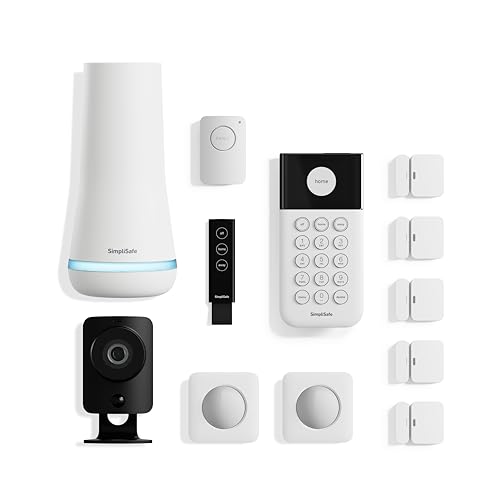
SimpliSafe's 12-piece wireless system addresses a common pain point for homeowners: wanting professional security without the headaches of installation or long-term contracts. The kit arrives ready to deploy, with a base station, HD camera, entry sensors, motion detectors, panic button, and key fob. You plug in the base station, place the wireless sensors where you need them, and the SimpliSafe app walks you through activation. For most homeowners, this means having a functional security system within 30 minutes.
The system's strength lies in its flexibility and backup redundancy. The base station includes a battery that lasts up to 24 hours, so your security doesn't disappear if the power goes out. If you opt for professional monitoring, cellular backup ensures that alerts still reach monitoring agents even if your internet drops. The included HD camera features a mechanical privacy shutter, which is a thoughtful design choice that gives you genuine control over when the camera is active. Motion sensors are pet-friendly up to 60 pounds, and entry sensors can send silent alerts to your phone without triggering the alarm, useful for monitoring areas like medicine cabinets or home offices.
The optional professional monitoring plan is worth examining closely. The first month is free, and ongoing plans start below $1 per day with no contracts. If you enable video verification, SimpliSafe's agents can review camera footage to confirm break-ins, which can result in priority police dispatch. This is a meaningful advantage over self-monitoring alone, though it does require an active subscription. The system integrates with Alexa and Google Assistant, letting you arm or disarm through voice commands, and the wireless key fob provides quick control from up to 30 feet away.
| Specification | Details |
|---|---|
| Brand | SimpliSafe |
| Kit Size | 12 Piece Set |
| Color | White |
| Dimensions | 13.3 x 13.2 x 6.8 inches |
| Camera Type | HD Wired Indoor Camera with Privacy Shutter |
| Motion Sensor Range | 35 feet with 90-degree field of view |
| Pet Tolerance | Up to 60 lbs |
| Key Fob Range | Up to 30 feet |
| Base Station Battery | Up to 24 hours backup power |
| Cellular Backup | Available with professional monitoring plan |
| Smart Home Integration | Alexa and Google Assistant compatible |
| Monitoring Contract | No long-term contracts required |
| Installation | No wiring or drilling required |
Initial Setup: Unbox the system and plug in the base station. Download the SimpliSafe app and follow the guided setup. The app will prompt you to add each sensor and camera by scanning QR codes or entering codes manually. Place entry sensors on doors and windows, motion sensors in corners for full room coverage, and the camera in a central location with a clear view of your main living area.
Daily Operation: Use the app to arm your system before leaving home or going to bed. The key fob offers one-touch arming and disarming from up to 30 feet away, useful as you arrive home. The panic button can trigger a silent alert if you need help discreetly. Check the camera feed anytime through the app to see what's happening inside your home.
Monitoring Setup: The first month of professional monitoring is free. If you want to continue, select your monitoring plan in the app. Enable video verification in your camera settings if you want monitoring agents to review footage and confirm break-ins, which can speed police response. Test your system monthly by triggering a sensor to ensure everything communicates properly with the base station.
Is This System Right for You? SimpliSafe's 12-piece kit works best for homeowners who want professional security without professional installation costs or long-term contracts. If you rent, move frequently, or prefer DIY solutions, the wireless design is a major advantage. If you have a large home with multiple floors or rooms, you may need additional sensors beyond this kit.
Monitoring Decisions: The system works as a self-monitoring solution right out of the box, sending alerts to your phone when sensors trigger. Professional monitoring adds significant value if you want agents to verify break-ins and dispatch police on your behalf, especially for video verification. The no-contract approach means you can try it for a month and decide without penalty.
Coverage Assessment: This 12-piece kit typically covers a small to medium home. The motion sensor detects up to 35 feet, so one sensor per room usually works, but larger rooms may need two. Entry sensors should cover all exterior doors and ground-floor windows. If you have a larger home or need more comprehensive coverage, SimpliSafe sells additional sensors individually, allowing you to expand incrementally.
Sensor Placement: Mount motion sensors in corners at eye level for maximum coverage. Place entry sensors on doors you actually use regularly, not just every possible opening, to reduce false alerts. The camera works best with a clear line of sight to your main entry point or living area. Test sensor range by walking through your space after setup to confirm detection works where you expect it.
Battery Awareness: Check the base station battery level monthly through the app. The 24-hour backup is a safety net, not a long-term solution, so address power outages quickly. Replace sensor batteries proactively rather than waiting for low-battery alerts, which ensures uninterrupted protection.
Smart Home Integration: Link your SimpliSafe system to Alexa or Google Assistant for voice-activated arming and disarming. Use routines to arm the system automatically at bedtime or when you leave home. This reduces the chance of forgetting to arm manually, which is one of the most common security lapses in smart home systems.

Pros
- Genuinely simple setup that takes minutes, not hours - no special skills or tools needed
- Flexible monitoring plans with no contracts give you control over costs and commitment level
- Reliable backup power and cellular connectivity ensure protection even when utilities fail
- Entry sensors and motion detectors work seamlessly together for comprehensive home coverage
- Smart home compatibility lets you integrate security into your existing Alexa or Google ecosystem
Cons
- Motion sensors require careful placement to avoid false alerts from pets or air vents
- Professional monitoring subscription adds ongoing costs beyond the initial system purchase
SimpliSafe's 8-piece wireless system represents a practical approach to home security for DIYers and homeowners who want professional protection without professional installation costs. The bundle includes everything needed for basic perimeter and interior monitoring: a base station, keypad, entry sensors, motion detector, and panic button. Setup truly is straightforward - plug in the base station, download the app, and position sensors where you need them. No drilling into walls, no running cables through attics, and no waiting for an installer to visit.
The system's real strength lies in its flexibility and backup capabilities. You get one free month of professional monitoring to evaluate whether 24/7 service works for your household, then decide whether to continue at transparent pricing with no contracts. The base station includes battery backup lasting up to 24 hours and cellular connectivity as a failsafe if your internet goes down - both critical features for reliable security. Remote control via smartphone, voice commands through smart speakers, and customizable alerts (including silent panic options) give you the flexibility modern homeowners expect.
Motion sensors with 35-foot range and pet-friendly detection work well for covering larger rooms, while entry sensors on doors and windows provide your first line of defense. The wireless keypad offers convenient arm/disarm without fumbling for your phone. Battery life on wireless components and the overall reliability of the system's communication between devices are important considerations that align with typical homeowner expectations for this price range and feature set.
| Specification | Details |
|---|---|
| Brand | SimpliSafe |
| Bundle Size | 8 Pieces |
| Color | White |
| Dimensions | 12.13 x 4.44 x 12.38 inches |
| Installation | Wireless, no wiring or drilling required |
| Motion Sensor Range | 35 feet with 90-degree field of view |
| Pet Compatibility | Pets under 60 lbs |
| Base Station Backup | 24-hour battery plus cellular failover |
| Smart Home Compatible | Amazon Alexa and Google Assistant |
| Monitoring | Optional 24/7 professional monitoring available |
| Warranty | 1 year manufacturer limited warranty |
| Category | Home Improvement / Home Security Systems |
Initial Setup: Unbox your SimpliSafe system and locate the base station, keypad, entry sensors, motion detector, and panic button. Plug the base station into a power outlet in a central location - this is your system's brain and communicates with all wireless components. Download the SimpliSafe app on your smartphone and follow the on-screen pairing instructions to register your system and connect it to your home Wi-Fi network.
Installing Sensors: Entry sensors mount on doors and window frames using included adhesive strips or small screws - place the larger sensor on the frame and the smaller magnet on the door or window itself. Motion detectors work best mounted in corners at least 6 feet high, angled to cover the room's interior. Test each sensor through the app to confirm it's communicating with the base station before finalizing placement. The keypad can be mounted on any wall or kept portable on a shelf.
Daily Operation: Arm your system before leaving home or going to bed using the app, keypad, or voice command. The system will alert you if any protected entry point opens or motion is detected. Disarm the same way when you arrive home. Set up custom zones and notification preferences in the app - you can receive alerts for specific doors, silent alerts for sensitive areas, or full alarm triggers depending on your needs and monitoring subscription level.
Sensor Placement Matters: Position motion sensors in corners rather than against walls for maximum coverage. Keep them away from heating vents, direct sunlight through windows, and areas where curtains or blinds move frequently - these trigger false alerts. For entry sensors, place them on the most accessible doors and windows first, then expand coverage as needed.
Optimize Your Monitoring Plan: Start with the free month of professional monitoring to understand if you actually need 24/7 service or prefer app-only alerts. Many homeowners find they can adjust their plan seasonally - upgrading when traveling or during high-risk periods, then downgrading during normal home occupation. Since there's no contract, you have complete flexibility.
Leverage Smart Home Integration: Connect your SimpliSafe system to your Alexa or Google Home device to arm the system hands-free as part of your bedtime or away-from-home routines. Create automation that arms your system automatically at sunset or when the last person leaves home. This removes the most common security gap - forgetting to arm before leaving.
Battery and Backup Management: Check wireless sensor batteries quarterly and replace them before they drain completely. Ensure your base station battery stays charged by testing the backup function monthly - unplug the power adapter briefly and confirm the system maintains connectivity. This ensures you're protected during actual power outages.
Is This System Right for You? SimpliSafe's 8-piece bundle works best for homeowners with modest security needs - typically single-family homes or apartments under 2,000 square feet. If you value easy installation, flexible monitoring options, and smartphone control over professional installation and advanced features, this system delivers solid value. It's ideal for first-time security system buyers and renters who need protection without permanent modifications.
What You're Getting: This bundle provides basic perimeter security (entry sensors on doors/windows) plus one interior motion detector for whole-room coverage. The panic button adds emergency capability. This combination covers typical entry points and main living areas but may require additional sensors for larger homes or multiple floors. Evaluate your home's layout before purchase to confirm the 8 pieces provide adequate coverage.
Monitoring Considerations: The free month lets you experience professional monitoring risk-free. Understand that ongoing monitoring adds $14.99-$24.99 monthly depending on your plan. App-only operation is free but means you're relying on your own response to alerts rather than professional dispatch. Consider your schedule, neighborhood, and risk tolerance when deciding whether to continue monitoring beyond the free trial.
Long-Term Investment: Beyond the initial system cost, budget for potential sensor additions as your security needs evolve and occasional battery replacements for wireless components. The lack of long-term contracts means you can pause or cancel monitoring anytime without penalty, making this a low-risk security investment compared to traditional alarm systems.

Pros
- Comprehensive out-of-the-box kit eliminates guesswork and reduces the need for additional purchases
- Intuitive keypad and app interface make arming/disarming quick and accessible for all household members
- Expandable design allows you to customize coverage as your needs change without replacing the entire system
- Alexa integration enables convenient voice control for busy homeowners and hands-free operation
- Professional monitoring option provides peace of mind with trained emergency response coordination
Cons
- Ring Protect Plan subscription required for remote arming, voice control, and professional monitoring, adding ongoing costs beyond the initial kit purchase
- No customer reviews currently available to assess real-world reliability, durability, or long-term user satisfaction
The Ring Alarm 14-Piece Kit provides a complete security solution designed specifically for mid-sized homes. The package includes everything needed for comprehensive coverage: a central base station, two keypads for convenient access points, eight contact sensors for doors and windows, two motion detectors for interior monitoring, and a range extender to maintain strong signal throughout your home. This thoughtful combination addresses the primary security concerns most homeowners face without overwhelming complexity.
What sets this system apart is its flexibility and integration with the broader Ring ecosystem. You can monitor all activity through the Ring app, receive instant notifications when sensors are triggered, and expand the system with additional sensors as your needs evolve. For those with Alexa devices, voice control adds genuine convenience, though this feature requires a Ring Protect subscription. The system's ability to function even when Wi-Fi is temporarily unavailable demonstrates consideration for real-world home scenarios where connectivity isn't always guaranteed.
The professional monitoring option transforms this from a self-monitored system to a fully staffed security service, providing emergency response coordination for police, fire, and medical situations. Whether you choose DIY monitoring or professional support, the kit's intuitive interface ensures that family members of varying technical skill levels can operate the system confidently. The overall design reflects Ring's understanding that security systems must be both effective and user-friendly to deliver genuine peace of mind.
| Specification | Detail |
|---|---|
| Color | White |
| Kit Contents | 1 Base Station, 2 Keypads, 8 Contact Sensors, 2 Motion Detectors, 1 Range Extender |
| Dimensions | 4.13 x 4.41 x 0.75 inches |
| Weight | 0.42 pounds |
| Recommended Home Size | 2-4 bedroom homes |
| Connectivity | Wireless with Wi-Fi backup via Range Extender |
| Mobile App Control | Yes - Ring App for iOS and Android |
| Voice Control | Compatible with Alexa (requires Ring Protect subscription) |
| Expandable | Yes - additional sensors and accessories sold separately |
Is This Kit Right for You? The 14-piece configuration is engineered for homes with 2-4 bedrooms, making it suitable for most single-family residences and smaller properties. If your home is significantly larger or you have specific security concerns in multiple buildings, you may want to evaluate whether additional sensors are needed at purchase time or shortly after installation.
Subscription Considerations While the base system functions as a self-monitored solution, the most valuable features—remote arming, voice control, and professional monitoring—require a Ring Protect Plan subscription. Factor this ongoing cost into your security budget when comparing total cost of ownership with other systems.
Installation and Setup Ring systems are designed for homeowner installation without professional help. The wireless sensors and straightforward app setup process mean you can have the system operational within an hour or two. No special tools or technical expertise required.
Integration with Your Smart Home If you already use Alexa devices, this system integrates naturally into your existing ecosystem. If you're building a smart home from scratch, the Ring Alarm serves as an excellent foundation that works alongside other Ring products like video doorbells and cameras.
Optimal Sensor Placement Position contact sensors on all entry points (doors and windows), prioritizing ground-floor access first. Place motion detectors in high-traffic interior areas where they can monitor multiple rooms, avoiding direct sunlight and heat sources that may cause false triggers.
Keypad Strategy Position one keypad near your main entry point for quick arming before leaving, and keep the second keypad in a bedroom for nighttime control. This eliminates the need to use your phone for routine security operations.
Range Extender Placement If your home has dead zones or the base station can't reach certain areas, position the range extender roughly halfway between the base station and problem areas. Test connectivity before finalizing placement.
Subscription Planning Start with self-monitoring to evaluate the system's reliability in your home. If you decide professional monitoring is worth the investment, you can add it at any time without replacing hardware.
Pros
- Wireless design with rechargeable batteries makes installation quick and repositioning simple without drilling or running power cables
- Custom detection and event captions help you find relevant footage fast using keyword search rather than reviewing hours of video
- 2K HDR video quality with 12x zoom and dual-band Wi-Fi connectivity delivers clear, reliable footage in various weather conditions
- Emergency response integration adds a genuine safety layer for families, especially when away from home
- Four-camera bundle provides whole-home coverage at a better value than purchasing individual units
Cons
- Requires an active subscription after the one-month trial to access advanced features like 60-day history and emergency response, adding ongoing monthly costs
- No customer reviews available yet as a 2025 release, so real-world durability and long-term battery performance data from homeowners is limited
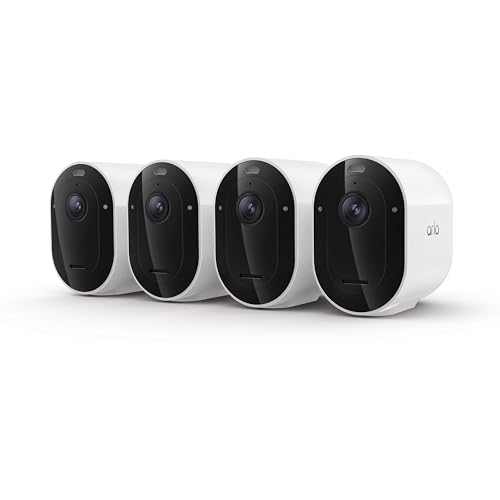
The Arlo Pro 6th Gen represents a meaningful upgrade for homeowners seeking wireless outdoor surveillance without the complexity of professional installation. The 2K HDR sensor with 160-degree field of view captures impressive detail in both bright sunlight and low-light conditions, revealing facial features, license plates, and other identifying information that standard 1080p cameras miss. The 12x digital zoom and integrated spotlight further enhance visibility when you need to examine specific areas closely.
What sets this system apart is its intelligent approach to motion detection. Rather than drowning you in alerts for every passing leaf or car, you can define custom detection rules for events that actually matter to your home and family, such as a garage door opening, someone on your porch, or even a dog jumping on the couch. The system automatically captions video clips with event descriptions, letting you quickly assess whether you need to watch full footage or take action. The direct emergency response feature is genuinely useful for families, allowing one-tap contact with local police, fire, or medical services while automatically sharing gate codes and property details to speed response times.
Battery management is practical and thoughtful. The swappable, rechargeable batteries deliver approximately 15% longer runtime than previous generations and eliminate the need for permanent power wiring, making these cameras suitable for hard-to-reach areas like high eaves or detached structures. The dual-band Wi-Fi ensures strong connectivity, and integration with major smart home platforms (Alexa, Google Home, Apple Home, SmartThings) means motion alerts can trigger other automations like turning on outdoor lights or locking doors. Note that the most useful features require an active Arlo Secure subscription after the included one-month trial expires.
| Specification | Details |
|---|---|
| Brand | Arlo |
| Model | Pro Security Camera 2K HDR (6th Gen, 2025) |
| Quantity | 4 Cameras |
| Color | White |
| Video Resolution | 2K HDR |
| Field of View | 160 degrees |
| Night Vision | Color Night Vision with integrated spotlight |
| Zoom | 12x digital zoom |
| Power Source | Rechargeable, swappable battery |
| Connectivity | Dual-band Wi-Fi |
| Audio | 2-way audio |
| Dimensions (per unit) | 3.43 x 2.05 x 3.09 inches |
| Total Weight (4-pack) | 4.52 pounds |
| Smart Home Compatibility | Amazon Alexa, Apple Home, Google Home, Samsung SmartThings, IFTTT |
| Subscription Included | 1-month trial of Arlo Secure Plan |
| Support | 24/7 chat support via app and website (US only) |
Wireless Setup (No Tools Required)
These cameras mount with simple bracket hardware, typically needing just a screwdriver. The swappable battery design means you can charge batteries separately indoors before installing cameras, eliminating outdoor outlet dependencies. Dual-band Wi-Fi automatically selects the strongest signal for reliable connectivity.
Placement Tips
Position cameras 8-20 feet high for optimal coverage and to prevent tampering. The 160-degree field of view covers most entry points and driveways without multiple angles. Avoid pointing directly into bright sunlight, which can create glare even in HDR mode. Test camera angles using the live view in the Arlo app before finalizing mounting.
Custom Alert Configuration
After installation, spend time configuring custom detection zones and alert types in the app. Define activity zones for areas you want monitored (driveway, porch) and exclude areas like street traffic that generate false alerts. Set up smart home automations so alerts trigger lights, sirens, or notifications to family members immediately.
Battery Longevity
Battery life depends heavily on motion frequency and video quality settings. High-traffic areas and night vision use drain batteries faster. Keep spare charged batteries on hand for quick swaps during peak seasons (holidays, deliveries). Cold weather reduces battery efficiency, so expect shorter runtimes in winter months.
Emergency Response Best Practices
Set up emergency contacts and verify your address is correct in the app before relying on the emergency response feature. Test the feature once to ensure it works with your local dispatch system. Provide gate codes, lock box combinations, or other access information in your account settings so responders can reach your property quickly.
Smart Home Automation
Create routines that extend your security system's usefulness. For example, motion detection can trigger outdoor lights to turn on at dusk, activate a siren to deter intruders, or send notifications to multiple family members simultaneously. Combine cameras with smart locks and lights to create a cohesive security ecosystem.
Video Storage Strategy
The included one-month Secure Plan trial provides 60-day video history. After the trial, decide whether the subscription cost justifies keeping full cloud history or if you prefer to manually save important clips. Download and back up critical footage to local storage for permanent records.

Pros
- True plug-and-play setup with pre-paired components eliminates complex configuration
- No subscription fees keep long-term costs low compared to cloud-based systems
- IP66 weatherproof rating allows outdoor installation in rain, snow, and harsh conditions
- Expandable storage up to 6TB HDD provides months of continuous recording
- Local processing with P2P connection ensures privacy - footage stays on your network
Cons
- Cameras require constant power connection despite 'wireless' label, limiting placement flexibility
- No existing customer reviews available, making it difficult to assess real-world reliability and long-term performance
The Firstrend 8-channel security system delivers a complete surveillance solution for homeowners seeking comprehensive property monitoring without recurring subscription costs. The package includes eight 1080P bullet cameras with 65-foot infrared night vision, an 8-channel NVR with pre-installed 3TB hard drive, and all necessary cables and power adapters. The cameras arrive pre-paired with the NVR, eliminating the need for complex pairing procedures and allowing users to achieve a working system within minutes of unboxing.
Key features address common homeowner concerns about security system complexity and cost. AI-powered human detection filters out motion alerts triggered by pets, vehicles, and weather, reducing notification fatigue. Two-way audio enables real-time communication through any camera, useful for greeting visitors or deterring trespassers. The H.265 video codec compresses footage efficiently, allowing the 3TB drive to store weeks of continuous recording. Remote monitoring through Android and iOS apps provides live viewing, playback, and backup capabilities from any location with internet access.
The system's local processing architecture prioritizes privacy by keeping all footage on your home network rather than uploading to cloud servers. IP66-rated weatherproof housing allows outdoor installation in all climates, while the expandable storage design supports larger drives up to 6TB for extended retention periods. The 60-day return policy and 1-year warranty provide reasonable protection, though potential buyers should research installation requirements and network compatibility before purchasing to ensure the system meets their specific property layout and technical capabilities.
| Specification | Details |
|---|---|
| NVR Channels | 8-Channel 1080P |
| Cameras Included | 8x 1080P HD Bullet Cameras |
| Storage | 3TB HDD Pre-Installed (Expandable to 6TB) |
| Night Vision | 65 Feet with 6 IR LEDs per Camera |
| Weather Rating | IP66 Waterproof/Weatherproof |
| Video Codec | H.265 Compression |
| Connectivity | WiFi P2P, Ethernet, Mobile App (iOS/Android) |
| Audio | Two-Way Audio |
| Recording | 24/7 Continuous (No Monthly Fees) |
| Motion Detection | AI Human Detection with Smart Alerts |
| Connection Methods | VGA or HDMI to Monitor, Ethernet to Router |
| Dimensions (NVR) | 13.2 x 7.29 x 12.18 inches |
| Warranty | 1 Year |
| Return Policy | 60 Days |
Before You Start: Ensure you have a stable WiFi network, a monitor or TV with HDMI/VGA input, and access to your router. Plan camera placement by identifying areas needing coverage (driveway, entrance, backyard, perimeter).
Step-by-Step Setup: 1) Unpack all components and verify the cameras and NVR are pre-paired. 2) Mount cameras using the provided hardware, positioning them to cover target areas with 65-foot night vision range. 3) Connect each camera to power using the included adapters. 4) Connect the NVR to power and attach a mouse for navigation. 5) Link the NVR to your TV or monitor via HDMI or VGA cable (not included). 6) Connect the NVR to your router using the provided Ethernet cable. 7) Power on all devices and wait 2-3 minutes for the system to initialize. 8) Download the Firstrend mobile app on your smartphone, create an account, and link the NVR for remote access. 9) Configure motion detection sensitivity and alert preferences in the app settings to match your property's activity patterns.
Optimization Tips: Position cameras 8-12 feet high for optimal viewing angles. Ensure cameras aren't directly facing bright lights or reflective surfaces. Test night vision by checking live feed after sunset. Enable two-way audio in settings to communicate through cameras. Regularly review recorded footage to confirm coverage meets your security needs.
Is This System Right for You? This 8-camera system suits homeowners with medium to large properties who want comprehensive surveillance without monthly subscription costs. It works best for those comfortable with basic setup tasks and local network management. If you prefer cloud backup, professional monitoring, or minimal technical involvement, consider alternatives.
Key Considerations: Verify your home WiFi network can handle 8 simultaneous camera streams - a dual-band router with 5GHz capability is recommended. Confirm available power outlets near planned camera locations, as wireless means no video cables but cameras still require constant power. Measure your property to ensure 65-foot night vision covers desired areas. Check if your monitor/TV has HDMI or VGA input for NVR connection. Review local privacy laws regarding outdoor camera placement, especially near property lines.
Comparison Factors: Unlike cloud-based systems (Ring, Nest), this keeps footage local for privacy but requires your own storage management. Compared to professional DVR systems, setup is simpler and no technician visit is needed. Storage expandability to 6TB provides longer retention than many consumer systems. The one-device, one-user account policy prioritizes security over convenience if multiple household members need simultaneous access.

Pros
- No subscription fees or hidden charges, with built-in 32GB storage for 120 days of event recording
- Exceptional night vision with color accuracy 30% higher than standard 2K cameras, plus 40-foot detection range
- Intelligent AI tracking automatically follows people and links clips across multiple cameras for complete event context
- Solar-powered reliability with stable charging even in cloudy, rainy, or shaded conditions
- Whole-home coverage with dual-band Wi-Fi and custom detection zones to minimize false alerts from traffic
Cons
- No existing customer reviews available to verify real-world performance and reliability in varied weather conditions
- Learning curve required to optimize AI detection zones and cross-camera tracking features for your specific property layout
The ANSQUE 4-camera system addresses a common frustration for homeowners: the hidden costs of traditional security systems. With no subscription fees and 120 days of local event storage built into the base station, you're looking at genuine savings of roughly $200 per year. The system uses AES-128 encryption to keep your footage private even if a camera is stolen, which adds a meaningful layer of security beyond what many budget-friendly systems offer.
What sets this system apart is its 360-degree PTZ capability paired with AI auto-tracking. Rather than relying on static wide-angle shots, the cameras actively follow movement across your property and link video clips from the same time period across multiple cameras. This means you can see exactly how an intruder or delivery person moved from your front door to your backyard without blind spots. The 2K color night vision with smart IR and 8x digital zoom lets you capture fine details like license plates and package labels in real time, even in complete darkness up to 40 feet away.
Installation and daily operation are genuinely straightforward. The solar panels charge fully in just 2 hours of sunlight and maintain a 365-day battery cycle even in cloudy or shaded areas, eliminating the need for frequent maintenance. The dual-band Wi-Fi base station provides stable coverage across larger properties, and the mobile app allows you to switch between Home, Away, and Disarm modes with one tap, plus set custom detection zones to reduce false alerts from passing cars and pedestrians.
| Specification | Details |
|---|---|
| Brand | ANSQUE |
| Camera Count | 4 Cameras |
| Color | White |
| Dimensions | 4.33 x 5.91 x 7.87 inches |
| Weight | 8.5 pounds |
| Video Resolution | 2K HD |
| Night Vision | Color night vision with 8x digital zoom |
| Pan-Tilt-Zoom | 360-degree PTZ with auto-tracking |
| Power Source | Solar panel with 365-day battery life |
| Storage | 32GB local storage, 120 days event recording |
| Encryption | AES-128 |
| Wi-Fi | Dual-band 2.4GHz and 5GHz |
| Detection Range | 40 feet (12 meters) at night |
| Installation Time | 5 minutes |
| Subscription Fees | None |
Initial Setup: Mount the base station in a central location with Wi-Fi access. Download the ANSQUE app and follow the pairing wizard to connect your four cameras via the dual-band network. Attach the solar panels to each camera using the included 4-hole reinforced bracket, positioning them to receive at least 2 hours of direct sunlight daily.
Configuring Detection: In the app, use the custom detection zone tool to draw areas you want to monitor. This prevents alerts from passing vehicles and pedestrians on nearby streets. Enable AI auto-tracking so cameras follow movement across your property. Adjust the sensitivity of the PIR sensor based on your environment, especially if you have pets or frequent activity nearby.
Daily Operation: Switch between Home, Away, and Disarm modes using the one-tap controls in the app. Enable scheduled recording during your vacation or nighttime hours to increase security level automatically. Monitor live feeds from all four cameras simultaneously on one screen, or focus on individual camera angles. Use the 8x digital zoom to inspect suspicious activity in real time, such as license plates or package details.
Maximize Solar Charging: Position solar panels at a 45-degree angle facing south for optimal year-round charging, even in winter. Clean the panels monthly with a soft cloth to remove dust and debris, which can reduce charging efficiency by up to 20%.
Optimize AI Tracking: Set up custom detection zones to focus on high-value areas like your front door, driveway, and backyard entry points. Exclude zones where you expect frequent passing traffic to reduce false alerts and preserve battery life.
Network Stability: Place the AnsqueBase (signal booster) in a central location away from thick walls and metal objects. If you have a large property, the dual-band 5GHz network provides faster speeds for multiple simultaneous camera feeds, while 2.4GHz offers better range through obstacles.
Storage Management: Review event recordings weekly to familiarize yourself with normal activity patterns on your property. This helps you recognize genuinely suspicious behavior faster. The 120-day loop recording automatically deletes oldest footage when storage reaches capacity, so you don't need to manage files manually.
Who Should Buy This System? Homeowners and DIYers who want comprehensive surveillance without monthly subscription costs. Ideal for properties with multiple vulnerable areas like driveways, backyards, side gates, and pool areas. Works well for people who prefer local storage and privacy over cloud-based systems, and those willing to handle basic app setup.
Property Size Considerations: The dual-band Wi-Fi base station supports coverage across typical residential properties up to 2,000-3,000 square feet. Larger properties or those with dense landscaping may benefit from adding the base station as a dedicated signal booster rather than relying on your home router.
Climate Suitability: The solar panels charge effectively even in cloudy, rainy, and shaded conditions, making this system viable in most U.S. climates. However, properties with extremely limited sunlight (dense tree cover, north-facing walls) may struggle to maintain consistent charging. The 365-day battery cycle provides a buffer, but solar access remains important for long-term reliability.
Alternative Considerations: If you need cloud backup for critical footage or prefer professional monitoring, subscription-based systems may better suit your needs. If installation difficulty is a concern, this system's 5-minute setup process is genuinely beginner-friendly. Compare the annual savings from zero subscription fees against the upfront kit cost to confirm value for your budget.

Pros
- Extremely easy setup and installation - no professional technician required, saves time and money
- Flexible monitoring options with no long-term contracts give you complete control over your service level
- Video verification feature enables priority police dispatch when needed most
- Reliable backup power and cellular connection ensure continuous protection even during outages
- Smart home compatibility lets you manage security through voice commands or mobile app
Cons
- No user reviews available yet, so real-world performance feedback from homeowners is limited
- Professional monitoring service is optional but recommended for full protection, adding ongoing monthly costs
SimpliSafe's 9-piece wireless system represents a practical approach to home security for homeowners who want professional-grade protection without installation headaches or long-term contracts. The bundle includes everything needed for comprehensive coverage: a base station with cellular backup, an HD indoor camera with privacy shutter, entry sensors for doors and windows, motion detectors rated for pet-friendly homes, and a wireless keypad. Setup is genuinely straightforward - no drilling, wiring, or professional installation required, though SimpliSafe offers that option if you prefer hands-off deployment.
The standout feature is the integration of optional professional monitoring with video verification capabilities. When enabled, SimpliSafe's monitoring agents can review camera footage to confirm break-ins, which can result in priority police dispatch. The flexibility here matters: you get one free month to evaluate the service, and if you continue, monitoring starts at less than $1 per day with no contracts binding you long-term. The system also maintains protection during outages through 24-hour battery backup and cellular connectivity, ensuring your home stays monitored even when your internet goes down.
Smart home integration is seamless, allowing you to arm and disarm the system through Alexa or Google Assistant commands. The motion sensors intelligently detect intrusions within a 35-foot range while remaining pet-friendly for animals under 60 pounds. The wireless keypad with context-aware backlit buttons adds convenience without cluttering your entryway. For homeowners seeking flexibility, affordability, and modern security features without sales pressure or long-term commitment, this system delivers solid value.
| Specification | Details |
|---|---|
| Brand | SimpliSafe |
| Bundle Size | 9 Pieces |
| Color | White |
| Dimensions | 12.13 x 12.38 x 4.4 inches |
| Weight | 0.35 pounds |
| Key Components | Base Station, HD Camera, Entry Sensors, Motion Sensors, Wireless Keypad |
| Camera Features | HD Video, Privacy Shutter, Mobile App Access |
| Motion Sensor Range | 35 feet with 90-degree field of view |
| Pet Compatibility | Pets under 60 lbs |
| Battery Backup | Up to 24 hours |
| Connectivity | Wi-Fi, Cellular Backup, Smart Home Compatible |
| Smart Home Support | Amazon Alexa, Google Assistant |
| Monitoring Options | Optional Professional Monitoring (No Long-Term Contract) |
| Category | Home Security Systems |
Initial Setup (5-10 minutes): Unbox the system and plug in the base station to power and Wi-Fi. Download the SimpliSafe mobile app and follow the guided setup walkthrough. The app will prompt you through adding and naming each component - the camera, entry sensors, motion detectors, and wireless keypad.
Placing Sensors: Position entry sensors on doors and windows where intruders are most likely to enter. Mount motion sensors in corners for full room coverage. The 35-foot detection range and 90-degree field of view mean strategic corner placement maximizes coverage without overlap. For pet-friendly homes, keep sensors at heights where pets under 60 pounds won't trigger false alarms.
Daily Operation: Use the wireless keypad or mobile app to arm the system when leaving or before bed. The app lets you monitor live camera feeds, check sensor status, and receive instant alerts. Enable voice control through Alexa or Google Assistant to arm/disarm hands-free. Test the system monthly by triggering a sensor and confirming alerts arrive correctly on your phone.
Professional Monitoring (Optional): If you choose monitoring service, activate it in the app. During emergencies, SimpliSafe agents will receive alerts, review camera verification if enabled, and dispatch emergency responders on your behalf. You control whether monitoring is active and can pause or cancel anytime without penalty.
Maximize Video Verification: If you subscribe to professional monitoring, enable video verification on your camera. This allows SimpliSafe agents to confirm break-ins with visual evidence, which typically results in faster police dispatch compared to motion-only alerts.
Leverage Secret Alerts: Use the entry sensor 'secret alert' feature for sensitive areas like medicine cabinets or home offices. These send silent notifications to your phone without triggering the alarm, letting you monitor unauthorized access to private spaces discreetly.
Optimize Motion Sensor Placement: Position motion sensors in opposite corners of large rooms to eliminate coverage gaps. The 90-degree field of view means two sensors in opposite corners provide nearly complete room coverage without false triggers from pets moving between zones.
Test Backup Power Regularly: Unplug the base station once monthly to verify the 24-hour battery backup is functioning. This ensures your system will protect your home during power outages without surprises when you need it most.
Use Keypad Strategically: Place the wireless keypad near your main entry point for quick disarming when arriving home. The backlit buttons activate automatically in low light, so you won't fumble in the dark while entering your home.
Who Should Buy This System: Homeowners seeking flexible, affordable security without long-term contracts. Renters who need portable security that doesn't require drilling or permanent installation. Tech-savvy users who want smart home integration and mobile app control. Budget-conscious buyers who prefer no-contract monitoring options.
Who Might Want to Look Elsewhere: Homeowners needing outdoor perimeter cameras (this bundle includes only an indoor camera). Those requiring professional monitoring as mandatory rather than optional. Users in areas with unreliable Wi-Fi or cellular coverage where backup connectivity is critical.
Key Decision Points: Consider whether professional monitoring adds value for your situation. The system works as a standalone DIY solution, but monitoring provides 24/7 agent response and potential faster police dispatch. Evaluate your entry points - this 9-piece bundle covers typical homes with 2-3 entry doors and a few windows. Larger homes may need additional sensors. Confirm your Wi-Fi strength near the base station location, as the system relies on connectivity for app control and alerts.
Monitoring Cost Reality: The first month is free, giving you genuine time to evaluate the service. After that, expect to pay less than $1 per day for professional monitoring, which translates to roughly $25-30 monthly depending on your plan tier. No long-term contracts mean you can cancel anytime, making it a low-risk way to test whether professional monitoring fits your needs.

Pros
- Solar charging eliminates battery replacement hassles and ongoing power costs
- Zero subscription fees with local storage keeps your footage private and saves money long-term
- AI-powered tracking intelligently distinguishes people and vehicles from false triggers
- 2K resolution with excellent low-light performance captures actionable details
- Four-camera kit offers better value and flexibility than single-unit purchases
Cons
- Requires consistent sunlight (2 hours daily) to maintain charge in cloudy climates
- MicroSD card and HomeBase hubs sold separately, adding to total system cost
The eufy SoloCam E30 four-pack brings professional-grade security to residential properties without the professional price tag. The 360-degree pan capability and 2K sensor work together to eliminate common coverage gaps around your home's perimeter, while the f/1.6 aperture ensures you capture usable detail in low-light conditions. Whether monitoring a front porch, backyard, or driveway, the wide field of view minimizes the number of cameras needed for comprehensive protection.
The solar charging system is the standout feature for homeowners seeking truly maintenance-free operation. With just two hours of daily sunlight, the removable solar panel keeps each camera perpetually charged through eufy's SolarPlus technology. This eliminates the battery swap cycle that plagues traditional wireless cameras and removes the temptation to skimp on security during winter months when maintenance feels inconvenient. The built-in AI motion detection learns the difference between meaningful activity and environmental triggers, reducing the notification fatigue that makes many homeowners disable alerts entirely.
The local storage approach—using microSD cards up to 128GB without mandatory cloud subscriptions—appeals to privacy-conscious homeowners and those seeking long-term cost savings. Pairing with a HomeBase hub (sold separately) unlocks advanced AI features and enables multi-camera management from a single interface. The 2.4GHz Wi-Fi requirement is standard for this class of equipment and generally poses no connectivity issues in typical residential setups.
| Specification | Details |
|---|---|
| Color | White |
| Dimensions | 17 x 5.1 x 3.7 inches per unit |
| Video Resolution | 2K Clarity |
| Lens Aperture | f/1.6 |
| Pan Coverage | 360 degrees |
| Power Source | Removable solar panel with SolarPlus technology |
| Storage | MicroSD card up to 128GB (not included) |
| Subscription | None required |
| AI Features | Motion detection and auto-tracking |
| Compatible Hubs | HomeBase S380 or HomeBase S280 |
| Wi-Fi | 2.4GHz only |
| Product Group | Camera |
| Kit Contents | 4-camera pack |
Placement Considerations: Position each camera where it receives at least 2 hours of direct daily sunlight for optimal solar charging. South-facing or west-facing eaves typically work best. Ensure the camera has a clear view of your target area and that the solar panel faces upward without obstruction from leaves, gutters, or roof overhangs.
Initial Setup: Download the eufy Security app and create an account. Connect each camera to your 2.4GHz Wi-Fi network (5GHz is not supported). Mount the camera using the included bracket, ensuring it's secure and level. Install a microSD card if you want local storage without a HomeBase hub. For advanced features and larger storage capacity, connect your cameras to a HomeBase S380 or S280 hub.
Ongoing Maintenance: Check solar panels quarterly for dirt, pollen, or debris that might reduce charging efficiency. Wipe clean with a soft cloth if needed. Monitor the app to confirm each camera is charging properly, especially during winter months when daylight hours are shorter. If solar charging alone proves insufficient in your climate, consider supplementing with a HomeBase hub for more reliable power management options.
Is This Right for You? The SoloCam E30 four-pack works best for homeowners with adequate sunlight, who value privacy and cost savings, and who want to monitor multiple outdoor areas. If your property receives less than 2 hours of direct daily sun, or if you require cloud backup as a primary storage method, you may want to explore alternatives or supplement with a HomeBase hub.
Budget Planning: The four-camera kit provides excellent per-unit value compared to buying individual cameras. Budget separately for a microSD card (up to 128GB recommended) and optionally a HomeBase hub if you want advanced AI features and centralized management. Calculate your total investment before purchasing to ensure it aligns with your security goals.
Comparison Factors: Evaluate this kit against single-camera systems and wired alternatives. The 360-degree pan and AI tracking reduce the number of cameras needed for full coverage. Solar charging eliminates recurring battery costs. The lack of mandatory subscriptions saves money over time compared to cloud-dependent systems. However, the 2.4GHz Wi-Fi requirement and sunlight dependency are real constraints to consider for your specific property.

Pros
- Easy DIY installation without professional setup required
- Affordable entry point into smart home security with flexible subscription options
- Reliable motion and contact sensor detection with responsive app notifications
- Compact, unobtrusive design fits most home aesthetics
- No long-term contracts; cancel professional monitoring anytime
Cons
- Requires separate Ring Protect subscription for remote access and professional monitoring features
- Limited to 1-2 bedroom homes out of the box; larger homes need additional sensors sold separately
The Ring Alarm 8-Piece Kit is a practical entry-level security system designed for small to medium homes. The included components cover the essentials: a central base station manages the system, four contact sensors protect doors and windows, a motion detector monitors interior spaces, and a range extender ensures signal strength throughout your home. The keypad provides convenient local control without requiring your phone every time you arm or disarm.
What sets this system apart is its integration with the Ring ecosystem and Alexa compatibility. If you already own Ring video doorbells or cameras, this alarm system centralizes monitoring through a single app. Voice control via Alexa adds convenience, though it requires an active Ring Protect subscription. The system sends real-time notifications to your smartphone whenever sensors are triggered, giving you immediate awareness of any activity.
For homeowners considering professional monitoring, Ring's optional 24/7 service connects you with emergency responders for police, fire, and medical situations. The system operates independently without a contract, so you can enable monitoring when needed and cancel without penalties. The expandable design means you can add sensors later as your security needs evolve, making this kit a flexible foundation rather than a fixed solution.
| Specification | Details |
|---|---|
| Kit Configuration | 8-Piece Kit |
| Included Components | Base Station, Keypad, 4 Contact Sensors, 1 Motion Detector, 1 Range Extender |
| Color | White |
| Recommended Coverage | 1-2 Bedroom Homes |
| Control Methods | Keypad, Ring App, Alexa Voice (with subscription) |
| Notifications | Real-time Mobile Alerts |
| Professional Monitoring | Optional 24/7 Service (sold separately) |
| Expandability | Additional sensors and accessories available |
| Ring Ecosystem | Compatible with Ring Protect Plan and Alexa devices |
Initial Setup: Download the Ring app, create an account, and follow the in-app setup wizard. Power on the base station, add the keypad by scanning its code in the app, and pair each contact sensor and the motion detector. The range extender can be placed midway between the base station and distant sensors if you experience connectivity issues.
Daily Operation: Use the keypad to arm your system when leaving home or going to bed. The app allows remote arming and disarming from anywhere (requires Ring Protect subscription). You'll receive instant notifications on your phone whenever a sensor detects activity. Check the Ring app anytime to view system status, sensor battery levels, and armed/disarmed history.
Customization: Customize notification settings per sensor, set up automation rules with Alexa routines, and add additional sensors through the app as your coverage needs expand. If you subscribe to professional monitoring, the system automatically alerts monitoring centers during emergencies without requiring your action.
Is This Right for You? This kit works best for small homes, apartments, and townhouses with 1-2 bedrooms. If you have a larger home with multiple entry points, plan to purchase additional contact sensors. Renters appreciate that Ring Alarm requires no hardwiring or permanent installation.
What You Should Know Before Buying: The base kit provides basic local monitoring through your phone, but full features like remote arming and professional monitoring require a Ring Protect subscription (sold separately). Consider whether you want professional 24/7 monitoring or prefer self-monitoring through the app. The system needs reliable WiFi; if your connection drops, a Ring Protect subscription keeps the system online via cellular backup.
Budget Considerations: Factor in the cost of a Ring Protect subscription if you want remote access and professional monitoring. Additional sensors and accessories are sold separately, so budget for expansion if your home is larger than 2 bedrooms or has multiple entry points beyond what's included. No long-term contracts mean you can start basic and upgrade or cancel anytime.
Sensor Placement: Position contact sensors on all exterior doors and ground-floor windows. Place the motion detector in high-traffic interior areas like hallways or living rooms where it can detect unauthorized movement. Keep the range extender centrally located between the base station and distant sensors for optimal signal strength.
Maximize Battery Life: Check sensor battery levels monthly through the Ring app. Replace batteries promptly when low to avoid gaps in protection. The keypad and motion detector use more power than passive contact sensors, so prioritize their battery maintenance.
Optimize Notifications: Customize alert settings in the app to receive notifications only for armed-system triggers, reducing false alarms from family members opening doors when disarmed. Consider setting up different armed modes for away, home, and sleep to prevent unwanted alerts from interior motion sensors when people are home.
Integration Strategy: If you own other Ring devices like video doorbells, monitor everything through the unified Ring app for seamless security management. Use Alexa routines to automatically arm your alarm at specific times or when the last family member leaves home.
How to Choose the Right Wireless Security System
The market for wireless home security has matured rapidly over the past few years. Prices have dropped, image quality has improved dramatically, and cloud storage is no longer the only option for saving footage. That said, the sheer range of features and price points can feel overwhelming when you are starting from scratch. The buying guide below breaks down every factor that matters so you can focus on what is genuinely right for your home, your budget, and your lifestyle.
Wired vs. Wireless: Which Is Right for You?
Wired systems offer stable, interference-free connections but require professional installation that can cost several hundred dollars before you ever power on a single camera. Wireless systems, by contrast, communicate over Wi-Fi, RF, or cellular bands and can be repositioned whenever your needs change. For most renters and homeowners who want a DIY-friendly setup, a wireless system is the obvious starting point. The tradeoff is that wireless devices depend on battery life or a nearby outlet, and congested Wi-Fi networks can occasionally cause delays. Premium kits from SimpliSafe and Ring use proprietary RF signals alongside Wi-Fi to reduce those interference risks, giving you a more resilient connection than a camera relying solely on your home network. Mounting cameras correctly matters too, and having reliable cordless drill sets on hand makes positioning and anchoring exterior hardware far less frustrating.
Professional Monitoring vs. Self-Monitoring
Professional monitoring means a staffed call center watches your alerts around the clock and can dispatch emergency services on your behalf. SimpliSafe and Ring both offer optional monitoring plans with no long-term contract, so you can activate or cancel month-to-month without penalty. Self-monitoring relies entirely on push notifications to your phone, which works well if you are reliably reachable but leaves a gap when you are asleep or out of signal range. If you travel frequently or manage a rental property, the added cost of professional monitoring is usually worth it. For households that simply want visibility into package deliveries and driveway activity, self-monitoring through a capable app is perfectly adequate and costs nothing beyond the initial hardware purchase.
Understanding Coverage: Sensors, Cameras, and Zones
Entry-level kits typically protect two to four doors and windows plus a motion sensor for a main living area. Mid-tier kits like the SimpliSafe 8-Piece (B07C38HT49) cover a medium-sized home with sensors on most access points. Larger bundles such as the SimpliSafe 12-Piece (B07GXVSMT5) or Ring Alarm 14-Piece Kit (B08YMBQJ49) are better suited to multi-story homes or properties with detached garages. Before purchasing, walk through your home and count every door, window, and hallway you want covered, then match that count to the kit’s sensor quantity. Most systems are expandable, so starting with a core kit and adding sensors later is a sound strategy that avoids overspending upfront.
Camera Resolution and Night Vision Quality
Resolution determines how much detail you capture, and 2K (roughly 2,560 by 1,440 pixels) has become the practical sweet spot for outdoor surveillance. It delivers enough clarity to identify faces and license plates without the massive storage footprint of 4K footage. The Arlo Pro 6th Gen (B0FJTQ2K7V) records in 2K HDR, which handles high-contrast scenes like a bright doorway at night far better than standard cameras. For pure night vision, color night vision powered by a spotlight is increasingly common on solar cameras like the aosu 4-Cam Kit (B0CNRDG796) and the ANSQUE system (B0D7Z97Q48), giving you identifiable color detail even in complete darkness rather than the familiar black-and-white infrared image.
Power Sources: Battery, Solar, and Wired Cameras
Battery-powered cameras offer maximum placement flexibility since they can go anywhere a signal reaches. The Arlo Pro 6th Gen uses a removable rechargeable battery so you can hot-swap packs without taking the camera offline. Solar-powered cameras like the aosu 4-Cam Kit, the ANSQUE 4-Camera Kit, and the eufy SoloCam E30 4-Cam Pack (B0DT43P9D5) eliminate recharging chores entirely in regions with adequate sunlight. Notably, the ANSQUE kit claims a 365-day battery reserve for stretches of cloudy weather, which is a meaningful advantage over competitors that require recharging every few weeks. Corded NVR-based systems like the firstrend 8-Channel kit (B0FMRF5SX1) record 24/7 to a local hard drive and never run out of battery, making them the most reliable option for continuous coverage of a driveway or parking area.
Local Storage vs. Cloud Storage
Cloud storage means your footage remains safe even if a thief takes the camera, but ongoing subscription fees add up over time. Local storage options, including built-in flash memory, microSD cards, and network-attached NVR hard drives, carry no monthly fee and give you complete control over your data. The eufy SoloCam E30 supports built-in local storage expandable up to 16TB, while the firstrend NVR kit ships with a 3TB hard drive included at no extra cost. Ring and SimpliSafe lean toward cloud storage with optional local backup depending on the plan you choose. Consider how long you want to retain footage: most cloud plans keep seven to thirty days of recordings, whereas a large local drive can hold months of continuous video without intervention. For households that prefer zero recurring fees, the aosu, ANSQUE, eufy, and firstrend options in this guide all support local storage natively.
Smart Home Integration and App Control
Amazon Alexa and Google Assistant compatibility lets you arm your system, view camera feeds on a smart display, and trigger automations without picking up your phone. Both SimpliSafe and Ring integrate natively with Alexa, and SimpliSafe also supports Google Assistant. Ring’s tight integration with the Amazon ecosystem means Echo Show owners get a particularly seamless live-view experience. For households already invested in Apple HomeKit or Google Home, it is worth confirming compatibility before buying. App design matters too: Ring’s app is polished and beginner-friendly, while SimpliSafe’s app offers granular control over each individual sensor. The firstrend and ANSQUE systems use their own companion apps with remote live-view and AI detection filtering to cut down on false alerts from wind, shadows, and passing cars.
Pan and Tilt vs. Fixed-Lens Cameras
Fixed-lens cameras deliver a set field of view, typically 110 to 130 degrees, that you aim during installation. Pan-and-tilt cameras let you remotely rotate the view or automatically track a moving subject in real time. The aosu 4-Cam Kit offers 360-degree pan and tilt with auto tracking, letting a single camera cover an area that would otherwise require two fixed units. The eufy SoloCam E30 similarly provides 360-degree pan with AI-powered subject tracking. This flexibility is especially useful in large backyards, driveways, or open commercial spaces where a fixed camera would leave blind spots. Keep in mind that PTZ cameras have more moving parts and may carry a slightly higher long-term maintenance profile than fixed units. When mounting any camera at an awkward angle under an eave, a spirit level ensures your field of view is perfectly aligned before you tighten the final screws.
Subscription Fees and Long-Term Costs
The sticker price of a security kit is only part of the total cost of ownership. Systems that rely on cloud storage almost always charge a monthly fee for video history beyond the most recent twenty-four hours. Ring Protect plans and SimpliSafe monitoring plans both operate on month-to-month terms with no cancellation penalty, which is a significant advantage over older contracts that lock you in for years. If avoiding subscriptions entirely is a priority, the aosu, ANSQUE, eufy, and firstrend options in this guide store footage locally with no recurring fee. Just remember that local storage requires periodic management to avoid running out of space, and footage stored only on-site is vulnerable if the hardware is stolen or damaged in a fire. A hybrid approach, local storage plus occasional manual cloud backup, offers the best of both worlds.
Ease of Installation and Setup
All ten systems in this guide are designed for DIY installation. SimpliSafe and Ring use peel-and-stick mounting for sensors and magnetic mounts for cameras, making apartment-friendly installation genuinely tool-free for most components. Solar and battery cameras from aosu, ANSQUE, and eufy require drilling a single anchor into an exterior wall or soffit. The firstrend NVR system is the most involved: it requires running camera cables back to a central recorder, which is closer to a semi-professional installation but still manageable for a confident DIYer comfortable with basic cable management. For any installation that involves cutting through siding or masonry, reciprocating saw blades make creating clean access holes far easier than a standard drill bit alone. Once cables are routed, a quality tape measure helps you space cameras evenly across a wide facade before committing to permanent anchors.
Weatherproofing and Outdoor Durability
Outdoor cameras need an IP65 or IP66 rating at minimum to survive rain, sleet, and road-salt air in colder climates. The firstrend kit carries an IP66 rating, and most solar cameras in this roundup are built to similar standards. Check the operating temperature range if you live somewhere with harsh winters: some Wi-Fi modules struggle below freezing, which can cause cameras to go offline during exactly the weather events that raise security concerns. Sealing cable entry points with weatherproof caulk after installation dramatically extends the life of any outdoor camera. For tricky mounting locations under a soffit or on textured masonry, claw hammers and wall anchors rated for the substrate make a meaningful difference in how securely cameras stay put over time.
AI Detection and False Alert Reduction
Early motion-detection cameras alerted you every time a leaf blew past the lens. Modern AI detection filters separate people, vehicles, animals, and general motion, sending you targeted alerts instead of a constant stream of noise. The Arlo Pro 6th Gen uses on-device AI to flag human and vehicle events independently of a cloud subscription, while ANSQUE and firstrend use similar algorithms to reduce false positives from environmental movement. Ring’s Smart Alerts distinguish between people, packages, vehicles, and animals for subscribers on a Protect plan. SimpliSafe’s professional monitoring layer adds an additional verification step so dispatchers can review footage before calling emergency services, significantly cutting false alarm dispatches that waste police resources and can trigger fines in some municipalities.
Expandability and Future-Proofing
A system that cannot grow with your needs quickly becomes frustrating. SimpliSafe and Ring both support adding sensors, keypads, panic buttons, glass-break detectors, and smoke or CO detectors to an existing hub without replacing any hardware. The Ring ecosystem in particular connects seamlessly to Ring doorbells, floodlight cameras, and indoor cameras, letting you build a comprehensive property-wide network over time. For camera-only setups, adding cameras to the aosu, ANSQUE, or eufy platforms is straightforward through each brand’s companion app. If you plan to expand significantly in the future, starting with a hub-based system rather than a standalone camera kit gives you a more coherent long-term architecture. Planning cable routes during initial installation, using hand saws to notch trim or panel sections cleanly, saves considerable rework later.
Why Trust HomeThru
HomeThru is a fully independent editorial platform. We earn no income from manufacturers and have no financial relationship with any brand featured in this article. Our evaluation process combines structured analysis of verified user feedback, published technical specifications, hands-on product documentation, and side-by-side feature comparisons. We assess each wireless security system on installation complexity, video quality, power management, smart home compatibility, storage options, and long-term cost of ownership. When a product earns a place on our list, it is because the evidence supports the recommendation, not because of a promotional arrangement. We apply the same editorial rigor to security equipment as we do to impact drivers, circular saws, and every other category we cover. Our goal is to save you hours of research and help you spend your money confidently on gear that genuinely protects your home.
Final Thoughts
After a thorough review of all 10 systems in this guide, the standout picks organized by use case are as follows.
- Best Overall: SimpliSafe 9-Piece Wireless Home Security System with HD Camera earns top honors for combining a generous sensor count, a built-in HD camera, optional professional monitoring with no contract, and native Alexa and Google Assistant compatibility in one balanced, mid-range package.
- Best for Large Homes: Ring Alarm 14-Piece Kit delivers the most sensors of any kit in this roundup, making it ideal for multi-story homes or properties with multiple entry points, and it integrates deeply with the broader Ring and Amazon smart home ecosystem.
- Best No-Subscription Solar System: aosu Solar-Powered Security Camera System stands out for households that want zero ongoing fees, 360-degree pan-and-tilt coverage, color night vision, and a completely wire-free outdoor setup powered by the sun.
- Best for Continuous Local Recording: Firstrend WiFi Wireless Security Camera System is the right pick for anyone who wants uninterrupted 24/7 footage stored on a local hard drive with no cloud subscription, AI human detection, and two-way audio built in.
- Best Premium Wireless Camera: Arlo Pro Security Camera 2K HDR 6th Gen leads the pack on image quality with 2K HDR video, a removable rechargeable battery, and a built-in emergency response feature that sets it apart from every other camera in this guide.
Whichever direction you go, the best wireless security systems share a few defining traits: they are genuinely easy to install, they alert you reliably without crying wolf, and their long-term costs are transparent from day one. Pair your new system with utility knives for trimming mounting tape and cable sheathing cleanly, and your installation should go smoothly from the first anchor to the final app pairing. If you have questions about which system fits your specific home layout, the FAQ section below addresses the most common concerns we hear from readers.
Frequently Asked Questions
Do I Need Professional Monitoring for a Wireless Security System?
Professional monitoring is optional with most modern kits. SimpliSafe and Ring both allow fully self-monitored operation at no monthly cost. If you want a team to call police or fire services on your behalf while you are unavailable, a monitoring plan adds meaningful protection. For light-duty use like package alerts and driveway visibility, self-monitoring through the app works well for most households and costs nothing beyond the upfront hardware investment.
How Many Cameras and Sensors Do I Actually Need?
A good starting point is one sensor per exterior door and one motion sensor per main floor level. For cameras, cover the front door, back door, and any garage or side gate. An 8-piece sensor kit suits most two-bedroom to three-bedroom homes. Larger properties benefit from a 12-piece or 14-piece kit. Every system in this guide is expandable, so starting smaller and adding hardware later is a perfectly valid approach that avoids locking in unnecessary spending upfront.
Can I Take a Wireless Security System with Me When I Move?
Yes. This is one of the biggest advantages wireless systems have over wired alternatives. SimpliSafe and Ring sensors peel off walls cleanly, and battery or solar cameras unscrew from their mounts in minutes. You can reinstall everything at a new address the same day. Just update your monitoring account address so emergency responders are dispatched to the correct location. No professional reinstallation fee is required at the new home, which makes these systems particularly attractive for renters. A set of jigsaws or basic mounting tools is all you need for adapting brackets to a new wall material.
Will My Wireless Security System Work During a Power Outage?
Most base stations and hubs include a built-in battery backup that keeps the system armed for several hours after a power cut. SimpliSafe’s base station is designed to operate on battery alone for an extended period. Solar and battery-powered outdoor cameras continue functioning independently of your home power. However, if your internet router loses power, Wi-Fi cameras may lose cloud connectivity. Systems with cellular backup, like SimpliSafe on a professional monitoring plan, communicate via cellular even when your router is completely offline.
What Is the Difference Between a Security Camera Kit and a Full Security System?
A security camera kit records video and sends motion alerts but does not protect doors, windows, or interior zones with dedicated contact sensors. A full security system combines door and window sensors, motion detectors, a central hub, and optionally cameras and a siren under one unified platform. For comprehensive protection, a full system is the stronger choice. For renters or those focused purely on outdoor surveillance, a quality camera kit from Arlo, aosu, or eufy covers the most common threat scenarios without the complexity of a multi-sensor setup. Many homeowners build custom mounting brackets using orbital sanders for finishing and hand saws for shaping wood, showing how hands-on the installation process can become once you commit to a permanent outdoor setup.