A smart sprinkler controller is one of the most practical upgrades you can make to your home’s outdoor routine. Instead of manually adjusting a dial timer every time the weather changes, you get an app-connected device that reads local forecasts, skips watering when rain is on the way, and lets you run or pause zones from anywhere. The result is a healthier lawn, lower water bills, and one fewer thing to think about. Our independent team researched and analyzed more than a dozen top-selling models, weighing zone count, app quality, weather intelligence, and long-term reliability to find the smart sprinkler controllers genuinely worth buying. Whether you manage a modest four-zone system or a sprawling multi-zone estate, you will find a well-matched option below. While you are upgrading your outdoor setup, you may also want to consider outdoor security cameras to keep an eye on the property while the sprinklers do their work.
Top Smart Sprinkler Controllers We Recommend

Pros
- Weather-based automation significantly reduces water waste while keeping your lawn healthy in all seasons
- Simple DIY installation process means no plumber or electrician required, saving money and time
- Intuitive app interface makes scheduling adjustments and zone control straightforward for all skill levels
- Compatible with most existing sprinkler systems, eliminating the need for costly system replacement
- Eight zones provide flexibility to manage different lawn areas and plant types with customized schedules
Cons
- Requires stable WiFi connection for remote access and weather-based features; weak connectivity can limit functionality
- Initial setup of individual zones and watering schedules demands some time investment despite quick installation
The Rachio 8-Zone Smart Sprinkler Controller brings genuine convenience and water savings to residential irrigation. Its standout feature is the patented Weather Intelligence system, which monitors local conditions and automatically skips watering when rain, wind, or freezing temperatures occur. This hands-off approach eliminates the frustration of manually adjusting schedules during unpredictable weather and directly reduces water waste throughout the year.
Installation is genuinely quick and hassle-free. Most homeowners complete setup in 30 minutes or less by connecting the controller to their existing sprinkler lines, and the system works with 99% of standard residential systems. Once installed, the free Rachio app provides complete control from anywhere, allowing you to run zones on demand, adjust schedules, and monitor estimated water usage in real time. The adaptive scheduling feature adjusts watering patterns seasonally, accounting for spring rains and summer heat without requiring manual intervention.
For DIYers and homeowners prioritizing water conservation without sacrificing lawn health, the Rachio 8-Zone delivers measurable value. The combination of smart scheduling, weather automation, and straightforward installation makes it an accessible entry point into smart irrigation. The eight-zone capacity suits most residential properties, and the transparent water usage tracking helps you understand exactly where your irrigation dollars go each month.
| Feature | Details |
|---|---|
| Zones | 8 independent zones |
| Control Method | Free mobile app (iOS and Android) |
| Weather Features | Patented Weather Intelligence with rain skip, wind skip, and freeze skip |
| Scheduling | Flexible custom schedules or automatic Weather Intelligence adjustments |
| Installation | DIY-friendly; 30 minutes or less; compatible with 99% of existing systems |
| Remote Access | Control from anywhere via mobile app |
| Usage Tracking | Real-time water consumption estimates |
| Connectivity | WiFi enabled |
| Additional Options | Grow-in modes for new lawn establishment |
Installation: Turn off your sprinkler system at the main valve. Locate your existing controller and note which wires connect to each zone. Remove the old controller and connect the corresponding wires to the Rachio controller's terminal ports, following the color-coded diagram included in the package. Secure the controller to your outdoor electrical outlet using the provided mounting bracket. Power on the device and confirm WiFi connection through the app.
Initial Setup: Download the free Rachio app and create an account. Walk through the setup wizard, which guides you to name each zone (front lawn, garden, back patio, etc.) and assign watering duration based on your lawn type and sun exposure. The app provides preset recommendations for your climate zone to jumpstart your schedule.
Daily Operation: Let Weather Intelligence handle most adjustments automatically. Use the app to manually run zones on demand, adjust schedules seasonally, or enable grow-in mode for newly seeded areas. Monitor your water usage dashboard to track consumption trends and identify savings opportunities.
Optimize Zone Timing: Assign longer watering durations to zones with clay soil or afternoon shade, and shorter durations to sandy or morning-sun areas. The app's soil type selector helps calibrate recommendations for accuracy.
Leverage Grow-In Mode: When establishing new seed or sod, use the grow-in scheduling option to increase watering frequency for the first 4-6 weeks, then transition to standard seasonal schedules once the lawn is established.
Monitor Weather Forecasts: Review the in-app weather forecast before major schedule changes. Weather Intelligence accounts for predicted rain and freeze conditions, but understanding local patterns helps you make informed manual adjustments when needed.
Check WiFi Signal Strength: Position your controller near a strong WiFi signal or consider a WiFi extender if your outdoor outlet is far from your router. Strong connectivity ensures reliable remote access and timely weather-based skips.
Who Should Buy: Homeowners and DIYers with existing sprinkler systems who want to reduce water waste, eliminate manual scheduling, and control irrigation remotely. Works best for properties with 1-8 distinct watering zones.
Who Might Look Elsewhere: Homes without existing sprinkler systems requiring full installation (consider hiring a professional irrigator). Properties with more than 8 zones may need multiple controllers or a higher-capacity Rachio model.
Key Considerations: Verify your current sprinkler system is compatible by checking the wiring diagram in your existing controller. Ensure your WiFi router provides reliable coverage near your outdoor electrical outlet. Confirm your local utility offers any rebates for smart irrigation upgrades, which can offset the purchase price.
Long-Term Value: Smart irrigation typically reduces water usage by 20-50% annually, translating to lower water bills and reduced environmental impact. The DIY installation eliminates professional setup costs, and the system's durability and app-based updates provide years of reliable service.

Pros
- App-based control eliminates the need to manually reprogram timers when you're away or weather changes
- Weather skip feature prevents overwatering during rain, saving water and money automatically
- Independent zone scheduling lets you water drought-tolerant plants less frequently than thirsty lawn areas
- Straightforward setup with WiFi and Bluetooth support makes installation a DIY-friendly task
- Supports diverse irrigation types, making it adaptable to most residential yard layouts
Cons
- Requires stable WiFi signal near the controller location, which may be challenging for detached garages or outdoor installations
- Limited to 8 zones, so larger properties with extensive irrigation systems may need multiple controllers
The Orbit B-hyve 8-Zone Smart Sprinkler Controller brings modern automation to residential irrigation management. By connecting to your home WiFi network, this indoor controller lets you adjust watering schedules, monitor zones, and receive notifications directly from your smartphone, whether you're at work or traveling. The setup process is straightforward for most homeowners, requiring only basic knowledge of your irrigation zones and WiFi credentials.
What sets the B-hyve apart is its weather intelligence feature. The controller automatically adjusts or skips watering based on local weather forecasts, rainfall sensors, and seasonal patterns. This means you avoid overwatering after rain or during cool periods when plants need less moisture. Over a growing season, this smart adaptation can meaningfully reduce water consumption and lower your utility bills while maintaining healthy landscapes.
The multi-zone capability is particularly valuable for yards with varied planting areas. You can set different schedules for your lawn, vegetable garden, flower beds, and shrubs all from one device. The controller accommodates multiple irrigation methods including traditional sprinklers, drip lines, and soaker hoses, giving you flexibility in how you design and modify your yard's watering system.
| Specification | Details |
|---|---|
| Brand | Orbit |
| Model | B-hyve Indoor Smart Sprinkler Controller |
| Number of Zones | 8 Independent Zones |
| Connectivity | WiFi and Bluetooth |
| Control Method | Mobile App (iOS and Android) |
| Installation Location | Indoor (garage, basement, utility room) |
| Weather Features | Weather-Based Watering Adjustment and Skip |
| Compatible Irrigation Types | Sprinklers, Drip Lines, Soaker Hoses |
| Warranty | 2-Year Limited Manufacturer Warranty |
| Setup Type | User-Friendly DIY Installation |
Initial Setup: Turn off power to your existing irrigation system. Connect the B-hyve to your home WiFi using the mobile app, then wire your irrigation zones into the controller terminals following the included wiring diagram. Power the unit back on and verify each zone activates correctly before programming schedules.
Creating Watering Schedules: Open the app and input your lawn type, soil conditions, and plant types for each zone. The controller uses this information along with local weather data to suggest watering times and durations. You can manually adjust any schedule or allow the weather intelligence feature to automatically modify watering based on forecasts and rainfall.
Ongoing Management: Monitor your zones through the app to ensure proper water delivery. Adjust schedules seasonally as plant water needs change. The weather skip feature will automatically prevent watering during rain or cold periods, reducing the need for manual intervention throughout the growing season.
Placement Matters: Install the controller indoors in a location with strong WiFi signal, such as a garage near your router or a utility room with good connectivity. This ensures reliable app communication and prevents frustrating disconnections during critical watering periods.
Zone Planning: Group plants with similar water needs into the same zone. For example, keep your thirsty lawn separate from drought-tolerant native plants so each area receives appropriate moisture without waste. This strategy maximizes the controller's efficiency and plant health.
Seasonal Adjustments: Update your watering schedules quarterly as seasons change. Increase frequency in summer heat and reduce it during spring and fall when natural rainfall and cooler temperatures reduce plant water needs. The app's seasonal adjustment feature can help automate these changes.
Is This Right for You? The B-hyve 8-Zone is ideal if you have a residential property with multiple irrigation zones and want to reduce water waste through smart scheduling. It works best for homeowners comfortable using mobile apps and who have a stable WiFi network covering their irrigation controller location.
Zone Count Considerations: With 8 zones maximum, this controller suits most suburban homes and average-sized properties. If your irrigation system has more than 8 zones or you manage multiple properties, you may need to purchase additional controllers or consider larger commercial systems.
WiFi and Connectivity: Before purchasing, verify that your WiFi network reaches the location where you plan to install the controller. Weak signals can cause connection drops and missed watering schedules. If WiFi coverage is limited, consider a mesh network system or WiFi extender to ensure reliable operation.

Pros
- Remote app control lets you adjust watering schedules and monitor zones from anywhere
- Weatherproof construction handles outdoor elements and garage storage equally well
- Multi-zone capability manages sprinklers and drip systems with precision across different landscape areas
- Saves water and time with automated, intelligent irrigation scheduling
- Straightforward setup suitable for DIY homeowners without technical experience
Cons
- No reviews available to verify real-world performance and user satisfaction
- Limited to 6 zones, which may require additional controllers for larger properties or complex irrigation layouts
The Orbit B-hyve 6-Zone Smart Sprinkler Controller brings convenient automation to residential irrigation systems. Its app-based control interface allows homeowners to create custom watering schedules, adjust settings in real time, and monitor individual zones remotely. The weatherproof design accommodates both indoor installation in garages and sheds as well as outdoor mounting on walls, providing flexibility in system placement without sacrificing durability.
What sets this controller apart is its ability to manage multiple irrigation types simultaneously. Whether you're running traditional pop-up sprinklers across your lawn or operating drip lines in garden beds, the 6-zone architecture lets you coordinate watering schedules with precision. This multi-zone approach helps ensure each landscape area receives appropriate moisture levels, reducing overwatering and promoting healthier plant growth.
The two-year limited warranty provides peace of mind against manufacturing defects. For homeowners seeking to reduce water consumption, simplify yard maintenance, and gain remote control over their irrigation system, the B-hyve offers a practical solution that balances automation with user-friendly operation and straightforward installation.
| Specification | Details |
|---|---|
| Brand | Orbit |
| Model | B-hyve Smart Indoor/Outdoor Sprinkler Controller |
| Number of Zones | 6 zones |
| Control Method | Smartphone app (app-controlled) |
| Installation Type | Indoor and outdoor |
| Weather Resistance | Weatherproof case |
| Irrigation Types Supported | Lawn sprinklers and drip systems |
| Scheduling | Custom irrigation schedules |
| Warranty | Two-year limited warranty (material and workmanship defects) |
| ASIN | B01D15HOIQ |
Initial Setup: Install the B-hyve controller in your chosen location (garage, shed, or outdoor wall). Connect it to your existing sprinkler lines or drip irrigation system, assigning each zone to the appropriate line. Download the Orbit app and follow the guided setup to connect the controller to your home Wi-Fi network.
Creating Schedules: Use the app to set custom watering schedules for each zone based on your lawn and garden needs. You can adjust frequency, duration, and timing for different landscape areas. The app allows you to modify schedules remotely, pause watering, or make immediate adjustments without visiting your controller.
Monitoring and Adjustments: Check the app regularly to monitor zone status and water usage. Make seasonal adjustments to your schedules as plant needs change. The remote control capability means you can respond to weather changes or unexpected watering needs from anywhere using your smartphone.
Zone Organization: Assign zones strategically based on plant types and water needs. Group drought-tolerant plants together and water-intensive plants separately. This allows you to customize schedules for each zone's specific requirements rather than watering everything uniformly.
Seasonal Adjustments: Update your irrigation schedules seasonally. Reduce watering frequency and duration during cooler months and increase during hot, dry seasons. Smart scheduling prevents water waste and keeps your landscape healthy year-round.
Weather Monitoring: Check weather forecasts before your scheduled watering times. Adjust or skip watering if rain is expected. Many homeowners use the app's manual override feature to pause zones during rainy periods, maximizing water conservation.
Drip Line Integration: If using drip irrigation, set shorter run times and higher frequency schedules compared to sprinkler zones. Drip systems deliver water more slowly and directly to plant roots, requiring different timing than overhead sprinklers.
Is This Right for You? The B-hyve 6-Zone Controller suits homeowners with moderate to complex irrigation needs who want remote control and automation. It's ideal if you have multiple landscape areas with different water requirements, want to reduce water waste, or prefer managing irrigation from your smartphone rather than manually adjusting timers.
Zone Capacity Considerations: With 6 zones, this controller handles most residential properties. However, if you have extensive landscaping, multiple garden areas, and both sprinkler and drip systems, verify that 6 zones will accommodate your layout. Larger properties may require additional controllers or careful zone planning.
Installation Requirements: This is a DIY-friendly controller suitable for homeowners with basic plumbing knowledge. You'll need to connect it to your existing sprinkler lines and ensure Wi-Fi connectivity at your installation location. Outdoor installations may require weatherproof housing or strategic placement to maintain signal strength.
App Dependency: Control and monitoring rely entirely on the smartphone app and Wi-Fi connectivity. Ensure your installation location has reliable Wi-Fi coverage. Consider your comfort level with app-based controls before purchasing, as this is the primary interface for scheduling and adjustments.
Pros
- Easy remote access lets you adjust watering schedules from your phone anytime, anywhere
- Intelligent weather-based watering reduces water usage and lowers utility bills
- Supports up to 8 zones, making it suitable for larger residential properties
- Straightforward app interface allows quick program changes without manual timer adjustment
- Solid two-year warranty provides peace of mind on your investment
Cons
- No user reviews currently available, making it harder to assess real-world reliability and long-term durability
- Requires reliable WiFi connection; performance may suffer in areas with weak signal or frequent outages
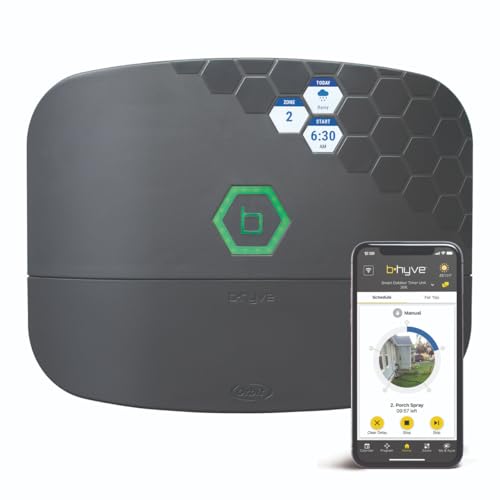
The Orbit B-hyve XR 8-Zone Smart Sprinkler Timer brings modern automation to residential irrigation systems. This WiFi-enabled controller allows homeowners to manage up to eight separate watering zones through a mobile app, eliminating the need to adjust traditional timers manually. The system supports flexible scheduling and custom programs, making it adaptable to different lawn and garden layouts.
A standout feature is the weather-aware intelligence built into the controller. The system monitors weather forecasts and automatically adjusts watering cycles to account for rainfall, temperature, and humidity. This adaptive approach helps conserve water and reduce unnecessary watering, which can lower outdoor water consumption and associated utility costs over time.
The B-hyve XR is designed for both indoor and outdoor installation with weatherproof construction. The two-year limited warranty covers material and workmanship defects, providing standard protection for residential use. For homeowners seeking app-based sprinkler control without professional installation, this eight-zone system offers a practical solution to automate and optimize irrigation schedules.
| Specification | Details |
|---|---|
| Brand | Orbit |
| Model | B-hyve XR |
| Number of Zones | 8 |
| Connectivity | WiFi-Enabled |
| Control Method | Mobile App |
| Installation | Indoor/Outdoor |
| Weather-Smart Features | Forecast-Driven Irrigation |
| Warranty | Two-Year Limited Warranty |
| Warranty Coverage | Material and Workmanship Defects |
| Category | Irrigation System Controllers |
Initial Setup: Install the B-hyve XR controller near your main water supply or existing irrigation line. Connect it to your home WiFi network using the mobile app. The app will guide you through pairing and configuration.
Zone Configuration: Assign each of your eight zones to the appropriate valve or sprinkler line. Name each zone (e.g., 'Front Lawn,' 'Garden Bed') for easy identification in the app.
Creating Watering Programs: Set custom schedules for each zone based on plant type, soil conditions, and sun exposure. The app allows you to specify watering days, start times, and duration. Enable weather-aware mode to let the system automatically adjust schedules based on forecasts.
Remote Management: Monitor and adjust your watering schedule anytime from the app. You can pause watering before rain, extend cycles during hot weather, or make quick adjustments without visiting the physical timer.
Optimize Zone Grouping: Group plants with similar water needs into the same zone to maximize efficiency. Separate sun-exposed areas from shaded zones, as they require different watering frequencies.
Leverage Weather Intelligence: Keep the weather-aware feature enabled to reduce manual adjustments. The system learns your local climate patterns and adapts automatically, conserving water during rainy periods.
Monitor Water Usage: Use the app's scheduling features to review your watering history and adjust programs seasonally. Reduce watering frequency in cooler months and increase it during summer heat.
WiFi Signal Strength: Ensure your controller has a strong WiFi signal for reliable app connectivity. If signal is weak, consider a WiFi extender or relocating the router closer to the controller location.
Is This Right for You? The B-hyve XR is ideal if you have multiple irrigation zones (up to eight) and want app-based control without hiring a professional installer. It suits homeowners who value water conservation and want automated, weather-responsive watering.
Installation Considerations: This controller works with existing underground irrigation systems or above-ground sprinkler setups. You'll need access to your main water valve and WiFi connectivity in or near your yard. No special tools or plumbing knowledge is required for basic installation.
Key Questions to Ask: Do you have reliable WiFi coverage in your yard? How many separate watering zones do you need? Are you comfortable using a mobile app to manage your irrigation? If you answered yes to these questions, the B-hyve XR is a solid choice for smart irrigation automation.

Pros
- Weather-smart automation reduces water waste and prevents overwatering during rain or freezing conditions
- Flexible scheduling with 16 plans across 4 zones lets you tailor watering to different plant types and lawn areas
- Quick 10-minute installation means you can get up and running without hiring a technician
- App control provides real-time monitoring and schedule adjustments from your phone or tablet
- Dual irrigation modes (standard and soak) accommodate various soil types and plant needs
Cons
- No customer reviews available yet, so long-term reliability and real-world performance data are limited
- Requires a stable 2.4GHz WiFi connection, which may be problematic in yards far from your router or in areas with weak signal
The HiOazo Smart Sprinkler Controller addresses a common pain point for homeowners: the hassle of manually managing irrigation schedules. By combining app-based control with weather-aware automation, this system lets you water your lawn and garden intelligently without constant intervention. The ability to set up 16 different watering plans across 4 zones means you can tailor hydration to suit everything from delicate flower beds to hardy lawn grass, ensuring each area gets exactly what it needs.
What sets this controller apart is its focus on water conservation. The automatic skip features for rain, frost, and wind conditions prevent the waste that occurs when sprinklers run during unfavorable weather. For homeowners in regions with variable climates or water restrictions, this smart adaptation can translate into meaningful savings on both water bills and plant health. The dual irrigation modes (standard and soak) add flexibility for different soil compositions and plant types, allowing water to penetrate deeper where it's needed most.
Installation is refreshingly straightforward at just 10 minutes, removing the barrier of professional setup costs and complexity. The 2.4GHz WiFi connectivity is standard and reliable for most home networks, though you'll want to ensure adequate signal strength in your yard. The 5-year care warranty reflects confidence in the product's durability, which is important for outdoor electronics exposed to the elements year-round.
| Specification | Details |
|---|---|
| Brand | HiOazo |
| Zones | 4 |
| Watering Plans | 16 |
| Connectivity | 2.4GHz WiFi |
| Irrigation Modes | Standard Irrigation, Soak Irrigation |
| Weather Features | Rain Skip, Freeze Skip, Wind Skip |
| Installation Time | 10 minutes |
| App Control | Yes - Remote monitoring and scheduling |
| Warranty | 5-year care |
Getting Started: Begin by downloading the HiOazo app and creating your account. Connect the controller to your 2.4GHz WiFi network during the initial setup. The app will guide you through the pairing process and zone configuration.
Setting Up Zones: Assign each of your 4 zones to specific areas of your yard (front lawn, back garden, flower beds, etc.). For each zone, specify the plant types or area characteristics so the app can recommend optimal watering schedules.
Creating Watering Plans: Use the app to create up to 16 customized watering plans. Set frequency (daily, alternate days, weekly), duration, and start times. You can apply different plans to different zones based on their needs.
Choosing Irrigation Mode: Select Standard Irrigation for continuous watering or Soak Irrigation to allow soil absorption time between cycles. Soak mode is ideal for clay soils or areas where water runs off quickly.
Enabling Weather Features: Activate the automatic skip features for rain, frost, and wind. The system will monitor local weather and pause scheduled watering when conditions are unfavorable, protecting your plants and conserving water.
Monitoring and Adjustments: Check the app regularly to view watering history and real-time system status. Adjust schedules seasonally as your plants' water needs change throughout the year.
Zone Organization: Group plants with similar water needs into the same zone. This ensures lawns, vegetables, and ornamentals each receive their ideal hydration without compromise.
Seasonal Adjustments: Update your watering schedules seasonally. Spring and fall typically require less frequent watering than hot summer months, and dormant winter grass needs minimal irrigation.
Soak Mode for Clay Soil: If your yard has dense clay soil that absorbs water slowly, use Soak Irrigation mode to prevent runoff and allow deeper penetration.
WiFi Placement: Position your router or WiFi extender to ensure strong signal near the controller location. Weak WiFi can cause scheduling delays or app connectivity issues.
Rain Sensor Calibration: Adjust the rain skip sensitivity in the app settings. Heavier rainfall amounts trigger skips more quickly, while lighter settings skip only during significant rain events.
Valve Maintenance: Check your irrigation valves periodically for leaks or mineral buildup. Clean valve screens annually to ensure smooth operation of the system.
Is This Right for You? The HiOazo Smart Sprinkler Controller is ideal if you have 4 or fewer irrigation zones and want app-based control without professional installation. It's perfect for homeowners tired of manual watering or those looking to reduce water consumption through smart automation.
Yard Size Considerations: This 4-zone system works well for small to medium residential properties. If you have extensive landscaping requiring more than 4 zones, you may need multiple controllers or a larger system.
WiFi Requirements: Ensure your home WiFi network reaches your controller location. If you have dead zones in your yard, consider installing a WiFi extender before purchasing.
Compatibility: This controller works with standard 24V solenoid irrigation valves. Check that your existing sprinkler system uses this voltage before installation. If you're building a new system, any standard residential irrigation valve will work.
Climate Factors: The weather-skip features are most valuable in regions with variable rainfall, temperature swings, or strong winds. If you live in an arid climate with predictable dry seasons, you'll still benefit from precise scheduling and water conservation.
Budget Perspective: This controller represents a mid-range investment for smart irrigation. The 5-year warranty and 10-minute installation make it cost-effective compared to hiring professionals for setup.

Pros
- Fast DIY installation replaces 99% of existing controllers with minimal effort
- Advanced weather intelligence automatically skips unnecessary watering cycles
- Hyperlocal weather data and soil-based scheduling deliver precise watering tailored to your yard
- App-based monitoring lets you view schedules and water usage estimates anytime
- Weatherproof enclosure protects the controller in harsh outdoor conditions
Cons
- No reviews available yet, so long-term durability and real-world performance data are limited
- Initial setup requires WiFi connectivity and smartphone access, which may be challenging in areas with poor signal
The Rachio 3 Smart Bundle addresses a common homeowner frustration: overwatering. By combining an intelligent 8-zone controller with hyperlocal weather data, this system learns your landscape's specific needs including plant type, soil composition, and sun exposure. The included weatherproof enclosure ensures the controller withstands outdoor elements, making this a complete solution right out of the box.
Installation is genuinely accessible for DIYers. The controller replaces 99% of existing systems, and Rachio's in-app tutorial walks you through the process in roughly 30 minutes without requiring special tools or professional installation. Once online, the app provides intuitive control: run zones manually, view upcoming schedules, and monitor estimated water usage. Integration with Alexa and Apple HomeKit adds convenience for those invested in smart home ecosystems.
The real value lies in water conservation. Smart scheduling features like rain skip, wind skip, and freeze skip prevent unnecessary watering, and many homeowners report 30-50% reductions in monthly water bills. For environmentally conscious homeowners or those in drought-prone regions, this efficiency translates to both cost savings and meaningful resource conservation.
| Specification | Detail |
|---|---|
| Model | Rachio 3 Smart Controller |
| Zones | 8 zones |
| Connectivity | WiFi enabled |
| Smart Home Compatibility | Amazon Alexa, Apple HomeKit |
| Weather Features | Rain skip, wind skip, freeze skip, hyperlocal weather intelligence |
| Installation Time | 30 minutes or less |
| Compatibility | Replaces 99% of existing sprinkler controllers |
| Included Enclosure | Weatherproof outdoor housing |
| Water Savings | Up to 30-50% monthly reduction |
| Control Method | Mobile app, voice commands, manual scheduling |
Installation: Turn off power to your existing sprinkler controller. Remove the old controller and photograph the wire connections for reference. The Rachio 3 uses standard terminal connections, so wiring is straightforward. Mount the controller in the included weatherproof enclosure, connect the wires to matching terminals, and power on. Use the in-app tutorial for step-by-step guidance.
Initial Setup: Download the Rachio app and create an account. Connect the controller to your WiFi network during setup. Input your address so the system can access hyperlocal weather data. Add your sprinkler zones, specifying plant types, soil type, and sun exposure for each.
Daily Operation: The system creates smart watering schedules automatically. Monitor upcoming schedules in the app anytime. Manually run any zone instantly if needed. The app displays estimated water usage and savings. Weather intelligence automatically adjusts or skips watering when rain or freeze conditions occur.
Maximize Efficiency: Accurately describe each zone's plant type, soil composition, and sun exposure during setup. The more precise your input, the better Rachio's scheduling algorithm performs. If you have mixed plantings in one zone, describe the dominant type.
Seasonal Adjustments: Review and update your schedule seasonally. Rachio adjusts watering based on weather, but you can fine-tune monthly if your landscape changes or if you notice over or underwatering.
Smart Home Integration: Link your Rachio to Alexa or Apple HomeKit for voice control. You can ask to run a specific zone or view water usage without opening the app, adding convenience to daily management.
Monitor Water Usage: Check the app's water usage estimates regularly. Sudden increases may indicate a broken sprinkler head or leak, prompting you to investigate before water waste escalates.
Who Should Buy: Homeowners with existing sprinkler systems looking for smart automation, those in drought-prone regions seeking water conservation, and DIYers comfortable with basic electrical connections. Also ideal for anyone already invested in Alexa or Apple HomeKit ecosystems.
What to Verify Before Purchasing: Confirm your current sprinkler system uses standard 24V controllers. Check that you have WiFi coverage in the area where the controller will be installed. Count your sprinkler zones to ensure the 8-zone capacity meets your needs (additional controllers can be linked for larger systems).
Budget Considerations: This is a mid-range smart controller. The included weatherproof enclosure adds value compared to purchasing a controller and enclosure separately. Water bill savings typically offset the investment within 1-2 seasons for most homeowners.
Installation Confidence: If you're uncomfortable working with electrical connections, hire a professional installer. Most sprinkler contractors can install this in under an hour. However, the included tutorial and straightforward design make DIY installation achievable for most homeowners with basic mechanical skills.

Pros
- Smart weather intelligence automatically adjusts watering to prevent waste from rain, wind, and freeze conditions
- Fast DIY installation with in-app tutorials makes setup accessible for most homeowners without professional help
- Comprehensive app provides real-time control, schedule visibility, and water usage tracking from your phone
- Weatherproof enclosure is included, eliminating the need for a separate purchase to protect outdoor equipment
- Compatible with major smart home ecosystems for seamless voice and automation integration
Cons
- 16-zone capacity may be limiting for larger properties or complex irrigation layouts requiring more zones
- Requires stable WiFi connectivity for remote access and weather-based features; performance depends on signal strength
The Rachio 3 Smart Bundle delivers a practical solution for homeowners looking to upgrade their irrigation system with smart technology. The controller's hyperlocal weather intelligence automatically skips watering when rain, wind, or freezing temperatures are detected, eliminating unnecessary water waste. Combined with customized scheduling based on your lawn's specific characteristics, the system adapts to real-world conditions rather than following a rigid timer.
Installation is straightforward enough for most DIYers, with the in-app tutorial guiding you through the process in about 30 minutes. The 16-zone capacity suits most residential properties, and the included weatherproof enclosure means you don't need to purchase additional protection for outdoor mounting. Integration with Alexa and Apple HomeKit provides flexibility for those already invested in smart home ecosystems.
The real value proposition centers on water and cost savings. By eliminating unnecessary watering cycles and tailoring schedules to actual plant needs, users commonly report 30-50% reductions in water consumption. For homeowners in regions with water restrictions or higher utility costs, this efficiency gain translates directly to measurable monthly savings while supporting environmental conservation.
| Model | Rachio 3rd Generation Smart Sprinkler Controller |
| Zones Supported | 16 zones |
| Smart Home Compatibility | Alexa, Apple HomeKit |
| Weather Features | Hyperlocal Weather Intelligence Plus with rain skip, wind skip, freeze skip |
| Control Method | Mobile app, voice commands, smart home integration |
| Installation | DIY; replaces 99% of existing controllers; 30 minutes or less |
| Included Accessories | Rachio Weatherproof Outdoor Enclosure |
| Water Savings Potential | Up to 30-50% reduction in water usage |
| Scheduling | Customized based on plant type, soil type, sun exposure, and location |
| Tools Required | None; standard household items sufficient |
Initial Setup: Turn off power to your existing sprinkler system. Remove the old controller and photograph the wire connections for reference. The Rachio 3 connects to the same terminals using standard sprinkler wiring. Once wired, download the Rachio app and follow the in-app installation tutorial to connect to your WiFi and configure your zones.
Creating Your Schedule: Input details about your lawn including plant types (grass, shrubs, trees), soil composition, sun exposure, and your location. The app uses this information along with hyperlocal weather data to generate a customized watering schedule. You can manually adjust frequency and duration if needed, or let the system optimize automatically.
Daily Operation: The system monitors local weather conditions throughout the day. If rain is forecasted or detected, it automatically skips that day's watering. Check the app anytime to view upcoming schedules, current water usage estimates, and system status. Adjust settings seasonally as plant needs change with temperature and daylight hours.
Maximize Water Savings: Take time during initial setup to accurately describe your lawn's characteristics. More detailed information about soil type and sun exposure leads to better-optimized schedules. Review your watering history in the app monthly to identify patterns and adjust zones if needed.
Seasonal Adjustments: Use the app's seasonal features to reduce watering during cooler months when plants require less water. Many users create separate schedules for spring/summer and fall/winter to align with actual plant growth cycles.
WiFi Optimization: Ensure your outdoor enclosure is installed within reliable WiFi range. If signal is weak, consider a WiFi extender near your controller to maintain consistent connectivity for weather updates and remote access.
Weather Intelligence Tuning: The rain skip feature can be adjusted based on your preference. Some users prefer to skip watering after even light rain, while others set a threshold for heavier rainfall. Experiment to find the balance that works for your lawn.
Is This Right for You? The Rachio 3 Smart Bundle works well if you have a residential lawn with up to 16 irrigation zones, reliable home WiFi, and an existing sprinkler system that needs a controller upgrade. It's especially valuable for homeowners in regions with water restrictions, seasonal dry periods, or higher water utility costs where efficiency gains deliver noticeable savings.
Zone Capacity Considerations: Count your existing zones before purchasing. Most single-family homes have 6-12 zones, so 16 zones provides comfortable headroom. If you have more than 16 zones or plan significant future expansion, you may need multiple controllers or a different solution.
Smart Home Integration: If you already use Alexa or Apple HomeKit, the Rachio 3's compatibility adds convenience through voice commands and automation routines. However, the mobile app alone provides full functionality, so smart home integration is a bonus rather than a requirement.
Installation Confidence: The DIY installation is manageable for most homeowners with basic comfort around electrical wiring. If you're unfamiliar with sprinkler system wiring, consult your existing system's documentation or consider professional installation through a local irrigation contractor.

Pros
- Weather-based watering cuts water usage and reduces monthly utility bills significantly
- Expandable design grows with your property without requiring a complete system replacement
- Fast DIY installation means no contractor fees and same-day operation
- Remote app control lets you adjust schedules from work, vacation, or anywhere with internet
- Durable outdoor-rated construction handles rain, sun, and temperature swings
Cons
- No customer reviews available yet, so long-term reliability and real-world performance data are limited
- Expansion modules sold separately add to total cost if you need more than 4 zones
The Hunter Hydrawise HPC400 addresses a common DIY frustration: controlling lawn watering without professional installation or complicated wiring. The system ships with 4 zones ready to go, and the touchscreen interface walks you through setup step-by-step. Most homeowners report getting the controller operational in under 30 minutes, which eliminates the need to hire an irrigation specialist and saves hundreds in labor costs.
Where this controller truly stands out is its weather intelligence. By pulling real-time local forecast data, the Hydrawise app automatically adjusts your watering schedule to skip watering when rain is expected or reduce run times during cooler days. Homeowners who rely on weather-based adjustments consistently report water bill reductions of 30-50%, making this system pay for itself within a season or two depending on your climate and current watering habits.
The expandable architecture is practical for growing properties. If you start with a small garden or townhouse lot, you can add expansion modules later to reach up to 32 zones total, covering larger residential landscapes, multiple garden beds, and lawn sections without replacing the entire controller. The weather-resistant enclosure is engineered for outdoor mounting, and Hunter's long track record in irrigation equipment suggests this system will deliver years of reliable service.
| Feature | Details |
|---|---|
| Brand | Hunter |
| Model | HPC400 |
| Control Method | WiFi + Mobile App (iOS/Android/Web) |
| Starting Zones | 4 Zones Included |
| Maximum Zones | Up to 32 Zones (Expandable) |
| Weather Intelligence | Real-Time Weather-Based Adjustments |
| Installation | DIY (No Professional Setup Required) |
| Setup Time | Under 30 Minutes |
| Interface | Touchscreen + Mobile App |
| Enclosure | Weather-Resistant Outdoor Rated |
| Water Savings | Up to 50% Reduction Potential |
| Expansion | Modules Sold Separately |
Initial Setup: Mount the controller in a protected outdoor location near your main water line. Connect the labeled wires to your sprinkler valve solenoids following the touchscreen prompts. Download the Hydrawise app, connect to your home WiFi, and the system will guide you through zone naming and watering preferences. Most users complete this in one session.
Daily Operation: Once configured, the system runs on autopilot. The weather engine checks forecasts daily and adjusts schedules automatically. You can override schedules anytime via the app, skip a watering day, or manually start zones immediately if needed.
Expansion: To add zones beyond 4, purchase expansion modules separately and connect them to the main controller following Hunter's documentation. The app automatically recognizes new zones once wired and configured.
Maximize Water Savings: Let the weather-based engine run for at least two weeks before manually tweaking schedules. The algorithm learns your lawn's needs and often outperforms manual adjustments. Set zone run times conservatively at first and increase if you notice dry patches.
Smart Zone Planning: Group plants with similar water needs into the same zones. Pair sun-exposed lawn areas separately from shaded or mulched garden beds so the weather adjustments benefit each zone appropriately.
WiFi Reliability: Ensure your home WiFi signal reaches the controller location. If signal is weak, consider a WiFi extender to prevent connection drops that could interrupt schedules. Test connectivity before relying on remote adjustments.
Seasonal Adjustments: Manually reduce overall watering percentages in fall and winter to prevent overwatering during dormant seasons. The app makes these adjustments simple without reprogramming individual zones.
Best For: Homeowners and gardeners who want smart watering without professional installation, have at least 4 lawn or garden zones to manage, and live in areas where weather-based watering delivers meaningful water savings (temperate climates with variable rainfall).
Consider Your Needs: If you currently have fewer than 4 zones, this system still works but may be overkill. If you have a small apartment balcony garden, a simpler hose timer might suffice. If you manage a large estate or commercial property with 20+ zones, this controller shines.
Installation Readiness: Confirm you have access to your existing sprinkler valve wiring or are comfortable running new wire from the controller to valves. If your lawn has no irrigation system yet, you'll need to install valves and lines before the controller becomes useful. This controller handles the scheduling and water delivery control, not the physical pipe installation.
WiFi Requirement: Reliable home WiFi is essential for remote control and weather updates. If your WiFi is spotty or you're far from your router, plan for a WiFi extender before purchasing.

Pros
- Native Apple HomeKit support is rare in smart irrigation controllers and adds seamless ecosystem integration
- Dual Ethernet and Wi-Fi connectivity eliminates dead zones common in garage installations
- Physical control buttons are a genuine safety net when internet or power fluctuates
- Real-time leak detection prevents costly water damage and identifies maintenance issues early
- Compact design and fast installation make retrofitting simple for most homeowners
Cons
- No customer reviews available yet, so real-world durability and long-term performance data is limited
- Requires separate purchase of flow sensors and optional weatherproof enclosure for full monitoring and outdoor placement
The Yardian Pro stands out as one of the few smart irrigation controllers built from the ground up for Apple HomeKit users. Its native HomeKit integration, combined with support for Alexa, Google Home, and Home Assistant, makes it flexible enough for virtually any smart home setup. The dual connectivity approach—Ethernet and Wi-Fi—addresses a real pain point for homeowners whose garages have spotty wireless coverage, ensuring your controller stays online even when conditions are less than ideal.
What sets this controller apart is its focus on both automation and manual control. The physical on-device buttons let you run zones or troubleshoot sprinklers instantly, without reaching for your phone or worrying about internet outages. This is particularly valuable during installation or when diagnosing system problems. The ET-based weather scheduling learns your local conditions and adjusts watering automatically, with claims of up to 50% water savings—a meaningful reduction for most households.
The real-time leak and flow monitoring capability transforms this from a simple timer into a protective system. By detecting burst pipes, clogs, or unusual water flow patterns, it can alert you before minor issues become expensive repairs. The 15-minute installation process and compact design make it accessible to DIYers, though you'll want to budget separately for flow sensors if you want the full monitoring suite.
| Specification | Detail |
|---|---|
| Zones Supported | 6 zones |
| Connectivity | RJ45 Ethernet + Wi-Fi |
| Smart Home Integration | Apple HomeKit (native), Amazon Alexa, Google Home, Home Assistant |
| Control Method | Physical buttons, mobile app, voice commands |
| Watering Technology | ET-based (evapotranspiration) with hyper-local weather data |
| Flow Monitoring | Wireless and wired flow sensor support |
| Power Supply | Universal 100V-240V adapter |
| Installation | DIY-friendly, ~15 minutes |
| Enclosure Options | Indoor (standard) or outdoor with optional IP56 weatherproof enclosure |
| Water Savings Claim | Up to 50% reduction vs. traditional controllers |
Initial Setup: Turn off power to your existing controller. Note the wire connections from your current system, then swap in the Yardian Pro. Connect the same wires to the corresponding zone terminals. Plug in the universal power adapter and power on. The compact design fits most standard irrigation boxes without modification.
Mobile App & HomeKit Configuration: Download the Yardian app or add the device to Apple Home using HomeKit code. The app guides you through zone naming and assignment. Once configured, you can control zones directly from the app, Apple Home, or voice commands via Siri, Alexa, or Google Assistant.
Weather-Based Scheduling: Enable ET-based scheduling in the app. The system pulls hyper-local weather data and automatically adjusts watering frequency and duration based on rainfall, temperature, and soil conditions. You can override schedules manually using the physical buttons or app at any time.
Leak Monitoring Setup (Optional): If using flow sensors, attach wireless or wired sensors to your main line or individual zones. The app will display real-time water usage and alert you to unusual flow patterns or sudden spikes indicating leaks.
Use Ethernet for Maximum Reliability: If your garage or equipment closet has network access, run an Ethernet cable to the Yardian Pro. This eliminates Wi-Fi interference and ensures your controller stays connected even during Wi-Fi router reboots or updates.
Test Physical Buttons During Installation: Before burying wires or closing up your irrigation box, use the on-device buttons to verify each zone is wired correctly. This saves troubleshooting time later and confirms the controller is functioning independently of your network.
Start Conservative with ET Scheduling: When first enabling weather-based watering, monitor your lawn for 2-3 weeks. ET algorithms are conservative by design to prevent overwatering, but your soil type and plant variety may need fine-tuning. Adjust the ET percentage in the app if your lawn shows signs of stress.
Invest in Flow Sensors Early: If water conservation and leak detection matter to you, add flow sensors during initial setup rather than retrofitting later. Early detection of small leaks or clogged valves saves money and prevents landscape damage.
Best For: Homeowners with Apple HomeKit ecosystems, those seeking water-saving automation, and DIYers comfortable with basic wiring. Also ideal for properties where Wi-Fi coverage is unreliable and Ethernet connectivity is possible.
Consider Alternatives If: You need more than 6 zones (larger systems may require multiple controllers or expansion modules), or if you're committed exclusively to a non-HomeKit smart home platform and don't value native integration.
Budget Considerations: Factor in the cost of flow sensors if leak detection is important to you, and the optional IP56 weatherproof enclosure if you plan to install the controller outdoors rather than in a garage or shed.
Installation Skill Level: DIY-friendly for anyone comfortable matching wire terminals. If your current controller is hardwired without a plug-in adapter, you may need an electrician to install a standard outlet near your irrigation box.

Pros
- Exceptional zone capacity at 14 stations gives you flexibility for complex landscapes and multiple lawn areas
- Weather-responsive technology reduces water waste and keeps your lawn healthy through seasonal changes
- Built-in diagnostics catch wiring issues early, saving time troubleshooting and preventing watering failures
- Expandable design lets you add Wi-Fi capability later without replacing the entire unit
Cons
- Wi-Fi functionality requires purchasing the WAND module separately, adding to the total cost
- No reviews available yet, so long-term reliability and real-world performance feedback is limited
The Hunter X2 delivers substantial control for homeowners managing multiple irrigation zones across their property. With 14-station capacity, three independent programs, and four start times per program, this controller handles complex watering schedules that would overwhelm basic systems. The ability to run zones for up to 6 hours and adjust seasonal settings without full reprogramming makes it practical for changing weather patterns throughout the year.
What sets the X2 apart is its integration with Hydrawise technology for weather-responsive watering. The system uses real-time weather data to intelligently adjust your irrigation schedule, reducing water waste while maintaining lawn and garden health. This approach appeals to environmentally conscious homeowners and those in water-restricted areas. The QuickCheck diagnostic system is another standout feature, instantly detecting wiring faults before they cause watering problems, which saves frustration and prevents brown spots from missed cycles.
The controller is built for outdoor durability with a weather-resistant enclosure and large backlit display that remains readable in bright sunlight or darkness. Setup is straightforward, and the Easy Retrieve Memory function protects your schedule during power interruptions. While Wi-Fi capability requires a separate WAND module purchase, this modular approach lets you start with a reliable hardwired system and upgrade to smart home control later if your needs evolve.
| Feature | Details |
|---|---|
| Stations | 14 zones |
| Programs | 3 independent programs |
| Start Times | 4 per program |
| Maximum Runtime | 6 hours per station |
| Smart Control | Wi-Fi capable with optional WAND module |
| Weather Technology | Hydrawise weather-based scheduling |
| Diagnostics | QuickCheck wiring fault detection |
| Memory Protection | Easy Retrieve Memory backup |
| Display | Large backlit LCD |
| Enclosure | Weather-resistant outdoor rated |
| Seasonal Adjustment | Yes, without full reprogramming |
Initial Setup: Mount the controller in a protected outdoor location near your main water line. Connect your irrigation zone wires to the corresponding terminals, ensuring proper polarity. Program your three watering schedules using the backlit keypad, setting start times, duration, and which zones to activate. The interface guides you through each step without requiring technical expertise.
Daily Operation: Once programmed, the X2 runs automatically on your set schedule. Use the large display to monitor which zones are currently watering and check upcoming schedules. The QuickCheck feature automatically monitors for wiring problems, alerting you if faults are detected so you can address them immediately.
Seasonal Adjustments: As weather changes, adjust the seasonal percentage rather than reprogramming everything. This simple adjustment increases or decreases watering duration across all zones proportionally, keeping your lawn appropriately hydrated without starting from scratch. If you add the optional WAND module, access the Hydrawise app to make adjustments remotely from your phone.
Optimize Zone Layout: Group zones with similar soil types and sun exposure together on the same program. This ensures each area receives appropriate watering without wasting water on areas that need less moisture.
Leverage Weather Data: If using Hydrawise, enable weather-based adjustments to skip watering after rain or during cooler periods. This single feature typically saves 20-30% on water usage while maintaining turf quality.
Use Seasonal Adjustment Strategically: Rather than manually changing every zone's runtime, adjust the seasonal percentage monthly. Increase it 10-20% in peak summer heat and decrease it 30-50% in spring and fall to match natural rainfall patterns and cooler temperatures.
Plan for Expansion: Position the controller where you can easily add the WAND module later if you want smartphone control. Keeping the unit accessible makes the upgrade process simple and non-invasive.
Best For: Homeowners with medium to large properties requiring multiple irrigation zones, those wanting weather-responsive watering without complicated setup, and DIYers who may upgrade to smart control later.
Consider This If: You have more than 8 irrigation zones, want to reduce water usage through weather-based scheduling, need reliable diagnostics to catch problems early, or plan to integrate with a smart home system eventually.
Key Decision Points: Decide whether you need Wi-Fi capability now or might want it later (the modular WAND approach accommodates both). Confirm your property has 14 or fewer zones; if you need more, consider a higher-capacity model. Verify your outdoor mounting location is protected from direct spray but accessible for programming and maintenance.
What to Know About Installation: This is a DIY-friendly controller that requires basic wiring knowledge. You'll need to run zone wires from your valve manifold or individual valves to the controller terminals. If you're unfamiliar with irrigation wiring, consult your system's documentation or hire an irrigation professional for the initial setup.
Pros
- Intuitive 3-step programming makes setup quick for homeowners without irrigation experience
- Weather-based adjustments deliver genuine water savings and lower utility bills
- Dual-mode WiFi lets you control your system locally or remotely from anywhere
- Large backlit display remains readable in bright sunlight and low-light conditions
- Flexible 14-day delay feature accommodates rain events or seasonal pauses
Cons
- No built-in reviews available to assess real-world user experiences and long-term reliability
- WiFi connectivity depends on a stable home network, which may limit range in large properties
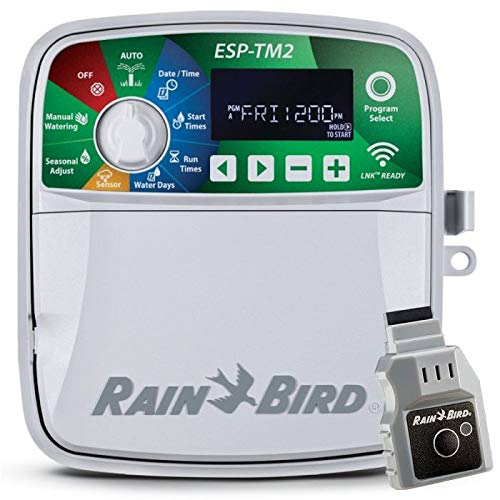
The Rain Bird ESP-TM2 is a solid mid-range sprinkler controller designed for homeowners who want smart watering without overwhelming complexity. Its standout feature is the weather-based adjustment technology, which evaluates local conditions daily and automatically scales back watering time when rain is expected or soil moisture is adequate. For most residential properties, this translates to real water savings and lower monthly utility costs.
Setup is genuinely straightforward. The 3-step programming approach walks you through zone assignment, watering days, and run times without forcing you to navigate confusing menus. The large backlit LCD display is a practical touch, making the controller readable whether you're programming at dawn or in direct afternoon sun. The WiFi module adds flexibility: use it as a wireless remote while you're home, or monitor and adjust your system from your phone while traveling.
The 12-zone capacity suits most residential properties, and the included 6-foot outdoor-rated power cord eliminates the need for additional accessories. The contractor default feature is useful if you want to experiment with schedules and quickly return to a proven setup. Overall, the ESP-TM2 strikes a good balance between ease of use and smart-home functionality for DIYers and homeowners seeking efficient irrigation control.
| Specification | Detail |
|---|---|
| Brand | Rain Bird |
| Model | ESP-TM2 |
| Maximum Zones | 12 |
| WiFi Connectivity | Yes, with Link WiFi Module |
| Installation | Indoor or outdoor |
| Power Cord | 6 feet, outdoor-rated (factory installed) |
| Programming Steps | 3-step quick setup |
| Display | Large backlit LCD |
| Weather Adjustments | Automatic daily run time changes |
| Water Savings | Up to 50% reduction potential |
| Delay Watering | Up to 14 days |
| Special Features | Contractor default save/restore, automatic resume after delay |
Getting Started: Unbox the ESP-TM2 and verify all components are included. If installing outdoors, position the controller in a sheltered location away from direct water spray. Connect the 6-foot power cord to a GFCI-protected outlet.
Basic Programming (3 Steps): First, assign your sprinkler zones by connecting each zone wire to the corresponding terminal on the controller. Second, select your watering days and frequency using the large LCD menu. Third, set the run time for each zone. The backlit display makes navigation easy in any lighting condition.
Adding WiFi Control: Install the Link WiFi module as directed in the manual. Connect it to your home network using your smartphone app. Once paired, you can view your schedule, start or stop watering remotely, and receive notifications about your irrigation system's activity.
Using Weather Adjustments: Enable the automatic weather feature in the app settings. The controller will check local weather data daily and reduce watering time when rain is forecasted or recent precipitation is detected, helping you conserve water without manual intervention.
Taking Advantage of Delay Watering: If heavy rain occurs or you're expecting extended wet weather, use the delay feature to pause watering for up to 14 days. The system will automatically resume your saved schedule when the delay expires, so you don't have to remember to restart it manually.
Optimize Zone Layout: Before connecting zone wires, map out your landscape and group zones by plant type and sun exposure. This makes it easier to set appropriate run times and maximizes the effectiveness of weather-based adjustments.
Leverage Contractor Default: After dialing in your ideal schedule, save it using the contractor default feature. This acts as a backup if you accidentally change settings or want to quickly reset after experimenting with new watering times.
Monitor WiFi Signal Strength: Place your controller in a location with solid WiFi coverage. If the signal is weak, consider a WiFi extender to ensure reliable remote access and weather data updates.
Adjust Seasonally: Even with automatic weather adjustments, manually review your schedule at the start of spring and fall. Cooler temperatures and changing daylight hours may warrant tweaks to run times for optimal plant health.
Use Delay for Seasonal Pauses: During winter dormancy or extended dry spells, the 14-day delay feature lets you pause your system without reprogramming. Simply set the delay, and your schedule resumes automatically when the period ends.
Who Should Buy This: The ESP-TM2 is ideal for homeowners with residential properties featuring up to 12 sprinkler zones. It suits both beginners seeking simple setup and experienced DIYers who want smart automation. If you're tired of manual watering schedules or want to reduce water waste, this controller delivers practical benefits.
Zone Capacity Considerations: Count your existing sprinkler zones before purchasing. If you have fewer than 12 zones, this controller still works perfectly and gives you room to expand later. If you need more than 12 zones, you'll want to look at higher-capacity models.
WiFi Requirements: Ensure your home has stable WiFi coverage in the area where you'll install the controller. The WiFi module needs a reliable connection for remote access and weather data updates. If your WiFi is weak in that location, plan for a signal booster.
Installation Flexibility: The ESP-TM2 works indoors or outdoors, giving you flexibility in placement. The factory-installed 6-foot power cord is a convenience, but verify that a GFCI outlet is accessible near your intended installation spot.
Feature Priorities: If water savings and ease of use are your main goals, the weather-based adjustments and 3-step programming make this a strong choice. If you need advanced scheduling options or integration with other smart home systems, research whether additional features matter for your setup.
Pros
- Modular expansion design lets you add 3 or 6 station modules as your landscape grows
- Intuitive interface with large text and symbols reduces programming confusion
- Smart-ready architecture means you can upgrade to WiFi control without replacing the whole unit
- Built-in diagnostics catch problems early through visual and mobile alerts
- Suitable for both indoor installation and outdoor mounting with weatherproof cabinet included
Cons
- Base controller lacks WiFi connectivity out of the box, requiring a separate LNK module purchase for smart features
- No reviews available to assess real-world user experience and long-term reliability feedback
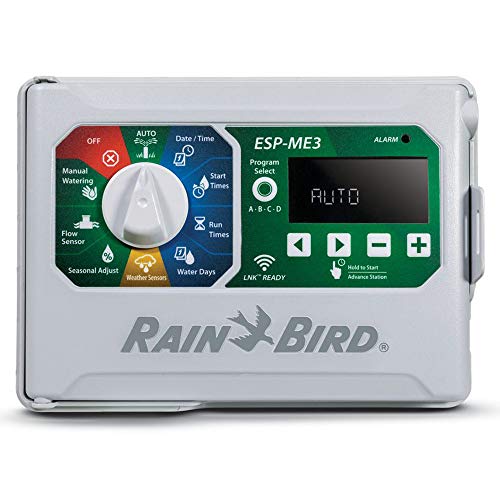
The Rain Bird ESP-ME3 is a modular irrigation controller designed for homeowners and light commercial users who need flexibility without complexity. Its standout feature is the ability to expand from 4 stations up to 22 stations by adding optional modules, allowing you to start with what you need today and grow your system later without replacing the entire controller. This approach saves money and reduces installation headaches if your landscape design changes or expands.
The interface prioritizes usability with a large 3-inch backlit display and color-coded dial positions that make programming straightforward, even in dimly lit garages or outdoor sheds. The controller includes built-in diagnostics that monitor for electrical faults, programming errors, and high flow conditions when paired with a flow sensor. These alerts display via a red LED and scrolling messages on the screen, with optional mobile notifications if you add the LNK WiFi module and Rain Bird app for remote management.
Installation is straightforward with the included power plug and weatherproof outdoor cabinet, giving you the option to mount it inside or outside. If you want to upgrade to smart home integration later, the LNK WiFi module integrates seamlessly without requiring a controller swap. This scalable, forward-thinking design makes the ESP-ME3 a practical choice for homeowners who want a reliable foundation that grows with their irrigation needs.
| Specification | Details |
|---|---|
| Brand | Rain Bird |
| Model | ESP-ME3 |
| Station Count | 4 to 22 (base + expandable modules) |
| Expansion Modules | 3 or 6 station modules available |
| Display | 3-inch color-coded backlit screen |
| Installation | Indoor or outdoor with included cabinet |
| Power | Plug-in power supply included |
| Smart Features | Optional LNK WiFi module for app control |
| Sensor Compatibility | Works with rain sensors and flow sensors |
| Diagnostics | Electrical, programming, and flow monitoring with LED alerts |
| Application | Residential and light commercial irrigation |
Initial Setup: Unpack the controller and choose your installation location (indoor garage, outdoor shed, or weatherproof enclosure). Plug in the power supply and connect your irrigation zone wires to the appropriate station terminals. The color-coded dial and large display guide you through basic programming without a manual.
Programming Irrigation Schedules: Use the color-coded dial to select your watering days, start times, and run duration for each station. The large text on the backlit screen makes it easy to read and adjust settings. Test each zone individually before running the full schedule to ensure proper coverage.
Monitoring and Alerts: Check the LED status light regularly for red alerts indicating electrical, programming, or flow issues. If you add the optional LNK WiFi module, you'll receive mobile notifications and can adjust schedules remotely through the Rain Bird app. This is especially useful if weather changes or you're away from home.
Expanding Your System: When you're ready to add more zones, simply add a 3 or 6 station module without powering down the controller. This modular approach means zero downtime and easy future expansion.
Plan for Growth: Even if you only need 4 stations today, consider a controller that can expand to 22. This future-proofs your investment if you add new landscape beds or expand your lawn in the coming years.
Add a Rain Sensor: Pair the ESP-ME3 with a Rain Bird rain sensor to automatically skip watering after rainfall. This simple addition saves water and reduces your utility bills without requiring the WiFi module.
Use Flow Sensors for Leak Detection: If you have a flow sensor installed, the controller monitors for unusual flow patterns that may indicate a broken line or leaking valve. This early warning system can prevent water waste and costly damage.
Upgrade to WiFi When Ready: You don't need the LNK WiFi module from day one. Start with the base controller and add the module later when you want remote access and mobile notifications. This staged approach spreads costs over time.
Mount in a Shaded, Protected Location: Whether indoors or outdoors, keep the controller out of direct sunlight and extreme temperature swings. The weatherproof cabinet protects it, but shade extends its lifespan.
Who Should Buy the ESP-ME3? This controller is ideal for homeowners with small to medium-sized lawns (4-22 zones) who want a straightforward, expandable system. It's also suitable for light commercial applications like small commercial landscapes or HOA properties. If you prefer simplicity over smart features, the base unit works great without WiFi. If you want smart home integration, you can add it later.
What to Consider Before Purchasing: Count your irrigation zones or planned zones to determine the right base configuration. Remember that you can start with 4 stations and expand later. Decide whether you want WiFi capability now or later; if now, budget for the separate LNK module. Ensure you have a suitable installation location that's protected from extreme weather if mounting outdoors.
Installation Requirements: You'll need basic electrical access (standard outlet) and the ability to connect irrigation zone wires to the controller terminals. No special tools are required. If you're unfamiliar with irrigation wiring, consult a professional installer or the manufacturer's documentation.
Cost Considerations: The base controller is an investment, but modularity means you avoid replacing the entire system when expanding. Optional add-ons like the LNK WiFi module and rain sensor increase functionality but are not required for basic operation.
Smart Sprinkler Controller Buying Guide
Choosing the right smart sprinkler controller comes down to matching the device to your yard’s actual complexity, your preferred smart home ecosystem, and how much fine-tuned control you want. The section below breaks down every factor that separates a frustrating purchase from one you will be happy with for years. Think of this the same way you would approach picking smart thermostats for your HVAC system: the goal is hands-off automation that quietly saves money without requiring daily attention.
Zone Count: Match Your System Before You Buy
Every controller lists a maximum zone count, and buying too few zones is a common mistake. A zone represents one independently controlled valve circuit. Most suburban homes run six to eight zones, while larger properties or those with drip irrigation alongside traditional spray heads can easily need twelve or more. Count your existing valves before shopping. Several controllers in our lineup, including the Hunter Hydrawise HPC400, are expandable well beyond their base zone count, which matters if you plan to add irrigation in the future. Controllers that support expansion modules, like the Rain-Bird ESP-TM2, offer the most flexibility for growing systems.
Weather Intelligence: The Feature That Pays for Itself
The single most valuable feature in any smart sprinkler controller is weather-based scheduling. Entry-level smart controllers simply pull a nearby weather station’s forecast and skip a scheduled run if rain is predicted. Higher-end systems, like the Rachio 3 with its Hyperlocal Weather Intelligence Plus, use hyperlocal data that accounts for your specific address, soil type, slope, and sun exposure to calculate precise run times. Over a full irrigation season, this level of precision can reduce water usage significantly compared to a fixed timer. For a budget-friendly option, the 2.4GHz Wi-Fi controller from our list delivers basic rain and freeze skipping at an accessible price point, which is a meaningful step up from a dumb timer even if it lacks advanced learning.
App Quality and Remote Access
A smart controller is only as useful as its app. Look for an interface that lets you start, stop, or adjust zones remotely with minimal taps. Rachio’s app is widely regarded as one of the most polished in the category, with intuitive scheduling, zone-by-zone status, and real-time alerts. Orbit’s B-hyve app covers the basics well and works reliably across both Android and iOS. Hunter’s Hydrawise platform stands out for professional-grade reporting, making it a strong choice if you want detailed water usage logs. Before committing, check recent app store reviews because software quality can shift with updates. A poorly maintained app erodes the entire value proposition of a connected controller. For context on how smart home apps compare across categories, see how smart lock upgrades handle remote access and credential management.
Voice Assistant and Smart Home Compatibility
Most smart sprinkler controllers support Amazon Alexa and Google Home. Apple HomeKit compatibility is rarer and tends to command a premium. If your household runs on HomeKit, the Yardian Pro is one of the few controllers that natively supports it alongside both Ethernet and Wi-Fi connections. Rachio 3 works with Alexa and Google Home out of the box, and its IFTTT support opens the door to custom automations. If your broader smart home setup includes Wi-Fi smart switches or smart displays, choosing a controller that sits in the same ecosystem makes managing everything from a single interface much smoother.
Indoor vs. Outdoor Installation and Enclosures
Many homeowners install their controller in the garage near the valve manifold, in which case an indoor-rated unit is sufficient. If the controller must mount outside, you need either a weatherproof-rated device or a dedicated outdoor enclosure. Rachio offers both a standalone 8-zone controller and a Smart Bundle that pairs it with a weatherproof outdoor enclosure, which eliminates the guesswork. The Orbit B-hyve XR is purpose-built for indoor/outdoor use. Regardless of placement, protect the unit from direct sun exposure and temperature extremes to maximize lifespan. Installation is typically a DIY job that takes under thirty minutes for anyone comfortable swapping a light switch, which is comparable in complexity to installing Wi-Fi smart plugs.
Connectivity: Wi-Fi Band and Wired Options
Most smart sprinkler controllers connect over 2.4GHz Wi-Fi, which provides better range through walls and across yards than 5GHz. This is a meaningful consideration if your router is inside and the controller mounts in a detached garage or near the property edge. The Yardian Pro adds an Ethernet port as a fallback, which is useful in environments with crowded wireless channels. A strong and stable connection matters more here than raw bandwidth. If your home network already supports a wide range of smart speakers and other connected devices, verify your router handles 2.4GHz devices reliably before installation.
Budget: What Each Price Tier Actually Gets You
Smart sprinkler controllers span a wide price range from budget-friendly to professional-grade. At the lower end, you get basic Wi-Fi connectivity, app scheduling, and simple rain-skip logic. Mid-range options add refined weather intelligence, better app ecosystems, and broader smart home integrations. At the higher end, professional platforms like the Rain-Bird ESP-TM2 with the Link Wi-Fi module and the Hunter X2 deliver the kind of reliability, serviceability, and expansion capacity that landscaping contractors and large-property owners require. For most homeowners with a standard six to twelve zone system, a mid-range controller delivers the best balance of features and long-term value.
Why Trust HomeThru’s Recommendations
HomeThru is an independent review publication. We do not sell products, manage orders, or handle warranties. Our editorial team independently researched, analyzed, and compared the smart sprinkler controllers in this article using verified buyer reviews, manufacturer specifications, and real-world usage reports from homeowners. We evaluated each product on zone flexibility, app quality, weather intelligence accuracy, installation ease, and overall reliability. We have no financial relationship with any brand featured here. The same independent methodology guides all of our smart home coverage, from smart smoke detectors to wireless home security systems.
Final Thoughts
The best smart sprinkler controllers do more than replace a mechanical timer. They actively learn your landscape, adapt to the weather, and put water where and when it is needed without any manual input. After thoroughly reviewing the options above, here are the standout picks by category:
- Best Overall: Rachio WiFi Smart Sprinkler Controller (8-Zone) delivers an outstanding combination of polished app experience, robust weather intelligence, and seamless smart home integration that earns it the top spot for most homeowners.
- Best Budget Pick: Smart Sprinklers Controller 2.4GHz WiFi (4-Zone) brings app-enabled scheduling, rain skip, and freeze protection to homeowners who want smart irrigation without a significant upfront investment.
- Best for Large Properties: Rain-Bird ESP-TM2 with Link Wi-Fi Module (12-Zone) is built for expansive systems that demand professional-grade reliability, deep zone customization, and long-term expandability.
- Best for Apple HomeKit Users: Yardian Pro Smart Sprinkler Controller (6-Zone) is the rare irrigation controller that natively supports HomeKit alongside Wi-Fi and Ethernet, making it a natural fit for households already invested in Apple’s ecosystem.
- Best Outdoor-Ready Bundle: Rachio 3 Smart Bundle: 8-Zone Controller with Outdoor Enclosure pairs one of the category’s highest-rated controllers with a purpose-built weatherproof enclosure, removing any guesswork about outdoor installation.
Whichever model you choose, pairing your new controller with a smart lighting system and a capable video doorbell rounds out a well-connected, low-maintenance home exterior. For whole-home automation inspiration, our coverage of hands-free robot vacuums and energy-saving smart thermostats shows how much automation can simplify daily home management.
Frequently Asked Questions
Do smart sprinkler controllers work with existing in-ground irrigation systems?
Yes. Smart controllers replace your existing timer box and wire directly into the same valve wiring. Most installations require no new wiring and take under an hour. As long as your valves operate on standard 24VAC solenoids, which covers the vast majority of residential systems, any of the controllers above will work as a drop-in upgrade.
Can I control my sprinklers when I am away from home?
Yes. Every controller in this article connects to your home Wi-Fi and provides remote access through its companion app. You can start, stop, or adjust any zone from anywhere with a cellular connection. Some models also send push notifications if a zone runs unexpectedly long or if a sensor detects a fault.
Is a master valve or rain sensor required?
Neither is strictly required, but both are recommended. A rain sensor prevents watering during or immediately after rainfall as a hardware backup to the app’s weather skip logic. A master valve protects against a stuck zone solenoid by shutting off the water supply line when no zones are active. Most smart controllers support both as optional add-ons.