A welding helmet is the single most important piece of safety gear in any welder’s kit. Whether you’re laying beads on a weekend project in the garage or running continuous passes on a professional job site, the right helmet keeps your eyes, face, and neck protected from UV radiation, infrared light, spatter, and debris. The challenge is that the market is flooded with options ranging from bare-bones budget hoods to advanced panoramic auto-darkening systems. At HomeThru, our editorial team independently researched and evaluated welding helmets across price tiers, welding processes, and user skill levels so you can spend less time comparing specs and more time welding. The lineup below covers popular options from YESWELDER, Miller, ESAB, and ARCCAPTAIN, spanning budget-friendly picks to professional-grade shells. Before diving into the full list, it helps to understand what separates a truly protective helmet from one that simply looks the part. If you’re outfitting a larger home workshop, pairing a great helmet with reliable reciprocating saws and cordless drills makes for a capable, well-rounded setup.
Top Welding Helmets

YESWELDER Auto Darkening Welding Helmet
Pros
- Excellent optical clarity with true-color viewing reduces guesswork and improves weld quality
- Fast auto-darkening response keeps up with rapid arc strikes and restarts
- Dual power system (solar plus battery) means reliable operation in any workshop setting
- Wide shade range eliminates the need for multiple helmets across different welding processes
- Blue light blocking technology adds modern eye protection without extra cost
Cons
- No user reviews available yet, so real-world durability and long-term reliability remain unverified
- Adjustable sensitivity and delay controls require trial-and-error setup for optimal performance
The YESWELDER auto-darkening helmet delivers impressive optical performance for the price point. The 3.64" x 1.67" viewing window with 1/1/1/1 optical clarity provides a true-color image that helps reduce eye strain during long welding sessions, while the blue light blocking outer lens adds a modern layer of eye protection against high-energy light exposure. These features make it easier to see your work clearly and maintain accuracy without the fatigue that comes with poor visibility.
Speed and responsiveness are critical in welding, and this helmet's dual arc sensors switch in 1/30000 second, which is fast enough to handle rapid strikes and restarts across TIG, MIG, ARC, and grinding applications. The adjustable sensitivity and delay controls give you flexibility to fine-tune the helmet's behavior for different lighting conditions and arc characteristics, though getting those settings dialed in may take some experimentation. The wide shade range of 3.5 to 13 means you can use one helmet for multiple processes rather than investing in several.
Build quality appears solid with a thickened PP shell that resists impact, flames, and corrosion, while the adjustable pivot-style headgear distributes weight evenly for comfortable all-day wear. The dual power system, combining a solar panel with a replaceable CR2450 battery, provides reliable operation whether you're working in bright conditions or a dimly lit shop. The helmet meets ANSI Z87.1 and CSA Z94.3 safety standards, giving you confidence in its protective capabilities.
| Specification | Detail |
|---|---|
| Brand | YESWELDER |
| Color | Black |
| Viewing Window Size | 3.64" x 1.67" |
| Optical Clarity Rating | 1/1/1/1 |
| Shade Range | 3.5 to 13 |
| Auto Darkening Speed | 1/30000 second |
| Arc Sensors | 2 |
| Power Source | Solar panel + CR2450 battery (replaceable) |
| Shell Material | Thickened PP (polypropylene) |
| Features | Blue light blocking outer lens, adjustable sensitivity and delay controls, magnifying lens compatible |
| Headgear Style | Adjustable pivot |
| Applications | TIG, MIG, MMA/ARC, Grinding |
| Safety Standards | ANSI Z87.1, CSA Z94.3 |
Getting Started: Before your first weld, put on the helmet and ensure the headgear sits securely and comfortably. Adjust the pivot-style straps so the helmet stays in place without pinching. Check that the solar panel is clean and unobstructed for optimal battery charging.
Adjusting Sensitivity and Delay: Start with medium sensitivity settings and make small adjustments based on your arc conditions. If the helmet darkens too slowly or too quickly, or if it stays dark too long after you stop welding, tweak these controls one at a time and evaluate the results. Keep notes on settings that work best for each welding process.
Switching Between Processes: Use the shade range dial to select the appropriate level for your task (lower shades for grinding, higher shades for welding). The helmet's dual sensors will respond automatically once you strike an arc, so you don't need to manually trigger darkening.
Maintenance: Regularly clean the outer lens and solar panel with a soft cloth to maintain visibility and charging efficiency. If the helmet doesn't darken, check that the CR2450 battery is properly installed and has charge. Replace the battery if darkening becomes sluggish or fails.
Eye Protection Fundamentals: Never look directly at an arc without the helmet's protection, even briefly. The auto-darkening feature works fast, but your reflexes are slower. The blue light blocking outer lens provides additional defense against harmful high-energy light, but it does not replace the helmet's primary shade protection.
Verify Proper Darkening: Before welding, test the helmet's response by striking a small arc away from your workpiece. Confirm that the lens darkens quickly and completely. If darkening is slow or incomplete, adjust sensitivity settings or replace the battery before proceeding with full work.
Check for Damage: Inspect the lens, shell, and headgear before each use. Cracks in the lens, dents in the shell, or loose straps compromise protection. The thickened PP shell resists impact and corrosion, but damage still requires repair or replacement.
Compliance and Standards: This helmet meets ANSI Z87.1 and CSA Z94.3 standards, which ensure it provides adequate protection for welding operations. Always follow your workplace or project safety guidelines and wear additional PPE as needed, such as flame-resistant clothing and gloves.
Who Should Buy This Helmet: The YESWELDER is well-suited for hobbyist and semi-professional welders who work across multiple processes (TIG, MIG, ARC, grinding) and want a single helmet that handles all of them. If you prioritize true-color visibility and fast arc detection without spending premium prices, this is a strong option. It's also ideal if you value solar-powered reliability and want to minimize battery replacement costs.
Key Considerations: The dual arc sensors and adjustable controls offer flexibility, but they require some setup time to optimize for your specific work environment. If you're new to welding, budget extra time for experimenting with sensitivity and delay settings. The helmet accommodates magnifying lenses if you do detailed work, which is a useful feature for precision applications.
Comparison Points: Look for helmets with similar optical clarity ratings (1/1/1/1 is excellent), dual or multiple sensors for faster response, and a shade range that covers your welding processes. Solar-powered options reduce battery costs over time. Consider the size and weight of the headgear if you wear it for extended periods; this helmet's adjustable pivot design helps distribute weight evenly.
Long-Term Value: The replaceable CR2450 battery and solar charging system extend the helmet's lifespan compared to battery-only models. The durable PP shell resists impact, flames, and corrosion, so it should withstand years of workshop use if maintained properly. The blue light blocking feature is a modern addition that may reduce eye fatigue in long sessions, adding to overall comfort and value.

Pros
- Panoramic lens design dramatically expands your field of view, reducing head movement and improving overall welding accuracy
- Seven arc sensors trigger auto-darkening in 1/30000th of a second, providing instant eye protection and reducing fatigue
- Memory modes let you save custom settings for different welding types, eliminating repetitive adjustments on job sites
- Integrated LED light and rechargeable battery eliminate the need for separate work lights or external power sources
- Gradient control smoothly transitions between light and dark states, preventing jarring vision changes that strain the eyes
Cons
- No customer reviews available yet, so long-term durability and real-world performance data are limited
- The panoramic design and internal display add complexity compared to basic helmets, which may require a learning curve for first-time users
The ARCCAPTAIN Intelligent Auto-Shade Helmet stands out for its expansive 180-degree panoramic view, combining a large 4.6-inch by 3.2-inch main lens with dual side lenses. This design significantly reduces the need to reposition your head during welding, cutting, or grinding, which translates to better precision and less neck fatigue during extended work sessions. The helmet's upgraded 1/1/1/1 optical clarity ensures true color representation across all lenses, critical for assessing weld quality and detecting defects.
The intelligent auto-shade technology is where this helmet truly shines for versatile welders. Seven premium arc sensors detect the welding arc in just 1/30000th of a second, automatically adjusting shade, sensitivity, and delay across nine customizable levels. The internal display screen allows you to fine-tune these settings without removing the helmet, and the gradient control feature smoothly transitions between light and dark states rather than jarring your eyes with abrupt changes. For those juggling multiple welding tasks, the ability to save and recall up to nine custom profiles saves considerable setup time on the job.
Practicality is built in throughout. The rechargeable 500mAh battery charges fully in 2.5 to 3 hours and delivers approximately 1,200 hours of operation without the LED light, or 500 hours with it enabled. The integrated LED work light is particularly valuable in dimly lit workspaces, improving visibility for precise alignment and reducing the need for additional lighting equipment. The multi-layer lens protection, including a blue-light filtering outer lens, addresses eye safety concerns during long welding sessions, making this helmet a solid investment for serious DIYers and professionals who demand both performance and protection.
| Specification | Details |
|---|---|
| Brand | ARCCAPTAIN |
| Color | Black |
| Size | One size, adjustable |
| Main Lens Dimensions | 4.6 inches x 3.2 inches |
| Side Lens Dimensions | 1.3 inches x 2.5 inches each |
| Total Viewing Area | 7.2 inches x 3.2 inches |
| Optical Clarity Rating | 1/1/1/1 |
| Arc Sensors | 7 premium sensors |
| Auto-Darkening Speed | 1/30000 second |
| Shade Adjustment Levels | 9 customizable levels |
| Memory Profiles | Up to 9 custom settings |
| Battery Type | 500mAh rechargeable |
| Charge Time | 2.5-3 hours |
| Standby Time | Approximately 16,000 hours |
| Operating Time (no LED) | Up to 1,200 hours per charge |
| Operating Time (with LED) | Up to 500 hours per charge |
| LED Work Light | Built-in, button-controlled |
| Lens Protection | Two thick outer lenses plus blue-light filtering lens |
| Compatible Processes | TIG, MIG, Stick, Cut, Grind |
Initial Setup: Charge the helmet fully (2.5-3 hours) before your first use. Adjust the head straps to fit snugly but comfortably. Familiarize yourself with the internal display buttons and menu system by reviewing the user manual.
Adjusting Settings: Press the buttons next to the internal display to access Shade, Sensitivity, and Delay controls. Fine-tune these settings within the nine available levels based on your welding arc brightness and personal preference. Test adjustments with a few practice welds before starting your actual project.
Saving Custom Profiles: Once you've dialed in the perfect settings for a specific task (TIG, MIG, stick, etc.), save the profile using the memory function. You can store up to nine different configurations, making it simple to switch between tasks without manual readjustment.
Using the LED Work Light: Press the LED button below the internal screen to activate the built-in work light. This is especially helpful when welding in dim workspaces or for precise alignment work. Monitor battery level regularly, as the LED significantly reduces operating time per charge.
Maintenance: Keep the outer lenses clean and free of spatter. Replace outer lens covers as needed to protect the main optical elements. Check the battery charge before extended work sessions to avoid unexpected power loss mid-project.
Eye Protection Priority: The auto-darkening feature activates in 1/30000th of a second, but always verify the helmet is functioning properly before welding. Never rely solely on the auto-shade if the helmet appears to malfunction. Keep backup eye protection nearby as a precaution.
Lens Care: Inspect all lenses regularly for cracks, chips, or cloudiness. The helmet includes multiple protective layers, but damaged lenses compromise UV and IR protection. Replace outer lens covers frequently, especially if you weld in high-spatter environments.
Blue Light Protection: The built-in blue-light filtering outer lens reduces harmful exposure, but this is supplementary to the auto-darkening function. The auto-shade feature remains your primary eye protection mechanism.
Battery Management: Monitor battery charge levels before long work sessions. A depleted battery means the auto-darkening feature won't function. Charge the helmet after each use or every few weeks if stored long-term to maintain battery health.
Proper Fit: Ensure the helmet fits securely and sits at the correct angle on your face. An improper fit can allow light to enter from the sides, compromising eye safety. Adjust straps regularly, especially after extended use.
Create Task-Specific Profiles: Don't just save one generic setting. Create separate profiles for TIG welding, MIG welding, stick welding, and grinding. Each process produces different arc brightness and requires different sensitivity settings. Having these pre-configured eliminates guesswork and speeds up job transitions.
Optimize Gradient Control: Use the gradient control feature to match your welding style. A smoother gradient reduces eye strain during long sessions, while a sharper transition might suit quick, intermittent welding tasks. Experiment during practice welds to find your ideal setting.
Leverage the Panoramic View: The expanded field of view is a major advantage, but it takes practice to fully utilize. Position your head to take advantage of the side lenses for better visibility of joint preparation and surrounding work area without constant repositioning.
Use the LED Strategically: The built-in LED consumes significant battery power, so use it primarily for alignment and setup work. Once you begin welding, you may not need it thanks to the arc light itself. This extends operating time between charges.
Sensitivity Sweet Spot: While sensitivity is fixed in the automatic modes, the shade and delay adjustments are your primary tools for fine-tuning. Start with middle-range settings and adjust based on your arc characteristics and ambient light conditions in your workspace.

Pros
- Large 6-square-inch viewing area reduces head movement and improves overall weld quality visibility
- ClearLight optics deliver sharper, more detailed arc view compared to standard auto-darkening lenses
- Lightweight at 2 pounds minimizes neck fatigue during extended welding projects
- 3.0 light state allows you to keep the helmet down between welds, improving workflow efficiency
- Dual sensors and fast switching provide dependable protection even at low amp settings (five amps and below)
Cons
- No user reviews available yet, so real-world feedback on long-term durability and battery life is limited
- Higher price point compared to passive helmets may require significant upfront investment for casual hobbyists
The Miller Classic Series auto-darkening helmet stands out for its commitment to optical clarity through ClearLight lens technology. For welders who spend hours examining their work, this matters significantly. The 6-square-inch viewing window is spacious enough to reduce head repositioning, and the variable shade range (8-13 for welding, 5-8 for cutting, and 3 for grinding) makes this helmet versatile across multiple tasks without swapping equipment.
Performance-wise, the dual arc sensors deliver lightning-fast switching at 1/23,000 second, ensuring your eyes stay protected the moment the arc strikes. The adjustable digital controls for shade, delay, and sensitivity give you fine-grained control to match your specific welding style and equipment. This customization is particularly valuable for precision work like TIG welding, where consistent settings directly impact bead quality. The ratchet headgear system keeps the helmet secure without uncomfortable pressure points, even during full-day projects.
Safety and compliance are built in. The helmet meets ANSI Z87.1+, CSA, and CE standards, and Miller backs it with a three-year warranty. The 3.0 light state feature allows you to keep the helmet down between welds rather than flipping it up and down repeatedly, which streamlines your workflow and reduces distraction. At 2 pounds, it's light enough to minimize neck strain during extended sessions. This is a professional-grade helmet designed for serious welders and experienced DIYers who prioritize optical quality and reliable arc detection.
| Specification | Details |
|---|---|
| Color | Black |
| Size | One Size (Adjustable Fit) |
| Dimensions | 11 x 10.5 x 9.3 inches |
| Weight | 2 pounds |
| Viewing Area | 6 square inches |
| Weld Shades | 8-13 |
| Cut Shades | 5-8 |
| Grind Shade | 3 |
| Arc Sensors | Dual (1/23,000 second switching) |
| Light State | 3.0 |
| Safety Standards | ANSI Z87.1+, CSA, CE |
| Warranty | 3 years |
| Minimum Amperage | 5 amps and below |
Setup and Fitting: Adjust the ratchet headgear to achieve a snug, comfortable fit. The helmet should sit securely without gaps around your face. Ensure the viewing window is centered in front of your eyes for optimal arc visibility.
Adjusting Controls: Before welding, use the digital controls to set your preferred shade level, delay time, and sensitivity. Start with manufacturer-recommended settings for your specific welding process (TIG or MIG), then fine-tune based on your arc visibility and comfort.
During Welding: Position the helmet over your face and initiate your arc strike. The dual sensors will automatically darken the lens within 1/23,000 second. Keep the helmet down between welds when possible to maintain focus and reduce workflow interruptions. For grinding or cutting tasks, adjust the shade setting accordingly before starting.
Maintenance: Clean the exterior lens regularly with a soft cloth to remove spatter buildup. Check the battery periodically and replace as needed. Store in a cool, dry place away from direct sunlight when not in use.
Eye Protection Standards: This helmet meets ANSI Z87.1+, CSA, and CE safety standards. These certifications ensure the lens provides adequate UV and infrared protection during welding. Always verify the helmet is functioning properly before each use.
Arc Sensor Care: Keep the dual arc sensors clean and free from spatter. Buildup on sensors can slow darkening response. Regularly inspect sensors for damage and replace the helmet if they become compromised.
Proper Fit and Seal: A secure fit prevents light leakage around the edges. Adjust the ratchet headgear snugly but not so tight that it causes discomfort or restricts blood flow. Light entering around the edges defeats the helmet's protection.
Battery and Power: Monitor battery status regularly. A weak or dead battery prevents auto-darkening function, leaving you unprotected. Replace batteries according to Miller's recommendations and always have spares on hand.
Amperage Limits: This helmet is rated for welding at five amps or below for optimal ClearLight performance. Verify your equipment settings stay within this range for best results and protection.
Who Should Buy This Helmet: This Miller Classic Series is designed for serious hobbyists, professional welders, and experienced DIYers who prioritize optical clarity and precision work. If you're doing TIG welding, detailed MIG work, or frequent grinding and cutting tasks, the versatile shade range and ClearLight optics justify the investment.
Key Considerations: Auto-darkening helmets require battery maintenance and sensor care, so factor in ongoing upkeep. The 6-square-inch viewing window is generous but not the largest on the market. If you have vision challenges or prefer maximum field of view, compare side-by-side. The adjustable digital controls offer customization, but you'll need to spend time dialing in optimal settings for your specific equipment and welding style.
Budget and Value: This is a premium helmet with professional-grade features. Compare it against mid-range alternatives if you're a casual DIYer who welds infrequently. However, if you weld regularly or professionally, the optical clarity, fast sensor response, and durability typically deliver better long-term value than cheaper options that compromise on lens quality or sensor reliability.
Warranty and Support: The three-year warranty provides solid protection. Keep your purchase documentation and register the helmet with Miller if available. This ensures you can access warranty support and stay informed about any recalls or technical updates.
Pros
- Exceptional optical clarity and large viewing window make detail work and precision welding significantly easier
- Solar and battery hybrid power system eliminates constant battery replacements and supports sustainability
- Four-sensor arc detection provides reliable darkening across diverse welding processes and amperage ranges
- Adjustable sensitivity and delay controls allow customization for different welding styles and conditions
- Competitive pricing for a helmet with professional-grade features and optical quality
Cons
- No existing user reviews available to verify real-world performance and durability claims
- Blue light blocking outer lens may require periodic replacement, adding to long-term maintenance costs
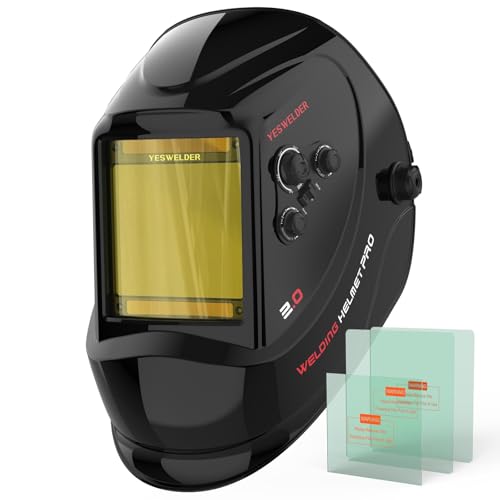
The YESWELDER auto darkening helmet stands out for its combination of advanced optical technology and practical durability. The 1/1/1/1 true color optical clarity is a significant advantage for welders who need precision, as it minimizes distortion and eye strain during extended sessions. The large 3.93" x 3.66" viewing area gives you better visibility of your work area, which is especially valuable when performing detailed TIG welding or working in tight spaces where positioning matters.
Protection features are comprehensive. The blue light blocking outer lens addresses a genuine concern for welders exposed to intense arc radiation over years of work. The four arc sensors with 1/30000 second response time ensure consistent darkening across different welding processes, from low-amperage TIG to high-amperage stick welding. The wide shade range of 3/5-9/9-13 covers nearly all common welding applications, making this a versatile single-helmet solution rather than requiring multiple units.
Comfort and sustainability round out the design. The pivoting headgear with breathable padding reduces neck strain during long work sessions, while the dual solar and battery power system means fewer battery changes and lower environmental impact. The reinforced PP construction appears robust enough for regular shop use, though long-term durability will depend on your specific welding demands and maintenance practices.
| Specification | Details |
|---|---|
| Brand | YESWELDER |
| Color | Black |
| Viewing Window Size | 3.93" x 3.66" |
| Overall Dimensions | 12.5" x 7.9" x 9.75" |
| Weight | 2.2 lbs |
| Shade Range | 3/5 - 9/9-13 |
| Arc Sensors | 4 sensors |
| Darkening Speed | 1/30000 second |
| Optical Clarity | 1/1/1/1 True Color |
| Power Source | Solar panel + CR2450 lithium battery |
| Applications | TIG, MIG, MMA (Stick), Cutting, Grinding |
Getting Started: Put on the helmet and adjust the pivoting headgear until it sits comfortably without excessive pressure on your forehead or neck. The headgear should feel balanced and secure before you begin welding.
Adjusting Settings: Before welding, set your sensitivity and delay controls based on your specific amperage and welding process. Lower sensitivity works better for high-amperage stick welding, while higher sensitivity suits low-amperage TIG work. The delay control determines how long the lens stays darkened after the arc stops, allowing you to see your work clearly.
During Welding: The auto darkening should activate automatically when you strike the arc. If the lens doesn't darken reliably, increase sensitivity slightly. For cutting and grinding operations, ensure you're in an appropriate shade setting for your task, as these generate different light signatures than welding arcs.
Maintenance: Keep the outer lens and inner lens clean to maintain optical clarity. Check the solar panel regularly to ensure it's not blocked by dirt or debris. Replace the CR2450 battery if the helmet fails to darken in bright sunlight, indicating the solar panel isn't generating sufficient power.
Eye Protection Priority: Never weld without an auto darkening helmet or fixed shade lens in place. The blue light blocking outer lens provides additional protection, but it doesn't replace the primary darkening function. Always inspect your helmet's lens before each use for cracks or damage that could compromise protection.
Sensor Maintenance: Keep the four arc sensors clean and free from spatter buildup. Spatter accumulation can interfere with arc detection and cause unreliable darkening. Wipe sensors gently with a dry cloth after welding sessions, especially when working with processes that generate heavy spatter.
Proper Fit: Ensure the headgear is adjusted snugly to prevent the helmet from shifting during work. A loose helmet can expose your eyes to unfiltered arc light if it moves away from your face. The breathable padding should contact your forehead and temples without creating pressure points.
Battery Monitoring: If you notice the helmet darkening more slowly than usual or failing to darken in bright conditions, the battery may be depleted. Keep spare CR2450 batteries on hand, especially if you work in low-light shop conditions where the solar panel cannot fully charge.
Optimize Sensitivity for Your Process: Stick welding benefits from moderate sensitivity settings since the arc is more consistent, while TIG welding often requires higher sensitivity due to the smaller, more variable arc. Experiment with your sensitivity and delay settings during practice runs to find the sweet spot for your specific work style and equipment.
Leverage the Wide Shade Range: This helmet's 3/5-9/9-13 shade range eliminates the need to swap helmets between welding and cutting or grinding. Use lower shades (3-5) for cutting and grinding, mid-range shades (7-9) for TIG welding, and higher shades (11-13) for high-amperage stick or MIG work. This versatility saves time and reduces equipment costs on a busy job site.
Maximize Solar Power: Position your helmet in sunlight during breaks to keep the solar panel charged. In shop environments with limited natural light, the battery will carry more of the load, so keep spare CR2450 batteries accessible. The hybrid power system works best when the solar panel gets regular exposure to bright light.
Use Magnifying Lenses for Detail Work: The helmet accepts magnifying lenses for close-up TIG work or precision fabrication. If you frequently work on small components or intricate welds, investing in clip-on magnifiers will dramatically improve visibility and reduce eye strain without requiring a separate helmet.

Pros
- Exceptionally fast auto-darkening response time catches even quick arc strikes instantly
- Solar and battery hybrid power system means fewer interruptions during long work sessions
- True color technology with advanced optical clarity reduces eye strain and improves weld quality
- Lightweight construction and adjustable headband with cushioning provide genuine all-day comfort
- Durable PA material with high tensile and flexural strength resists impacts and heat damage
Cons
- No customer reviews available yet, so real-world durability feedback is limited
- Shade level range of DIN 4/9-13 may require a separate helmet for lighter grinding or inspection tasks
The ARCCAPTAIN HSH-S800 Skeleton Knight is engineered for welders who demand speed and clarity. The four arc sensors and 1/25000 second response time mean the lens darkens almost instantaneously when you strike an arc, protecting your eyes without the jarring delay found in slower helmets. The true color 1/1/1/1 optical clarity lens and advanced color technology deliver a realistic, undistorted view of your work, which translates directly to better bead placement and fewer defects.
Comfort matters when you're working for hours, and ARCCAPTAIN addressed this thoughtfully. At just 1 pound with breathable padding on the adjustable headband, this helmet won't leave you with a sore neck by day's end. The PA material construction offers impressive durability with high tensile and flexural strength, meaning it can handle the heat, impacts, and wear that come with regular shop use. The helmet also meets ANSI Z87.1, EN379, and CSA Z94.3 safety standards, so you know the eye protection is legitimate.
The dual power system is a practical advantage. Solar cells keep the helmet powered during daylight work, and replaceable CR2450 lithium batteries provide backup for indoor or low-light welding. ARCCAPTAIN claims this hybrid approach extends service life by 200 percent compared to battery-only designs. The adjustable shade and sensitivity controls let you fine-tune the lens for TIG, MIG, or ARC welding, and the cheater lens compatible design means you can add magnification if needed for detailed work.
| Specification | Details |
|---|---|
| Brand | ARCCAPTAIN |
| Model | HSH-S800 Skeleton Knight |
| Lens Viewing Size | 3.86" x 1.69" |
| Optical Clarity | 1/1/1/1 True Color |
| Auto-Darkening Response Time | 1/25000 second |
| Arc Sensors | 4 Premium Sensors |
| Shade Range | DIN 4/9-13 |
| Power Source | Solar Cells + CR2450 Lithium Batteries |
| Weight | 1 pound |
| Dimensions | 7.48" x 2.76" x 2.76" |
| Material | High-Quality PA (Polyamide) |
| Tensile Strength | 120 MPa |
| Flexural Modulus | 4000 MPa |
| Headband | Adjustable with Breathable Padding |
| Compatibility | Cheater Lens/Magnifying Lens Compatible |
| Safety Standards | ANSI Z87.1, EN379 CE, CSA Z94.3 |
| Welding Types | TIG, MIG, ARC |
| Color | Colorful |
Eye Protection Essentials: Always ensure your helmet is properly positioned before striking an arc. The auto-darkening lens should cover your entire viewing area. If you notice any cracks or damage to the lens or shell, replace the helmet immediately, as compromised protection can lead to serious eye injury.
Battery and Power Maintenance: Check your CR2450 batteries regularly and replace them when the lens response slows. Clean the solar panels periodically to maintain charging efficiency. Store the helmet in a cool, dry place away from extreme heat or direct sunlight when not in use to extend component life.
Proper Fit and Adjustment: Adjust the headband snugly but not so tight that it causes discomfort. The helmet should sit level on your face with the lens centered in your field of view. A loose or tilted helmet can leave your eyes exposed during critical moments. For added vision correction, ensure any cheater lenses are securely installed and properly aligned.
Optimize Lens Settings for Your Work: Take time to dial in the shade and sensitivity controls for your specific welding type. TIG welding often benefits from a slightly lower sensitivity to avoid false triggers, while MIG work may require higher sensitivity for consistent arc detection. Keep notes on your preferred settings so you can quickly adjust when switching between projects.
Maximize Battery Life: Position your helmet to catch natural light whenever possible to let the solar cells do the heavy lifting. This reduces battery drain and means fewer replacements over time. If you work primarily indoors, consider a well-lit work station to keep solar charging active during the day.
Extend Helmet Durability: Store your helmet hanging from a hook rather than placing it face-down on your workbench. This prevents unnecessary pressure on the lens and keeps the viewing area clear of dust and debris. After each shift, gently wipe the exterior with a dry cloth to remove spatter and oxidation before they harden.
Who Should Buy This Helmet: The ARCCAPTAIN HSH-S800 is ideal for DIY welders, hobbyists, and professionals who work regularly with TIG, MIG, and ARC processes. If you value comfort during long sessions, appreciate true color optics for precision work, and want a helmet that won't slow you down with sluggish lens response, this model deserves serious consideration. It's also a solid choice if you work in varied lighting conditions, thanks to the dual solar and battery power system.
Key Considerations Before Buying: The shade range tops out at DIN 13, which suits most welding tasks but may not be ideal if you frequently do heavy grinding or plasma cutting that requires lighter shades. If you need cheater lenses for vision correction, factor in the cost of those add-ons. Also, since this is a newer model without extensive customer reviews, you're relying on the manufacturer's specifications and safety certifications rather than long-term user feedback.
Comparison Points: Compare this helmet against other models in its price range by evaluating response time, lens clarity, weight, and power system design. Look for ANSI and EN certifications to ensure you're getting legitimate eye protection. The 1/25000 second response time and four-sensor design are competitive advantages worth considering against single or dual-sensor competitors.

Pros
- Exceptional viewing clarity with true-color lens technology and large screen area for detailed welding work
- Feather-light at 2 pounds with ergonomic padding, making it comfortable for all-day wear
- Reliable solar and battery hybrid power system eliminates frequent battery changes
- Comprehensive safety certifications and full UV/IR protection inspire confidence in eye health
- Four independent arc sensors provide precise auto-darkening response across different welding processes
Cons
- No customer reviews available yet, so long-term durability and real-world performance remain unverified
- Specifications list shows conflicting weight information (0.002 lbs vs. stated 2 lbs), creating uncertainty about actual product specifications
The ARCCAPTAIN auto-darkening welding helmet stands out for its combination of comfort and optical performance. Weighing just 2 pounds with an adjustable, breathable headgear system, this helmet is designed to minimize neck strain during extended welding projects. The large 3.94" x 3.66" viewing screen with true-color technology delivers exceptional clarity, allowing welders to see their work with precision while maintaining full visibility of the surrounding work area.
Eye protection is comprehensive and multi-layered. The helmet features four independent arc sensors that automatically adjust the lens shade between DIN 4 (light state) and DIN 5-9 or 9-13 (dark state), depending on your welding process. Whether you're working with ARC, MIG, or TIG welding, the sensor system adapts in real time. Beyond auto-darkening, the helmet provides continuous UV and IR protection up to DIN 16, safeguarding your eyes from harmful light exposure across all working conditions.
The ARCCAPTAIN helmet meets rigorous safety standards including ANSI Z87.1, EN379 CE, and CSA Z94.3 certification. Its durable polypropylene construction resists shock and flame, while the dual-power system combining solar cells with a CR2450 lithium battery backup ensures reliable operation throughout your workday. The eco-friendly solar design reduces your need for frequent battery replacements, making it both practical and environmentally conscious for serious welders and DIY enthusiasts.
| Specification | Details |
|---|---|
| Brand | ARCCAPTAIN |
| Color | Black |
| Size | One size, adjustable |
| Weight | 2 pounds |
| Dimensions | 7.09" L x 8.66" W x 7.87" H |
| Viewing Screen Size | 3.94" x 3.66" |
| Optical Clarity | 1/1/1/1 (top grade) |
| Light State Shade | DIN 4 |
| Dark State Shade | DIN 5-9 or 9-13 |
| Arc Sensors | 4 independent sensors |
| Welding Processes | ARC, MIG, TIG |
| UV/IR Protection | Continuous up to DIN 16 |
| Power Source | Solar cells + CR2450 lithium battery |
| Shell Material | Polypropylene (shock and flame resistant) |
| Safety Certifications | ANSI Z87.1, EN379 CE, CSA Z94.3 |
| Headgear | Adjustable with breathable padding |
Getting Started: Adjust the headgear straps to fit snugly around your head before your first welding session. The helmet should sit comfortably without excessive pressure on your forehead or temples. Ensure the battery is installed (CR2450 lithium battery) and place the helmet in sunlight briefly to activate the solar charging system.
Adjusting Sensitivity and Shade: The four arc sensors allow you to fine-tune the helmet's response to your specific welding process. For ARC welding, start with the mid-range shade setting. For MIG or TIG welding, you may prefer a lighter shade for better visibility. Most helmets have adjustment controls on the side or inside the helmet body; consult your manual for the exact location and adjustment procedure.
During Welding: The auto-darkening lens will activate automatically when you strike an arc. The helmet should darken within milliseconds to protect your eyes. After you finish welding, the lens returns to light state automatically. Always inspect the viewing screen for damage before each use, and keep the lens clean with a soft cloth to maintain optimal visibility and sensor accuracy.
Eye Protection Standards: This helmet meets ANSI Z87.1, EN379 CE, and CSA Z94.3 standards, ensuring it provides the eye protection required for professional and DIY welding. However, proper use is essential. Never look directly at an arc without the helmet in place, and ensure the auto-darkening filter is functioning before beginning work.
Battery and Power Management: The hybrid solar and lithium battery system provides reliable power, but check your battery regularly, especially if you work indoors or in low-light conditions. A low or dead battery will prevent the auto-darkening feature from working, leaving your eyes unprotected. Replace the CR2450 battery annually or when the lens fails to darken properly.
Lens Care and Inspection: Inspect the viewing screen regularly for cracks, scratches, or damage. A compromised lens cannot provide adequate protection and must be replaced immediately. Keep the lens clean using a soft, dry cloth. Avoid touching the lens with bare hands, as oils and dirt can reduce optical clarity and interfere with sensor performance. Store the helmet in a cool, dry place away from extreme heat or direct sunlight when not in use.
Who Should Buy This Helmet? The ARCCAPTAIN auto-darkening helmet is ideal for DIY welders, hobbyists, and semi-professional welders who work across multiple welding processes (ARC, MIG, TIG). If you prioritize comfort during extended welding sessions and want a lightweight option that won't strain your neck, this helmet delivers. It's also a solid choice for anyone seeking a mid-range helmet with comprehensive safety certifications and reliable dual-power operation.
Key Considerations: Evaluate your primary welding process before purchasing. While this helmet handles ARC, MIG, and TIG welding, the adjustable shade ranges (DIN 4-5/5-9/9-13) work best for specific applications. If you work primarily in bright outdoor conditions, the solar charging will keep your helmet powered all day. If you work mostly indoors or in low-light workshops, you'll rely more heavily on the lithium battery backup. Consider your work environment and battery replacement frequency when making your decision.
Value Assessment: At its price point, this helmet offers professional-grade features including true-color viewing, four arc sensors, and multiple safety certifications. The 2-pound weight and solar-powered design provide practical advantages over heavier, battery-only alternatives. However, since no customer reviews are currently available, you may want to research long-term durability reports from other sources before committing to this purchase.

Pros
- Exceptional arc detection accuracy with quad-sensor setup ensures no missed strikes
- True Color lens technology reduces eye strain and improves weld quality visibility
- Programmable memory settings save time switching between different welding tasks
- Lightweight and balanced design reduces neck fatigue during extended welding sessions
- Replaceable CR2450 battery keeps operating costs low
Cons
- No customer reviews available yet, so real-world durability feedback is limited
- Low-profile design may feel snug for welders with larger head sizes or thick hair
The ESAB Sentinel A60 represents a solid mid-range auto-darkening helmet designed for welders who need reliable performance without breaking the bank. The 4.65" x 2.80" viewing area is genuinely spacious, reducing the head movement required to track your work and making it easier to maintain proper welding angles. The quad-sensor setup combined with a 0.08 millisecond switching time means you'll catch every arc without the disorienting delay that plagues cheaper helmets.
What sets this helmet apart is the OpTCS True Color Lens Technology, which delivers natural color representation rather than the greenish or yellowish tint common in budget auto-darkening helmets. This matters more than many DIYers realize, because accurate color perception directly impacts weld quality and reduces eye fatigue during longer sessions. The adjustable shade range (DIN 3/5-13) covers everything from light grinding to heavy structural steel work, and the 0.5-increment adjustments give you precision tuning for specific applications.
The on-board memory storing up to 9 settings is practical for shops running multiple welding processes, and the shade lock feature prevents accidental adjustments during work. The low-profile design and lightweight nylon construction keep the helmet comfortable for extended use, though the snug fit may require adjustment if you have a larger head size. Battery life should be solid with the standard CR2450, and the replaceable cell design keeps long-term costs down.
| Specification | Details |
|---|---|
| Brand | ESAB |
| Model | Sentinel A60 |
| Color | Black |
| Size | Large |
| Dimensions | 14 x 14 x 10 inches |
| Weight | 1 pound |
| Viewing Area | 4.65 x 2.80 inches |
| Shade Range | DIN 3/5-13 (adjustable in 0.5 increments) |
| Arc Sensors | 4 |
| Switching Speed | 0.08 milliseconds |
| Battery Type | CR2450 (replaceable) |
| Memory Settings | Up to 9 programmable |
| Lens Technology | ESAB OpTCS True Color |
| Design | Low-profile with high-impact nylon |
Initial Setup: Insert the CR2450 battery into the battery compartment and verify all LEDs illuminate. Use the internal controls to set your preferred shade level (DIN 3/5-13) and sensitivity based on your welding process. Store these settings in the helmet's memory for quick recall.
During Welding: Position the helmet so the ADF (auto-darkening filter) is centered over your work area. The four arc sensors will automatically detect the arc and darken the lens within 0.08 milliseconds. Adjust sensitivity using the intuitive internal controls if needed for your specific application.
Grind Mode: Activate grind mode when performing grinding or cutting operations to prevent the lens from darkening unnecessarily. The helmet features dedicated LED indicators for grind mode, low battery, and shade lock status, keeping you informed of operational status at a glance.
Before Each Use: Check that the lens is clean and free of spatter buildup, which can interfere with arc sensor accuracy. Verify the battery is functioning by checking the LED indicators. Inspect the nylon shell for cracks or damage that could compromise impact protection.
Arc Detection: The quad-sensor system is highly reliable, but position the helmet so all sensors have a clear view of the arc. If the lens fails to darken, check battery level immediately and replace if needed. Never rely on a helmet with suspected sensor issues.
Lens Protection: The large viewing area is excellent for visibility, but ensure you're wearing appropriate face protection underneath. Replace the protective cover lens if it becomes heavily spattered. Always shade your eyes properly; the True Color lens is accurate but still requires proper shade selection for your specific amperage and process.
Who Should Buy This Helmet: The Sentinel A60 is ideal for serious hobbyists, small shop owners, and professional welders who need reliable auto-darkening performance without premium pricing. The large viewing area and True Color lens make it especially valuable for detailed work where precision matters. It's equally suitable for stick (SMAW), MIG (GMAW), and TIG (GTAW) welding applications.
Key Considerations: The low-profile design is comfortable for most users but may feel tight on larger heads. If you work in cold environments, note that the CR2450 battery performance may decrease in extreme cold. The adjustable shade range covers most common applications, but verify your typical welding amperage falls within the DIN 3/5-13 range for optimal performance.
Value Assessment: This helmet delivers features typically found in helmets costing significantly more, particularly the True Color lens technology and quad-sensor detection. The programmable memory for up to 9 settings adds genuine convenience for multi-process shops. The replaceable battery design means lower total cost of ownership compared to sealed-unit competitors.
Buying Guide: How to Choose the Right Welding Helmet
Not every welding helmet suits every welder. The best welding helmets for a hobbyist running flux-core wire look very different from the helmet a professional TIG welder needs for long, precise passes. Working through the key specs below will help you match helmet features to your actual workflow rather than overpaying for capabilities you won’t use or underbuying and putting your safety at risk.
Auto-Darkening vs. Passive Lenses
Passive helmets use a fixed-shade lens, typically shade 10, and require you to flip the helmet down manually before striking an arc. They’re simple, reliable, and inexpensive, but they slow down workflow and make it harder to position the torch precisely before you start. Auto-darkening helmets switch from a light state (usually shade 3 or 4) to a dark welding shade in milliseconds the moment an arc is detected. This allows you to see your work clearly right up to the moment the arc ignites. For most welders, auto-darkening is the smarter long-term investment because it reduces eye strain, improves bead placement accuracy, and speeds up multi-pass jobs considerably. All seven helmets in this roundup feature auto-darkening technology.
Optical Clarity Class
Optical clarity is rated on a four-number scale covering diffusion of light, angle dependence of luminous transmittance, variation in luminous transmittance, and uniformity of shade. A rating of 1/1/1/1 is the gold standard and means the lens is optically flat, consistent across its entire surface, and delivers true color rendering at every angle. A rating of 1/1/1/2 is still very good and barely noticeable in practice. Ratings of 2 or higher in the first position can introduce distortion that causes eye fatigue during long sessions. Several helmets in this guide carry 1/1/1/1 ratings, and that distinction matters especially for fine TIG work where arc clarity is everything.
Shade Range and Sensitivity
Different welding processes and amperage levels demand different shade levels. Low-amperage TIG welding on thin aluminum may only require shade 8 or 9, while heavy MIG or stick welding at high amperage calls for shade 11 to 13. A wide variable shade range (typically 3 to 13 or 5 to 13) gives you flexibility across processes without needing multiple helmets. Shade 3 or 4 in the light state is useful for grinding mode, allowing you to use the helmet as eye protection when finishing welds. Sensitivity controls let you fine-tune how easily the darkening sensor is triggered, which helps prevent false triggering in bright sunlight or from nearby welders.
Viewing Area
Viewing area is measured in square inches and directly affects how much of the weld puddle you can see without shifting your head. A small viewing area (around 6 square inches) works for basic MIG and stick welding but becomes frustrating for positioning on tight joints or overhead work. A large viewing area (10 square inches and above) gives you better situational awareness and reduces neck strain because you’re not constantly repositioning to see clearly. The YESWELDER large-view model and the ARCCAPTAIN panoramic helmet in this lineup both prioritize viewing area as a core feature. The ESAB Sentinel A60 takes it further with a curved lens design that offers one of the widest effective fields of view in any production helmet.
Arc Sensors
Arc sensors detect the light from a welding arc and trigger the darkening filter. Most quality helmets have at least two sensors, but four-sensor designs are significantly more reliable because they detect the arc even when one or two sensors are blocked by your torch hand, a workpiece edge, or a corner joint. Four arc sensors are essentially mandatory for professional use and strongly recommended for anyone doing out-of-position welding. Four of the seven helmets in this roundup include four arc sensors.
Switching Speed and Delay Controls
Switching speed (also called response time) describes how fast the lens darkens after the arc is detected. The standard ANSI and EN379 maximum is 1/3,500 of a second, but the best helmets react at 1/25,000 of a second or faster. At those speeds, the difference in eye exposure is negligible, but faster is always better when it comes to UV protection. The delay control (also called the arc-off or sensitivity delay) adjusts how long the lens stays dark after the arc extinguishes. A longer delay keeps the lens dark while the weld puddle is still glowing, protecting your eyes from infrared light. For TIG welding, a longer delay setting is especially useful.
Power Source
Auto-darkening helmets are powered by solar cells, replaceable batteries, or a combination of both. Solar-assisted helmets use solar panels to extend battery life and are the most common and reliable configuration for general use. Pure battery-powered helmets require periodic battery replacement but work reliably in low-light indoor environments where solar charging is limited. Look for helmets with an easy-access battery compartment or a solar-plus-battery hybrid setup if you weld regularly in both indoor and outdoor conditions.
Comfort and Fit
A helmet that causes neck fatigue or pressure points becomes a safety hazard because welders naturally start lifting or adjusting it mid-session. Weight matters: lighter helmets (under 2 pounds) are easier to wear for extended periods, but very lightweight shells sometimes sacrifice impact resistance. Headgear adjustability is equally important. A ratcheting headband lets you dial in fit precisely without removing gloves. Look for helmets that offer both vertical tilt adjustment and front-to-back depth adjustment so the viewing area sits at exactly the right distance from your eyes. If you wear safety glasses or a respirator underneath, check the internal clearance dimensions before buying. Just as you’d want spirit levels that fit comfortably in your hand for long layout sessions, your welding helmet should feel like a natural extension of your body, not a burden.
Shell and Lens Durability
The outer shell needs to withstand spatter, heat, and occasional drops. High-impact nylon and polypropylene composites are the most common materials and provide a good balance of weight and toughness. Professional-grade helmets like the ESAB Sentinel A60 use specifically engineered nylon blends designed to resist cracking from impacts at elevated temperatures. The outer lens cover (the replaceable clear plastic shield in front of the auto-darkening filter) should be easy and inexpensive to replace, since it takes the brunt of spatter damage. Check whether replacement lens covers are readily available for any helmet you’re considering.
Why Trust HomeThru
HomeThru is an independent review platform with no affiliation to any manufacturer or retailer. We do not sell products, process orders, or handle warranties. Our editorial team researched and analyzed welding helmets by reviewing verified buyer feedback across thousands of purchases, comparing published specifications against ANSI Z87.1 and EN379 safety standards, and assessing long-term reliability signals from professional welding communities. We looked at arc sensor counts, optical clarity ratings, shade ranges, switching speeds, headgear ergonomics, shell construction, and manufacturer support reputations. Our goal is to give you the clearest, most honest picture of each product so you can make a confident decision without guesswork. We apply the same rigorous, independent methodology to every category we cover, whether that’s impact drivers, hand saws, or smart home devices like smart locks.
Final Thoughts
Choosing from the best welding helmets on this list comes down to matching the helmet’s capabilities to your welding process, session length, and budget. Here’s a quick summary of our top picks by category:
- Best Overall Value: YESWELDER Large View Auto Darkening Welding Helmet delivers a wide viewing area, 1/1/1/1 true color optics, four arc sensors, and a broad shade range at a budget-friendly price point that’s hard to beat for hobbyists and entry-level professionals alike.
- Best Budget Pick: YESWELDER Auto Darkening Welding Helmet covers the essentials with 1/1/1/1 optics and solar power at an accessible price, making it a sensible starting point for beginners.
- Best Professional Upgrade: Miller Classic Series Auto-Darkening Welding Helmet brings ClearLight technology and high-definition optics from a brand with decades of professional credibility, ideal for TIG and MIG work that demands precision.
- Best for Advanced Features: ARCCAPTAIN Intelligent Auto-Shade Welding Helmet stands apart with its 180-degree panoramic view, internal display, memory and gradient settings, and built-in LED work light, a genuinely innovative package for welders who want the latest technology.
- Best Premium Shell: ESAB Sentinel A60 Welding Helmet earns its premium price with a low-profile high-impact nylon shell, a large curved viewing area, and a reputation for durability that professional welders trust on demanding job sites.
Whatever your skill level or welding process, investing in a quality helmet is non-negotiable. The right hood protects your vision for a lifetime of work. If you’re building out a full home workshop, don’t overlook other foundational tools: top-rated cordless drills and well-chosen impact drivers round out a capable shop. For workspace lighting while you work, under cabinet lights and LED strip lights improve visibility in your welding area without adding heat overhead.
Frequently Asked Questions
What Does Auto-Darkening Response Time Actually Mean in Practice?
Response time is how fast the lens switches from its light state to its dark welding shade when an arc is detected. A helmet rated at 1/25,000 of a second darkens so rapidly that the transition is essentially invisible to the human eye. Any helmet meeting ANSI Z87.1 standards provides adequate protection, but faster response times offer a small additional margin of safety, especially for high-frequency TIG starts where the arc ignites almost instantaneously.
Can I Use a Welding Helmet for Plasma Cutting and Grinding?
Most auto-darkening helmets with a grind mode can be used for grinding safely. Grind mode disables the auto-darkening function and locks the lens at a light shade so you can see clearly while grinding. For plasma cutting, you need a helmet with a shade range that goes low enough to cover the amperage of your plasma cutter, typically shade 5 to 8 for lower-amperage units. Always verify the helmet’s listed compatible processes before using it outside of standard arc welding.
How Often Should I Replace the Outer Lens Cover on My Welding Helmet?
Replace the outer lens cover whenever you notice pitting, heavy spatter buildup, or scratches that obscure your view. A compromised outer lens doesn’t just reduce visibility; it can allow spatter to reach and damage the auto-darkening filter cartridge, which is far more expensive to replace. For active welding, inspecting the outer lens every few months is a reasonable habit. Replacement covers are inexpensive and widely available for most major helmet brands.
For other workshop and home improvement tools, top reciprocating saws are worth evaluating for demolition and rough cuts, while quality hand saws handle detail work where power tools are too aggressive. If you’re upgrading your shop’s security alongside your tools, top-rated security cameras and a solid wireless home security system protect your investment.