A rotary tool is one of the most versatile instruments you can own in a home workshop. Whether you are carving intricate designs in wood, grinding down a weld, cutting tile grout, or polishing jewelry, the best rotary tools handle an enormous range of tasks that no single dedicated power tool can match. We researched and analyzed dozens of options, scrutinizing motor performance, speed range, ergonomics, accessory compatibility, and real-world user feedback across thousands of verified reviews to bring you this shortlist. The lineup includes corded and cordless models from Dremel, Milwaukee, WEN, and HARDELL, spanning budget-friendly entry points all the way to professional-grade brushless systems, so every skill level and project type is covered.
If you already own a capable workshop setup, you might also find value in pairing your rotary tool with angle grinders for heavier material removal, or with random orbital sanders when you need swirl-free finishing on larger surfaces. For now, here are the top rotary tools we evaluated this year.
Top Rotary Tools
Pros
- Exceptional motor power handles heavy-duty grinding, cutting, and carving without performance drops
- Electronic feedback maintains consistent RPM across variable speeds for accurate, repeatable results
- Comprehensive 40-piece accessory bundle covers most common DIY tasks without additional purchases
- Rotating LED light attachment makes working in tight spaces and detail work significantly easier
- Replaceable motor brushes extend tool lifespan and reduce long-term maintenance costs
Cons
- Corded design limits mobility and requires proximity to a power outlet during use
- Steep learning curve for beginners; mastering speed control and technique takes practice
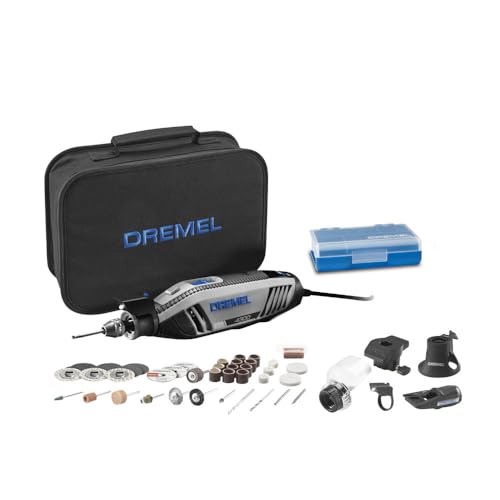
The Dremel 4300-5/40 stands out as one of the most capable rotary tools available for serious home improvement and craft work. The motor delivers impressive power across its full 5,000 to 35,000 RPM range, with electronic feedback that maintains consistent speed even under load. This makes it reliable for demanding applications like metal grinding, tile cutting, and detailed wood carving without the frustration of performance drops mid-project.
What makes this kit particularly valuable is the thoughtful engineering beyond raw power. The pivot LED light attachment is genuinely useful for illuminating corners and crevices that would otherwise be hidden from view. The innovative airflow system keeps the tool running cooler and quieter than many competitors, reducing fatigue during longer sessions. The slim, ergonomic body fits comfortably in your hand, and the separated dial and switch design gives you intuitive control without accidental speed changes.
The 40-piece accessory bundle and 5 attachments cover an impressive range of tasks, from sanding and polishing to engraving and detail work. The universal 3-jaw chuck accepts all Dremel accessory sizes, so you can expand your capabilities later. For homeowners and DIYers tackling projects that demand precision and versatility, this kit delivers professional-grade performance without the professional-grade price tag.
| Model | Dremel 4300-5/40 |
| Motor Type | High-performance corded electric motor |
| Speed Range | 5,000 to 35,000 RPM |
| Speed Control | Variable speed with electronic feedback |
| Chuck Type | Universal 3-jaw chuck |
| Accessories Included | 40 high-quality accessories |
| Attachments Included | 5 attachments (includes pivot LED light) |
| Light Feature | Rotating pivot LED light attachment |
| Motor Features | Replaceable brushes, ball bearing construction |
| Cooling System | Innovative airflow ventilation system |
| Design | Slim and ergonomic body |
| Power Source | Corded electric |
| Storage | Included storage bag |
Getting Started: Unpack your kit and familiarize yourself with the accessories and attachments. Insert your chosen accessory into the 3-jaw chuck and tighten it securely. Plug in the tool and position yourself in a comfortable, well-lit workspace.
Speed Selection: Start at a lower RPM (5,000-10,000) for heavy material removal and detailed work. Use medium speeds (15,000-20,000) for general sanding and grinding. Reserve higher speeds (25,000-35,000) for polishing, engraving, and fine detail work. Always begin at a lower speed and increase gradually to find the right setting for your task.
Technique Tips: Let the tool do the work; apply gentle, steady pressure rather than forcing it. Use the pivot LED light to keep your work area illuminated. For grinding and cutting, maintain a firm grip with both hands. For detailed work like engraving or carving, use a lighter touch and slower speeds for better control.
Maintenance: Unplug the tool before changing accessories. Allow the motor to cool between heavy-use sessions. Keep the ventilation slots clear of dust and debris. Check motor brushes periodically and replace them when worn to maintain performance and extend tool life.
Before You Start: Always wear appropriate personal protective equipment including safety glasses to protect against flying debris, and a dust mask when working with materials that create fine particles. Secure your workpiece firmly so it won't shift during operation. Keep long hair tied back and avoid loose clothing that could get caught in the rotating accessory.
During Operation: Never leave the running tool unattended. Keep your hands clear of the rotating accessory at all times. Maintain a firm, two-handed grip for better control and stability. Be aware of the cord and keep it away from the rotating tool. Allow the motor to reach full speed before applying the accessory to your workpiece.
After Use: Always unplug the tool before changing accessories, cleaning, or performing maintenance. Allow the tool to cool before storing it. Never touch the accessory immediately after use as it may be hot. Store the tool and accessories out of reach of children in a safe, dry location.
Accessory Selection: Match your accessory to the task and material. Use grinding stones and burrs for metal and stone work, sanding drums and discs for wood, and polishing pads for finishing. The universal chuck means you can experiment with third-party accessories to expand your capabilities beyond the included bundle.
Speed Mastery: The electronic feedback system is your friend. Lower speeds provide more control and reduce heat buildup in delicate materials. Higher speeds work best for polishing and finishing. For detail work like engraving, use the slowest speed that still provides adequate cutting action; this gives you maximum control and precision.
Lighting Advantage: Position the pivot LED light to eliminate shadows on your work area. This is especially valuable when working on intricate details, small engravings, or in corners where natural light doesn't reach. The rotating design means you can adjust it without repositioning the entire tool.
Extended Sessions: The slim ergonomic design reduces hand fatigue, but take breaks during long projects. The innovative cooling system keeps the motor running smoothly, but avoid continuous maximum-speed operation for extended periods. Let the tool cool between heavy-use sessions to maintain peak performance.

Pros
- Variable speed control accommodates both delicate detail work and general grinding tasks
- Extended runtime and USB charging eliminate the need for proprietary batteries or chargers
- Comprehensive accessory bundle covers most common craft and light DIY applications
- Lightweight design reduces hand fatigue during extended crafting sessions
- LED lighting improves accuracy on small or detailed projects
Cons
- Not designed for heavy-duty work like extended metal grinding or demanding construction tasks
- 3.7V power is more limited than corded or larger rotary tools, restricting some applications
The HARDELL Mini Cordless Rotary Tool delivers solid performance for hobbyists and DIY enthusiasts working on crafts, engraving, and light finishing tasks. The five-speed range from 5,000 to 18,000 RPM provides meaningful control, allowing you to start at lower speeds for delicate work and increase power as needed. The 200-minute battery life per charge is genuinely useful for extended crafting sessions, and USB charging keeps things simple without proprietary battery dependencies.
What sets this tool apart is its thoughtful design for detail work. The pen-like grip feels natural for precision tasks, and the LED lighting with blind-spot reduction actually makes a difference when working on small projects or intricate designs. The 69-piece accessory kit covers the essentials for most hobby applications, including sanding drums, polishing wheels, cutting discs, and engraving bits. The beginner-friendly documentation and video tutorials help new users get started quickly without frustration.
The main limitation is honest: this is a craft and hobby tool, not a workhorse for heavy-duty applications. The 3.7V battery and lightweight design make it unsuitable for prolonged grinding, metal work, or construction-grade tasks. If you're looking for a reliable, low-maintenance tool for resin crafts, jewelry making, model building, or general DIY hobbies, this delivers solid value. For serious renovation work or sustained heavy use, you'll want something more powerful.
| Brand | HARDELL |
| Model | Mini Cordless Rotary Tool |
| Power Source | 3.7V Rechargeable Lithium Battery |
| Speed Range | 5 Settings: 5,000 / 8,000 / 11,000 / 14,000 / 18,000 RPM |
| Runtime Per Charge | 200 minutes continuous |
| Charging Method | USB Charging |
| Battery Indicator | LED Light (Green when fully charged) |
| Design | Compact, Lightweight (Pen-like Grip) |
| Lighting | LED with Blind-Spot Reduction |
| Included Accessories | 69 Pieces (Sanding, Polishing, Drilling, Cutting, Engraving Bits) |
| Suitable For | Carving, Sanding, Grinding, Polishing, Cutting, Etching, Engraving, DIY Crafts, Resin Work |
| Not Suitable For | Heavy-Duty Projects or Extended Professional Use |
Getting Started
Before first use, fully charge the tool using the included USB cable. The LED indicator will turn green when charging is complete. Insert the desired accessory bit securely into the collet, ensuring it's seated properly before operation.
Speed Selection
Select your speed setting based on the task: lower speeds (5,000-8,000 RPM) work best for detailed engraving and delicate polishing, while higher speeds (14,000-18,000 RPM) suit sanding and grinding. Start at a lower speed and increase as needed for better control and safety.
Operating Tips
Hold the tool like a pen with a relaxed grip to reduce hand fatigue. Let the tool do the work without forcing pressure, especially on detail tasks. Use the LED light to illuminate your work area. For continuous use, monitor battery life and plan charging breaks during longer projects. Always refer to the included instruction manual and video tutorials for specific accessory usage guidelines.
Before Operating
Read all instructions and precautions in the manual before first use. Inspect the tool and accessories for damage. Ensure the battery is fully charged and the LED indicator is green. Wear appropriate safety gear including eye protection when using grinding or cutting accessories.
During Operation
Always secure your workpiece properly to prevent slipping. Never force the tool or accessories; let the motor do the work. Keep hands and loose clothing away from rotating bits. Do not use damaged or bent accessories. Start at lower speeds and increase gradually. Take regular breaks to avoid overheating the tool.
After Use and Storage
Allow the tool to cool before storing. Do not leave the tool running unattended. Store in a dry location away from moisture and extreme temperatures. Keep the battery charged between uses. Inspect accessories regularly and replace any that are worn or damaged. Store accessories in the provided case to prevent loss and maintain organization.
Maximize Precision
Use the lower speed settings (5,000-8,000 RPM) for detailed work like engraving, etching, and fine polishing. The slower speeds give you better control and reduce the risk of slipping. The LED lighting is especially valuable for detail work, so position your workpiece to take full advantage of the illumination.
Extend Battery Life
Charge the battery fully before starting a project. Avoid running the tool at maximum speed continuously; use only the speed necessary for your task. This not only extends runtime but also reduces motor wear. Keep the battery in a cool, dry place when not in use, and charge regularly even during storage periods to maintain battery health.
Accessory Organization
Keep frequently used bits organized and easily accessible. Label or sort accessories by type (sanding, polishing, grinding, engraving) so you can quickly find the right tool. Store the complete kit in the provided case to prevent loss and ensure accessories stay clean and protected between projects.

Pros
- Significantly stronger performance than entry-level models makes quick work of tough materials
- Variable speed control gives you the precision needed for fine detail work and the power for aggressive cuts
- Excellent thermal management keeps the tool comfortable to hold during longer work sessions
- Sustainable construction appeals to environmentally conscious homeowners without sacrificing durability
- Corded operation means consistent power output with no downtime for charging between projects
Cons
- The six-foot cord limits your working radius and requires proximity to a power outlet, which may be inconvenient for large projects or outdoor work
- No reviews currently available, so you cannot read firsthand user experiences with long-term durability or specific application performance
The Dremel 3100 represents a meaningful step up from budget rotary tools, delivering the power and control that serious DIYers and crafters need. With a 1.2 amp motor that's 33% stronger than the Dremel 200, this tool handles demanding applications like cutting through metal, grinding welds, and sharpening blades without bogging down. The five variable speed settings (5,000-35,000 RPM) give you the flexibility to work delicately on detailed engraving or carving projects, then switch to aggressive grinding or cutting without changing tools.
Heat management is a genuine advantage of the 3100's design. The optimized airflow system runs 10% cooler than the Dremel 3000, which matters when you're spending hours on a single project. The ergonomic housing and flexible six-foot cord reduce hand fatigue and improve your ability to maneuver the tool precisely. Whether you're working on jewelry, hobby crafts, home repairs, or fine woodworking, the combination of power and control gives you confidence that the tool will perform consistently.
Beyond performance, Dremel's commitment to sustainability in the 3100's construction is noteworthy. The housing uses more than 65% recycled plastic, and the entire kit arrives in a recyclable carton without unnecessary plastic packaging. For homeowners and DIYers who care about environmental impact, this approach doesn't compromise durability or functionality. The corded design ensures you'll never lose power mid-project, though it does require access to an outlet and limits your working radius compared to cordless alternatives.
| Specification | Detail |
|---|---|
| Brand | Dremel |
| Model | 3100-1/15 |
| Motor Type | Variable Speed |
| Motor Power | 1.2 Amp |
| Speed Range | 5,000 - 35,000 RPM |
| Speed Settings | 5 Variable Speeds |
| Cord Length | 6 Feet |
| Power Source | Corded Electric |
| Included Attachments | 1 Attachment |
| Included Accessories | 15 Accessories |
| Housing Material | Greater than 65% Recycled Plastic |
| Thermal Performance | 10% Cooler than Dremel 3000 |
| Applications | Cutting, Sanding, Polishing, Carving, Engraving, Grinding, Sharpening |
| Design | Ergonomic with Flexible Cord |
| Packaging | Fully Recyclable, Polybag-Free |
Getting Started: Before your first project, review the included accessory guide to match the right attachment and bit to your task. Insert your chosen accessory firmly into the collet (the rotating head) and tighten it by hand or with the included wrench. Always plug the tool into a grounded outlet and ensure the cord is clear of your work area.
Speed Selection: Start at a lower speed setting (5,000-10,000 RPM) for delicate work like engraving, fine detail carving, or polishing. Use medium speeds (15,000-25,000 RPM) for general sanding and cutting tasks. Reserve the highest speeds (30,000-35,000 RPM) for grinding, sharpening, and aggressive material removal. Adjust speed based on the material you're working with: softer materials often benefit from higher speeds, while harder materials may require lower speeds for better control.
Technique Tips: Let the tool do the work rather than forcing it. Use a light, steady touch and allow the rotating accessory to make contact with your workpiece gradually. For engraving and detail work, use a pencil or marker to sketch your design first, then follow the line slowly. When sanding or polishing, use smooth, even motions. Always wear safety glasses, and for dusty applications like sanding or grinding, consider wearing a dust mask. Keep the cord away from the rotating accessory and your work area to prevent accidents.
Essential Precautions: Always wear safety glasses or a face shield when operating the rotary tool, as debris can be ejected at high speed. For dusty applications like sanding or grinding, wear a dust mask to protect your respiratory system. Tie back long hair and remove loose jewelry or clothing that could get caught in the rotating accessory. Never leave the tool running unattended, and always unplug it before changing accessories or bits.
Proper Handling: Maintain a firm grip on the tool with both hands when possible, especially when using high speed settings. Keep your hands and fingers clear of the rotating accessory at all times. Clamp or secure your workpiece firmly so it cannot slip or shift during operation. Be aware that some accessories may generate heat, so avoid touching the tip or accessory immediately after use. Allow the tool to cool between extended work sessions.
Workspace Setup: Work in a well-lit area where you can see clearly and maintain control. Keep your work surface clean and organized to prevent tripping hazards or accidental contact with the cord. For grinding or cutting metal, use appropriate eye protection and consider using a dust collection system or working in a ventilated area. Never operate the tool while fatigued or distracted, and keep children and pets away from your work area.
Material-Specific Techniques: When working with wood or plastic, use medium to high speeds (20,000-35,000 RPM) for clean cuts and smooth finishes. For metal work, start at lower speeds and increase gradually to find the sweet spot where the tool cuts efficiently without generating excessive heat. When polishing or buffing, use felt or cloth accessories at lower speeds to avoid scorching the material. For delicate engraving on glass or ceramic, use the lowest speed settings with steady, controlled pressure to prevent chipping.
Accessory Care and Maintenance: Invest in quality accessories and bits, as they make a significant difference in results and tool longevity. Store accessories in a dry location and inspect them regularly for wear or damage before use. Clean dust and debris from the tool's vents regularly to maintain optimal cooling performance. If you notice the tool running hot, stop and let it cool before continuing. Replace worn accessories promptly, as they work less efficiently and can damage your workpiece.
Project Planning: For large projects, break them into smaller sessions to avoid tool fatigue and maintain precision. Practice on scrap material first to get a feel for the right speed and pressure for your specific task. Mark your design lightly with pencil before engraving or detailed carving so you have a guide to follow. Keep the included 15 accessories organized and know which tool works best for each application, as using the right accessory for the job saves time and improves results significantly.
Pros
- Excellent value with 190 accessories included, eliminating the need for separate purchases
- Variable speed control allows you to match RPM to your specific material and task for better results
- Steady-grip handle design reduces hand strain and improves precision compared to basic rotary tools
- Flex shaft attachment adds versatility for detailed work in confined areas
- Organized carrying case makes storage and job-site transport convenient
Cons
- No user reviews available yet, so real-world durability feedback from homeowners is limited
- 1.3-amp motor may feel underpowered compared to professional-grade rotary tools for heavy-duty grinding tasks
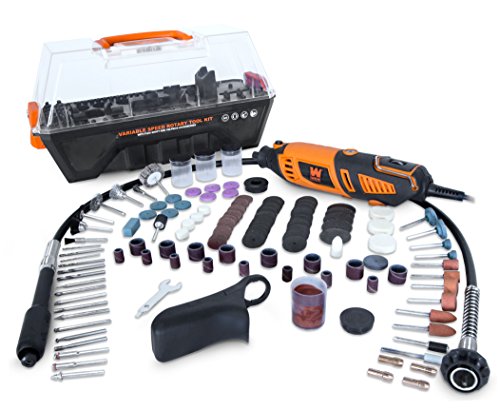
The WEN 23190 rotary tool strikes a practical balance for homeowners and DIYers who need a versatile machine without the professional-grade price tag. The variable speed motor spanning 8,000 to 35,000 RPM gives you control across a wide range of applications, from delicate detail work and engraving to sanding and polishing. This flexibility matters because different materials and accessories perform best at different speeds, and the ability to dial in the right RPM helps you achieve cleaner results and reduces the risk of damaging your workpiece.
The removable steady-grip handle is a thoughtful design feature that sets this tool apart from basic rotary tools. By providing a comfortable, stabilized grip, it reduces hand fatigue during longer work sessions and helps you maintain better control and precision. The included flex shaft is equally valuable for anyone doing intricate detail work or accessing tight spaces where a standard rotary tool head won't fit. Combined with the 190-piece accessory kit covering grinding wheels, polishing pads, cutting discs, and engraving bits, you get a genuinely complete system ready for most home improvement and hobby projects.
The carrying case deserves mention because organization matters when you're managing dozens of small accessories. Rather than hunting through a toolbox, everything has a designated spot, making setup faster and keeping your workspace cleaner. The collet system accommodating bits from 1/32 inch to 1/8 inch provides solid compatibility with standard accessories. For hobbyists, crafters, and homeowners tackling moderate-duty tasks, this tool delivers reliable performance and genuine versatility in a reasonably compact package.
| Specification | Detail |
|---|---|
| Brand | WEN |
| Model | 23190 |
| Motor Power | 1.3 Amp |
| Speed Range | 8,000 to 35,000 RPM (variable) |
| Handle Type | Removable steady-grip |
| Collet Sizes | 1/32 inch to 1/8 inch |
| Flex Shaft | Yes, included |
| Accessories Included | 190-piece kit |
| Storage | Carrying case included |
Getting Started: Before plugging in, insert the appropriate collet into the tool head based on your accessory bit size (1/32 inch to 1/8 inch). Tighten the collet nut firmly by hand to secure the bit. Attach the steady-grip handle to the tool body for added stability and comfort during operation.
Basic Operation: Plug in the tool and use the variable speed dial to select your desired RPM. Start at a lower speed and increase gradually as you become comfortable. For detail work and engraving, use higher speeds (25,000-35,000 RPM). For grinding and polishing, mid-range speeds (15,000-25,000 RPM) often work best. Always let the tool reach full speed before contacting your workpiece.
Using the Flex Shaft: Connect the flex shaft attachment to the tool head for work in confined spaces or intricate detail projects. The flexible design allows you to angle the bit without twisting your wrist, reducing fatigue. Support the workpiece securely and move the bit slowly across the surface for controlled results.
Maintenance: After each use, allow the tool to cool completely. Check that accessories are clean and free of debris. Store all pieces in the carrying case to protect them and keep your workspace organized. Periodically inspect the power cord for damage.
Before You Start: Always unplug the tool before changing accessories or adjusting the collet. Wear safety glasses to protect your eyes from flying debris and dust. For grinding or cutting tasks, consider wearing a dust mask to avoid inhaling fine particles. Secure your workpiece in a vise or clamp so both hands are free to control the tool.
During Operation: Never reach into the spinning accessory or leave the tool running unattended. Keep your hands and hair away from the rotating bit. Allow the tool to reach full speed before making contact with your workpiece. Avoid applying excessive pressure; let the tool do the work. If the bit catches or binds, release the trigger immediately and wait for it to stop completely before investigating.
Workspace Considerations: Work in a well-lit area so you can see your project clearly. Keep your work area clear of clutter to avoid tripping hazards. Use the tool on a stable, level work surface. For extended sessions, take breaks to avoid hand fatigue. Store the tool in a dry location and keep it away from moisture to prevent electrical hazards.
Speed Selection Matters: Match your RPM to your task. High speeds (30,000-35,000 RPM) excel for engraving, detail work, and polishing. Mid-range speeds (15,000-25,000 RPM) work well for grinding and sanding. Lower speeds (8,000-12,000 RPM) are better for delicate materials like soft wood or plastic where you want to avoid burning or melting. Experimenting on scrap material first helps you dial in the right speed for your project.
Maximize the Steady-Grip Handle: The removable handle isn't just for comfort; it's a precision tool. Use it whenever you need fine control, such as engraving or detail work. Remove it for jobs requiring flexibility or when using the flex shaft. The handle reduces hand fatigue significantly during longer sessions, so don't skip it just because you're working on a quick task.
Organize Your Accessories: With 190 pieces, the carrying case is your friend. Take time to arrange accessories by type (grinding wheels, polishing pads, bits) so you can find what you need quickly. Label sections if the case doesn't have clear dividers. This saves frustration and keeps your workflow smooth.
Flex Shaft Techniques: The included flex shaft is ideal for detailed work, but it also reduces vibration transmission to your hands. Use it for longer sessions to reduce fatigue. Keep the shaft supported near the bit to minimize wobble and improve control. For engraving or fine detail work, this attachment is invaluable.

Pros
- Excellent ergonomic design with 360-degree grip comfort for extended working sessions
- Fast accessory changes via EZ Twist Nose Cap eliminate downtime and frustration
- Wide speed range (5,000-35,000 RPM) handles everything from delicate detail work to aggressive grinding
- LED battery indicator takes guesswork out of runtime and prevents mid-project shutdowns
- Quiet operation and thermal management make it suitable for indoor and residential use
Cons
- Limited runtime on single charge may require a second battery for longer projects or job sites
- No reviews available yet to validate real-world durability and long-term performance claims
The Dremel 8240-5 brings genuine cordless freedom to rotary tool work without sacrificing power. The 12V lithium-ion battery system delivers consistent performance across the full 5,000 to 35,000 RPM range, whether you're doing precision jewelry work, carving, grinding, or sanding. The variable speed control is intuitive, and the battery's 2AH capacity provides solid runtime for typical home improvement and craft projects. The LED indicator on the battery itself is a thoughtful touch that prevents unexpected shutdowns.
What sets this model apart is the attention to ergonomic detail. The 360-degree grip zone distributes pressure evenly across your hand and fingers, which makes a real difference during extended use. Unlike traditional rotary tools that force you into awkward gripping positions, the Dremel 8240-5 feels natural in hand. The patented EZ Twist Nose Cap is genuinely innovative, allowing you to swap between the included accessories in seconds without fumbling for a wrench or collet key. This speeds up workflow and reduces frustration when moving between different tasks.
The compact, lightweight design makes this tool portable enough to carry between rooms or to a job site, yet it doesn't feel underpowered compared to corded alternatives. Noise levels are manageable thanks to the ventilation design, which also keeps the motor cool during continuous operation. The kit includes five accessories plus a fabric carry bag, giving you a solid starting point before expanding into Dremel's extensive accessory library. For homeowners and DIYers seeking a reliable, user-friendly cordless rotary tool, this is a strong choice.
| Specification | Detail |
|---|---|
| Brand | Dremel |
| Model | 8240-5 |
| Power Source | Cordless (12V Lithium-Ion) |
| Battery Capacity | 2AH |
| Speed Range | 5,000 - 35,000 RPM |
| Speed Control | Variable |
| Grip Design | 360-Degree Ergonomic |
| Accessory System | EZ Twist Nose Cap (Patented) |
| Included Accessories | 5 Rotary Accessories |
| Included Items | Rotary Tool, Battery Pack, Charger, Wrench, Fabric Carry Bag |
| Battery Indicator | LED Life Indicator |
| Noise Level | Optimized with Ventilation |
| Compatibility | All Dremel Accessories and Attachments |
Getting Started: Fully charge the 2AH battery using the included charger before first use. Insert the charged battery into the handle until it clicks into place. Check the LED battery indicator to confirm charge status.
Selecting Speed: The variable speed dial allows you to adjust RPM from 5,000 to 35,000. Start at lower speeds for delicate work (engraving, detail carving) and increase speed for cutting, sanding, and grinding tasks. Higher speeds work best for harder materials and aggressive material removal.
Changing Accessories: Loosen the patented EZ Twist Nose Cap by hand (no wrench needed). Remove the old accessory and insert the new one fully into the collet. Twist the nose cap clockwise until snug. Do not over-tighten.
Operating Tips: Let the tool reach full speed before applying it to your workpiece. Use light to moderate pressure and let the rotary motion do the work. Avoid forcing the tool, which reduces control and can damage accessories. Monitor the LED battery indicator and recharge when the indicator shows low charge to maintain performance.
Before Use: Inspect the tool, battery, and all accessories for damage. Ensure the battery is fully charged and the nose cap is secure before operation. Always wear appropriate personal protective equipment including safety glasses and a dust mask when creating fine particles.
During Operation: Secure your workpiece in a vise or clamp to prevent it from spinning or shifting. Keep your hands and hair clear of the rotating accessory at all times. Never reach toward the spinning accessory while the tool is running. Maintain a firm grip using both hands when possible, especially at higher speeds.
After Use: Allow the tool to come to a complete stop before setting it down. Let the motor cool for a few minutes after extended use before changing accessories. Store the tool and battery in a dry location away from moisture and extreme temperatures. Keep the battery away from metal objects that could create a short circuit. Unplug the charger when not in use.
Accessory Selection: Different tasks require different accessories. For cutting, use cutting wheels appropriate to your material. For sanding and finishing, start with coarser grits and progress to finer grits for smooth results. For grinding and sharpening, use grinding stones or burrs designed for your specific application. Invest in a variety pack of accessories to expand your project range.
Speed Optimization: Lower speeds (5,000-15,000 RPM) work best for detail work, engraving, and delicate materials like soft wood or plastic. Mid-range speeds (15,000-25,000 RPM) suit general sanding and grinding. Maximum speed (30,000-35,000 RPM) is ideal for cutting, aggressive grinding, and polishing on harder materials. Experiment to find the sweet spot for your specific task.
Battery Management: For longer projects, consider purchasing an additional 2AH battery so you can rotate between charging and working. Avoid completely draining the battery; recharge when the LED indicator shows low. Store batteries in a cool, dry place and avoid leaving them fully discharged for extended periods, which can reduce lifespan.
Comfort and Control: The 360-degree grip allows you to hold the tool in whatever position feels most comfortable and gives you the best control. Experiment with different hand positions for different tasks. Use lighter pressure and let the tool do the work; forcing the tool reduces precision and can cause hand fatigue.

Pros
- Lightweight and compact design minimizes hand strain and fatigue during detail work
- Wide RPM range handles everything from delicate engraving to aggressive grinding
- Durable construction with protective bearing design outlasts many competing rotary tools
- Compatible with standard 1/8-inch collet accessories, giving you access to thousands of bits and attachments
- Cordless convenience eliminates tangled cords and extends your working range around the home
Cons
- No user reviews currently available to verify real-world performance and battery life expectations
- 12V power may limit sustained runtime on heavy-duty grinding tasks compared to higher-voltage competitors
The Milwaukee 12V cordless rotary tool strikes an excellent balance between power and portability for homeowners and DIYers who need precision control. With its variable speed range spanning 5,000 to 32,000 RPM, you can confidently tackle everything from delicate engraving and polishing to grinding and cutting tasks. The compact 9.5-inch length and lightweight 1.3-pound design make it comfortable to hold steady during detail work, reducing hand fatigue during longer projects.
Build quality is where Milwaukee's reputation shines through. The grinder-style exhaust ports and protected front bearing are engineered to deliver up to 10 times the tool life of standard rotary tools, meaning your investment will serve you reliably across multiple seasons of home improvement work. The powerful motor maintains consistent speed even under load, so you get cleaner results and more predictable cutting or grinding performance whether you're working on wood, plastic, or metal.
The 1/8-inch collet design opens up compatibility with virtually all standard rotary tool accessories on the market, giving you tremendous flexibility to expand your toolkit as your projects evolve. If you're tackling detail work around the home, from cleaning grout lines to shaping wood accents, this cordless model delivers the precision and durability that makes Milwaukee a trusted name among serious DIYers.
| Specification | Details |
|---|---|
| Brand | Milwaukee |
| Model Type | Cordless Rotary Tool |
| Voltage | 12.0V |
| Speed Range | 5,000 - 32,000 RPM |
| Collet Size | 1/8 inch |
| Length | 9.5 inches |
| Weight | 1.3 pounds |
| Motor Type | Powerful with variable speed |
| Exhaust Design | Grinder-style ports |
| Bearing Protection | Protected front bearing |
| Country of Manufacture | China |
| Accessory Compatibility | All current rotary tool accessories |
Getting Started: Ensure the battery is fully charged before your first use. Insert your chosen accessory into the 1/8-inch collet and tighten securely by hand or with the included wrench. Never force accessories into the collet.
Speed Selection: Start at a lower RPM setting (5,000-10,000) for delicate materials like soft wood, plastic, or detailed engraving work. Increase speed gradually to 20,000-32,000 RPM for tougher materials like metal or aggressive grinding and polishing tasks. Always let the tool reach full speed before contacting your workpiece.
Proper Technique: Hold the tool with a relaxed grip, allowing the rotary motion to do the work rather than applying excessive pressure. For best results, guide accessories smoothly across your material without forcing. Let the motor work at its intended speed for cleaner cuts and longer accessory life. Always wear appropriate safety glasses and work gloves, especially when grinding or cutting.
Before Operation: Inspect all accessories for damage or wear before each use. Ensure the collet is tight and the accessory is fully seated. Keep long hair tied back and remove loose clothing or jewelry that could catch on the rotating tool.
During Use: Always wear safety glasses to protect against debris and dust particles. Use a dust mask when grinding or cutting materials that produce fine dust. Work in a well-lit area so you can see your material and maintain steady control. Never reach toward a running rotary tool or attempt to clear debris while it's spinning.
After Use: Allow the tool to come to a complete stop before setting it down or changing accessories. Store the tool in a dry location away from moisture. Keep the battery charged according to manufacturer guidelines and inspect the charging port regularly for debris or damage. Never leave a charged tool unattended near children or pets.
Is This Tool Right for You? The Milwaukee 12V cordless rotary tool is ideal if you're a homeowner or DIYer who tackles detail work regularly. It's perfect for engraving, polishing, grinding, cutting, and shaping tasks around the home. If your projects are light to moderate and don't demand sustained heavy-duty grinding for extended periods, the 12V power level offers excellent balance between runtime and performance.
Key Considerations: Think about the types of projects you'll tackle most often. If you primarily do delicate detail work, polishing, or light grinding, this tool will serve you well. If you anticipate heavy, sustained grinding on thick metal or masonry, you may want to evaluate higher-voltage models. Consider whether you already own other Milwaukee 12V tools, as battery compatibility can save money and reduce clutter in your workshop.
What You Get: Verify your package includes the rotary tool, at least one battery, a charger, and the collet wrench. Check that any included accessories match your planned projects. Milwaukee's reputation for durability means this tool should outlast many competitors, making it a solid long-term investment for your home improvement toolkit.

Pros
- Exceptional power and runtime make it suitable for extended projects without battery swaps
- Brushless motor runs cooler and quieter with minimal maintenance compared to brushed alternatives
- Quick-change accessory system and variable speed dial provide excellent usability for both beginners and experienced users
- Comprehensive kit includes everything needed to start working right away
- Wide speed range handles diverse materials and applications from detail work to heavy grinding
Cons
- Higher price point compared to entry-level cordless rotary tools may challenge budget-conscious buyers
- Brushless technology and advanced features add complexity that may be unnecessary for occasional, light-duty users
The Dremel 8250-5 represents a significant upgrade in cordless rotary tool technology, combining brushless motor efficiency with impressive power output. The 12V lithium-ion battery system delivers genuine corded-level performance, making this tool genuinely capable of handling demanding projects that would exhaust lesser cordless models. Whether you're cutting metal, sanding wood, or grinding stone, the variable speed control from 5,000 to 30,000 RPM gives you the precision to match the task at hand.
What sets this model apart is the attention to usability details. The EZ Twist Nose Cap eliminates the frustration of tool-required accessory changes, and the dual storage cases keep everything organized and portable. The 3.0Ah battery provides substantial runtime, and the 95-minute charge time means you can get back to work quickly. For homeowners and DIYers tackling renovation projects, this tool handles cutting, sanding, drilling, grinding, and sharpening with equal competence across wood, metal, plastic, and tile.
The brushless motor technology is worth noting for long-term value. These motors run cooler, produce less heat wear on internal components, and require no brush maintenance, translating to a tool that maintains peak performance over years of use. If you're serious about your home improvement projects and want a cordless rotary tool that won't let you down mid-task, the 8250-5 delivers the reliability and power that justify the investment.
| Specification | Details |
|---|---|
| Model | Dremel 8250-5 |
| Motor Type | Brushless |
| Voltage | 12V Lithium-Ion |
| Speed Range | 5,000 - 30,000 RPM (variable) |
| Battery Capacity | 3.0Ah |
| Charge Time | 95 minutes |
| Accessories Included | 3x EZ456 Cut-off Wheels, 1x EZ476 Cut-off Wheel, 1x EZ402 Mandrel |
| Accessory Compatibility | All Dremel rotary accessories and attachments |
| Nose Cap Design | EZ Twist (tool-free) |
| Storage | Fabric tool case and accessory storage case |
| Power vs. 4300 | 20% higher power |
| Runtime vs. 8220 | 100% more (2X battery life) |
Getting Started: Charge the 3.0Ah battery fully before first use (95 minutes). Insert the charged battery into the tool until it clicks securely. Familiarize yourself with the variable speed dial located on the tool body.
Changing Accessories: The EZ Twist Nose Cap eliminates the need for a wrench. Simply hold the tool steady, grip the nose cap, and twist counterclockwise to remove it. Insert your desired accessory, align it properly, and twist the nose cap clockwise until snug. Do not overtighten.
Operating the Tool: Start with the variable speed dial set to a lower RPM (5,000-10,000) for detail work, delicate materials, or when first learning. Increase speed gradually as needed for heavier tasks like grinding or cutting. Always wear safety glasses and appropriate personal protective equipment. Let the tool reach full speed before applying it to your workpiece. Use light, steady pressure rather than forcing the tool through material.
Material-Specific Tips: For wood and soft materials, use speeds around 15,000-25,000 RPM. For metal and tile, start lower (10,000-15,000 RPM) and increase as comfortable. For detail work like engraving or polishing, use speeds between 5,000-12,000 RPM for maximum control.
Personal Protective Equipment: Always wear ANSI-approved safety glasses to protect against flying debris. For dusty operations like grinding or sanding, wear a dust mask or respirator. When working with loud tools, consider hearing protection. Wear fitted clothing and avoid loose jewelry that could catch on the rotating accessory.
Before Operation: Inspect the tool and battery for damage before each use. Ensure the accessory is properly seated and secured with the EZ Twist Nose Cap. Never operate with a damaged or loose accessory. Check that the battery is fully charged and properly inserted. Keep hands and hair away from the rotating accessory at all times.
During Operation: Maintain firm control of the tool with both hands when possible. Never force the tool through material; let the accessory do the work. Do not reach underneath or near the rotating accessory while the tool is running. Always allow the accessory to come to a complete stop before removing the tool from your workpiece. Keep the work area well-lit and free of clutter.
Battery Safety: Store the battery in a cool, dry location away from extreme heat or cold. Do not expose the battery to water or moisture. Charge only with the included GAL12V-20 charger. If the battery becomes damaged, swollen, or leaks, discontinue use immediately and replace it. Never leave a charging battery unattended.
Speed Selection Strategy: The variable speed range is your greatest asset. Lower speeds (5,000-10,000 RPM) provide maximum control and are ideal for detail work, engraving, and polishing. Mid-range speeds (15,000-20,000 RPM) work well for general sanding and cutting. Higher speeds (25,000-30,000 RPM) are best for heavy grinding and aggressive cutting. Experiment with different speeds on scrap material to find your comfort zone for each task.
Battery Management: The 3.0Ah battery provides impressive runtime, but consider purchasing an additional battery if you plan extended work sessions. Rotate batteries so one charges while you work with the other. Avoid depleting the battery completely; recharge when you notice the tool slowing down. Store batteries with a partial charge (around 50%) if not using the tool for extended periods.
Accessory Organization: Keep frequently used accessories readily accessible in the included storage case. Label or color-code accessories for quick identification during projects. The EZ Lock system makes changes fast, but organizing by task (cutting, sanding, grinding) saves time and mental energy on the job.
Maintenance for Longevity: The brushless motor requires minimal maintenance, but periodically blow out dust from the motor vents using compressed air. After working with abrasive materials, clean the tool body to prevent dust accumulation. Check the EZ Twist Nose Cap occasionally to ensure it's not cross-threaded. Keep the tool dry and store it in the provided case to protect it from moisture and damage.

Pros
- Excellent accessory bundle eliminates the need to buy bits and attachments separately, saving money upfront
- Flex shaft attachment is genuinely useful for detailed work where a rigid handheld tool would be awkward
- Variable speed control gives you precision for delicate tasks and power for tougher grinding and cutting
- Lightweight and well-balanced for extended handheld use without fatigue
- Carrying case provides genuine organization and protection for your investment
Cons
- 1-amp motor is modest in power compared to professional-grade rotary tools, limiting heavy-duty applications
- No reviews available yet to confirm real-world durability and long-term reliability from actual users
The WEN 23103 is a capable all-purpose rotary tool designed for homeowners and hobbyists who need versatility without breaking the bank. With variable speed control spanning 10,000 to 32,000 RPM, you can dial in the right speed for your task, whether you're doing delicate jewelry work, engraving, or more aggressive sanding and grinding. The 1-amp motor delivers adequate power for most DIY applications, though it won't match the performance of professional-grade tools for extended heavy-duty work.
What sets this tool apart is the included 3-foot flex shaft, which genuinely improves usability for detail-oriented projects. The flex shaft lets you work in tight spaces and at awkward angles without straining your wrist or hand, making it valuable for craft projects, model building, and intricate home repairs. The 100+ included accessories are a major advantage for someone just starting out, eliminating the frustration of needing to purchase bits and attachments separately.
The carrying case is well-designed and keeps everything organized and protected. The dual collets (1/8-inch and 3/32-inch) accommodate most standard accessories, and the mix of sanding bands, polishing wheels, diamond-coated bits, and grinding stones covers a broad range of applications. This is a practical choice for DIYers looking for a dependable rotary tool that handles cutting, sanding, polishing, drilling, and shaping without premium pricing.
| Specification | Details |
|---|---|
| Brand | WEN |
| Model | 23103 |
| Motor Power | 1 Amp |
| Speed Range | 10,000 - 32,000 RPM |
| Speed Control | Variable Speed |
| Flex Shaft | 3 feet included |
| Collets Included | 1/8-inch and 3/32-inch |
| Accessories Included | 100+ pieces |
| Accessory Types | Felt polishing wheels, sanding bands, drill bits, diamond-coated bits, stone grinding bits, dressing stone, cut-off wheels, sanding discs |
| Storage | Carrying case with organization |
Getting Started: Insert the appropriate collet (1/8-inch or 3/32-inch) into the chuck and secure your chosen accessory bit. Tighten the collet nut by hand until snug, then use the wrench if additional tightening is needed. Always ensure the bit is fully seated before powering on.
Speed Selection: Start at a lower speed (around 10,000 RPM) for delicate work like engraving, polishing, or detail sanding. Increase speed for grinding, cutting, and aggressive material removal. Let the tool reach full speed before making contact with your workpiece.
Flex Shaft Work: The 3-foot flex shaft is ideal for intricate projects where handheld operation would be difficult. Hold the flex shaft handpiece like a pen for fine control, and use a bench vise or clamp to stabilize your workpiece whenever possible. The flex shaft reduces vibration and allows better access to tight areas.
Safety Reminders: Always wear safety glasses when operating the rotary tool. Secure loose hair and clothing. Keep your hands clear of the rotating bit. Never force the tool through material; let the accessory do the work. Unplug the tool before changing bits or attachments.
Match Speed to Task: Use lower speeds (10,000-15,000 RPM) for polishing, detail work, and delicate materials. Use mid-range speeds (15,000-24,000 RPM) for general sanding and grinding. Reserve higher speeds (24,000+ RPM) for cutting and aggressive material removal. Matching speed to task extends bit life and improves results.
Organize Your Accessories: Use the carrying case's compartments to organize accessories by type. Keep frequently used bits in easy-to-reach spots. Label or color-code sections so you can quickly find what you need. A well-organized setup saves time and reduces frustration during projects.
Maintain Your Tool: Periodically clean dust and debris from the motor vents using a soft brush or compressed air. Check collets for wear and replace if they no longer grip bits securely. Store the tool in a dry location. Proper maintenance extends the life of your rotary tool and keeps it running smoothly.
Leverage the Flex Shaft: The flex shaft is most valuable for detail work and accessing tight spaces. Practice holding it like a pen for maximum control. Use it for engraving, jewelry work, model building, and any project where the rigid handheld tool would be awkward or cause hand fatigue.
Who Should Buy This Tool: The WEN 23103 is ideal for hobbyists, crafters, jewelry makers, and DIYers tackling light to moderate projects. It's a smart choice for anyone new to rotary tools who wants to explore different applications without significant investment. If you're doing detailed work like engraving, polishing, or sanding small items, this tool delivers solid performance.
What It Does Well: This rotary tool excels at detail work, polishing, sanding, drilling small holes, engraving, and light grinding. The variable speed control and included flex shaft make it particularly versatile for craft and hobby projects. The comprehensive accessory bundle means you're ready to start working immediately without additional purchases.
Limitations to Consider: The 1-amp motor is modest in power, so it's not designed for heavy-duty professional use or extended continuous operation. If you're planning to tackle demanding renovation work or production-level projects, a more powerful tool may be better suited. This is a hobbyist and light-duty DIY tool, not a professional-grade machine.
Value Assessment: For the price, you're getting a capable variable-speed rotary tool with an impressive accessory bundle and a useful flex shaft. The carrying case adds real value by keeping everything organized. This is a practical investment for anyone exploring rotary tool applications or maintaining a basic home workshop.

Pros
- Truly portable and lightweight for detail work in any location
- Quick accessory changes eliminate frustration and downtime
- USB charging is convenient and works with standard power adapters
- Variable speed control ensures optimal results for different materials
- Generous accessory kit and carrying case provide excellent value
Cons
- Limited battery life makes it unsuitable for extended heavy-duty projects
- Not designed for cutting, drilling, or routing tasks, restricting project scope
The Dremel Lite 7760 represents a smart choice for homeowners and crafters who prioritize convenience over raw power. This cordless rotary tool delivers solid performance for light-duty applications like engraving, sanding, polishing, and detail work. The 4V Li-ion battery system with USB charging removes the barrier to ownership for casual users who don't want to invest in a full workshop setup.
What sets this tool apart is its thoughtful design. The EZ Twist Nose Cap eliminates the need for a wrench when changing accessories, making workflow smoother and more enjoyable. The variable speed control from 8,000 to 25,000 RPM gives you the flexibility to match speed to material and task, whether you're working on delicate jewelry or tougher wood projects. The 360-degree soft grip and lightweight construction make extended hand-held work genuinely comfortable.
The included 10-piece accessory kit and carrying case mean you can start projects immediately without additional purchases. The LED battery indicator provides practical feedback so you're never caught mid-project with a dead battery. However, this tool is explicitly not recommended for cutting, drilling, or routing, so it's best suited for finishing and detail work rather than heavy material removal. For light-duty DIY and crafting, the Lite 7760 delivers reliable performance in a genuinely portable package.
| Brand | Dremel |
| Model | 7760 Lite N/10 |
| Tool Type | Cordless Rotary Tool |
| Battery Type | 4V Li-ion Rechargeable |
| Battery Capacity | 2Ah (Amp Hours) |
| Charging Method | USB with included power adapter |
| Speed Range | 8,000 - 25,000 RPM (Variable) |
| Collet Size | 1/8 inch |
| Weight | Lightweight and Portable |
| Grip Design | 360-degree Soft Grip |
| Accessories Included | 10-piece accessory kit |
| Included Items | Rotary tool, 10 accessories, carrying case, USB charging cable, power adapter, user manual, quick start guide |
| Warranty | 2 Years |
| Recommended Uses | Crafting, sanding, engraving, polishing, woodworking, jewelry making, car care |
| Not Recommended For | Cutting, drilling, routing |
Getting Started: Charge the battery fully using the included USB cable and power adapter before first use. The LED indicator will show when charging is complete.
Changing Accessories: Twist the EZ Twist Nose Cap counterclockwise to loosen, remove the current accessory, insert the new one, and twist the cap clockwise to tighten. No wrench needed.
Operating the Tool: Hold the tool with a firm grip using the soft-grip barrel. Press the power button and adjust the speed dial to your desired RPM for the task at hand. Let the tool do the work without excessive pressure, especially on delicate materials.
Task-Specific Tips: For engraving and detail work, use lower speeds (8,000-12,000 RPM) for better control. For sanding and polishing, higher speeds (18,000-25,000 RPM) often deliver better results. Always allow the tool to come to a complete stop before changing accessories or setting it down.
Before Use: Inspect the tool for damage before each use. Ensure the battery is fully charged and the accessory is securely attached. Wear appropriate personal protective equipment including safety glasses and, when needed, a dust mask.
During Operation: Keep long hair and loose clothing away from the rotating accessory. Never force the tool or apply excessive pressure. Keep hands and fingers clear of the rotating area. Do not use the tool near water or in wet conditions.
Battery Safety: Only use the included USB charger and power adapter. Do not attempt to disassemble the battery. If the battery becomes damaged or swollen, discontinue use immediately and dispose of it properly.
Storage and Maintenance: Store the tool in a cool, dry location away from extreme temperatures. Keep the charging cable and power adapter in good condition. Allow the tool to cool before storing. Never leave the tool running unattended.
Speed Selection Matters: Lower speeds provide better control for detail work and delicate materials like jewelry and thin wood. Higher speeds work better for aggressive sanding and polishing tasks. Start low and increase speed as you gain confidence with each accessory.
Accessory Compatibility: While the Lite 7760 works with most standard Dremel accessories, verify compatibility before purchase. Keep a variety of accessories on hand so you can match the right tool to each task without downtime.
Battery Management: Charge the battery after each use to keep it ready for your next project. The LED indicator helps prevent unexpected power loss. Consider having a second battery available if you work on multiple projects in succession.
Technique for Best Results: Use light, steady pressure and let the rotating accessory do the work. Aggressive pressure doesn't speed up the job and can damage both the tool and your workpiece. For engraving, move smoothly and consistently. For sanding, use overlapping strokes for even results.

Pros
- Brushless motor runs cooler and quieter than traditional models, extending battery life
- LED illumination is genuinely useful for intricate work, jewelry making, and hard-to-reach repairs
- Variable speed gives you control for delicate tasks like polishing without sacrificing power for grinding and cutting
- USB-C charging is convenient and future-proof compared to proprietary battery systems
- Includes 20 accessories right out of the box, covering most common DIY and craft applications
Cons
- 8V power is adequate for detail work and light tasks but may feel underpowered compared to corded models for heavy-duty grinding
- No user reviews available yet, so long-term durability and real-world performance data are limited
The Dremel 8150 brings cordless convenience to rotary tool work without forcing you to compromise on versatility. The brushless 8V motor delivers reliable power across its 5,000-30,000 RPM range, making it genuinely capable of handling detail engraving at low speeds and grinding or cutting tasks at higher speeds. For homeowners and DIYers tackling a mix of projects, this flexibility is a real asset that eliminates the need for multiple tools.
The built-in LED light at the nose cap is one of those features that seems simple but makes a measurable difference in real work. When you're engraving details, polishing jewelry, or working inside a cabinet or tight corner, proper illumination directly impacts both precision and safety. Combined with the ergonomic pencil-grip design, the 8150 feels natural in your hand during extended detail sessions and reduces fatigue compared to bulkier rotary tools.
Battery life and charging convenience matter for cordless tools, and the USB-C integration here is a smart choice that aligns with modern devices. The 20 included accessories cover the most common applications, from cutting and grinding wheels to polishing pads and engraving bits, so you can start working immediately. If you primarily do detail work, repairs, and crafts rather than heavy industrial grinding, this tool delivers solid performance in a package that fits in a drawer.
| Specification | Details |
|---|---|
| Motor Type | Brushless |
| Voltage | 8V |
| Speed Range | 5,000-30,000 RPM (variable) |
| Battery | Integrated 8V, USB-C rechargeable |
| Lighting | LED nose cap |
| Grip Design | Ergonomic pencil-style |
| Accessories Included | 20 rotary tool accessories |
| Compatibility | All Dremel rotary tool accessories and attachments |
| Weight | Compact and lightweight (exact weight not specified) |
| Applications | Engraving, cutting, polishing, sanding, sharpening, grinding, deburring |
Getting Started: Charge the battery fully using the USB-C port before your first use. Familiarize yourself with the speed dial and practice adjusting RPM on a scrap piece of material.
Selecting the Right Speed: Start at lower speeds (5,000-10,000 RPM) for delicate work like engraving, jewelry polishing, and detail sanding. Use higher speeds (20,000-30,000 RPM) for cutting, grinding, deburring, and heavy material removal. Always match the speed to both the task and the accessory being used.
Accessory Installation: Ensure the tool is powered off before changing accessories. Insert the accessory into the collet and tighten securely. The tool is compatible with all standard Dremel bits and attachments, so you can expand your capabilities as your projects grow.
Workspace Lighting: Take advantage of the built-in LED by positioning the tool so light falls directly on your work area. This is especially valuable when working in corners, inside cabinets, or on small, intricate details where shadows typically obscure precision work.
Before Every Use: Inspect the tool for damage, ensure the accessory is seated securely in the collet, and verify the battery is fully charged. Never operate a tool with a loose or damaged accessory.
Personal Protection: Wear safety glasses to protect against flying debris and dust. For longer sessions or when using cutting wheels, consider wearing a dust mask. Tie back long hair and avoid loose clothing that could catch on the spinning accessory.
Grip and Control: Hold the tool firmly in both hands when possible, especially at higher speeds. The pencil grip is designed for detail work, but always maintain control and let the tool do the work rather than forcing it through material.
Work Area: Secure your workpiece so both hands are free to control the rotary tool. Work in well-lit spaces and keep the built-in LED clear of obstructions. Never reach underneath or behind a spinning accessory, and always wait for the motor to stop before setting the tool down.
Battery Safety: Charge the tool in a dry location and never leave it charging unattended for extended periods. Store the battery in a cool, dry place and avoid exposing it to extreme temperatures.
Speed Matters More Than You Think: The variable speed range is your biggest advantage. Too high a speed on delicate work generates heat and can damage materials or accessories. Too low a speed on heavy grinding wastes time and strains the motor. Spend a few minutes dialing in the right speed for each task, and your results will improve dramatically.
Master the Detail Work: This tool excels at engraving, jewelry work, and fine detail tasks where precision beats raw power. Use the LED light strategically, keep your hand steady, and let the accessory do the cutting rather than forcing it. The ergonomic grip is your advantage here compared to larger rotary tools.
Expand Your Accessory Arsenal Gradually: The 20 included accessories cover most common tasks, but as your projects evolve, invest in specialty bits and wheels. Dremel's ecosystem is extensive, so you can add cutting wheels, sanding drums, buffing pads, and specialized engraving bits without replacing the tool.
Battery Longevity: Avoid completely draining the battery on every charge. Partial charges are gentler on lithium-ion cells. Keep the tool cool between uses, and store it with a partial charge if you won't be using it for weeks.
Maintenance Routine: After each use, clear dust and debris from the motor vents and collet. The brushless motor requires minimal maintenance, but keeping air passages clear ensures consistent performance and longer battery life.
Rotary Tool Buying Guide
Choosing the right rotary tool comes down to understanding a handful of core specifications and matching them to how you actually plan to use the tool. Below we break down every major factor so you can shop with confidence.
Corded vs. Cordless
Corded rotary tools deliver consistent power without any concern about battery life, making them the preferred choice for extended carving sessions, prolonged grinding, or any task where the tool is on for long stretches. Cordless models trade some sustained power for freedom of movement, which matters enormously when you are engraving glassware at a table, working outdoors, or doing detail work away from an outlet. Modern lithium-ion cordless rotary tools from Dremel and Milwaukee have closed the performance gap considerably, and USB-C charging on newer models means you can top them up from a laptop charger or power bank. If you do a lot of intricate crafting on the go, a cordless pick is hard to beat. If you run the tool for hours at a stretch in a fixed workshop, corded is still the more practical choice.
Motor Type: Brushed vs. Brushless
Brushed motors are simpler and less expensive to manufacture, which is why most budget and mid-range rotary tools use them. They are perfectly adequate for occasional use, crafting projects, and light grinding. Brushless motors, found in premium models like the Dremel 8250-5 and the Dremel 8150, generate less friction, run cooler, last longer, and deliver more torque per watt of battery energy. If you plan to use your rotary tool frequently or push it through demanding materials, a brushless option repays the higher upfront cost over time. The difference is most noticeable during extended runs and when working through dense hardwood or metal.
Speed Range and Variable Speed Control
Speed is measured in RPM (revolutions per minute), and virtually every rotary tool worth considering today offers variable speed control. What separates good tools from great ones is how smoothly and predictably speed can be dialed in. A wide RPM range, typically from around 5,000 up to 35,000 RPM, lets you slow down for polishing delicate surfaces and open up full throttle for aggressive cutting or grinding. Look for a tool where the speed control dial or wheel is easy to adjust mid-task without breaking your grip. Dial controls on the body are generally more intuitive than a front-mounted collar adjustment when your hands are occupied.
Collet Size and Accessory Compatibility
The collet is the small chuck at the front of the tool that holds accessories in place. Most rotary tools use an industry-standard collet that accepts accessories with a 1/8-inch shank, though many also include adapters for smaller shanks. Dremel’s proprietary EZ Twist system allows tool-free accessory changes, which is a genuine convenience when you are switching between a cutting disc and a sanding drum repeatedly. When shopping for accessories, verify that third-party bits are compatible with your specific collet diameter. Dremel’s vast accessory ecosystem is a practical advantage because replacement bits are available at virtually every hardware store and online retailer.
Ergonomics and Grip Design
A rotary tool is a precision instrument, and fatigue is your enemy during detail work. Tools with a slim barrel diameter, rubberized grip zones, and a well-balanced weight distribution reduce hand strain noticeably over an hour-long carving session. The WEN models use a “steady-grip” body shape that many users find comfortable for pen-style control. Dremel’s classic cylindrical form factor is familiar and proven. If you plan to use a flex shaft attachment for extra control, verify that your chosen tool includes the correct output shaft thread to accept one. Flex shafts are particularly popular among jewelers and artists who need to work at unusual angles for long periods.
Included Accessories and Kit Value
Rotary tools are almost always sold in kits that bundle a set of accessories. Entry-level kits from WEN include over 100 pieces, giving beginners a broad starting point without additional purchases. Higher-end Dremel kits tend to include fewer but higher-quality accessories alongside attachments like a right-angle attachment, a flex shaft, or a rotary tool workstation. Think about what you actually plan to do most often. A crafter who mainly engraves and polishes needs different bits than a woodworker who leans on cutting wheels and sanding drums. Starting with a comprehensive kit and expanding from there is generally the most cost-effective approach. For those building out a broader workshop, dedicated drill presses and cordless drills complement rotary tools well for hole-making tasks where precision matters more than versatility.
Battery Voltage for Cordless Models
Cordless rotary tools span a wide voltage range. Compact USB-charged models like the HARDELL Mini and Dremel Lite run on low-voltage lithium cells and are purpose-built for light crafting, engraving, and polishing tasks. Step up to 8V or 12V and you get noticeably more torque and longer run times that handle grinding and cutting more confidently. The Milwaukee 12V system integrates with Milwaukee’s broader M12 cordless platform, which is a compelling reason to choose it if you already own other M12 tools. Always check whether a charger and battery are included in the kit, since purchasing them separately can significantly change the overall value equation. For heavy material removal work where a rotary tool reaches its limits, a corded reciprocating saw or a jigsaw is the better instrument.
Noise, Vibration, and Heat Management
Rotary tools spin at very high RPM, which generates both noise and heat. Extended use on hard materials causes bits to heat up quickly, and a tool with poor ventilation or a weak motor can overheat and shut down. Quality tools feature ventilation slots along the motor housing to dissipate heat efficiently. If you are sensitive to noise or work in a shared living space, note that higher-end brushless models tend to run quieter than lower-cost brushed alternatives. Vibration dampening in the handle also reduces fatigue during precision work. Reading verified user reviews specifically about heat buildup and vibration gives you a realistic picture that spec sheets alone cannot provide.
Why Trust HomeThru
HomeThru is an independent review publication with no brand partnerships, sponsored placements, or financial relationships with any manufacturer. Our editorial team researched, compared, and evaluated rotary tools by analyzing product specifications, verified purchase reviews across thousands of buyers, accessory ecosystem depth, real-world use-case fit, and long-term reliability patterns reported by owners. We considered tools across every price tier so that our recommendations serve casual crafters, dedicated hobbyists, and workshop professionals equally. Our goal is straightforward: give you the clearest, most honest picture of each tool so your purchase decision is informed rather than influenced. We apply the same rigorous approach to hammer drills, impact drivers, and every other category we cover.
Final Thoughts
The best rotary tools for most people share a few traits: a wide variable speed range, comfortable ergonomics, a robust accessory ecosystem, and a motor that can sustain performance over extended use without overheating. Whether you are a first-time buyer on a tight budget or a seasoned woodworker upgrading to a brushless cordless system, there is a model in this lineup that fits your needs. Here is a quick summary of our top picks by category:
- Best Overall: Dremel 4300-5/40 Rotary Tool Kit earns this title for its universal three-jaw chuck that accepts any shank size, an LED work light that illuminates tight spaces, and an included set of 40 high-quality accessories that cover virtually every common task.
- Best Cordless for Professionals: Dremel 8250-5 12V Brushless Rotary Tool delivers the sustained torque and efficiency of a brushless motor in a cordless platform, backed by a 3Ah battery that outlasts most competitors on a single charge.
- Best Budget Pick: WEN 23103 Variable Speed Rotary Tool offers genuine variable speed control and over 100 accessories at an entry-level price that makes it an ideal first rotary tool for beginners and occasional users.
- Best for Crafters and Light DIY: Dremel Lite 7760 4V Cordless Rotary Tool charges via USB, changes accessories without a wrench, and is light enough to hold like a pen for extended engraving and crafting sessions.
- Best Mid-Range Upgrade: WEN 23190 Variable Speed Steady-Grip Rotary Tool steps up from the basic WEN with a more comfortable grip shape, a flex shaft for precision work, and a 190-piece accessory kit that covers nearly every application.
Whichever model you choose, pairing your rotary tool with a dedicated belt sander for stock removal and combination squares for accurate layout work rounds out a capable small-project workshop. If you are expanding into larger power tools, our coverage of miter saws, track saws, and cordless circular saws can help you build out the rest of your setup with the same level of independent analysis.