Leaving your pet at home while you head to work or run errands is far easier when you can actually see what they are up to. The best pet cameras give you a live window into your home, letting you check in on a nervous dog, monitor a recovering cat, or simply enjoy a moment of companionship through two-way audio. Beyond peace of mind, modern pet cameras pack in features like 360-degree pan and tilt, AI-powered animal detection, automatic tracking, treat dispensers, and color night vision that would have seemed extravagant just a few years ago. After independently researching and evaluating dozens of options across a wide range of price points, our team at HomeThru narrowed the field to the 12 strongest performers for different households and budgets. Whether you want a bare-bones budget-friendly cam or a full-featured robotic unit that rolls around your home on its own, you will find a worthy pick below. If you are also setting up broader home protection, our roundup of indoor security cameras covers cameras built around full household surveillance rather than pet monitoring specifically.
Top Pet Cameras We Recommend

Pros
- No subscription required; all core features work with local storage on SD card
- AI auto-tracking keeps moving subjects in frame automatically, perfect for active pets or babies
- Color night vision with spotlight offers clearer nighttime footage than standard infrared
- Versatile use cases: nanny cam, pet monitor, baby monitor, or general home security
- Smart home compatibility with major platforms simplifies setup and control
Cons
- HomeKit integration limits resolution to 1080p, reducing the advantage of 4K recording on Apple devices
- SD card sold separately, and continuous 24/7 recording requires larger capacity cards and eventual replacement costs
The eufy Security E30 stands out as a comprehensive indoor surveillance solution that eliminates the frustration of monthly subscription fees while delivering professional-grade 4K recording. The camera's on-device AI engine processes video locally, enabling smart detection of humans, pets, and specific sounds without relying on cloud services. This approach protects your privacy while providing the intelligent features homeowners expect from modern security cameras.
The 360-degree pan-and-tilt mechanism combined with auto-tracking creates a dynamic monitoring experience. Whether you're watching a playful dog, checking on a sleeping infant, or securing a room while away, the camera automatically follows movement and keeps subjects centered in the frame. The color night vision with integrated spotlight is particularly valuable, delivering recognizable footage in low-light conditions rather than the ghostly thermal images typical of infrared-only cameras.
Setup and daily use are straightforward thanks to compatibility with HomeKit, Alexa, and Google Assistant. The Quick Focus Tap feature lets you instantly shift the camera's view by tapping any area on your phone screen, while the two-way audio enables real-time communication. For those committed to local storage, an SD card provides unlimited recording without ongoing costs, though HomeKit users should note that Apple's integration caps resolution at 1080p despite the camera's 4K capability.
| Feature | Details |
|---|---|
| Resolution | 4K Ultra HD |
| Pan and Tilt | 360-degree panoramic view |
| Night Vision | Color night vision with built-in spotlight and infrared |
| Recording | 24/7 continuous recording capability |
| AI Detection | Humans, pets, audio cues, crying sounds |
| Auto Tracking | AI-powered tracking of detected subjects |
| Audio | Two-way audio communication |
| Storage | Local SD card (sold separately) or cloud options |
| Subscription | None required |
| Smart Home | HomeKit, Alexa, Google Assistant compatible |
| HomeKit Resolution | Up to 1080p |
Maximize AI Detection: Position the camera in a central location where it has clear sightlines to high-traffic areas. The on-device AI works best when subjects are well-lit and not obscured, so avoid pointing directly into windows or heavily shadowed corners.
Storage Strategy: Calculate your SD card needs based on recording resolution and frame rate. A larger capacity card (256GB or higher) supports extended continuous recording. Consider rotating cards or using cloud backup for important footage you want to preserve long-term.
Smart Home Setup: If you use HomeKit, understand that it will stream at 1080p. For full 4K recording, access the camera directly through the eufy app. Use Alexa or Google Assistant for voice control and basic status checks alongside HomeKit for a more flexible ecosystem.
Two-Way Audio Use: Test audio quality before relying on it for critical communication. Background noise in your room can affect how clearly the person on the other end hears you, especially if the camera is far from your phone's microphone during setup.
Who Should Buy This Camera: The eufy E30 is ideal for renters and owners who want security without long-term contracts, pet owners needing behavioral monitoring, parents setting up nursery surveillance, and tech-savvy homeowners comfortable with local storage management.
Who Might Look Elsewhere: If you require seamless 4K streaming through HomeKit, prefer fully managed cloud storage without hardware maintenance, or need multiple cameras with centralized professional monitoring, consider alternatives that specialize in those features.
Key Considerations: Budget for an SD card (at least 128GB recommended for 24/7 recording), ensure your home WiFi is strong in the camera's location, and decide whether you prefer local-only storage or want the option to add cloud backup. Verify that your smart home ecosystem (HomeKit, Alexa, or Google) meets your control preferences, keeping in mind HomeKit's resolution limitation.

Pros
- Smart AI detection works without paid subscriptions, saving money on monthly fees
- Full 360-degree coverage with smooth pan-and-tilt eliminates blind spots in large rooms
- WiFi 6 connectivity provides faster, more stable performance than older WiFi standards
- Clear night vision in both color and infrared modes helps monitor in complete darkness
- Two-pack bundle offers better value for monitoring multiple rooms or homes
Cons
- No reviews available yet, so real-world user feedback and long-term reliability data are limited
- MicroSD card not included, and cloud storage for full event playback requires a paid subscription
The Blurams 2K indoor camera stands out for delivering sharp, clear video with genuine AI intelligence built directly into the hardware. The 360-degree pan-and-tilt mechanism covers entire rooms without blind spots, while the 2K resolution ensures you can see fine details whether you're monitoring a pet, nursery, or living space. The automatic tracking feature that follows motion and records 12-second clips is particularly useful for pet owners who want to document their animals' activities throughout the day.
What truly sets this camera apart is the commitment to privacy and cost savings through free AI detection. Unlike many competitors that lock basic motion and person detection behind subscription paywalls, Blurams includes these features at no ongoing cost. The dual-band WiFi 6 support is a practical advantage if you have multiple smart devices competing for bandwidth, as the faster standard ensures smoother streaming and more reliable connections in congested networks.
The flexible storage approach gives you control over your data. Local storage via microSD card (up to 256GB) lets you record continuously without monthly fees, while optional cloud storage is available for those who prefer automatic backup and easier event searching. Two-way audio and night vision in both color and infrared modes round out a feature set that delivers genuine value for home and pet monitoring without unnecessary complexity.
| Feature | Details |
|---|---|
| Video Resolution | 2K Ultra Clear |
| Pan & Tilt Coverage | 360 degrees |
| Night Vision | Color/IR Night Vision |
| AI Detection | Human, Motion, Sound (No Subscription Required) |
| Auto Tracking | Pet and Human Tracking with 12-Second Clip Recording |
| Two-Way Audio | Yes |
| WiFi Connectivity | Dual-Band WiFi 6 |
| Local Storage | MicroSD Card (Up to 256GB) |
| Cloud Storage | Available (Subscription Required) |
| Voice Control | Alexa and Google Assistant Compatible |
| Multi-Camera View | Up to 4 Cameras Simultaneously |
| Setup | Quick Setup with QR Code Scanning |
| Package Contents | 2-Pack Bundle |
Quick Start Process: Setup is designed to take just minutes. Plug in the camera, open the Blurams app on your smartphone, scan the QR code included with the device, and follow the on-screen prompts to connect to your WiFi network. The app will guide you through naming the camera and configuring your preferences.
WiFi 6 Connection: The camera supports both 2.4GHz and 5GHz bands on your WiFi 6 router, giving you flexibility in choosing the connection that works best for your home. If you have an older WiFi router, the camera will still work, but you won't benefit from the faster WiFi 6 speeds.
Multi-Camera Setup: If you're setting up the 2-pack, simply repeat the process for the second camera. The app allows you to view all cameras in one dashboard and manage them individually or as a group.
Storage Configuration: Insert a microSD card (purchased separately) into the designated slot for local recording, or configure cloud storage through the app if you prefer automatic backup and easier searching.
Ideal Monitoring Scenarios: This camera excels at monitoring pets in open spaces like living rooms, kitchens, and bedrooms where the 360-degree pan-and-tilt can capture the entire area. The automatic pet tracking feature is particularly valuable if you have active dogs or cats that move around frequently.
Using Two-Way Audio: Talk to your pet through the camera to comfort them during the day, discourage unwanted behavior, or simply check in when you're away. The two-way audio is clear enough for pets to recognize your voice.
Night Vision for Nighttime Monitoring: The upgraded color and infrared night vision ensures you can see your pets clearly even in complete darkness, which is especially useful if your pet is nocturnal or tends to move around at night.
Automatic Clip Recording: The AI-powered auto-tracking records 12-second clips whenever your pet moves, creating a video diary of their daily activities without requiring you to manually capture footage.

Pros
- No subscription required for basic motion detection and notifications, keeping costs low
- Versatile use cases: works equally well for baby monitoring, pet surveillance, and home security
- Excellent night vision range of 30 feet covers most rooms without additional lighting
- Smart filtering reduces false alarms by distinguishing between different types of motion
- Easy voice control integration with popular smart home ecosystems
Cons
- Requires 2.4GHz Wi-Fi connection, which may be less stable than 5GHz in homes with dual-band routers
- Limited to 1080P resolution, so fine details at distance may not be as sharp as 2K or 4K alternatives
The TP-Link Tapo C100 delivers solid indoor surveillance at a price point that won't strain your budget. Its 1080P sensor captures enough detail for most home monitoring scenarios, whether you're watching a sleeping infant, checking on a pet during work hours, or monitoring entry points. The motion detection system is thoughtfully designed to filter out false alarms from pets or moving curtains, so you receive notifications that actually matter rather than being bombarded with every shadow that passes by.
Night vision extends to 30 feet with infrared LEDs, which covers the typical bedroom, nursery, or living room. The two-way audio is surprisingly clear for a camera at this price, and the built-in siren provides a deterrent layer if unexpected motion is detected. Integration with Alexa and Google Home works smoothly, allowing you to pull up live feeds on Echo Shows or Google Nest displays without fumbling with your phone, which is especially convenient when your hands are full with a baby or pet.
The lack of mandatory subscription fees is a genuine advantage. You can use cloud storage for critical footage or rely on a microSD card for continuous local recording. Setup takes about five minutes if you're familiar with Wi-Fi-enabled devices, and the mobile app is intuitive. Just note that this camera connects only to 2.4GHz Wi-Fi, which may experience interference in congested networks, and the 1080P resolution, while adequate, won't match the detail of higher-resolution models if you need to identify faces from across a room.
| Model | Tapo C100 |
| Video Resolution | 1080P Full HD (1920 x 1080) |
| Night Vision Range | Up to 30 feet with IR LEDs |
| Audio | Two-way audio with built-in siren |
| Motion Detection | Yes, with intelligent filtering |
| Wi-Fi Connectivity | 2.4GHz band |
| Cloud Storage | Supported |
| Local Storage | microSD card (up to 256GB) |
| Smart Home Compatibility | Amazon Alexa, Google Assistant |
| Use Cases | Baby monitoring, pet surveillance, home security |
| Subscription Required | No (for basic features) |
Baby Monitoring: The motion and sound detection alert you instantly if your baby wakes or cries, and the two-way audio lets you soothe them remotely. 1080P clarity is sufficient to see your baby's position and condition at a glance.
Pet Surveillance: Keep tabs on your dog or cat while you're at work. The intelligent motion filtering learns your pet's typical behavior, reducing false alarms. Two-way audio lets you check in and offer reassurance.
Home Security: Position cameras in entryways, living rooms, or bedrooms to monitor for unauthorized access. The built-in siren can startle intruders, and instant notifications give you real-time awareness of activity.
Elder Care: Monitor aging parents or relatives who live independently, allowing you to check in without constant visits while respecting privacy.
Before You Buy: Verify that your home Wi-Fi router broadcasts a 2.4GHz band (most dual-band routers do). Ensure the location where you plan to mount the camera has reliable Wi-Fi signal strength. Consider whether you prefer cloud storage (requires TP-Link account) or local storage via microSD card.
Installation: Mount the camera on a shelf, table, or wall within range of your Wi-Fi network. Use the Tapo app to connect the camera to your network, configure motion zones, and set notification preferences. The process typically takes 5-10 minutes. No hub or professional installation is required.
Optimal Placement: Position the camera to cover entry points or areas of interest without obstructions. Avoid pointing directly at windows or bright light sources, which can cause glare. For baby monitoring, place the camera at a safe height out of reach of children.
Storage Decision: For continuous recording, insert a microSD card (sold separately). For cloud backup of important footage, enable cloud storage through the app. You can use both simultaneously for redundancy.

Pros
- Excellent pan-tilt range covers large areas and reduces the need for multiple cameras
- Motion tracking feature keeps moving subjects centered in the frame automatically
- Two-way audio with one-touch activation makes real-time interaction simple and intuitive
- Alexa compatibility expands functionality and viewing options across your smart home ecosystem
- 2K resolution captures fine details that lower-resolution cameras miss
Cons
- No local storage option mentioned; relies entirely on cloud connectivity for video recording and playback
- Limited to 2.4 GHz Wi-Fi only, which may cause connectivity issues in homes with weak signals or 5 GHz-only networks
The Aosu 2K indoor camera is a versatile surveillance solution designed for homeowners seeking flexible monitoring across multiple rooms or large open spaces. The standout feature is its 360-degree horizontal and 155-degree vertical pan-tilt range, which eliminates the need to position multiple cameras and allows you to adjust the viewing angle remotely. Combined with 2K QHD resolution, this camera captures clear detail that makes it easy to identify faces, expressions, and activity from across the room.
Smart motion tracking is where this camera truly shines for families with active pets or young children. When movement is detected, the camera automatically follows the action, keeping your subject centered in the frame. The one-touch two-way audio feature enables instant communication, making it practical for checking on kids, elderly relatives, or pets without leaving your current location. Integration with Alexa adds flexibility, allowing you to view the feed on compatible Echo displays and control the camera with voice commands.
Setup is straightforward thanks to 2.4 GHz Wi-Fi support and a simple pairing process. Infrared night vision ensures the camera remains functional in low-light conditions, and the compact dome design fits naturally into most room decor. For homeowners prioritizing ease of use, broad coverage, and smart home integration, this camera delivers solid performance at a practical price point.
| Brand | Aosu |
| Video Resolution | 2K QHD |
| Pan Range | 360 degrees horizontal |
| Tilt Range | 155 degrees vertical |
| Connectivity | 2.4 GHz Wi-Fi |
| Audio | Two-way audio with one-touch calling |
| Motion Detection | Smart motion tracking with auto-follow |
| Night Vision | Infrared (IR) |
| Smart Home Compatibility | Amazon Alexa |
| Ideal Use | Baby monitoring, pet surveillance, home security |
Initial Setup: Download the Aosu app, create an account, and connect the camera to your 2.4 GHz Wi-Fi network. The app will guide you through pairing and testing the connection before you mount the camera.
Viewing and Pan-Tilt Control: Open the live view in the app and use the directional controls to pan left or right, or tilt up and down. You can also set preset positions for quick access to frequently monitored areas.
Using Motion Tracking: Enable smart motion tracking in the camera settings. Once activated, the camera will automatically follow detected movement. Adjust sensitivity settings to reduce false alerts from shadows or reflections.
Two-Way Audio: In the live view screen, tap the speaker icon to activate the microphone. Speak clearly into your device's microphone; the camera's speaker will transmit your voice. Release to listen for responses.
Alexa Integration: Link your Aosu camera to Alexa in the Alexa app under Devices. Once connected, you can view the camera feed on compatible Echo displays or use voice commands to control pan-tilt functions.
Optimize Placement: Mount the camera at a height that captures both floor-level activity and elevated areas. Avoid pointing directly at windows or bright light sources, which can wash out the image.
Reduce False Alerts: Adjust motion detection sensitivity to match your room's lighting and activity level. Lower sensitivity prevents alerts from pets or shadows; higher sensitivity catches subtle movement.
Use Preset Positions: Save pan-tilt presets for key areas (crib, pet bed, entryway). This lets you quickly switch between views without manually adjusting the camera each time.
Leverage Night Vision: The infrared night vision works best in completely dark rooms. In low light with some ambient illumination, the camera often captures better detail than in total darkness.
Integrate with Routines: Create Alexa routines that trigger the camera to move to specific positions at certain times of day, such as focusing on the front door when you arrive home.
Who Should Buy This Camera? This model suits homeowners and renters who need flexible monitoring across large spaces or multiple zones. It's particularly valuable for families with young children or pets, elderly care situations, and anyone wanting Alexa integration.
Key Considerations: Ensure your Wi-Fi router is within reasonable range and operates on 2.4 GHz (not 5 GHz only). Consider your cloud storage preferences, as this camera does not offer local recording options. Verify that your internet speed supports reliable streaming, especially if monitoring multiple cameras simultaneously.
Alternatives to Consider: If you need local storage, look for cameras with microSD card slots. If you prefer a stationary camera with simpler setup, compact fixed-angle models may be more cost-effective. For larger homes requiring multiple cameras, evaluate bundle deals or systems designed for multi-camera deployment.
Installation Tips: Plan camera placement before purchase to ensure 2.4 GHz Wi-Fi coverage in your desired location. Use a sturdy mounting bracket and avoid positions where the camera could be easily knocked over or accessed by young children. Test the connection in your intended location before finalizing installation.

Pros
- Exceptional 4K video quality with 8x zoom eliminates the need for multiple cameras
- Smart AI detection for pets, people, and crying reduces false alerts and notification fatigue
- Smooth 360-degree pan and auto-tracking keep moving subjects in frame without manual adjustment
- Wi-Fi 6 technology provides reliable, lag-free streaming even on busy networks
- Dual storage options let you choose between cloud security and local privacy
Cons
- No microSD card included despite supporting up to 512 GB, requiring a separate purchase
- Cloud storage requires an active subscription, adding ongoing monthly costs beyond the initial investment
The Anona 4K indoor camera stands out as a well-rounded monitoring solution for households with pets, babies, or general home security needs. The 4K UHD resolution with 8x zoom capability delivers sharp, detailed footage that makes it easy to identify specific details—whether you're checking on a pet across the room or reviewing activity from a distance. The combination of 360-degree pan and 110-degree tilt movement, paired with auto-tracking functionality, means a single camera can cover an entire room and follow subjects as they move, reducing the need for multiple units.
What sets this camera apart is its intelligent detection system. The AI algorithms can distinguish between people, pets, and baby crying, sending targeted notifications to your phone app rather than alerting you to every minor motion. This smart filtering helps you stay informed about what matters most without becoming overwhelmed by alerts. The two-way audio feature adds practical value for communicating with pets or family members, while privacy mode gives you control over when the camera is actively monitoring.
The Wi-Fi 6 dual-band connectivity ensures smooth streaming and stable performance, even in homes with multiple connected devices. You have flexibility with storage—choose encrypted cloud backup for convenience or insert a microSD card for local, private recordings. Keep in mind that cloud storage typically involves subscription costs, and the camera ships without a microSD card, so factor those considerations into your decision.
| Feature | Detail |
|---|---|
| Video Resolution | 4K UHD |
| Zoom Capability | 8x Zoom |
| Pan Range | 360 Degrees |
| Tilt Range | 110 Degrees |
| Auto-Tracking | Yes |
| Wi-Fi Standard | Wi-Fi 6 Dual-Band (2.4 GHz / 5 GHz) |
| AI Detection | Person, Pet, Baby Crying |
| Audio | Two-Way Audio |
| Storage Options | Cloud (AES-128 Encrypted) or MicroSD (up to 512 GB) |
| Privacy Mode | Yes |
| Package Contents | 2 Cameras |
| MicroSD Card Included | No |
Optimize Camera Placement: Position the camera in a central location where it can use its 360-degree pan and 110-degree tilt to cover the most important areas. For pet monitoring, place it at eye level with your pet's typical movement patterns in view. The auto-tracking feature works best when the camera has a clear line of sight to the room.
Use Detection Settings Wisely: Take time to configure which detection types matter most to you. If you're primarily monitoring pets, enable pet detection and disable person detection to reduce unnecessary alerts. For baby monitoring, prioritize crying detection. This customization reduces alert fatigue and keeps you focused on genuine concerns.
Plan Your Storage Strategy: If you prefer privacy and want to avoid ongoing cloud subscription costs, invest in a high-capacity microSD card (256 GB or 512 GB). For convenience and peace of mind with encrypted backup, cloud storage offers redundancy. Many users benefit from using both—local storage for continuous recording and cloud for important events.
Leverage Two-Way Audio: Use the two-way audio feature to comfort pets when you're away or communicate with family members. This adds a personal touch to remote monitoring and can help reduce pet anxiety when you're not home.
Is This Camera Right for You? The Anona 4K indoor camera works best for homeowners who want comprehensive room coverage without installing multiple cameras. It's ideal if you have pets, young children, or want broad home monitoring with intelligent alerts. The 4K resolution and zoom capability make it valuable for anyone who wants to review details after the fact.
Key Considerations Before Buying: Evaluate your Wi-Fi network—Wi-Fi 6 works best, but the dual-band feature helps if you have an older router. Decide on storage: cloud subscriptions add ongoing costs, while microSD cards require purchasing separately. Consider your notification preferences; the AI detection system is powerful, but you'll want to spend time configuring it to match your needs.
Setup and Compatibility: The camera connects through a phone app, so ensure your smartphone is compatible. The two-pack is convenient if you want to monitor multiple rooms, though each camera requires its own Wi-Fi connection. Plan your placement before setup to maximize the pan-tilt range and auto-tracking effectiveness.

Pros
- AI motion and sound detection distinguishes humans from other objects, reducing false alerts and notification fatigue
- Auto-tracking feature keeps moving subjects centered in frame, eliminating blind spots during active moments
- Excellent low-light performance with F2.0 aperture and high-sensitivity sensor captures detail even at night
- Flexible storage with both cloud and local SD card options gives you redundancy and control over your footage
- Web browser access and multi-camera support make it easy to monitor multiple rooms from one dashboard
Cons
- Micro SD card not included, so you'll need to purchase storage separately if you want continuous local recording
- No reviews available yet, making it difficult to assess real-world performance and long-term reliability from actual users
The ARENTI P2Q brings solid indoor monitoring to pet owners and families who want more than basic surveillance. The 4MP resolution and dual-band WiFi setup deliver clear, stable video streaming without the lag that plagues single-band cameras in congested home networks. The AI-driven motion detection is genuinely useful, filtering out false alerts from shadows or moving objects while flagging actual human activity and sound, which keeps your phone from buzzing constantly.
Where this camera really shines is the auto-tracking feature and night vision. The motorized pan and tilt combined with AI tracking means you don't have to manually adjust the camera every time your dog moves across the room. The 32-foot infrared night vision with eight 840nm lights produces surprisingly detailed footage in complete darkness, making it effective for monitoring basements, garages, or nighttime pet behavior. The two-way audio is clear and responsive, letting you speak to your pets or check in with family members instantly.
The storage flexibility is practical. You can use cloud storage for redundancy or insert a microSD card for 24/7 local recording without monthly fees. Privacy Mode is a thoughtful addition for users concerned about continuous monitoring. The main limitation is that you'll need to buy a microSD card separately, and as a newer product, real-world user feedback is still limited. For the price, this camera delivers strong features and performance for indoor pet and family monitoring.
| Specification | Details |
|---|---|
| Resolution | 4MP (2.5K) Ultra Clear |
| WiFi Bands | Dual-Band (2.4GHz and 5GHz) |
| Night Vision | 32 feet with 8x 840nm Infrared Lights |
| Lens Aperture | F2.0 Large Aperture |
| Image Sensor | High-Sensitivity CMOS |
| Pan and Tilt | Auto-Tracking with AI Motion Detection |
| Audio | Built-in Microphone and Speaker (Two-Way Talk) |
| Motion Detection | AI Human/Sound Detection with Real-Time Alerts |
| Storage Options | Cloud Storage and microSD Card (up to 256GB) |
| Privacy Mode | Yes - Disables Streaming and Recording |
| Multi-Device Support | Up to 5 Simultaneous Connections |
| Multi-Camera Viewing | 4 Live Video Feeds Simultaneously |
| Access Methods | Mobile App and Web Browser |
| Security | Bank-Level Encryption and ONVIF Support |
| Model | ARENTI P2Q |
Is This Camera Right for You? The ARENTI P2Q works best for homeowners who want reliable indoor monitoring for pets, babies, or elderly family members without professional installation. It's ideal if you have a stable dual-band WiFi network and want the flexibility of both cloud and local storage options.
Setup and Compatibility This camera connects to your existing WiFi network and works with both iOS and Android phones. The dual-band WiFi means you can connect to 5GHz for faster speeds if your router supports it, or fall back to 2.4GHz for better range. Make sure you have a microSD card on hand if you plan to use local storage for continuous recording.
Key Considerations Budget for a microSD card separately if you want local storage. The auto-tracking feature works best in open rooms where the camera has space to pan and tilt. If you're concerned about privacy, enable Privacy Mode when you're home or in sensitive areas. The 4MP resolution is excellent for identifying details like your pet's behavior or a baby's movements, making it more useful than lower-resolution alternatives.
Optimize Your WiFi Connection For the smoothest streaming, connect the camera to your 5GHz WiFi band if your router supports it and the camera is within reasonable range. The dual-band flexibility means you can switch to 2.4GHz if you need better coverage in distant rooms. Keep the camera away from microwave ovens and cordless phones, which can interfere with WiFi signals.
Maximize Auto-Tracking Effectiveness Position the camera in a central location with a clear view of the area where your pet or baby spends the most time. The auto-tracking works best when there's open space for the camera to pan and tilt. Avoid placing it in corners where movement is restricted, as this limits the tracking range.
Storage Strategy Use cloud storage as a backup for important events and critical moments, while relying on a microSD card for continuous 24/7 local recording. This hybrid approach gives you redundancy without monthly subscription costs. Check your microSD card compatibility and format it in the camera's app for best performance.

Pros
- Affordable entry-level security camera with pan-tilt functionality typically found in pricier models
- Flexible storage options with local SD card backup reduce long-term costs
- Strong night vision performance and motion detection with smartphone notifications
- Two-way audio and alarm features add active deterrent capabilities beyond passive monitoring
- Easy smart home integration with major platforms simplifies setup and control
Cons
- Connects only to 2.4GHz Wi-Fi band, which may experience interference in congested networks or homes with dual-band routers
- Micro SD card not included and requires separate purchase; no built-in cloud storage means reliance on manual SD card management or optional paid cloud plans
The TP-Link Tapo C200 delivers solid performance as an affordable security and monitoring solution for homeowners balancing budget with functionality. Its 360-degree pan and 114-degree tilt capability allows you to monitor a significantly wider field of view compared to fixed cameras, making it practical for nurseries, pet rooms, garages, or entryways. The 1080p resolution captures adequate detail for identifying faces and movements, while the 30-foot infrared night vision performs reliably in low-light conditions, making it dependable for 24/7 monitoring.
The two-way audio feature stands out as a practical tool for active home management. Whether you're checking on children, communicating with pets, or verbally warning off an intruder, the audio quality is clear enough for real-world use. The motion detection system sends smartphone notifications promptly, and the integrated sound and light alarm adds a physical deterrent layer without requiring additional hardware. Local Micro SD storage is a genuine advantage for users uncomfortable with mandatory cloud subscriptions, though you'll need to purchase a compatible card separately and manage recordings manually.
Setup integrates smoothly with Alexa and Google Home, letting you view feeds and control the camera through voice commands or existing smart home routines. The main limitation is the 2.4GHz Wi-Fi connection only, which can struggle in homes with interference or when devices are far from the router. For the price point, the C200 represents good value for renters, budget-conscious homeowners, or anyone looking to add basic monitoring without committing to expensive professional systems or cloud services.
| Model | TP-Link Tapo C200 |
| Video Resolution | 1080p (1920 x 1080) |
| Pan Range | 360 degrees (horizontal) |
| Tilt Range | 114 degrees (vertical) |
| Night Vision | Infrared, up to 30 feet |
| Connectivity | 2.4GHz Wi-Fi |
| Audio | Two-way audio (microphone and speaker) |
| Storage Options | Micro SD card (up to 512GB) local storage; optional cloud storage |
| Motion Detection | Yes, with smartphone notifications |
| Alarm System | Sound and light alarm |
| Smart Home Compatibility | Amazon Alexa, Google Home |
| Intended Use | Baby monitoring, pet monitoring, home security |
Initial Setup: Download the Tapo app, create an account, and power on the camera. Use the app to connect the C200 to your 2.4GHz Wi-Fi network. Once connected, you can view live feed immediately and adjust pan-tilt angles through the app interface.
Daily Operation: Access live video from anywhere via the Tapo app on your smartphone. Use the pan-tilt controls to adjust the camera's view. Enable motion detection in settings to receive alerts when activity is detected. Tap the microphone icon to use two-way audio for real-time communication.
Storage Management: Insert a compatible Micro SD card into the slot to enable local recording. The camera will automatically save footage to the card. Periodically review and back up important recordings to prevent card overflow. You can also opt into optional cloud storage through the app if preferred.
Smart Home Integration: Link your Tapo account to Alexa or Google Home through their respective apps. Once connected, you can view the camera feed and control basic functions using voice commands like 'Show me the living room camera.'
Optimize Wi-Fi Connection: Place the camera within reasonable range of your 2.4GHz Wi-Fi router to ensure stable connectivity. If your router broadcasts both 2.4GHz and 5GHz, make sure the camera connects to the 2.4GHz band specifically. Avoid placing the camera near metal objects or in enclosed spaces that block signals.
Maximize Night Vision: Position the camera where it has a clear view of the area you want to monitor at night. The infrared night vision works best when there are no reflective surfaces directly in front of the camera lens, as reflections can reduce image clarity.
Use Motion Detection Strategically: Adjust motion detection sensitivity in the app to reduce false alarms from shadows, pets, or passing vehicles. Create activity zones to focus detection on specific areas like doorways or windows rather than monitoring the entire frame.
Leverage the Alarm Function: Enable the sound and light alarm to deter intruders during extended absences. Test the alarm volume and brightness in your space to ensure it's effective without being excessive for your monitoring needs.
Plan Your Storage: Purchase a high-capacity, high-speed Micro SD card (Class 10 or higher) for reliable continuous recording. Regularly back up important footage to cloud storage or a computer before the card reaches capacity.
Who Should Buy This Camera? The Tapo C200 is ideal for renters, budget-conscious homeowners, and anyone seeking a straightforward monitoring solution without expensive contracts. It works well as a baby monitor, pet camera, or entry-level home security option. If you want to avoid cloud subscriptions and prefer local control, this camera aligns with those priorities.
Who Should Look Elsewhere? If you need 4K resolution, require 5GHz Wi-Fi connectivity, or want seamless cloud backup without additional purchases, consider alternatives. Users with large homes requiring multiple cameras may find the pan-tilt feature less essential than fixed multi-camera setups.
Key Buying Considerations: Confirm your router broadcasts a 2.4GHz band before purchasing. Budget an additional $30-80 for a quality Micro SD card if local storage is important to you. Review your Wi-Fi coverage in the intended installation area to ensure reliable connectivity. Consider whether optional cloud storage appeals to you or if local SD card storage meets your needs.
Setup Expectations: Expect a straightforward 15-30 minute setup process. The Tapo app guides you through Wi-Fi connection and initial configuration. Smart home integration with Alexa or Google Home adds another 10-15 minutes but is optional for basic use.

Pros
- Exceptional pan and tilt range covers an entire room, reducing the need for multiple cameras
- Flexible storage with both local microSD and cloud options gives you control over your footage and privacy
- Smart motion and person detection filters out false alerts from pets, saving you from notification fatigue
- Two-way audio and built-in siren provide active deterrence and two-way communication
- Device sharing lets multiple family members monitor simultaneously from their own phones
Cons
- No reviews available yet, so real-world user experiences and long-term reliability remain unverified
- Tapo Care cloud subscription required for advanced features like motion tracking and baby crying detection; local microSD storage alone lacks these intelligent alerts
The Tapo C210 is a compact indoor security camera that balances solid performance with an accessible price. Its 2K resolution and expansive 360-degree horizontal pan combined with 114-degree vertical tilt means you can monitor an entire room from a single unit, whether you're keeping tabs on a nursery, living room, or entryway. The camera connects via 2.4GHz Wi-Fi and delivers clear, detailed video in daylight conditions, making it easy to spot small objects or activities across the space.
Where this camera stands out is its intelligent detection system and flexible storage approach. You can save footage locally to a microSD card (up to 512GB) for privacy-focused users, or subscribe to Tapo Care for cloud storage with 30-day history and enhanced features like motion tracking and baby crying detection. The detection algorithm does a respectable job distinguishing between pets and people, which cuts down on false alarms. Two-way audio and a built-in siren add an extra layer of security and convenience, letting you speak to family members or pets remotely or deter unwanted visitors.
Integration with Alexa and Google Home is straightforward, allowing you to view live feeds on compatible smart displays with simple voice commands. Device sharing means both parents can monitor simultaneously from separate phones. Night vision extends to 30 feet with infrared, so darkness won't leave you blind. The main limitation is the lack of verified user reviews, making it difficult to assess long-term reliability or real-world performance in various home environments.
| Model | Tapo C210 |
| Video Resolution | 2K (2304 x 1296) |
| Pan Range | 360 degrees horizontal |
| Tilt Range | 114 degrees vertical |
| Night Vision | IR up to 30 feet |
| Wi-Fi | 2.4GHz band |
| Local Storage | microSD card (up to 512GB; not included) |
| Cloud Storage | Tapo Care subscription (30-day history) |
| Audio | 2-way audio with built-in siren |
| Smart Features | Motion detection, person detection, baby crying detection (cloud subscription) |
| Compatibility | Amazon Alexa, Google Assistant (Chromecast and Nest devices) |
| Device Sharing | Yes, multiple smartphone access |
Initial Setup: Download the Tapo app on your smartphone, create an account, and connect the camera to your 2.4GHz Wi-Fi network. The app will guide you through the pairing process. Once connected, you can view the live feed immediately and adjust pan and tilt controls from your phone.
Pan and Tilt Control: Use the app's directional controls to pan left and right (360 degrees) or tilt up and down (114 degrees). You can also set preset positions and patrol modes to automatically scan your room on a schedule.
Storage Setup: For local storage, insert a compatible microSD card into the slot (verify compatibility on TP-Link's website first). For cloud storage, subscribe to Tapo Care through the app to enable continuous recording and advanced detection features.
Smart Alerts: Enable motion, person, or baby crying detection in the app settings. You'll receive push notifications on your phone when these events occur. Adjust sensitivity levels to reduce false alerts from pets or moving curtains.
Two-Way Audio: Tap the microphone icon in the live view to speak through the camera. Your voice will play through the camera's speaker. Use the siren button to emit a loud alert if needed.
Voice Control: Link your Tapo camera to Alexa or Google Home through the respective apps. You can then ask Alexa to show the camera feed on an Echo Show or Google Home to display it on a Chromecast device.
Best For: The Tapo C210 suits homeowners and renters who need dependable indoor monitoring without a large upfront investment. It's particularly well-suited for baby monitoring, pet surveillance, or general home security in a single room or open area.
Room Coverage: Thanks to its 360-degree pan and 114-degree tilt, this single camera can cover an entire room or large open space. If you need to monitor multiple separate rooms, you may need additional cameras.
Storage Considerations: Decide between local and cloud storage based on your privacy preferences and needs. Local microSD storage is more private but requires manual management. Cloud storage (via Tapo Care subscription) offers convenience and unlocks advanced features like motion tracking and baby crying detection.
Wi-Fi Requirements: This camera requires a stable 2.4GHz Wi-Fi connection. Check that your router broadcasts on the 2.4GHz band (many modern routers support both 2.4GHz and 5GHz). A strong signal near the camera location ensures smooth video streaming and responsive controls.
Smart Home Integration: If you already use Alexa or Google Home, this camera integrates well for voice-controlled viewing. Note that Google Home streaming is limited to Chromecast and Nest devices only.
Budget Approach: This camera offers a good balance of features and price for budget-conscious buyers. If you want to minimize ongoing costs, the microSD card route avoids subscription fees, though you'll miss out on cloud backup and intelligent detection features.
MicroSD Card Compatibility: Before purchasing a microSD card, check TP-Link's FAQ to confirm compatibility with the C210. Not all cards work reliably with this model. Higher-endurance cards designed for surveillance cameras tend to perform better for continuous recording.
Optimize Night Vision: Position the camera away from direct light sources at night to maximize infrared effectiveness. Reflective surfaces or glass barriers can reduce night vision range. A clear line of sight to the area you're monitoring ensures the best results.
Reduce False Alerts: Adjust motion detection sensitivity in the app to filter out minor movements like swaying curtains or pet activity. The person detection feature is more reliable than general motion detection for security purposes, so enable it if your primary concern is intruders rather than pet monitoring.
Leverage Device Sharing: Set up device sharing early so multiple family members can monitor simultaneously. This is especially useful for parents who want both mom and dad to have real-time access without sharing a single account.
Preset Positions: Create preset pan and tilt positions for frequently monitored areas (crib, pet bed, entryway). This lets you quickly jump to key angles without manually adjusting the camera each time.
Wi-Fi Stability: If you experience connectivity issues, move the camera closer to your router or upgrade to a mesh Wi-Fi system for better coverage. Consistent connectivity is critical for reliable alerts and remote access.

Pros
- Sharp 2K resolution with 4x zoom captures more detail than standard cameras
- Improved audio clarity and noise cancellation make two-way conversations feel natural
- Simple plug-in installation requires no wiring or technical expertise
- Affordable entry point to smart home security with Alexa integration
- Optional doorbell chime feature works with Blink Video Doorbell for unified alerts
Cons
- Smart detection features require a paid Blink Subscription Plan, adding ongoing costs
- Requires power outlet nearby; outdoor use needs additional Weather Resistant Power Adapter sold separately
The Blink Mini 2K+ represents a meaningful upgrade for homeowners seeking affordable indoor security. The 2K resolution delivers noticeably sharper footage than previous-generation cameras, and the 4x zoom capability helps you examine details without losing picture quality. Whether monitoring your living room, kitchen, or bedroom, you'll capture clear video even when lighting is less than ideal.
Audio performance stands out as a key improvement in this generation. The enhanced microphone and noise cancellation technology make two-way conversations feel genuinely natural, rather than the hollow, robotic quality common in budget cameras. This makes it practical for real-time communication with family members, guests, or service providers in your home. The compact form factor means it won't dominate your shelf or nightstand, making it easy to position exactly where you need it.
The subscription model does add complexity to the value proposition. While basic motion detection works without a paid plan, person and vehicle detection require the optional Blink Subscription. Cloud storage for footage review and sharing also depends on this subscription, though you get a 30-day trial to evaluate whether the service justifies the cost for your needs. Alexa integration is seamless, giving you voice control and remote access through Amazon's ecosystem.
| Video Resolution | 2K (2560 x 1440) |
| Field of View | Expansive coverage (exact degrees not specified) |
| Zoom | Up to 4x digital zoom |
| Night Vision | Yes, infrared |
| Audio | Two-way talk with noise cancellation |
| Motion Detection | Yes (basic); person and vehicle detection with subscription |
| Installation | Plug-in (indoor); optional Weather Resistant Power Adapter for outdoor use |
| Power | USB cable and power adapter included |
| Cloud Storage | 30-day free trial of Blink Subscription Plan |
| Smart Home Integration | Works with Alexa-enabled devices |
| Additional Features | Doorbell chime capability for Blink Video Doorbell |
| Included Accessories | Mounting kit, stand, USB cable, power adapter |
| Color | Black |
| Quantity | 1 camera |
Initial Setup is straightforward: plug the camera into a nearby outlet, download the Blink app, and follow the on-screen pairing steps. The included stand lets you place it on a shelf, or use the mounting hardware to secure it to a wall. Most homeowners complete setup in under five minutes without tools or technical knowledge.
Daily Operation happens primarily through the Blink app on your smartphone. You'll receive motion alerts in real time, review live video, and access recorded clips. The two-way audio button lets you speak through the camera when someone is near it. If you use Alexa, you can also arm and disarm the camera using voice commands.
Optimizing Performance means positioning the camera where it has a clear view of the area you want to monitor and ensuring the power outlet is stable and weatherproof if using outdoors. For outdoor placement, you'll need the separate Weather Resistant Power Adapter. Periodically check that the lens is clean and the camera hasn't shifted from its original angle.
Placement Strategy: Position the Mini 2K+ at eye level or slightly above to capture faces clearly. Avoid pointing it directly at windows or bright light sources, which can cause glare and wash out video quality. In bedrooms, place it high on a dresser or shelf to minimize privacy concerns while still covering the room.
Audio Setup: Test the two-way audio in different rooms to find the best volume and positioning. The noise cancellation works best when the camera is within 6-10 feet of where you're speaking. If background noise is a problem, consider placing the camera away from fans, air conditioning vents, or other constant sound sources.
Subscription Optimization: Use the 30-day free trial to evaluate whether person and vehicle detection is worth the monthly cost for your specific needs. If you only need basic motion alerts, you can skip the subscription entirely. If you decide to subscribe, the detection features make the camera significantly more useful for security purposes.
Who Should Buy: The Blink Mini 2K+ is ideal for renters who want security without permanent installation, homeowners seeking affordable multi-camera coverage, and anyone already invested in the Alexa ecosystem. It's also a smart choice if you want to test smart home security before committing to more expensive systems.
Who Might Want to Look Elsewhere: If you need outdoor weatherproof cameras, you'll require the separate Weather Resistant Power Adapter, which adds cost. If you want unlimited person detection without any subscription fee, you may prefer brands with different pricing models. For professional-grade security with dedicated monitoring services, this is a consumer-focused option rather than a business solution.
Budget Considerations: Factor in the optional Blink Subscription Plan when calculating total cost of ownership. The camera itself is competitively priced, but smart detection and cloud storage require ongoing monthly fees. The included 30-day trial gives you time to decide if those features justify the expense for your household.
Pros
- No subscription needed to use core features, saving money compared to subscription-based pet cameras
- Reliable sound detection alerts notify you immediately when pets bark or meow
- Infrared color night vision works well in low-light conditions for 24/7 monitoring
- Simple setup process with app-based control makes installation straightforward for most users
- Flexible mounting with adhesive pad or wall screws adapts to different home layouts
Cons
- Only supports 2.4GHz WiFi networks, which may require router adjustment in homes with primarily 5GHz connectivity
- USB power adapter not included in the box, requiring a separate purchase for setup
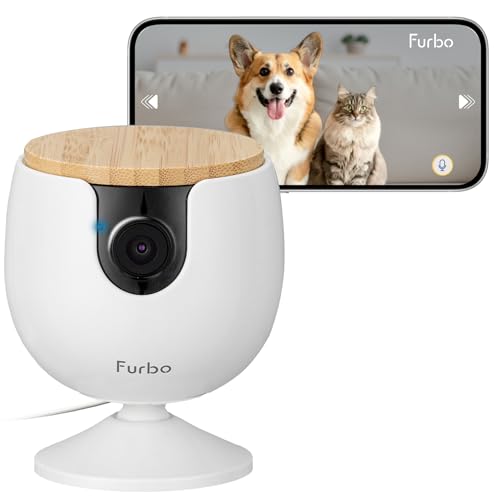
The Furbo Mini Pet Camera strips away premium subscription requirements while preserving the essential features pet owners need. With 1080p Full HD video, 4x digital zoom, and a wide viewing angle, this camera captures clear footage of your pets throughout your home. The real-time barking and meowing alerts work reliably to notify you when your pet needs attention, and the two-way audio lets you speak to them directly through your smartphone.
Night vision performance stands out as a practical strength. The infrared color night vision capability means you can monitor your pets in dim rooms or during nighttime hours without switching to grayscale footage. Combined with in-app volume control for audio clarity, this creates a genuinely usable monitoring experience in any lighting condition. The compact design and dual mounting options (adhesive pad or wall screw) make placement flexible, whether you want a temporary setup or permanent installation.
The 14-day free trial of Furbo Nanny's advanced features gives you the chance to explore AI-powered alerts, video history, and daily reports before committing to a paid plan. After the trial ends, the camera continues functioning with all basic features intact at no cost. This approach works well for owners who want essential pet monitoring without ongoing subscription expenses, though those seeking advanced AI capabilities will eventually need to upgrade.
| Feature | Details |
|---|---|
| Video Resolution | 1080p Full HD |
| Digital Zoom | 4x |
| Night Vision | Infrared Color Night Vision |
| Audio | Two-Way Audio with In-App Volume Control |
| Sound Detection | Barking and Meowing Alerts |
| WiFi Compatibility | 2.4GHz (5GHz not supported) |
| Mounting Options | Adhesive Pad or Wall Screw |
| Power | USB Cable (adapter not included) |
| Security | Bank-Level Encryption, Two-Step Verification Available |
| App Control | Furbo Mobile App |
| Subscription | Not Required for Basic Features |
| Free Trial | 14 Days of Furbo Nanny Advanced Features |
Initial Setup: Plug the Furbo Mini into power using the included USB cable (you'll need your own USB power adapter). Download the Furbo app on your smartphone and create an account. Connect the camera to your 2.4GHz WiFi network through the app - note that 5GHz networks are not supported. Once connected, you'll automatically start a 14-day trial of Furbo Nanny premium features.
Daily Monitoring: Open the Furbo app anytime to view live 1080p footage. Use the 4x digital zoom to get closer looks, and adjust in-app volume for clear audio. The wide viewing angle reduces blind spots, but you can reposition the camera using the adhesive pad (peel and stick) or by drilling a wall mount if you need a different angle. The camera will send real-time notifications to your phone when it detects barking or meowing.
Two-Way Communication: Tap the microphone icon in the app to speak to pets or family members at home. Color night vision activates automatically in low-light conditions, so you can monitor your pets day and night without switching cameras or settings. After your 14-day trial ends, decide whether to subscribe to Furbo Nanny or continue using the camera's free basic features indefinitely.
Best For: Pet owners seeking affordable, subscription-free monitoring with essential features like live view, two-way audio, and sound alerts. Ideal for those with single or multiple pets in apartments, houses, or offices who want to check in without paying monthly fees.
Consider Alternatives If: You need advanced AI features like person detection, package alerts, or activity analysis - these require the Furbo Nanny paid subscription. Also consider your WiFi setup: if your home only has 5GHz networks, this camera won't connect without upgrading your router.
Setup Considerations: You'll need a USB power adapter (not included) and a 2.4GHz WiFi network. If you already own multiple Furbo cameras, adding more than one to your account may require upgrading to a paid Furbo Nanny plan. Contact Furbo Support for details on multi-camera setups.
Value Assessment: The no-subscription model makes this camera cost-effective over time compared to cameras requiring monthly fees. The 14-day free trial of premium features lets you experience advanced capabilities before deciding whether they're worth the subscription cost.

Pros
- Unique mobile design reaches areas fixed cameras cannot, perfect for checking on curious pets
- Auto-recharge feature means the robot returns to its dock independently when battery is low
- Clear 1080P video with night vision provides visibility in both bright and dark environments
- Two-way audio lets you communicate with pets to soothe anxiety or correct behavior remotely
- Local storage option offers privacy-conscious monitoring without mandatory cloud uploads
Cons
- Requires the ROLA App specifically; switching between apps or WiFi networks can cause disconnection issues that need troubleshooting
- Infrared dock-finding system requires clear dock placement away from mirrors and reflective objects, and may need manual repositioning after each use
The Enabot EBO SE stands out as a genuinely innovative approach to home monitoring. Unlike traditional stationary cameras, this mobile robot gives you the ability to drive around your home and check on pets from a pet's-eye view, navigating under furniture and into spaces where fixed cameras simply cannot reach. The 1080P video quality is crisp and detailed, while the enhanced night vision ensures you can see what your pets are doing even when the lights are off, making it particularly useful for nocturnal pet behavior monitoring or checking on anxious pets at night.
The two-way audio feature transforms this from a passive monitoring device into an interactive tool. You can speak to your pets in real-time to calm them down, give commands, or simply let them know you're thinking of them while away. The automatic recharging dock is a genuine convenience factor, as the robot independently returns when power runs low, eliminating the need for manual charging and ensuring it's always ready for your next check-in. The compact form factor is key to its appeal, allowing it to squeeze into spaces and navigate around obstacles in ways that larger monitoring devices cannot.
However, potential buyers should understand the setup requirements. The robot requires the ROLA App (not the older EBO Home App), and some users report WiFi connectivity issues that may require network switching or router repositioning to resolve. The infrared dock-finding system works well but performs best when the charging dock area is clear of mirrors and reflective surfaces, and you may need to manually guide the robot near the dock initially to help it locate the charging signal. These are minor operational considerations rather than deal-breakers, but they're worth factoring into your expectations.
| Feature | Detail |
|---|---|
| Video Resolution | 1080P |
| Night Vision | Enhanced infrared night vision |
| Audio | Two-way talk, built-in microphone and speaker |
| Control Method | Mobile app (ROLA App) and remote control |
| Power System | Battery-operated with auto-recharge dock |
| Charging | Automatic return to dock when power is low |
| Storage | Local storage option available |
| Navigation | Compact design for tight spaces and under furniture |
| Dock Finding | Infrared-based automatic dock detection |
| Brand | Enabot EBO |
| Model | EBO SE |
Getting Started
Download the ROLA App (not the EBO Home App) and connect your EBO SE to your WiFi network. Ensure your router is within reasonable range of where you plan to use the robot. Position the charging dock in a clear, open area away from mirrors and reflective objects, as these can interfere with the infrared dock-finding system.
Operating the Robot
Use the mobile app to drive the EBO SE around your home remotely. The robot can navigate under furniture and through tight spaces, giving you unique viewing angles. Use the two-way audio feature by tapping the microphone icon in the app to speak to your pets or family members in real-time.
Charging and Maintenance
The robot automatically returns to its charging dock when the battery runs low. If the robot has difficulty finding the dock, manually drive it close to the dock to help the infrared system locate the charging signal. Keep the dock area clear and ensure it's placed on a flat, stable surface away from reflective surfaces.
Troubleshooting
If you experience WiFi disconnection issues, try switching to a different WiFi network or repositioning the robot and dock closer to your router. A factory reset may also help restore connection stability.
Optimize Dock Placement
Position the charging dock in a central location within your home where the robot can easily access it. Avoid placing it near windows with reflective glass or near mirrors, as infrared interference can prevent the robot from locating the dock. A clear, open floor space works best.
WiFi Network Setup
For the smoothest operation, connect the EBO SE to a 2.4GHz WiFi network (not 5GHz) and ensure your router is positioned centrally in your home. If you experience disconnections, try switching to a different WiFi band or moving the router closer to where you use the robot most.
Maximize Night Vision
The enhanced night vision works best in low-light conditions rather than complete darkness. If your home has very dark rooms, consider a small ambient light source to get the clearest nighttime footage of your pets.
Pet Interaction
Use the two-way audio to build positive associations with the robot. Start with gentle, calm voice interactions to help pets become comfortable with the device's presence. This works especially well for pets with separation anxiety.
Is This Right for You?
The Enabot EBO SE is ideal if you have pets and want to monitor them from unique angles that stationary cameras cannot provide. It's perfect for pet owners who travel frequently, work long hours, or have pets with separation anxiety. The mobile design also appeals to homeowners who want to check on different rooms without installing multiple fixed cameras.
Key Considerations
WiFi Stability: This device requires a stable WiFi connection. If your home has weak WiFi coverage or frequent disconnections, you may experience operational challenges. Test your WiFi strength in the areas where you plan to use the robot.
App Dependency: You must use the ROLA App specifically. If you prefer a single unified app for all your smart home devices, this separate app requirement may be inconvenient.
Dock Setup: The automatic charging dock requires careful placement away from reflective surfaces. Ensure you have a suitable location before purchasing.
Alternatives to Consider
If you prefer a stationary camera with simpler setup, traditional pet cameras with pan-and-tilt functionality offer similar monitoring without the mobile component. However, they cannot navigate under furniture or reach tight spaces like the EBO SE can.
Long-Term Value
The auto-recharge feature and local storage option extend the device's long-term utility. Unlike devices that require constant manual charging, the EBO SE maintains its own power management, making it a more convenient long-term investment for regular pet monitoring.

Pros
- Treat dispenser adds interactive engagement, allowing you to reward your pet remotely and reinforce good behavior
- Exceptional 360-degree viewing angle with pan rotation ensures you never miss activity in any corner of the room
- 2K resolution and night vision deliver clear footage in all lighting conditions, day or night
- AI auto-tracking and motion detection provide proactive alerts so you stay informed of unusual activity
- Dual storage options (cloud and microSD) give flexibility to match your recording and backup preferences
Cons
- The 0.5L treat hopper has limited capacity and works best with 7-15mm treats, requiring frequent refills for extended use
- Cloud storage features like the AI-generated Time Album require a paid subscription beyond the base camera cost
The TKENPRO 2K Pet Camera stands out as a practical solution for pet owners seeking both monitoring and interaction. The integrated treat dispenser is a genuine differentiator, allowing you to reward your pet remotely and maintain engagement throughout the day. The 2K resolution paired with infrared night vision ensures you capture clear details of your pet's behavior whether it's bright daylight or nighttime, making it useful for identifying health concerns or behavioral patterns.
The 360-degree pan rotation with wide-angle lens provides comprehensive room coverage, eliminating blind spots where your pet might hide or get into trouble. The AI-powered motion and bark detection sends alerts directly to your phone, so you're immediately aware of unusual activity or distress. Two-way audio communication is genuinely helpful for anxious pets, allowing you to comfort them or give commands from anywhere with an internet connection.
Storage flexibility is a practical advantage here. You can choose cloud storage with automatic cycle recording, or use a microSD card for continuous 24/7 recording up to 128GB. The dual WiFi support ensures stable connections in various home setups, and compatibility with Alexa and Google Home adds convenience. Keep in mind that premium features like the AI Time Album require a cloud subscription, so factor that into your budget if those features appeal to you.
| Feature | Details |
|---|---|
| Video Resolution | 2K Ultra HD |
| Viewing Angle | 355-degree pan rotation with wide-angle lens |
| Night Vision | Intelligent infrared |
| Treat Dispenser Capacity | 0.5L (recommended treat size: 7-15mm) |
| Audio | Two-way talk with motion and bark detection |
| WiFi | 5GHz and 2.4GHz dual band |
| Smart Home Integration | Alexa and Google Home compatible |
| Cloud Storage | 6 seconds to 7 days cycle recording; upgradeable to 30 days |
| Local Storage | microSD card support up to 128GB (not included) |
| AI Features | Auto tracking, motion alerts, bark voice detection |
| Time Album Feature | AI-generated 60-second highlight videos (cloud subscription required) |
Initial Setup: Download the TKENPRO app, create an account, and connect the camera to your WiFi network (5GHz or 2.4GHz). Follow the in-app pairing process to link the camera to your phone. Fill the treat dispenser hopper with your pet's favorite treats before powering on.
Daily Monitoring: Open the app to view live 2K video from any angle using the pan rotation controls. Enable motion and bark detection alerts in settings so you receive instant notifications when activity is detected. Use the two-way talk feature to communicate with your pet in real time.
Treat Dispensing: Navigate to the treat dispenser section in the app and tap to toss treats remotely. Start with short distances and gradually increase as your pet learns the association. Refill the hopper as needed, keeping treats within the recommended 7-15mm size range for smooth dispensing.
Recording and Storage: Choose between cloud storage (with automatic cycle recording) or insert a microSD card for continuous 24/7 recording. Review recorded footage in the app and use the download or sharing features to save memorable moments.
Optimize Treat Training: Use the remote treat dispenser to reward your pet during specific times of day, creating positive associations with your absence. Start with frequent small rewards and gradually space them out as your pet becomes comfortable with the camera. This technique helps reduce separation anxiety and keeps them mentally stimulated while you're away.
Maximize Camera Coverage: Position the camera at a height where it captures your pet's favorite spots and resting areas. The 360-degree pan rotation means you can adjust viewing angles remotely, so test different positions during setup to identify blind spots. Consider placing it near windows or common activity areas for better behavioral insights.
Monitor Behavioral Patterns: Use the motion detection alerts and recorded footage to identify your pet's daily routines, stress triggers, and energy levels. This information is valuable for veterinary consultations if you notice unusual behavior changes. The AI-generated Time Album feature (with subscription) makes it easy to spot trends over time.
Manage Storage Efficiently: If using cloud storage, understand the cycle recording limits (7 days standard, 30 days with upgrade). For important moments, download and save recordings immediately. If you prefer unlimited recording, invest in a 128GB microSD card for continuous 24/7 coverage without cloud subscription costs.
Is This Right for You? This camera works best for pet owners who want interactive monitoring beyond simple observation. If you value the ability to reward your pet remotely, communicate with them when anxious, and receive motion alerts, this is a strong choice. It's particularly useful for pets with separation anxiety or those who need engagement throughout the day.
Budget Considerations: Factor in the base camera cost plus potential cloud storage subscription if you want premium features like the AI Time Album or extended recording periods. A microSD card (up to 128GB) is an alternative for continuous recording without ongoing subscription fees.
Home Setup Requirements: Ensure your WiFi network (5GHz or 2.4GHz) has good signal where you plan to place the camera. The dual-band support provides flexibility for different home layouts. If you use smart home devices, compatibility with Alexa and Google Home adds convenience.
Pet Compatibility: The treat dispenser works best with small to medium-sized treats (7-15mm). Verify your pet's treat size before purchase. The two-way audio and motion detection work for all pets, but the treat dispensing feature is most effective for dogs and food-motivated cats.
Buying Guide: How to Choose the Right Pet Camera
Shopping for a pet camera involves more decisions than it first appears. Resolution, field of view, audio quality, connectivity, and smart features all vary considerably from model to model. The guide below breaks down each factor so you can match a camera to your specific pet, home layout, and budget. For a broader look at securing your property, top-rated security cameras covers both indoor and outdoor options across every major brand.
Video Resolution and Image Quality
Resolution determines how clearly you can see your pet, especially when you need to zoom in on a small detail like whether a cat has knocked over a water bowl or a dog has chewed through something. Cameras labeled 1080p deliver crisp, reliable footage for most homes. Stepping up to 2K or 4K adds noticeably more detail, which matters if you want to identify subtle behavioral cues or use the footage as part of a home security setup. Models like the eufy Security 4K Indoor Camera E30 and the Anona 4K UHD Indoor Camera offer that higher resolution at a reasonable cost, while budget-friendly picks like the TP-Link Tapo C100 still deliver solid 1080p clarity for everyday check-ins. Color night vision is a meaningful upgrade over traditional infrared night vision because it preserves context that a black-and-white image loses, particularly useful for spotting if a pet is limping or behaving oddly in a dimly lit room.
Pan, Tilt, and Field of View
A fixed camera can only cover a single angle, which means an active dog or a cat that roams multiple rooms will quickly disappear from frame. Pan-and-tilt cameras rotate horizontally and vertically so you can manually steer the view from your phone app. The best models add auto-tracking, which uses AI to detect a moving animal and follow it automatically without any input from you. The TP-Link Tapo C200 and C210 are popular choices for pan-and-tilt coverage at a budget price. The aosu 2K Security Camera goes further with a full 360-degree horizontal sweep and smart motion tracking. If your pet moves between rooms, a robotic camera like the Enabot EBO SE FamilyBot takes things to the next level by driving itself around your home. Full 360-degree coverage is also worth considering if you plan to use the same camera as part of a wider wireless home security system.
Two-Way Audio
Being able to speak to your pet through the camera is surprisingly effective. Many dogs will calm down when they hear their owner’s voice, and cats will often look toward the speaker with curiosity. Look for a camera with a clear built-in microphone and a speaker loud enough to be heard in a normal-sized room. Some models, including the ARENTI P2Q and the Tapo C210, add a siren function that can be triggered remotely, which is useful for deterring a dog from destructive behavior. Audio quality varies significantly between brands, so pay attention to user reviews that specifically mention whether voices come through clearly or sound distorted.
Smart Detection and AI Alerts
Generic motion detection alerts become annoying quickly because they fire every time a shadow crosses the lens. Pet-specific AI detection filters out irrelevant motion and notifies you only when your dog or cat is seen doing something significant. The Furbo Mini Pet Camera is purpose-built for this, offering barking and meowing alerts without requiring a subscription. The eufy Security E30 goes further with AI person detection and pet detection running simultaneously, useful if you want a single camera that covers both security and pet monitoring. The Anona 4K model adds baby crying detection, making it a versatile pick for households with both young children and animals. If you are also monitoring a nursery, pairing a pet camera with a dedicated video baby monitor gives each room purpose-built coverage.
WiFi Connectivity and App Performance
Most pet cameras connect over 2.4 GHz WiFi, which has broader range but lower bandwidth. Cameras that support 5 GHz or dual-band WiFi 6, such as the blurams 5G model and the Anona 4K, stream higher-resolution video with less buffering and lower latency. This matters most in homes with many connected devices competing for bandwidth. A reliable mesh WiFi network makes a tangible difference in streaming stability across your whole home. If your home has dead zones, improving your network with a whole-home WiFi system will benefit every smart device you own, not just your pet camera. App quality is equally important: look for apps that load the live feed quickly, offer clear notification controls, and let you adjust sensitivity settings easily.
Storage Options: Cloud vs. Local
How your camera stores recordings has real cost and privacy implications. Cloud storage typically requires a monthly subscription, which adds up over time. Local storage via a microSD card means footage stays on-device with no recurring fee, though you will need to replace or format the card periodically. Several cameras in this roundup support both, giving you flexibility. The eufy Security E30 supports 24/7 local recording without any subscription, which is a genuine differentiator. The Tapo C210 accepts microSD cards up to 256 GB. If you connect your camera to a broader smart home setup alongside a smart home hub, some platforms offer centralized local storage for multiple cameras at once.
Treat Dispensers and Interactive Features
A handful of cameras go beyond monitoring and let you interact with your pet by dispensing treats remotely. The TKENPRO 2K Pet Camera Treat Dispenser is specifically designed for this, with remote treat tossing and auto-tracking built into a single unit. These features are especially helpful for dogs prone to separation anxiety, as a treat reward can reinforce calm behavior from a distance. If your household includes multiple pets or a large dog that needs more stimulation, the robotic Enabot EBO SE offers a unique approach by physically moving through your home so you can follow your pet from room to room via your phone. These interactive models tend to sit at a higher price point than standard cameras, but for anxious or high-energy pets they can make a meaningful difference.
Smart Home Ecosystem Compatibility
Most pet cameras work with Alexa and Google Home, letting you pull up a live feed on a smart display or ask a voice assistant to show you the camera. If you already use Apple HomeKit, the eufy Security E30 is one of the few pet-focused cameras with native HomeKit support, making it an easy fit in an Apple household. Checking compatibility before you buy saves frustration later, especially if you are building a cohesive smart home. Pairing your camera with smart displays is one of the most convenient ways to monitor a live feed without picking up your phone. You can also automate routines so that the camera activates its siren or sends a push alert when a connected smart lock is engaged, adding a layer of automated security on top of basic pet monitoring.
Why Trust HomeThru
HomeThru is a fully independent review platform with no brand affiliations, sponsored rankings, or manufacturer relationships that influence our recommendations. Our editorial team researches and evaluates products by analyzing verified buyer reviews, comparing published specifications, assessing long-term ownership feedback, and benchmarking features against competitors across the same category. We do not accept free products in exchange for favorable coverage, and our rankings are never influenced by affiliate revenue potential. Every pick in this roundup was selected on merit, with real pet owners in mind. We apply the same rigorous, unbiased methodology to every category we cover, from smart doorbells to outdoor security cameras. HomeThru does not sell products and has no involvement in purchases, returns, or warranties.
Final Thoughts
Pet cameras have become one of the most practical smart home purchases for animal owners, combining peace of mind with genuine interactivity. The 12 models in this guide cover a range of needs from basic budget-friendly monitoring to advanced AI tracking, robotic mobility, and treat dispensing. Below is a quick reference to our top picks by use case.
- Best Overall: eufy Security 4K Indoor Camera E30, 4K resolution, AI auto-tracking, color night vision, HomeKit support, and no subscription required make this the most complete option in the roundup for most households.
- Best Budget Pick: TP-Link Tapo C100, An accessible entry point with 1080p video, two-way audio, and night vision at one of the lowest price points in the category, ideal for first-time pet camera buyers.
- Best for Active Pets: Enabot EBO SE FamilyBot, The only camera in this roundup that drives itself around your home, letting you follow a roaming dog or curious cat from room to room via a phone app.
- Best for Treat Rewards: TKENPRO 2K Pet Camera Treat Dispenser, Combines 360-degree auto-tracking with remote treat tossing, making it a practical tool for managing separation anxiety and reinforcing calm behavior.
- Best for High-Resolution Monitoring: Anona 4K UHD Indoor Camera, Dual-band WiFi 6, 4K clarity, and AI detection for people, pets, and baby crying in a two-pack that offers excellent value for multi-room coverage.
If you are building out a fuller smart home security setup, pairing a pet camera with smart smoke detectors and a water leak detector gives you comprehensive monitoring of both your pets and your home itself. For households that want to see who is at the door while also keeping an eye on a dog inside, combining a pet camera with one of our top-rated smart doorbells covers both angles efficiently.
Frequently Asked Questions
Do pet cameras require a monthly subscription?
Not all of them do. Several cameras in this roundup, including the eufy Security E30 and the Furbo Mini, offer meaningful functionality with no subscription. Cloud storage plans add clip history and smart alerts for a recurring fee, but local microSD storage keeps your footage free of ongoing costs. Decide whether cloud access is worth the expense before committing to a subscription-dependent model. If you are also investing in a wireless home security system, check whether a bundled plan covers both.
Can I use a pet camera as a baby monitor too?
Many of the cameras in this roundup include features that overlap with nursery monitoring, including two-way audio, night vision, and motion alerts. The Anona 4K model even adds dedicated baby crying detection. That said, a purpose-built video baby monitor typically offers more reliable audio sensitivity and a dedicated parent unit display, which many caregivers prefer over relying entirely on a smartphone app.
What WiFi band is best for streaming live pet camera footage?
Dual-band cameras that support 5 GHz offer smoother, lower-latency streaming in homes with many connected devices. The blurams 5G and Anona 4K both use WiFi 6 for added throughput. If your home has coverage gaps, a mesh WiFi system eliminates dead zones and ensures your camera stays connected even in larger rooms or multi-story homes.
Are treat dispenser cameras worth it for anxious dogs?
For dogs with separation anxiety, the ability to reward calm behavior remotely with a treat can genuinely help. Behaviorists widely use positive reinforcement during training, and being able to deliver that reward through an app bridges the gap when you are away. Models like the TKENPRO combine auto-tracking and treat tossing so you can monitor your dog’s stress cues and respond in real time without needing to be home.