Whether you want to keep an eye on a sleeping baby, check in on a curious pet, or add a layer of protection to a home office, indoor security cameras have become one of the most practical smart home investments available. The market has expanded enormously, and sorting through dozens of options to find the right one can feel overwhelming. At HomeThru, our editorial team independently researched, evaluated, and compared the top-rated indoor cameras available right now, weighing resolution, smart detection, privacy features, storage flexibility, and ecosystem compatibility to build this list. The picks below cover every budget and use case, from a no-frills budget-friendly model to a four-camera 4K system for whole-home coverage.
If you are also thinking about coverage beyond your front door, our roundup of outdoor security cameras ranked for coverage, power, and value is a natural companion to this guide. And for households that want a fully connected setup, pairing your cameras with a capable wireless home security system adds professional-grade deterrence without long-term contracts.
Top Indoor Security Cameras We Recommend

Pros
- Color night vision provides clear footage in low-light conditions, not just grayscale
- Physical privacy cover offers genuine peace of mind without relying on software toggles
- Simple setup and flexible mounting make it accessible for renters and homeowners alike
- Customizable motion detection zones reduce alert fatigue from irrelevant movement
- Compact footprint and lightweight design work in tight spaces or high-mounted positions
Cons
- Ring Protect subscription is required to unlock key features like video history scrollback and AI-powered alerts
- 1080p resolution is adequate but not exceptional compared to newer 2K and 4K competitors in the same price range
The Ring Indoor Cam is a straightforward security solution for homeowners and renters seeking basic indoor monitoring without complex installation. The 1080p HD video paired with color night vision delivers usable footage in most household lighting conditions, and the Advanced Pre-Roll feature captures a few seconds before motion events, giving you better context about what triggered the alert. Real-time notifications arrive quickly, and the ability to customize detection zones means you can focus on entry points or high-traffic areas while ignoring false alerts from ceiling fans or window reflections.
What sets this camera apart is the physical privacy cover, a simple swivel mechanism that lets you disable both video and audio instantly without opening an app or trusting software switches. For households with privacy concerns, this tangible control is genuinely valuable. The flexible mounting options and lightweight design make repositioning effortless, whether you're securing a nursery, office, or entryway. Alexa integration works smoothly, allowing voice commands and live viewing on Echo Show devices if you already own one.
The main limitation is that meaningful features like video history scrollback and advanced AI alerts require a Ring Protect subscription (sold separately). The 1080p resolution is also middle-of-the-road; newer models at similar price points offer 2K or higher. For basic motion detection and live viewing, however, the Ring Indoor Cam delivers reliable performance at an accessible price point, especially if you're already invested in Ring's ecosystem.
| Specification | Detail |
|---|---|
| Brand | Ring |
| Color | White |
| Video Resolution | 1080p HD |
| Night Vision | Color Night Vision |
| Dimensions | 1.93 x 1.93 x 3.75 inches |
| Weight | 0.16 pounds |
| Power | Plug-in (AC powered) |
| Mounting | Table or wall mount with flexible swivel |
| Privacy Control | Manual privacy cover |
| Smart Features | Motion alerts, customizable detection zones, Alexa integration |
| Quantity | 1 camera |
Setup and Installation
Plug the Ring Indoor Cam into a standard AC outlet near your desired monitoring location. Download the Ring app, create or log into your Ring account, and follow the in-app setup wizard to connect the camera to your home Wi-Fi network. The process typically takes 5-10 minutes and requires no technical expertise.
Mounting and Positioning
Use the included flexible swivel mount to position the camera on a shelf, table, or wall. The compact 1.93-inch width allows placement in tight corners or narrow shelves. For wall mounting, use the provided hardware and ensure the outlet is within reach of the power cable. Adjust the swivel to frame your desired viewing area, then test live view in the Ring app to confirm coverage.
Configuring Motion Alerts
Open the Ring app and navigate to the camera settings. Create custom motion detection zones by drawing on a preview image to specify which areas trigger alerts. This reduces false notifications from pets, plants, or activity outside your window. Adjust sensitivity levels based on your environment and test by walking through the monitored zone.
Using Privacy Mode
To disable the camera, simply swivel the physical privacy cover until it clicks into place. The cover disables both video and audio recording. Swivel it back to reactivate monitoring. This manual control works independently of the app, so you don't need internet or smartphone access to stop recording.
Optimal Placement for Maximum Coverage
Mount the camera 5-7 feet high at entry points or high-traffic areas to capture faces and body details. Avoid pointing directly at windows or bright light sources, which can cause glare and reduce night vision effectiveness. Test different angles in live view before finalizing the mount position.
Reduce Alert Fatigue
Use motion detection zones to exclude areas where you don't need alerts, such as outdoor windows or areas visible from neighboring properties. Start with high sensitivity and gradually lower it if you receive excessive false alerts from shadows or moving curtains.
Maximize Night Vision Performance
Position the camera where ambient light (from hallways, night lights, or outdoor sources) can reach the lens. The color night vision feature works best with at least minimal light in the room. Complete darkness may result in lower-quality footage.
Integrate with Your Smart Home
If you own an Echo Show, set up the camera to display live video when motion is detected. Use Alexa routines to trigger announcements or turn on lights when the camera detects movement, creating a more comprehensive security response.
Plan for Subscription Features
Consider whether you'll need a Ring Protect subscription for features like video history and advanced AI alerts. This helps you budget upfront and decide if the camera's value proposition aligns with your security needs.
Who Should Buy This Camera?
The Ring Indoor Cam is ideal for renters, apartment dwellers, and homeowners who need flexible, plug-and-play security without installation complexity. It works well for monitoring nurseries, home offices, basements, or entryways. If you already own Ring doorbells or other Ring products, this camera integrates seamlessly into your existing setup.
Who Might Want to Look Elsewhere?
If you require higher video resolution (2K or 4K), extensive cloud storage without subscription fees, or advanced AI features like person/package detection without extra cost, consider competing brands. Professional installers or those needing hardwired reliability may also prefer wired alternatives.
Key Considerations Before Purchasing
Internet Connectivity: The camera requires a stable 2.4GHz Wi-Fi connection. Test your Wi-Fi strength in the intended mounting location before buying.
Power Availability: Ensure an AC outlet is nearby and accessible. Extension cords work but may look unsightly.
Subscription Costs: Basic motion alerts are free, but video history and advanced features require Ring Protect (sold separately). Factor this into your total cost of ownership.
Privacy Preferences: If you value manual privacy controls, this camera's physical cover is a strong advantage. If you prefer app-only controls, this feature is less relevant.
Warranty and Support
Ring products typically include a one-year limited warranty. Check the product listing for current coverage details. Customer support is available through the Ring app and website.

Pros
- Extremely easy setup and installation - no professional technician required, saves time and money
- Flexible monitoring options with no long-term contracts give you complete control over your service level
- Video verification feature enables priority police dispatch when needed most
- Reliable backup power and cellular connection ensure continuous protection even during outages
- Smart home compatibility lets you manage security through voice commands or mobile app
Cons
- No user reviews available yet, so real-world performance feedback from homeowners is limited
- Professional monitoring service is optional but recommended for full protection, adding ongoing monthly costs
SimpliSafe's 9-piece wireless system represents a practical approach to home security for homeowners who want professional-grade protection without installation headaches or long-term contracts. The bundle includes everything needed for comprehensive coverage: a base station with cellular backup, an HD indoor camera with privacy shutter, entry sensors for doors and windows, motion detectors rated for pet-friendly homes, and a wireless keypad. Setup is genuinely straightforward - no drilling, wiring, or professional installation required, though SimpliSafe offers that option if you prefer hands-off deployment.
The standout feature is the integration of optional professional monitoring with video verification capabilities. When enabled, SimpliSafe's monitoring agents can review camera footage to confirm break-ins, which can result in priority police dispatch. The flexibility here matters: you get one free month to evaluate the service, and if you continue, monitoring starts at less than $1 per day with no contracts binding you long-term. The system also maintains protection during outages through 24-hour battery backup and cellular connectivity, ensuring your home stays monitored even when your internet goes down.
Smart home integration is seamless, allowing you to arm and disarm the system through Alexa or Google Assistant commands. The motion sensors intelligently detect intrusions within a 35-foot range while remaining pet-friendly for animals under 60 pounds. The wireless keypad with context-aware backlit buttons adds convenience without cluttering your entryway. For homeowners seeking flexibility, affordability, and modern security features without sales pressure or long-term commitment, this system delivers solid value.
| Specification | Details |
|---|---|
| Brand | SimpliSafe |
| Bundle Size | 9 Pieces |
| Color | White |
| Dimensions | 12.13 x 12.38 x 4.4 inches |
| Weight | 0.35 pounds |
| Key Components | Base Station, HD Camera, Entry Sensors, Motion Sensors, Wireless Keypad |
| Camera Features | HD Video, Privacy Shutter, Mobile App Access |
| Motion Sensor Range | 35 feet with 90-degree field of view |
| Pet Compatibility | Pets under 60 lbs |
| Battery Backup | Up to 24 hours |
| Connectivity | Wi-Fi, Cellular Backup, Smart Home Compatible |
| Smart Home Support | Amazon Alexa, Google Assistant |
| Monitoring Options | Optional Professional Monitoring (No Long-Term Contract) |
| Category | Home Security Systems |
Initial Setup (5-10 minutes): Unbox the system and plug in the base station to power and Wi-Fi. Download the SimpliSafe mobile app and follow the guided setup walkthrough. The app will prompt you through adding and naming each component - the camera, entry sensors, motion detectors, and wireless keypad.
Placing Sensors: Position entry sensors on doors and windows where intruders are most likely to enter. Mount motion sensors in corners for full room coverage. The 35-foot detection range and 90-degree field of view mean strategic corner placement maximizes coverage without overlap. For pet-friendly homes, keep sensors at heights where pets under 60 pounds won't trigger false alarms.
Daily Operation: Use the wireless keypad or mobile app to arm the system when leaving or before bed. The app lets you monitor live camera feeds, check sensor status, and receive instant alerts. Enable voice control through Alexa or Google Assistant to arm/disarm hands-free. Test the system monthly by triggering a sensor and confirming alerts arrive correctly on your phone.
Professional Monitoring (Optional): If you choose monitoring service, activate it in the app. During emergencies, SimpliSafe agents will receive alerts, review camera verification if enabled, and dispatch emergency responders on your behalf. You control whether monitoring is active and can pause or cancel anytime without penalty.
Maximize Video Verification: If you subscribe to professional monitoring, enable video verification on your camera. This allows SimpliSafe agents to confirm break-ins with visual evidence, which typically results in faster police dispatch compared to motion-only alerts.
Leverage Secret Alerts: Use the entry sensor 'secret alert' feature for sensitive areas like medicine cabinets or home offices. These send silent notifications to your phone without triggering the alarm, letting you monitor unauthorized access to private spaces discreetly.
Optimize Motion Sensor Placement: Position motion sensors in opposite corners of large rooms to eliminate coverage gaps. The 90-degree field of view means two sensors in opposite corners provide nearly complete room coverage without false triggers from pets moving between zones.
Test Backup Power Regularly: Unplug the base station once monthly to verify the 24-hour battery backup is functioning. This ensures your system will protect your home during power outages without surprises when you need it most.
Use Keypad Strategically: Place the wireless keypad near your main entry point for quick disarming when arriving home. The backlit buttons activate automatically in low light, so you won't fumble in the dark while entering your home.
Who Should Buy This System: Homeowners seeking flexible, affordable security without long-term contracts. Renters who need portable security that doesn't require drilling or permanent installation. Tech-savvy users who want smart home integration and mobile app control. Budget-conscious buyers who prefer no-contract monitoring options.
Who Might Want to Look Elsewhere: Homeowners needing outdoor perimeter cameras (this bundle includes only an indoor camera). Those requiring professional monitoring as mandatory rather than optional. Users in areas with unreliable Wi-Fi or cellular coverage where backup connectivity is critical.
Key Decision Points: Consider whether professional monitoring adds value for your situation. The system works as a standalone DIY solution, but monitoring provides 24/7 agent response and potential faster police dispatch. Evaluate your entry points - this 9-piece bundle covers typical homes with 2-3 entry doors and a few windows. Larger homes may need additional sensors. Confirm your Wi-Fi strength near the base station location, as the system relies on connectivity for app control and alerts.
Monitoring Cost Reality: The first month is free, giving you genuine time to evaluate the service. After that, expect to pay less than $1 per day for professional monitoring, which translates to roughly $25-30 monthly depending on your plan tier. No long-term contracts mean you can cancel anytime, making it a low-risk way to test whether professional monitoring fits your needs.

Pros
- No subscription required; all core features work with local storage on SD card
- AI auto-tracking keeps moving subjects in frame automatically, perfect for active pets or babies
- Color night vision with spotlight offers clearer nighttime footage than standard infrared
- Versatile use cases: nanny cam, pet monitor, baby monitor, or general home security
- Smart home compatibility with major platforms simplifies setup and control
Cons
- HomeKit integration limits resolution to 1080p, reducing the advantage of 4K recording on Apple devices
- SD card sold separately, and continuous 24/7 recording requires larger capacity cards and eventual replacement costs
The eufy Security E30 stands out as a comprehensive indoor surveillance solution that eliminates the frustration of monthly subscription fees while delivering professional-grade 4K recording. The camera's on-device AI engine processes video locally, enabling smart detection of humans, pets, and specific sounds without relying on cloud services. This approach protects your privacy while providing the intelligent features homeowners expect from modern security cameras.
The 360-degree pan-and-tilt mechanism combined with auto-tracking creates a dynamic monitoring experience. Whether you're watching a playful dog, checking on a sleeping infant, or securing a room while away, the camera automatically follows movement and keeps subjects centered in the frame. The color night vision with integrated spotlight is particularly valuable, delivering recognizable footage in low-light conditions rather than the ghostly thermal images typical of infrared-only cameras.
Setup and daily use are straightforward thanks to compatibility with HomeKit, Alexa, and Google Assistant. The Quick Focus Tap feature lets you instantly shift the camera's view by tapping any area on your phone screen, while the two-way audio enables real-time communication. For those committed to local storage, an SD card provides unlimited recording without ongoing costs, though HomeKit users should note that Apple's integration caps resolution at 1080p despite the camera's 4K capability.
| Feature | Details |
|---|---|
| Resolution | 4K Ultra HD |
| Pan and Tilt | 360-degree panoramic view |
| Night Vision | Color night vision with built-in spotlight and infrared |
| Recording | 24/7 continuous recording capability |
| AI Detection | Humans, pets, audio cues, crying sounds |
| Auto Tracking | AI-powered tracking of detected subjects |
| Audio | Two-way audio communication |
| Storage | Local SD card (sold separately) or cloud options |
| Subscription | None required |
| Smart Home | HomeKit, Alexa, Google Assistant compatible |
| HomeKit Resolution | Up to 1080p |
Maximize AI Detection: Position the camera in a central location where it has clear sightlines to high-traffic areas. The on-device AI works best when subjects are well-lit and not obscured, so avoid pointing directly into windows or heavily shadowed corners.
Storage Strategy: Calculate your SD card needs based on recording resolution and frame rate. A larger capacity card (256GB or higher) supports extended continuous recording. Consider rotating cards or using cloud backup for important footage you want to preserve long-term.
Smart Home Setup: If you use HomeKit, understand that it will stream at 1080p. For full 4K recording, access the camera directly through the eufy app. Use Alexa or Google Assistant for voice control and basic status checks alongside HomeKit for a more flexible ecosystem.
Two-Way Audio Use: Test audio quality before relying on it for critical communication. Background noise in your room can affect how clearly the person on the other end hears you, especially if the camera is far from your phone's microphone during setup.
Who Should Buy This Camera: The eufy E30 is ideal for renters and owners who want security without long-term contracts, pet owners needing behavioral monitoring, parents setting up nursery surveillance, and tech-savvy homeowners comfortable with local storage management.
Who Might Look Elsewhere: If you require seamless 4K streaming through HomeKit, prefer fully managed cloud storage without hardware maintenance, or need multiple cameras with centralized professional monitoring, consider alternatives that specialize in those features.
Key Considerations: Budget for an SD card (at least 128GB recommended for 24/7 recording), ensure your home WiFi is strong in the camera's location, and decide whether you prefer local-only storage or want the option to add cloud backup. Verify that your smart home ecosystem (HomeKit, Alexa, or Google) meets your control preferences, keeping in mind HomeKit's resolution limitation.

Pros
- No subscription required for basic motion detection and notifications, keeping costs low
- Versatile use cases: works equally well for baby monitoring, pet surveillance, and home security
- Excellent night vision range of 30 feet covers most rooms without additional lighting
- Smart filtering reduces false alarms by distinguishing between different types of motion
- Easy voice control integration with popular smart home ecosystems
Cons
- Requires 2.4GHz Wi-Fi connection, which may be less stable than 5GHz in homes with dual-band routers
- Limited to 1080P resolution, so fine details at distance may not be as sharp as 2K or 4K alternatives
The TP-Link Tapo C100 delivers solid indoor surveillance at a price point that won't strain your budget. Its 1080P sensor captures enough detail for most home monitoring scenarios, whether you're watching a sleeping infant, checking on a pet during work hours, or monitoring entry points. The motion detection system is thoughtfully designed to filter out false alarms from pets or moving curtains, so you receive notifications that actually matter rather than being bombarded with every shadow that passes by.
Night vision extends to 30 feet with infrared LEDs, which covers the typical bedroom, nursery, or living room. The two-way audio is surprisingly clear for a camera at this price, and the built-in siren provides a deterrent layer if unexpected motion is detected. Integration with Alexa and Google Home works smoothly, allowing you to pull up live feeds on Echo Shows or Google Nest displays without fumbling with your phone, which is especially convenient when your hands are full with a baby or pet.
The lack of mandatory subscription fees is a genuine advantage. You can use cloud storage for critical footage or rely on a microSD card for continuous local recording. Setup takes about five minutes if you're familiar with Wi-Fi-enabled devices, and the mobile app is intuitive. Just note that this camera connects only to 2.4GHz Wi-Fi, which may experience interference in congested networks, and the 1080P resolution, while adequate, won't match the detail of higher-resolution models if you need to identify faces from across a room.
| Model | Tapo C100 |
| Video Resolution | 1080P Full HD (1920 x 1080) |
| Night Vision Range | Up to 30 feet with IR LEDs |
| Audio | Two-way audio with built-in siren |
| Motion Detection | Yes, with intelligent filtering |
| Wi-Fi Connectivity | 2.4GHz band |
| Cloud Storage | Supported |
| Local Storage | microSD card (up to 256GB) |
| Smart Home Compatibility | Amazon Alexa, Google Assistant |
| Use Cases | Baby monitoring, pet surveillance, home security |
| Subscription Required | No (for basic features) |
Baby Monitoring: The motion and sound detection alert you instantly if your baby wakes or cries, and the two-way audio lets you soothe them remotely. 1080P clarity is sufficient to see your baby's position and condition at a glance.
Pet Surveillance: Keep tabs on your dog or cat while you're at work. The intelligent motion filtering learns your pet's typical behavior, reducing false alarms. Two-way audio lets you check in and offer reassurance.
Home Security: Position cameras in entryways, living rooms, or bedrooms to monitor for unauthorized access. The built-in siren can startle intruders, and instant notifications give you real-time awareness of activity.
Elder Care: Monitor aging parents or relatives who live independently, allowing you to check in without constant visits while respecting privacy.
Before You Buy: Verify that your home Wi-Fi router broadcasts a 2.4GHz band (most dual-band routers do). Ensure the location where you plan to mount the camera has reliable Wi-Fi signal strength. Consider whether you prefer cloud storage (requires TP-Link account) or local storage via microSD card.
Installation: Mount the camera on a shelf, table, or wall within range of your Wi-Fi network. Use the Tapo app to connect the camera to your network, configure motion zones, and set notification preferences. The process typically takes 5-10 minutes. No hub or professional installation is required.
Optimal Placement: Position the camera to cover entry points or areas of interest without obstructions. Avoid pointing directly at windows or bright light sources, which can cause glare. For baby monitoring, place the camera at a safe height out of reach of children.
Storage Decision: For continuous recording, insert a microSD card (sold separately). For cloud backup of important footage, enable cloud storage through the app. You can use both simultaneously for redundancy.
Pros
- 4K resolution with 8x zoom provides exceptional clarity for identifying faces and details
- AI detection system distinguishes between pets, people, and baby cries, reducing false alerts
- Full 360-degree pan and 110-degree tilt with auto-tracking covers large rooms without blind spots
- Wi-Fi 6 technology delivers faster, more stable connections than older Wi-Fi standards
- Flexible storage options let you choose between cloud encryption or local microSD recording
Cons
- No microSD card included in the box, requiring a separate purchase for local storage
- Relies on Wi-Fi connectivity, so network outages will interrupt live viewing and recording
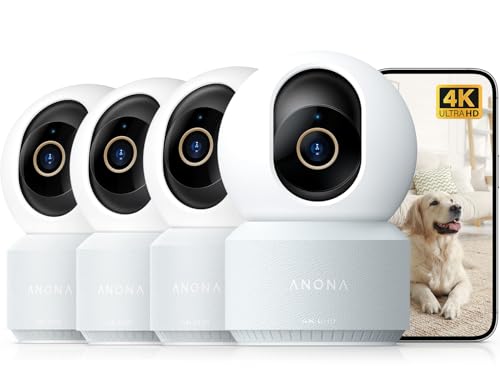
The Anona 4K UHD indoor camera stands out for its combination of sharp 4K video capture and practical AI detection features. The 8x digital zoom and professional-grade lens allow you to see fine details across your room, whether monitoring a pet in a play area or keeping an eye on a nursery. The 4K resolution makes a real difference when you need to zoom in on specific activity without losing image quality.
The intelligent detection system is where this camera earns its value for families and pet owners. Rather than triggering alerts for every movement, the AI specifically identifies people, pets, and baby crying, which means you get notifications that actually matter. The 360-degree pan and 110-degree tilt work smoothly, and the auto-tracking feature will follow movement across your space, so you don't need to manually adjust the camera position constantly.
On the technical side, Wi-Fi 6 dual-band connectivity keeps the camera responsive and streaming smoothly, even in homes with multiple connected devices. You have genuine flexibility with storage: cloud recording with AES-128 encryption offers convenience and backup, while local microSD recording gives you complete privacy control. The two-way audio and privacy mode round out a well-thought-out feature set for homeowners who take indoor security seriously.
| Feature | Details |
|---|---|
| Video Resolution | 4K UHD |
| Digital Zoom | 8x |
| Pan Range | 360 degrees |
| Tilt Range | 110 degrees |
| Wi-Fi Standard | Wi-Fi 6 (802.11ax) |
| Wi-Fi Bands | 2.4 GHz and 5 GHz dual-band |
| AI Detection | Person, Pet, Baby Crying |
| Auto-Tracking | Yes |
| Cloud Storage | AES-128 encrypted |
| Local Storage | microSD up to 512 GB (not included) |
| Audio | Two-way audio |
| Privacy Mode | Yes |
| Package Contents | 4-pack of cameras |
Who Should Buy This Camera? The Anona 4K is ideal for homeowners with larger rooms or open floor plans who want comprehensive coverage without multiple cameras. Pet owners and parents will appreciate the specific AI detection for their needs. If you have a newer Wi-Fi 6 router, you'll get maximum performance from the dual-band connectivity.
Room Size and Coverage The 360-degree pan and 110-degree tilt mean one camera can monitor most standard indoor spaces. However, if you have multiple rooms or very large open areas, you may need additional units. The 4-pack is well-suited for homes with multiple monitoring zones.
Storage Considerations Decide upfront whether you prefer cloud backup or local recording. Cloud storage offers convenience and peace of mind for long-term backup, while microSD recording gives you complete privacy with no reliance on external servers. Budget for a high-capacity microSD card if you choose local storage.
Network Setup Ensure your Wi-Fi router is within reasonable range for stable 5 GHz connectivity. If you have an older Wi-Fi 4 router, the camera will still work on 2.4 GHz, but you won't experience the speed advantage of Wi-Fi 6.
Maximize AI Detection Accuracy Position the camera at a height where it naturally captures the faces and body shapes of people and pets you want to monitor. The AI performs best when subjects are clearly visible in the frame. Test the detection settings during setup to fine-tune sensitivity to your environment.
Optimize Pan-Tilt Performance Use the auto-tracking feature for high-activity areas like pet play zones or nurseries. For stationary monitoring (like a doorway), manually position the camera and disable auto-tracking to reduce unnecessary movement and focus on your specific zone of interest.
Balance Storage Strategy If you use cloud storage, set recording to trigger only on AI detection events rather than continuous recording to manage storage costs. For local microSD storage, use high-speed cards rated for continuous video to avoid buffering and ensure reliable recording during movement-heavy moments.
Wi-Fi 6 Setup If your router supports Wi-Fi 6, connect the camera to the 5 GHz band for the best speed and stability. However, if you experience connectivity drops, switch to 2.4 GHz, which has better range through walls and obstacles in most homes.
Pros
- Exceptional 360-degree pan and tilt range provides comprehensive coverage without multiple cameras
- Color night vision with integrated spotlight delivers usable footage in darkness, a major advantage over basic models
- Dual-band Wi-Fi reduces lag and improves reliability compared to single-band alternatives
- Easy installation into existing light fixtures saves time and avoids costly rewiring
- Compact design blends into porch and entryway settings without appearing overtly industrial
Cons
- Mobile app setup and cloud storage integration can be confusing for users unfamiliar with smart home devices, requiring troubleshooting time
- Limited local storage means reliance on cloud services for video history, which may involve subscription costs for extended retention
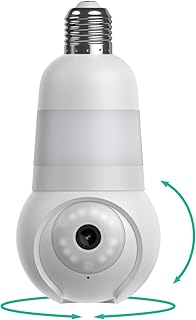
The Luna Light Bulb Security Camera stands out as a practical hybrid device that replaces standard porch lighting while delivering comprehensive home surveillance. The 360-degree pan and tilt capability eliminates the need for multiple fixed cameras, and the color night vision with integrated spotlight ensures you capture usable footage whether it is dusk or pitch darkness. Homeowners appreciate the dual-band Wi-Fi connectivity, which reduces streaming delays and improves reliability compared to single-band models, especially in homes with Wi-Fi congestion.
Installation is straightforward for anyone comfortable replacing a light bulb, as the device screws into standard E26 sockets found in most porch fixtures and lamps. The motion detection feature works reliably, sending smartphone alerts when activity is detected, and customizable sensitivity settings help reduce false alarms from passing cars or animals. The integrated LED bulb provides genuine illumination, so you are not sacrificing functional lighting for security, and the built-in spotlight adds an extra layer of deterrence.
The main drawback centers on the app-based setup process, which some users find unintuitive, and the reliance on cloud storage for video history. While the camera itself performs well, you will need to invest time in configuration and may face subscription costs if you want extended video retention beyond the free tier. For homeowners seeking a discreet, multi-functional security solution that avoids visible camera installations, this bulb camera delivers solid value.
| Specification | Detail |
|---|---|
| Camera Resolution | 1080p Full HD |
| Pan and Tilt Range | 360 degrees horizontal, 90 degrees vertical |
| Night Vision | Color night vision with integrated spotlight |
| Wi-Fi Standards | 2.4GHz and 5GHz dual-band |
| Connectivity | Wireless (no wiring required) |
| Installation | Standard E26 light socket |
| Motion Detection | Yes, customizable sensitivity |
| Audio | Two-way audio communication |
| Operating Temperature | -10 to 50 degrees Celsius |
| Power Source | AC powered through light fixture |
| Compatibility | Works with major smart home platforms |
| Storage | Cloud-based with optional local backup |
Step 1: Choose Your Location
Select a porch light, entryway fixture, or any outdoor or indoor location with a standard E26 light socket. Ensure the socket has AC power and Wi-Fi signal strength of at least two bars.
Step 2: Install the Bulb
Turn off power at the breaker or light switch. Unscrew the existing bulb and set it aside. Screw the Luna camera bulb into the socket, ensuring it is hand-tight but not over-tightened. Restore power to the fixture.
Step 3: Download and Set Up the App
Install the Luna app on your smartphone. Create an account and follow the pairing wizard. The app will guide you through connecting the camera to your Wi-Fi network. Select your preferred 2.4GHz or 5GHz band based on your home's signal strength.
Step 4: Configure Motion Detection and Alerts
Adjust motion sensitivity in the app settings to match your environment. Test the pan and tilt controls to ensure smooth operation. Enable push notifications for motion alerts on your phone.
Step 5: Verify Streaming
Open the live view in the app and confirm the camera is streaming smoothly. Test the two-way audio and spotlight features. Adjust video quality settings if needed based on your Wi-Fi bandwidth.
Optimize Wi-Fi Performance
Place your router within 30 feet of the camera for best results. If using 5GHz, ensure your phone and camera both support it for faster streaming. If you experience lag, try switching to 2.4GHz for better range, even if speeds are slightly lower.
Reduce False Motion Alerts
Adjust motion detection sensitivity in the app to account for your environment. Higher sensitivity catches more activity but triggers more false alerts from passing cars, leaves, or rain. Start at medium sensitivity and fine-tune based on a week of usage.
Maximize Night Vision Quality
The integrated spotlight significantly improves color night vision, but it also uses more power. Enable spotlight mode only for critical times like late evening or enable it on a schedule rather than continuously.
Manage Cloud Storage Costs
The free tier offers limited video retention. Review your cloud storage plan early and decide if extended retention is worth the subscription. Many users find the free tier sufficient for motion-triggered clips.
Position the Camera Strategically
Use the 360-degree pan and tilt to cover entry points, driveways, and package delivery areas. Avoid pointing directly at neighbors' properties to respect privacy. Test the camera angle during daylight before relying on it for security.
Is This Camera Right for You?
The Luna Light Bulb Camera is ideal if you want discreet home security that blends into existing fixtures. It works well for renters or homeowners who prefer not to install visible outdoor cameras. If you have standard light fixtures on your porch, entryway, or garage, this device replaces them without drawing attention.
What to Consider Before Buying
Confirm you have a standard E26 light socket in your target location. Verify your home Wi-Fi is strong enough (at least two bars) near the installation spot. Understand that video history depends on cloud storage, which may involve subscription fees. If you prefer completely local storage without cloud reliance, this may not be the best fit.
Alternative Use Cases
Beyond porch security, homeowners use these cameras in garage lights, basement fixtures, and indoor lamps to monitor package deliveries, check on elderly relatives, or supervise contractors. The 360-degree range makes it effective for monitoring larger areas with a single device.
Long-Term Value
This camera eliminates the need to purchase separate light fixtures and security cameras, saving money and space. However, factor in potential cloud storage subscription costs when calculating total cost of ownership. For homeowners seeking convenience and aesthetics over professional-grade surveillance, this represents solid value.

Pros
- Genuinely free AI detection eliminates recurring subscription costs for facial recognition and pet/baby alerts
- Superior video clarity in 3K UHD makes it easy to spot details like pacifier cleanliness or pet behavior
- Reliable WiFi 6 connectivity with dual-band support reduces connection drops and lag
- True two-way audio lets you communicate naturally without the delay of walkie-talkie systems
- Local face storage with encryption keeps your family's data private without forced cloud uploads
Cons
- Cloud storage backup requires an additional monthly subscription, so truly unlimited recording requires paid service
- No reviews available yet to validate long-term reliability and real-world performance claims
The CINMOORE 5G indoor security camera stands out in a crowded market by offering genuinely free AI detection features that typically require expensive monthly subscriptions elsewhere. The camera stores up to 5 family faces locally with bank-level encryption, recognizing family members, strangers, pets, and even alerts for baby crying or smoke/gas alarms without any cloud dependency or recurring fees. This approach prioritizes privacy and saves homeowners money compared to competitors charging $10 or more monthly for detection services.
Video quality is a major strength here. The true 3K UHD resolution (not upscaled) delivers exceptional clarity for monitoring babies, pets, or home spaces, and the 0-glow night vision preserves natural sleep cycles without the creepy red glow of infrared cameras. The dual-band WiFi 6 technology with Bluetooth support is a practical upgrade that reduces connection dropouts by 63% compared to standard 2.4GHz-only cameras, translating to more reliable monitoring when you need it most. Setup takes just two minutes, making this accessible for non-technical users.
The full-duplex two-way audio is genuinely impressive, allowing simultaneous listening and speaking unlike walkie-talkie style monitors that force you to take turns. For families with multiple pets or caregivers, this natural communication flow is invaluable. The camera supports expandable local storage up to 512GB via microSD card with encryption, giving you 24/7 recording options without mandatory cloud reliance. Optional AWS cloud storage is available for those wanting additional backup, but it remains optional rather than forced.
| Specification | Details |
|---|---|
| Brand | CINMOORE |
| Model | 5G Security Camera |
| Pack Quantity | 2 Cameras |
| Video Resolution | True 3K UHD |
| Night Vision | 0-Glow Night Vision 2.0 |
| WiFi Technology | Dual-Band WiFi 6 (2.4/5GHz) + Bluetooth |
| Connection Dropouts | 63% fewer than standard cameras |
| Audio | Full-Duplex 2-Way Audio |
| Local Face Recognition | Stores 5 family faces with encryption |
| AI Detection | Free - Family, Strangers, Pets, Baby Crying, Smoke/Gas Alarms |
| Local Storage | MicroSD Card (expandable to 512GB, not included) |
| Cloud Storage | Optional AWS with subscription |
| Encryption | Bank-level encryption (local and cloud) |
| Setup Time | Approximately 2 minutes |
| Use Cases | Baby Monitor, Pet Camera, Home Security |
| Rating | 4.9/5 |
Maximize Local Storage: Use a high-capacity microSD card (up to 512GB) to enable 24/7 continuous recording without relying on cloud storage. This keeps all footage private and accessible locally.
Leverage Dual-Band WiFi: Position your camera on the 5GHz band if you're close to the router for maximum speed and reliability. The 2.4GHz band works better for extended range if needed.
Face Tagging for Smart Alerts: Spend time tagging your family members' faces during initial setup. The camera will then prioritize alerts for unknown faces, reducing false notifications and keeping you informed about actual security concerns.
Two-Way Audio for Deterrence: Use the full-duplex audio to speak directly through the camera when motion is detected. This real-time communication can deter intruders or help you communicate with family members remotely.
Night Vision Optimization: The 0-glow night vision is ideal for nurseries and pet sleeping areas. Position the camera to avoid direct reflection off shiny surfaces that might reduce image clarity in low light.
Best For: Homeowners seeking affordable indoor security without monthly subscription fees, families monitoring babies or pets, and those prioritizing privacy with local face recognition and storage.
Consider This Camera If You: Want true 3K video clarity, need reliable WiFi connectivity without frequent dropouts, value natural two-way communication, and prefer local data storage over forced cloud uploads.
Compare Your Needs: If you require outdoor weatherproof cameras, this indoor-only model won't suit you. If you need pan-tilt-zoom (PTZ) functionality beyond basic monitoring, research whether the PTZ features meet your specific angles and coverage needs.
Budget Planning: Factor in the cost of a microSD card (up to 512GB) if you want local 24/7 recording. While AI detection is free, optional cloud storage requires a separate monthly subscription if you want cloud backup beyond local storage.
Installation Considerations: The 2-minute setup is straightforward, but ensure your WiFi network supports dual-band connectivity for optimal performance. Position cameras away from obstacles that might block WiFi signals or create blind spots.
How to Choose the Right Indoor Security Camera
Buying the right indoor security camera comes down to matching your specific needs to the right set of features. The sections below break down every major decision point so you can walk away confident in your choice.
Resolution and Image Quality
Resolution determines how much detail you can make out in recorded footage. A Full HD 1080p camera is the practical minimum for reading license plates or identifying faces at a distance. If you want sharper still frames or plan to zoom into footage after the fact, step up to a 2K or 4K model. The Anona 4K UHD Indoor Camera and the eufy Security 4K Indoor Camera E30 both deliver exceptional clarity, which matters most in larger rooms where subjects may be farther from the lens. For smaller spaces like a nursery or a hallway, 1080p is often more than adequate and keeps storage costs lower.
Pan, Tilt, and Field of View
A fixed-lens camera covers a static angle, typically between 110 and 140 degrees. That works fine for a single entry point or a crib corner, but a large living room or open-plan kitchen benefits from a motorized pan-and-tilt camera that can rotate 360 degrees horizontally and tilt vertically to eliminate blind spots. Both the eufy E30 and the Anona 4K offer full 360-degree pan and tilt, with AI-powered auto-tracking that follows movement across the frame automatically. If you are using an indoor camera as a video baby monitor, motorized coverage is especially valuable so you never have to physically reposition the unit.
Night Vision and Low-Light Performance
Most cameras rely on infrared night vision, which produces a black-and-white image in the dark. Higher-end models include color night vision using a built-in spotlight or starlight sensor. Color footage is far more useful for identifying clothing colors or distinguishing between people and animals in low-light conditions. The eufy Security E30 includes color night vision as a standard feature, while the 5G Security Camera Indoor 2-Pack advertises zero-glow night vision, meaning the IR illuminators are invisible to the naked eye and less likely to disturb light-sleeping pets or children.
AI Detection and Smart Alerts
Motion detection alone generates a flood of false alerts triggered by shadows, ceiling fans, or passing cars visible through a window. Look for cameras with AI-based detection that can differentiate between people, pets, packages, and general motion. The more granular the detection, the fewer irrelevant notifications you receive. The 5G Security Camera Indoor 2-Pack goes further with facial recognition, so it can alert you specifically when an unrecognized face appears. The Anona 4K Indoor Camera adds baby-crying detection, making it a strong option for nurseries. These smart alert categories align closely with features found in dedicated smart smoke detectors and other intelligent sensors that reduce false alarm fatigue.
Storage Options: Cloud vs. Local
Cloud storage keeps your footage accessible from anywhere and protects it even if the camera is stolen or unplugged, but it often requires a monthly subscription. Local storage via a microSD card or a network-attached drive is free after the initial hardware cost and keeps your footage off third-party servers. The TP-Link Tapo C100 supports both cloud and SD card storage with no mandatory subscription, which is one reason it has accumulated tens of thousands of positive reviews. The eufy Security E30 also supports local storage and even integrates with Apple HomeKit for users already in the Apple ecosystem. Consider your storage preference carefully before buying, since some cameras lock key features like extended clip history or person detection behind a paid tier.
Two-Way Audio and Siren
Two-way audio lets you speak through the camera’s built-in speaker from your phone app, which is useful for greeting a family member, calming a nervous pet, or warning an intruder that they have been spotted. A built-in siren adds another layer of deterrence. The TP-Link Tapo C100 includes both two-way audio and a siren at a budget-friendly price. The Ring Indoor Cam pairs its two-way audio with Ring’s wider ecosystem, which can trigger lights, locks, and alarms when motion is detected. For households already using Ring devices, that integration adds meaningful value.
Smart Home Compatibility
Check which platforms a camera supports before committing. Alexa and Google Home compatibility is table stakes at this point, but Apple HomeKit support is less common and worth seeking out if you run an Apple-first household. The eufy Security E30 is one of the few cameras at its price point to work with HomeKit. The SimpliSafe 9-Piece System integrates its HD camera within a broader professionally monitored ecosystem compatible with both Alexa and Google Assistant. Tying your camera into a broader setup via smart home hubs can unlock automations like lights that turn on when motion is detected or locks that engage when the camera spots an unfamiliar face. A reliable network backbone matters too: if your router struggles with coverage, adding cameras to weak-signal corners of a room will result in choppy streams. A quality mesh Wi-Fi system eliminates dead zones and keeps every camera streaming smoothly.
Wired vs. Wireless Power
Indoor cameras are almost universally plug-in powered, which means you get continuous recording without worrying about battery life. The main constraint is proximity to an outlet. The Luna Light Bulb Security Camera takes a creative approach by screwing directly into a standard light bulb socket, requiring no separate power cable at all. This makes it ideal for porch entryways or rooms where outlet placement is awkward, and it doubles as a functional LED bulb with a built-in spotlight for color night vision. If you are outfitting a room that already has smart light bulbs installed, a light socket camera like the Luna is an elegant addition that handles lighting and surveillance simultaneously.
Privacy Features
Privacy is a legitimate concern with indoor cameras, especially in bedrooms or home offices. Look for a hardware privacy shutter or a software privacy mode that physically or electronically blocks the lens when the camera is disarmed. The Anona 4K Indoor Camera includes a dedicated privacy mode accessible from the app. Some users also appreciate geofencing, which can automatically switch a camera into privacy mode when your phone is detected at home. Pairing indoor cameras with smart locks that trigger geofence-based automations creates a seamless arrive-home-and-disarm experience without any manual steps.
Budget Considerations
Indoor security cameras span a wide price range. The TP-Link Tapo C100 is an outstanding budget pick with a massive user base to validate its reliability. Mid-range options like the Ring Indoor Cam and the eufy Security E30 add features like sharper resolution and ecosystem depth. At the premium end, the Anona 4K Indoor Camera 4-Pack delivers whole-home 4K coverage at a per-camera cost that undercuts buying individual cameras separately. The SimpliSafe 9-Piece System bundles an HD camera with a full professional monitoring ecosystem, making it the right call for buyers who want security beyond just video. For households also evaluating smart displays to serve as central monitoring screens, factoring in those costs early helps keep the overall smart security budget in check.
Why Trust HomeThru
HomeThru is a fully independent editorial platform. We do not sell products, fulfill orders, or handle returns. Our recommendations are based on thorough independent research: we analyze manufacturer specifications, comb through verified owner feedback from thousands of real-world users, study expert commentary from across the home security industry, and compare competing products side by side on every meaningful metric. No brand pays for placement or influences our rankings. When we recommend a product, it is because the evidence supports that recommendation, not because of any commercial relationship. Our goal is simply to save you time and help you spend your money wisely on gear that will actually serve you at home.
Security is a broad topic, and cameras are just one piece of a layered approach. We also cover related smart home categories like smart doorbells worth installing for home security, smart water leak detectors that alert you before water damage spreads, and smart switches that can integrate lighting control into a broader security routine.
Final Thoughts
After a thorough independent review of every model in this guide, here is how we would summarize the standout performers across different use cases.
- Best Overall Value: TP-Link Tapo C100. With over 26,000 reviews and a 4.4-star average, this camera delivers reliable 1080p performance, two-way audio, a built-in siren, and flexible storage at a budget-friendly price that is genuinely hard to beat.
- Best for Whole-Home 4K Coverage: Anona 4K UHD Indoor Camera 4-Pack. Four cameras with 4K resolution, dual-band Wi-Fi 6, auto-tracking, and privacy mode make this the strongest value for households equipping multiple rooms at once.
- Best for Smart Ecosystem Integration: eufy Security 4K Indoor Camera E30. HomeKit, Alexa, and Google compatibility combined with 4K resolution, color night vision, 360-degree pan and tilt, and no mandatory subscription make this a standout for mixed-platform households.
- Best Budget Pick: Luna Light Bulb Security Camera. Screws into any standard bulb socket, supports 2.4GHz and 5GHz Wi-Fi, and includes color night vision via a built-in spotlight. A clever solution for rooms where outlet placement is a challenge.
- Best for Professional Monitoring: SimpliSafe 9-Piece Wireless Home Security System with HD Camera. The only pick in this guide that pairs a camera with a full no-contract professional monitoring system, rated 4.8 stars and compatible with both Alexa and Google Assistant.
Whichever model fits your needs, indoor security cameras work best as part of a layered approach to home safety. Consider complementing your setup with top-rated security cameras for every home and budget if you need a broader overview across both indoor and outdoor categories. And if you are building out a more comprehensive smart home, a look at our coverage of smart thermostats that save energy and smart speakers worth buying for every room can help round out your setup efficiently.
Frequently Asked Questions
Below are answers to the most common questions homeowners ask when shopping for indoor security cameras.
Do indoor security cameras need a subscription to work?
No. Several cameras on this list, including the TP-Link Tapo C100 and the eufy Security E30, offer full functionality with local microSD storage at no recurring cost. A subscription typically unlocks extended cloud history or advanced AI features but is not required for basic live viewing and motion alerts.
Can I use indoor security cameras as baby monitors?
Yes, and several models on this list are well-suited for nursery use. The Anona 4K Indoor Camera includes a dedicated baby-crying detection alert. Pan-and-tilt cameras like the eufy E30 let you check every corner of a crib without moving the unit. For a purpose-built solution, our coverage of video baby monitors worth buying explores dedicated monitor options alongside smart camera alternatives.
What Wi-Fi band should an indoor security camera use?
Most cameras connect via 2.4GHz Wi-Fi, which has longer range and better wall penetration than 5GHz. Dual-band cameras like the Anona 4K and the 5G Security Camera Indoor 2-Pack let you choose the band that suits your setup. If your router signal is weak in the camera’s location, upgrading to a mesh Wi-Fi system is one of the highest-impact improvements you can make.
Is it safe to put a security camera in a bedroom?
This depends on your comfort with the manufacturer’s data practices and the camera’s privacy features. Look for models with a physical privacy shutter or a software privacy mode that disables recording on demand. The Anona 4K Indoor Camera includes an app-controlled privacy mode for exactly this purpose. Enabling two-factor authentication on your camera app account and using a strong, unique password are also important steps regardless of where the camera is placed.
How many indoor security cameras does a typical home need?
A starting point for most homes is one camera per primary entry point (front door interior, back door, garage entry) plus one in a main living area. A four-camera kit like the Anona 4K 4-Pack covers that baseline efficiently. Larger homes with multiple floors or a dedicated home office may need six or more. For the exterior, outdoor security cameras cover zones that indoor units cannot reach.